%202.svg)
Aplos vs QuickBooks for churches compared on fund accounting, reporting, donor tools, payroll, and cost. See which fits your ministry, plus the spend gap neither covers.
Aplos and QuickBooks both put church accounting in the cloud. For most churches, the key question is fund accounting: do you need built-in fund tracking, or can your team manage with QuickBooks using classes, tagging discipline, and often a trained bookkeeper?
This side-by-side guide helps treasurers choose a ledger by comparing fund accounting, board reporting, donor tools, payroll, support, and cost.
Last reviewed: October 2026. Pricing changes often. Check current rates on Aplos pricing and TechSoup QuickBooks Online for nonprofits before you buy.
By Owen Hill, co-founder of KleerCard and a church treasurer who has closed books on restricted gifts and building campaigns and prepared monthly board packets.
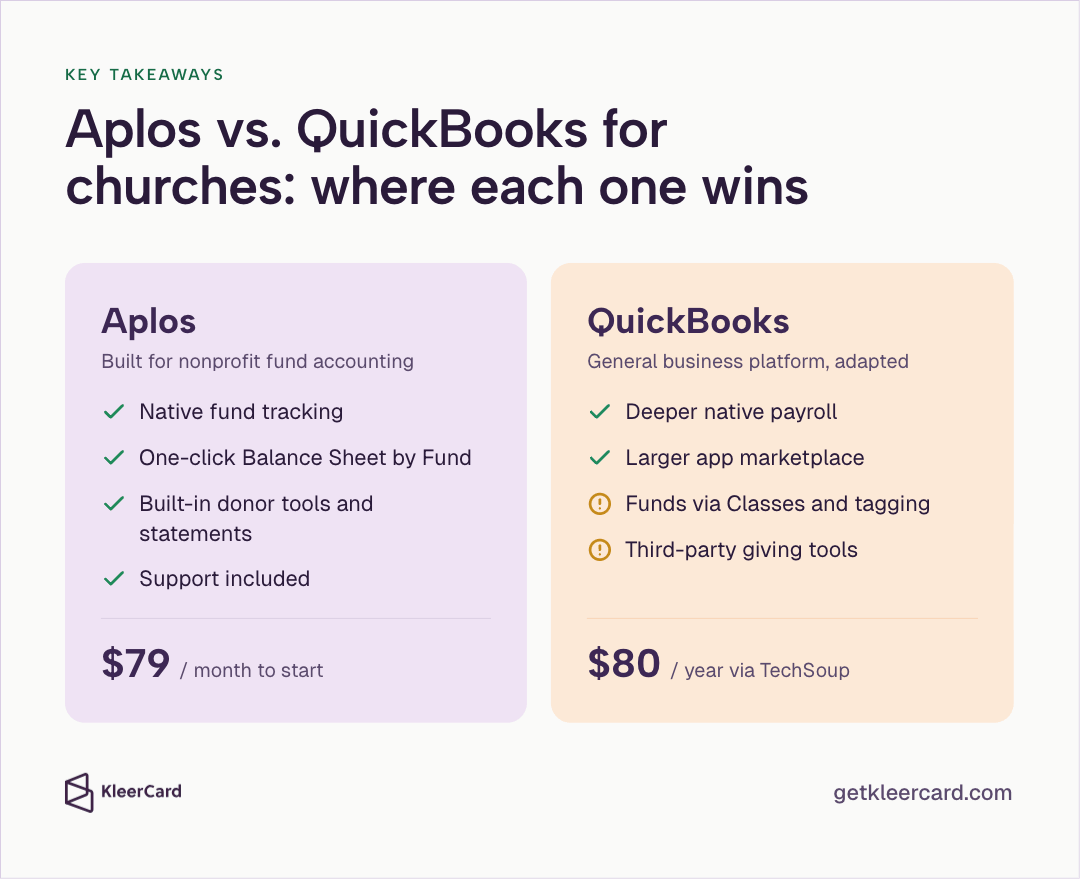
QuickBooks was built for small and medium-sized businesses. Its primary features include invoicing, payroll, profit-and-loss reporting, and expense tracking, and many churches use it. If you use QuickBooks for church accounting, you'll need to modify the chart of accounts and Class structure to track designated gifts, restricted revenue, and net assets by fund.
Aplos was designed for nonprofits and churches. Fund structures, contribution tracking, and board-ready reports by fund are included in the product, not bolted on later.
Before you choose a vendor, start with church fund accounting to understand why funds matter.
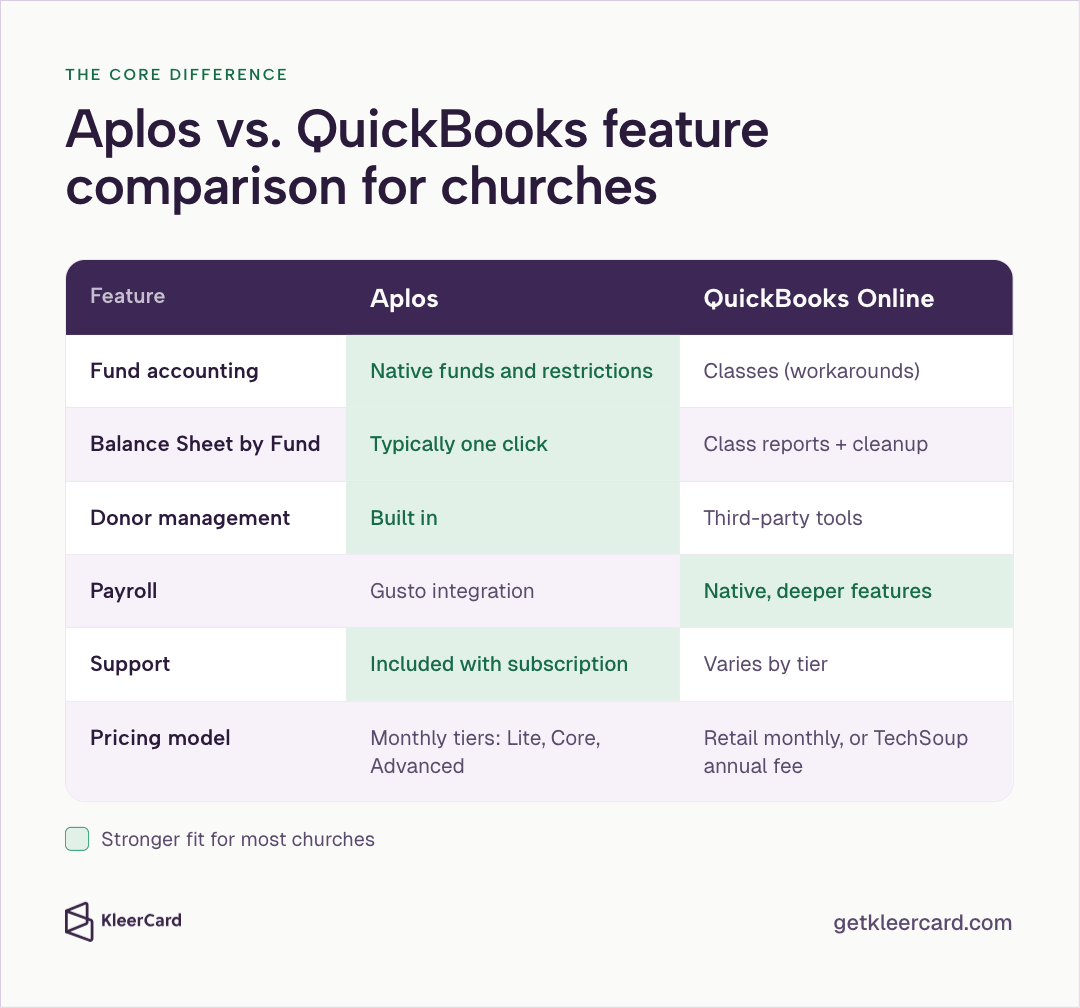
| Feature | Aplos | QuickBooks Online |
|---|---|---|
| Fund accounting | Native funds and restriction tracking | Classes (account workarounds) |
| Board Balance Sheet by Fund | Typically one-click | Class reports + cleanup |
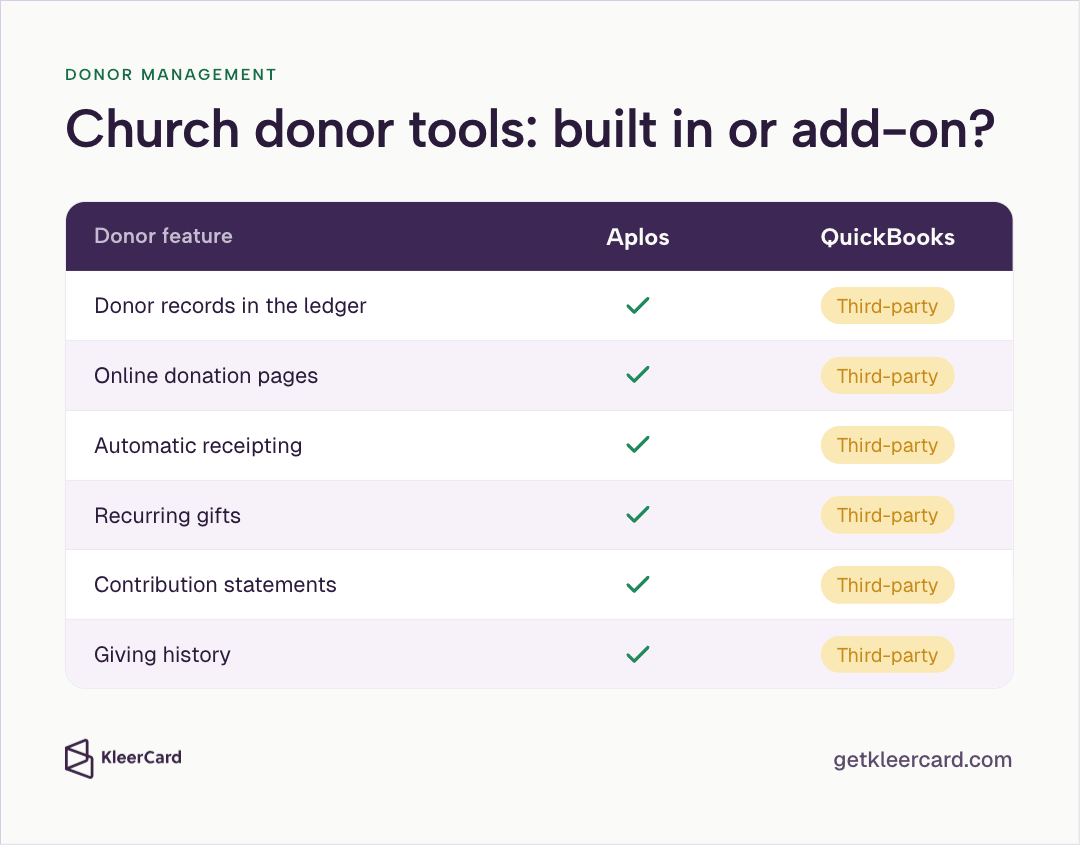
| Donor management / contribution statements | Built in | Third-party tools |
| Payroll | Gusto integration (common path) | Native QuickBooks Payroll (stronger depth) |
| Support | Included with subscription | Varies by tier; lower tiers lean self-serve |
| Pricing model | Monthly SaaS tiers (Lite / Core / Advanced) | Retail monthly SaaS, or TechSoup donated annual admin fee for eligible nonprofits |

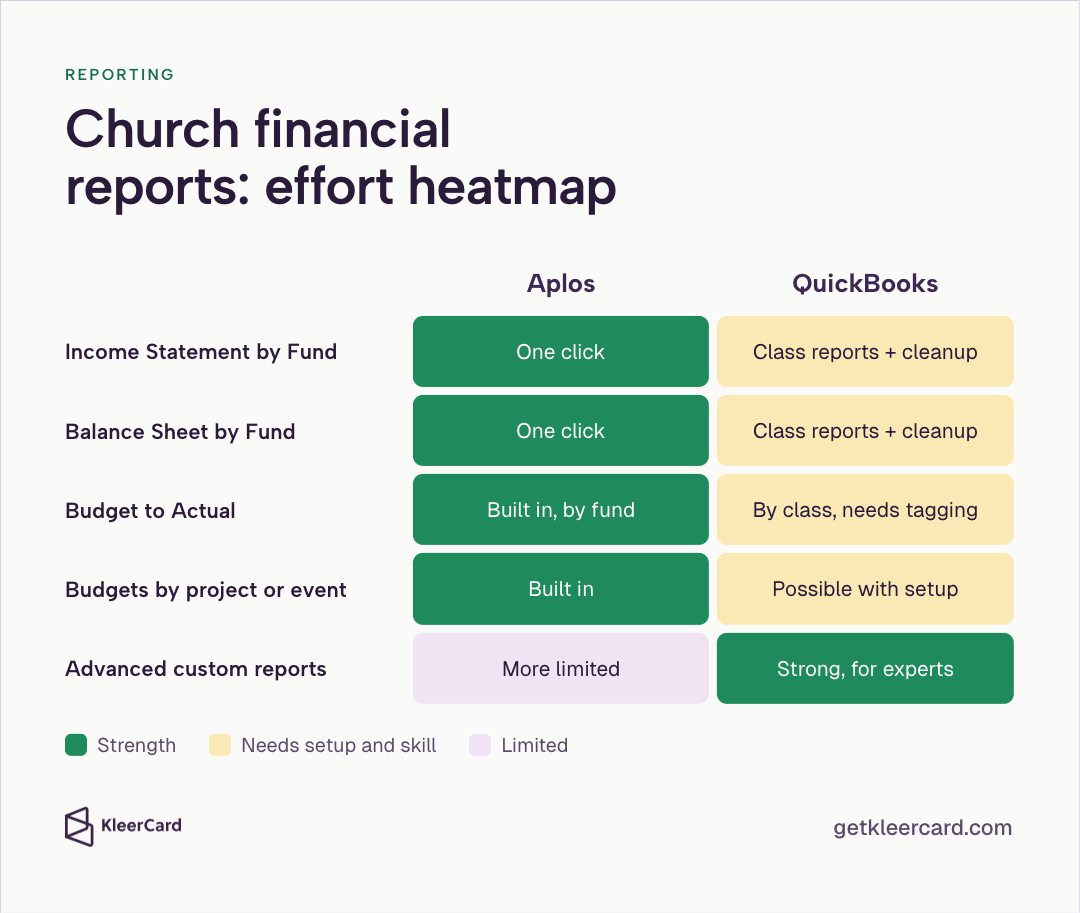
Imagine a treasurer building the monthly board packet in Aplos. One click generates the Balance Sheet by Fund. Missions, building, and general each show their own balance in terms the board already understands. You can send the packet without rewriting the numbers into board-friendly language by hand.
In QuickBooks, building that same packet typically means verifying every transaction was class-tagged, running Profit and Loss by Class, and often exporting to a spreadsheet so fund balances read cleanly. One miscoded class during the month skews the story the board sees.
QuickBooks can close the books. Creating leadership-ready fund views takes more time and practical skill. In my treasurer role I see this firsthand: when a building fund has to carry its balance forward month to month, a true per-fund balance sheet is the best way to verify those balances. Manually tracking each fund in a spreadsheet with class tags can approximate a true per-fund balance sheet. Those worksheets work until tagging becomes inconsistent. See why QuickBooks can't produce a true fund balance sheet.

For most churches, fund accounting is the deciding factor when choosing software. Other features tend to matter less once that question is settled.
Aplos tracks donations and spending by fund without a separate tracking system. Unrestricted, temporarily restricted, and permanently restricted activity are recorded in the product's built-in fund structures. Fund budgets and budget-to-actual views flow from that design.
QuickBooks doesn't use native fund accounting structures. The common church pattern is Classes (and sometimes locations or projects) plus a carefully built chart of accounts. Every deposit and bill must be tagged. Reports then create approximations that resemble fund views. The method works when a trained bookkeeper or CPA manages the setup. It presents a real barrier for a first-time volunteer treasurer.
One mis-tagged transaction is enough to break the picture the board sees. Restricted gifts raise the stakes when tagging goes wrong. For designated-money release, see how to track restricted funds in a church or nonprofit.

One click lets churches generate an Income Statement and Balance Sheet by Fund in Aplos. Budgeting that separates funds, grants, departments, projects, locations, or events, plus Budget to Actual, follows the same model.
Teams who know QuickBooks can get a lot from its reporting: custom exports, Budget vs. Actual by class, contribution summaries with add-ons, and functional expense schedules. Those features come together into useful views, but they need specialized knowledge and precise tagging. They aren't defaults built for churches.
If the board needs clear fund financials and the treasurer isn't a career accountant, Aplos is built for that default. If a finance director needs complex custom reports and already knows how to produce them safely, QuickBooks can get there.
Volunteer and part-time church finance staff usually notice how easy the system is to use before they care about advanced features.
Aplos runs in the cloud and uses nonprofit labels like Donations and Funds. Setup wizards and training videos help new treasurers get started. Treasurers who move from QuickBooks often find a shorter learning curve and terminology that matches how churches talk about money.
QuickBooks includes a broader feature set that can overwhelm a team that only needs straightforward nonprofit books. Proper nonprofit setup depends on understanding classes, sub-accounts, and chart design, and how they work together.
Hand the system to a capable person who's new to accounting software. Aplos usually feels familiar faster because the labels align with church work. QuickBooks usually needs training resources and a deliberate nonprofit configuration plan before that same person is confident at month-end.

Aplos connects accounting to giving records, online donation pages, and automatic receipting. Inside the product you can track donors, manage recurring gifts, generate contribution statements, and review giving history. Churches that want basic fundraising tools and an integrated ledger usually prefer Aplos.
QuickBooks needs third-party giving tools to reach the same baseline. Dedicated giving platforms still go deeper on engagement than either ledger system. For accounting and core donor features under one roof, Aplos covers the basics.
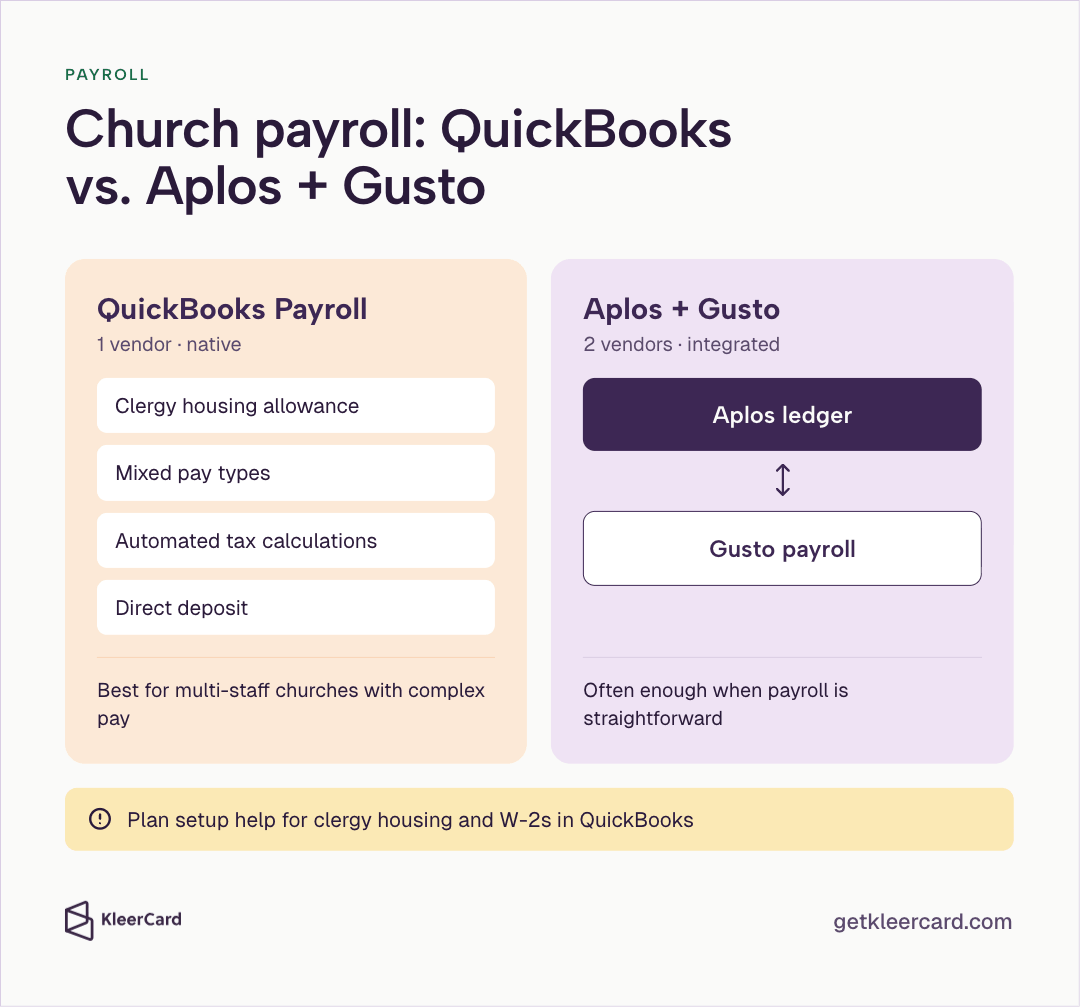
QuickBooks Payroll can be configured for clergy housing allowances, mixed pay types, automated tax calculations, and direct deposit. Multi-staff churches with complex compensation often prefer that depth.
Clergy setup in QuickBooks Online still creates friction for some teams. The cash versus in-kind treatment of housing allowances and the process of issuing W-2s can take extra support time. Plan for setup help if clergy pay is complex.
Aplos commonly handles payroll through Gusto. That works for many churches, but it adds a second vendor and cost compared with native QuickBooks Payroll.
If payroll complexity is a primary driver and someone on the team understands QuickBooks Payroll, that advantage is real. If payroll is straightforward, Aplos plus Gusto is often enough.
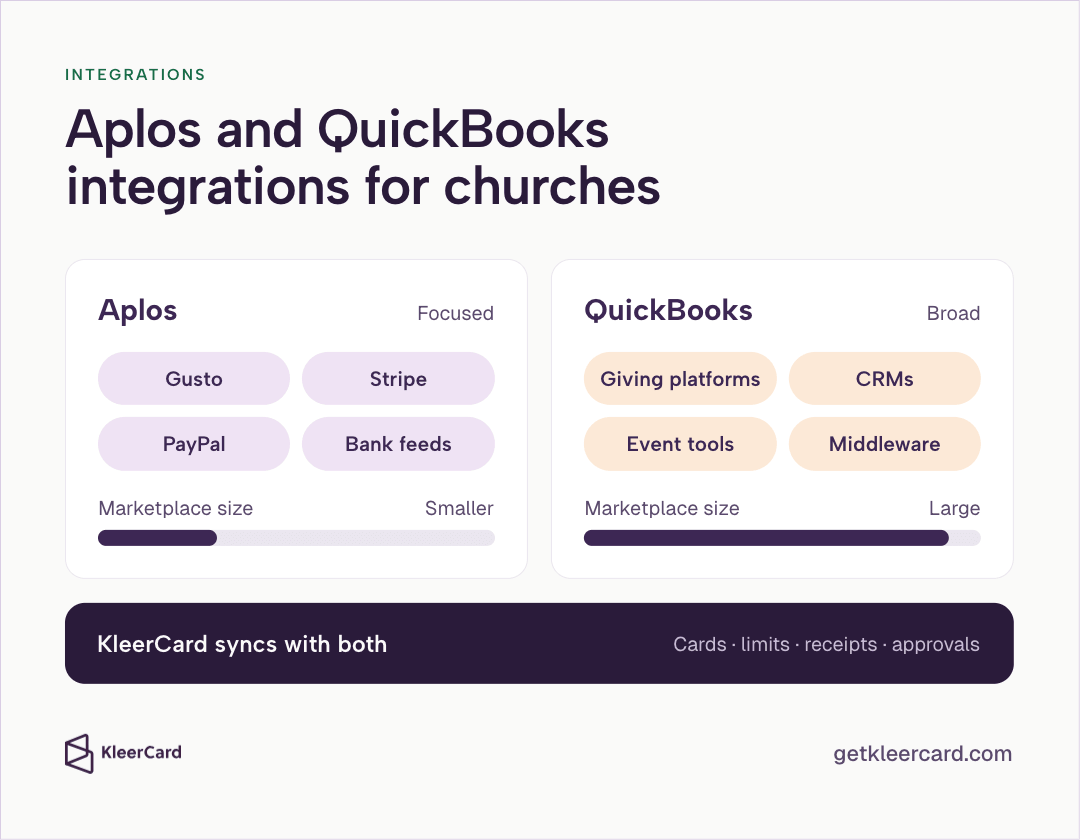
Both platforms connect to outside systems, though the breadth of integrations differs.
Aplos partners with the services most churches need: Gusto for payroll, Stripe and PayPal for donations, plus bank feeds. Its app store and third-party list are smaller than QuickBooks.
QuickBooks has a large third-party marketplace. Because of that scale, giving platforms, CRMs, event tools, and middleware often connect more easily. Churches with wide software stacks gain that advantage.
Aplos covers giving, payroll, and banking for most ministries. Unusual or large tech ecosystems may need integrations beyond giving, payroll, and banking.
We work with both QuickBooks and Aplos. Whichever ledger you choose, the same spend tools (cards, limits, receipt capture, and approvals) can feed that system. See our Aplos integration and how card activity syncs into your books.
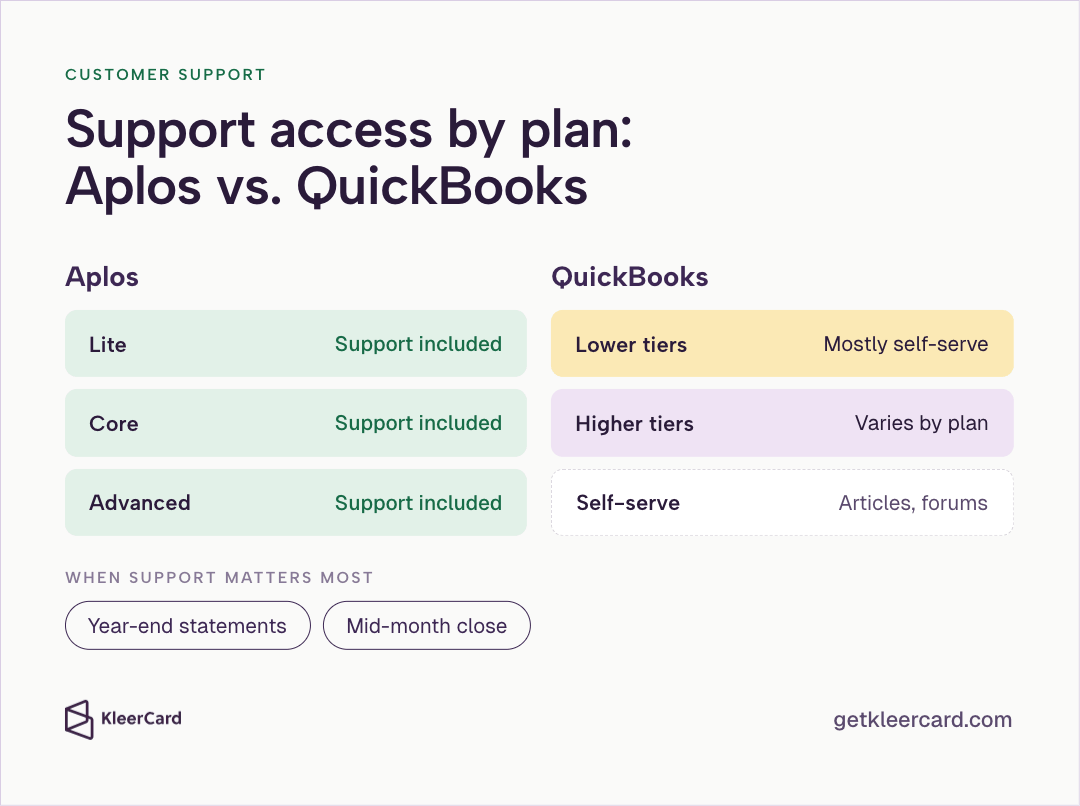
Aplos includes support with every subscription, so churches without a staff accountant usually have a reliable way to reach someone when something breaks. QuickBooks support depends on plan tier. Lower tiers lean on help articles and community forums.
That gap matters when you're preparing year-end statements or closing the books mid-month. Response quality still varies by ticket and season on either side. For churches without in-house accounting expertise, predictable access to help is how the books stay current. Check each vendor's listed support options before you buy.
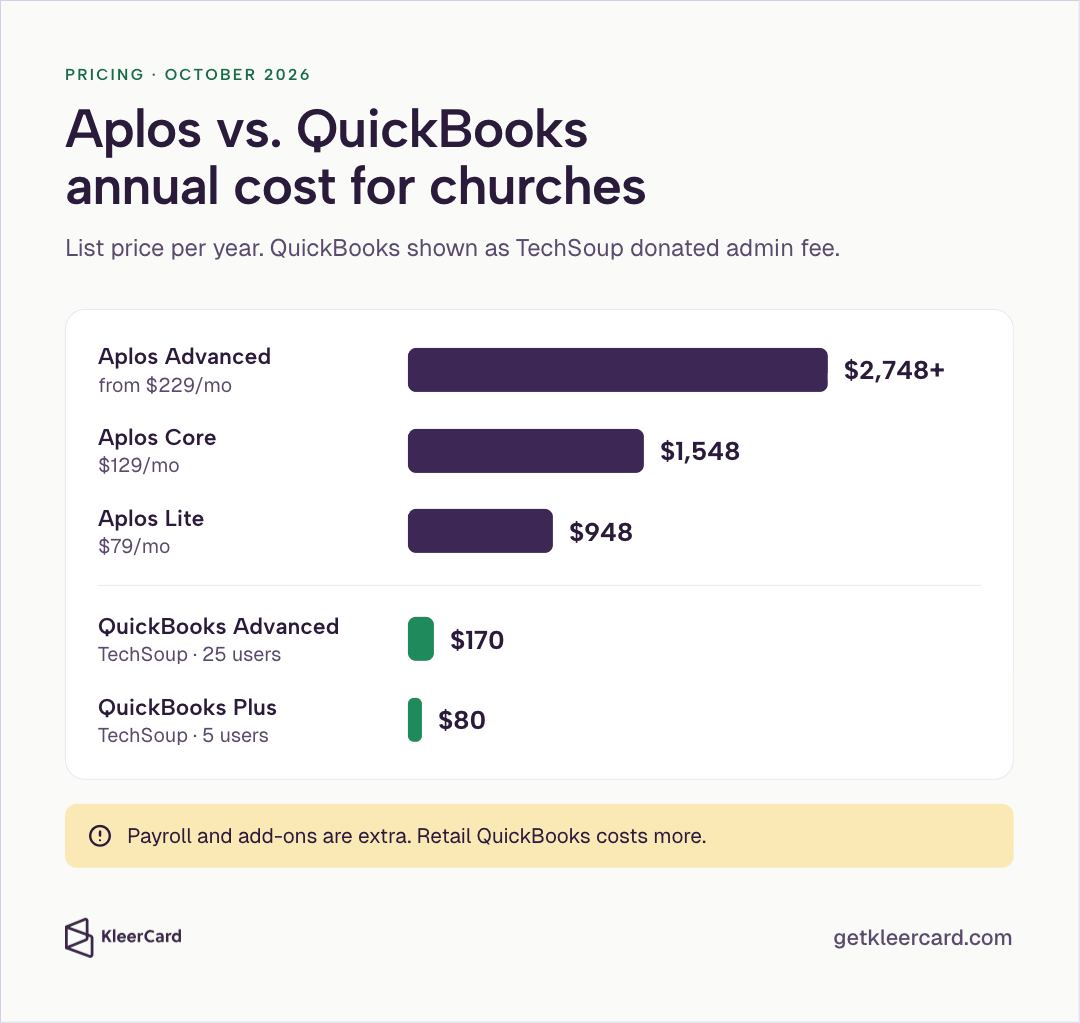
Prices change. Treat every figure as directional and confirm on the vendor site before you commit.
Aplos (list pricing verified October 2026 on aplos.com/pricing):
Lite fits smaller teams that need Balance Sheet and Income Statement by Fund, bank reconciliation, and core reporting. Core adds budgeting and accounts payable management. Advanced adds budgeting and reporting across more dimensions (fund, department, project) plus higher-end controls. Confirm current trial terms on Aplos.
QuickBooks Online for churches / nonprofits:
Without TechSoup, mid-tier Aplos and retail QuickBooks often land in a similar monthly cost band. Total cost still includes add-ons, payroll, implementation, and the time treasurers spend on workarounds. Plan for price and feature-tier changes over a multi-year horizon, and build that cost creep into your budget.
Aplos and QuickBooks record spending after it posts. The ledger can categorize and reconcile; spend controls (limits, receipts, and approvals) sit ahead of that step.
Youth ministry buys event supplies on a shared card and plans to turn in the receipt later. Missions comes back Monday with charges that lack documentation. Hospitality can overrun October when live activity against the budget isn't visible yet. By the time those transactions reach Aplos or QuickBooks, the money is already spent.
The fix sits ahead of accounting. Churches that put controls there see fewer month-end surprises, less receipt chasing, and cleaner imports into whichever system they choose.
Our church expense management integrates with both QuickBooks and Aplos. Cards with fund-level limits, automated receipt capture, real-time visibility, and approval workflows catch problems before they become entries. We run the spending controls that feed the ledger; Aplos or QuickBooks still keeps the books. See pricing when you're ready to compare card options.

Small to mid-size churches that regularly need native fund structures, church-readable reports, donor tools, volunteer-friendly language, and included support generally choose Aplos.
QuickBooks is the stronger match when a bookkeeper or CPA is already fluent in it, clergy payroll is complex, or the tech stack is built around QuickBooks integrations. With that expertise, class workarounds are manageable and the platform's depth shows up in payroll and apps.
For everyone else, adapting a business tool to ministry finance shows up as extra hours in every close, board packet, and treasurer handoff. Use the who-should-choose lists below rather than treating either brand as the default.
For a wider market map, see best accounting software for churches.

Choose Aplos when your church:
Sweet spot: small to mid-size churches that prioritize ease of use, ministry terminology, and built-in fund accounting. Trade-off: narrower integrations and payroll through a third party (Gusto).

Choose QuickBooks when your church:

If neither seems like a good fit, it may be worth looking into KleerFi Accounting. It's the fund accounting software we've designed specifically for churches and nonprofits.
It depends which jobs matter most to your team. When native fund reporting and built-in donor tools matter more than payroll depth or marketplace breadth, Aplos usually covers those jobs with less setup. Aplos was built for church and nonprofit accounting, so fund-level reporting, donor management, and contribution statements work without class workarounds. QuickBooks is the better match with trained accounting staff, complex payroll needs, or a CPA relationship built around the platform.
QuickBooks can approximate fund accounting with classes and a nonprofit-style chart of accounts, but it doesn't use native fund structures, meaning funds aren't a first-class object the way they are in Aplos. Setup, tagging discipline, and reporting limits remain. See why QuickBooks can't produce a true fund balance sheet.
Aplos Lite lists at $79/month, Core at $129/month, and Advanced from $229/month (verified October 2026 on Aplos's pricing page). Promotional rates may appear on the site; confirm what you'll pay at checkout. Always verify current pricing and trial terms on Aplos.
QuickBooks can work well for churches that already have QuickBooks expertise, need advanced payroll functions, or rely on its integration marketplace. It's a harder first system for a volunteer treasurer who needs native fund reports and built-in contribution tools. Eligible nonprofits should evaluate TechSoup donated admin fees against retail monthly pricing when comparing total cost.
Features have moved between pricing tiers over time, which complicates long-term cost forecasting. The integration ecosystem has fewer partners than QuickBooks. Payroll usually depends on Gusto rather than a built-in payroll engine. Built-in donor tools cover core needs but are shallower than dedicated giving platforms. Reporting is easier for non-accountants; advanced customization is more limited than QuickBooks for power users.
QuickBooks started as a for-profit business platform, so churches usually adapt it with class workarounds for fund accounting and third-party tools for donation tracking. Church-specific board reports take more manual setup, and clergy payroll (housing allowance and W-2 details) often needs extra configuration time. Support is lighter on lower tiers. Retail pricing has risen in recent years, though TechSoup donated subscriptions help eligible nonprofits reduce costs.
Most churches pick one general ledger. Aplos usually replaces QuickBooks rather than running beside it as a second set of books. If you use us for spend management, we integrate with both platforms, so card controls and receipt capture are available no matter which system you choose.

If your treasurer is a volunteer, your gifts are designated, and you want church-native structure from day one, start your demo and pricing check with Aplos. If trained staff, an established CPA workflow, or complex native payroll outweigh the cost of class workarounds, start with QuickBooks instead.
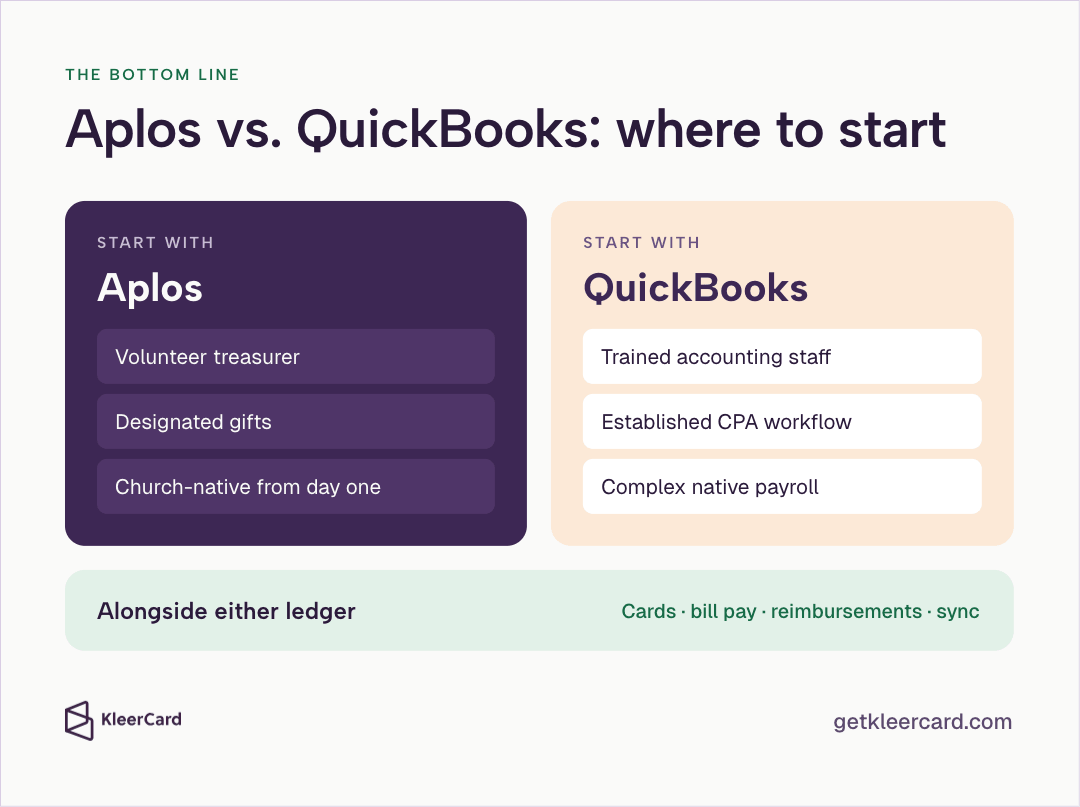
Alongside either ledger, cards with spending controls, bill pay, reimbursements, and sync help ministries watch budgets in real time and close without a week of chasing receipts. Compare options on church expense management and pricing.


Speak to a member of our team and we can have you up and running in minutes, not weeks.