%202.svg)
Church accounting guide covering fund accounting, chart of accounts, restricted gifts, internal controls, and practical workflows for treasurers and pastors. Real examples included.
Church accounting differs from business accounting. The goal is stewardship of donor-restricted gifts rather than profit. Most of the rules that work for a company create risk or waste inside a church.
This guide walks through fund accounting, a usable chart of accounts, restricted-gift compliance, internal controls that actually work, month-end workflow, clergy payroll basics, and software choices. It draws on real church and school finance operations so the advice is concrete.
I have run church and school books on platforms ranging from Blackbaud Financial Edge and Microsoft Great Plains to QuickBooks Online, and the patterns below come from that work plus the finance teams I support.
I'll cover a clear definition of fund accounting, a sample chart structure that avoids common traps, a controls checklist, and practical next steps that fit a small-to-midsize church.
Church accounting relies on fund accounting, which tracks money in separate funds according to donor restrictions and purpose rather than a single profit-and-loss pool used in business accounting.
Restricted funds (donor-designated for building, missions, or benevolence) cannot legally be redirected to general operations, even temporarily, without violating donor intent and risking tax-exempt status.
Common funds most churches maintain:
| Fund | Purpose | Restriction Level |
|---|---|---|
| General / Operating | Day-to-day salaries, utilities, supplies | Unrestricted |
| Building | Construction, renovation, mortgage | Temporarily restricted |
| Missions | Support for missionaries and partners | Temporarily restricted |
| Benevolence | Assistance to members and community | Temporarily restricted |
| Youth / Children's | Programs, camps, events | Temporarily restricted |
| Memorial / Endowment | Long-term gifts in memory of individuals | Permanently restricted |
At my own church, a $1,000 gift restricted to the building fund shows up as both revenue and cash in QuickBooks Online. It also inflates the operating surplus on the profit-and-loss report. The software cannot produce a balance sheet that isolates that fund.
Every month I export the balance sheet to Excel and manually subtract every restricted balance so leadership can see what is actually available. That process is slow, error-prone, and unnecessary once the right structure is in place.
The multiple-bank-account workaround many churches try is even worse. Each account needs board resolutions, designated signers, and re-notarization when a treasurer rotates off. Donation platforms often connect to only one bank account, so every transfer becomes a manual, control-free chore. You end up with more work and weaker controls than you started with.
Fund accounting exists so the board and the congregation can see at a glance which money is free to spend and which money is spoken for. Without it, a healthy-looking bank balance can hide an operating shortfall. For a deeper look at the practical side, see our church fund accounting guide.
A chart of accounts is the list of every account used to record transactions. Churches need five standard categories: Assets (1000s), Liabilities (2000s), Net Assets / Fund Balances (3000s), Revenue (4000s), and Expenses (5000s).
Sample high-level structure that works for most churches:
The most common structural mistake is over-fragmentation. Creating separate accounts for “missions meals,” “worship meals,” and “pastors meals” makes it hard to answer simple questions such as “How much did we spend on meals last year?”
The cleaner approach is one “Business Meals” account plus a dimension (class, department, or fund in QuickBooks Online language). The same principle applies to classroom or ministry supplies: one account plus a dimension for elementary, middle, upper, or specific ministries. Reports then become simple re-slices instead of custom builds.

I see the same pattern with schools. They create three or four separate classroom-supplies accounts so they can track elementary versus middle versus upper school. Then every teacher purchase has to be coded to the exact right account.
The better structure is one classroom-supplies account and a dimension that tags the school level. Suddenly “how much did upper school spend” is a pivot, not a custom report. The same dimensionality principles appear throughout nonprofit organization accounting.
When a customer tells me “our church is special, so our chart of accounts has to be unique,” that is usually a sign the chart is already too complex. Everyone does accounting. The terms you use for departments or ministries will differ, but the underlying data structure should be the same. The belief that your organization is uniquely different almost always produces a bloated, hard-to-maintain chart.
Donor-restricted gifts create a legal obligation. State charitable trust law and IRS rules require the church to honor the designation. “Close enough” is not a defense.
Track every restricted gift with donor name, date, amount, purpose, and any goods or services provided. Issue contribution statements that clearly separate unrestricted and restricted totals.
For gifts of $250 or more, the acknowledgment must state whether any goods or services were provided in exchange, per IRS requirements for contribution acknowledgments.
Board-designated funds (set aside by the board, not by a donor) can be re-designated by the board. Donor-restricted funds cannot. For more on practical tracking methods, see our guide on how to track restricted funds.
In practice this means each restricted fund type needs its own account or clear dimension so the finance manager can see the flow in and out. The finance team should never have to guess which event or purpose an Amazon purchase was for.

Internal controls protect the church, its volunteers, and its staff. Core non-negotiables:
The primary control is alignment of authority to spend with the ability to spend. A high-limit card kept in a drawer or passed around creates the illusion of control. In practice a teacher or ministry leader can still swipe that card for almost anything.
Real control is a card that only works up to the approved budget for that person or department. When the budget is exhausted the card declines.
I have seen districts with exactly two cards for the entire system. The result is constant card hunting and teachers fronting purchases out of pocket because they cannot find the card in time.
A gas-pump-only card punched onto a van key ring is a simple example of secondary merchant controls that still leave the primary budget control intact. You can also issue loaner cards labeled by department so an administrator can hand one out without giving up their own.
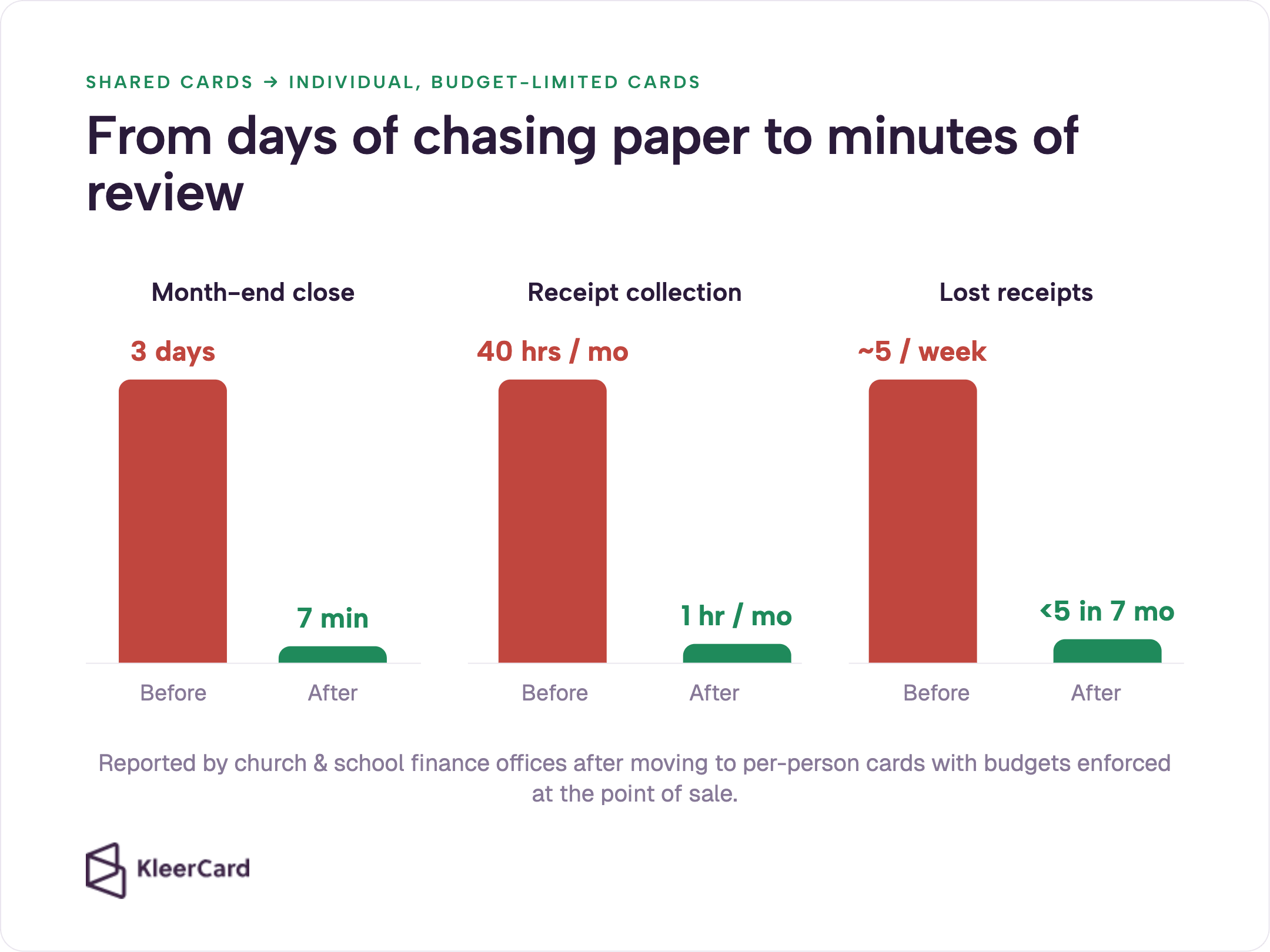
Churches that move from a handful of shared cards to individual or department cards with set limits see two measurable changes. Lost or chased receipts drop sharply, and month-end reconciliation shrinks from days or hours to minutes.
One private Christian school finance office reported fewer than five lost receipts across seven months after the change, compared with roughly five per week before. Month-end close moved from a lengthy manual process to a few minutes of review because transactions were already coded and receipted weekly.
We have customers who cut month-end close from three days to seven minutes and receipt collection from forty hours a month to one hour. Those gains come from capturing receipts at the point of purchase and enforcing budgets on the card itself rather than after the fact. For a deeper look at practical church financial controls, the same principles apply at every size.
The maintenance director who used to spend an hour hunting for a card just to buy a toilet part at Home Depot now has his own card with a weekly spend check-in. He uploads the receipt on the spot and moves on. That is what real control looks like: the person who needs to spend can spend, within the limit that has already been approved.
The three core statements are:
Functional expense reporting (program vs. administrative vs. fundraising) is useful for transparency even when Form 990 is not required. The hardest report for most churches is a true balance sheet by fund.
Systems that cannot produce it force the Excel workaround I described earlier.
When leadership asks “how much do we have left in the building fund,” the answer should take seconds, not a custom export and a formula.

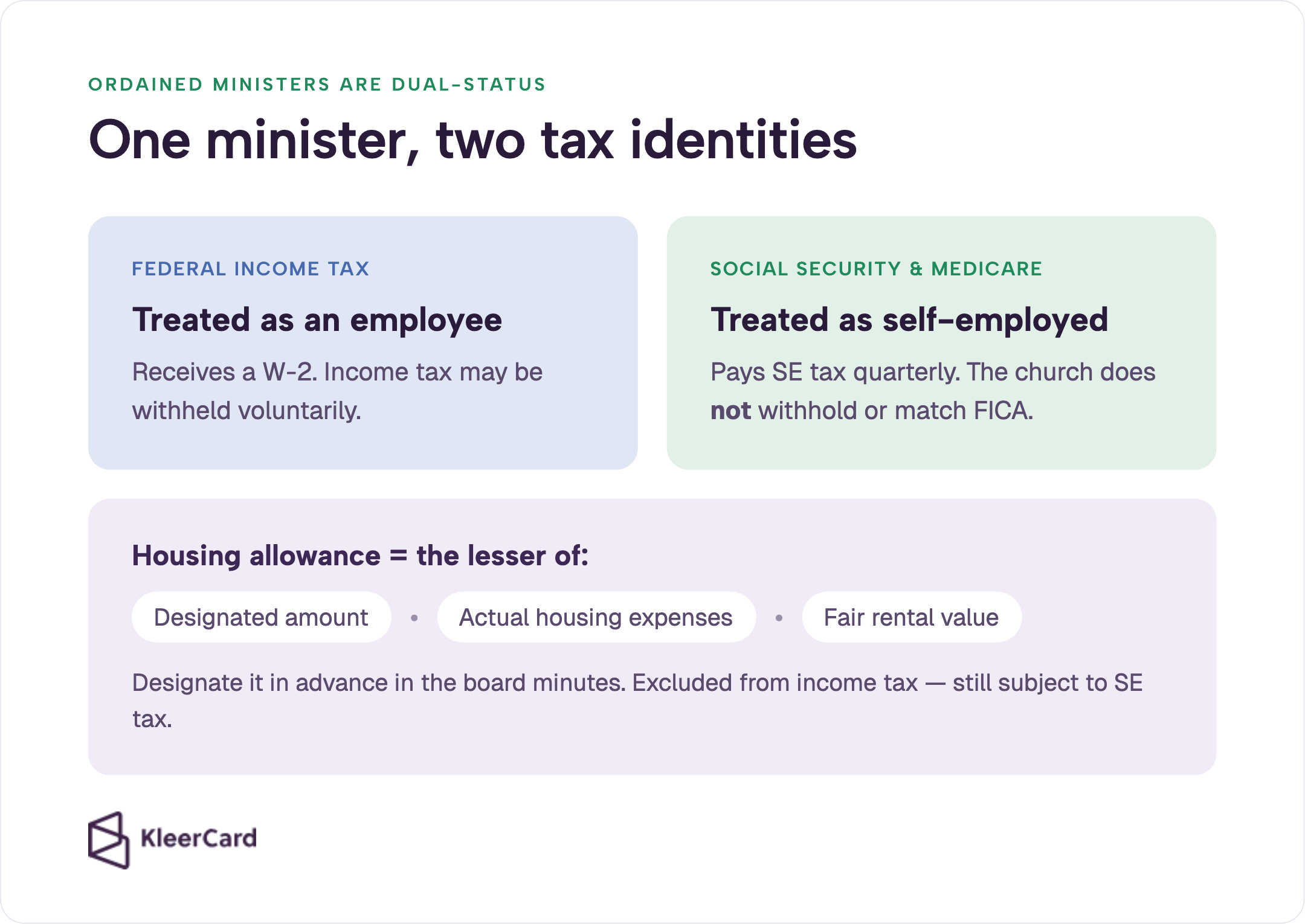
Ordained ministers are dual-status employees: employees for federal income tax purposes and self-employed for Social Security and Medicare. Churches do not withhold or match FICA.
Ministers pay self-employment tax quarterly (or file Form 4361 for a conscientious objection, which is irrevocable). Details are covered in IRS Publication 517.
Housing allowance is the most valuable tax benefit available to clergy. It must be designated in advance by the board, limited to the lesser of the designated amount, actual housing expenses, or fair rental value, and properly documented. It is excluded from federal income tax but still subject to self-employment tax.
Get the housing allowance resolution into the board minutes before the year starts. The documentation requirement is not optional.
Good accounting software stores data and manages the workflow that gets information into the system. Cards, receipts, coding, and approvals are part of that workflow. When the workflow is manual, month-end becomes a scramble of missing receipts, unclear coding, and delayed approvals.
A recurring bookkeeping mistake is optimizing for precision instead of usefulness. Tracking every $3 coffee by exact purpose (business development versus team meeting) creates friction with almost no decision value. One “Business Meals” category that can be automated removes the friction and still produces accurate high-level reports.
The bookkeeper is paid for accuracy. The pastor or executive is paid for decisions. Align the chart and the coding rules to the decisions that actually matter.
Weekly review of coded and receipted transactions keeps the monthly close short. Churches that adopt this rhythm report month-end close times dropping from multiple days to under ten minutes. In most of the churches I work with, the card and receipt process already handles sixty to seventy percent of the financial workflow before the books ever close.
The future of the category is the platform that owns both the data storage and the workflow that gets the data in correctly the first time. That is why the spend layer matters so much.

Most small-to-midsize churches can run effective fund accounting on QuickBooks Online provided the chart of accounts uses dimensions rather than proliferating near-duplicate accounts. Specialized platforms (Aplos, Realm/ACS, Shelby, Blackbaud Financial Edge) add native fund balance sheets and stronger donor tracking, but they also cost more and can be harder to staff.
I have run books on Blackbaud Financial Edge, Microsoft Great Plains, Xledger, QuickBooks Online, and QuickBooks Desktop. The enterprise platforms usually require multiple full-time staff just to keep the technology running. For the majority of churches, that cost is unnecessary.
You can run ninety percent of the schools and churches in America on QuickBooks Online for roughly the cost of a couple of textbooks. The specialized tools often feel like owning a Ferrari when you cannot find a mechanic who knows how to work on it.
Do not tightly couple the accounting system to the church management system or tuition platform. Vertical integration locks both the finance team and the operations team into the same vendor decision and makes future changes expensive. Keep the accounting layer independent so either side can improve without breaking the other.
Amazon Business accounts plus card-level controls solve a common pain point. Fifty to sixty percent of non-payroll spend at many churches runs through Amazon.
A business account keeps personal and organizational purchases separate, supports tax-exempt status, and preserves a clean audit trail even after staff turnover. Pairing that account with Amazon Business expense tracking removes the “Amazon $47.23, go figure out what it was” problem that used to consume hours every month.
For a full comparison of the current options, see our church accounting software guide. Direct accounting sync and integrations matter more than feature lists once you are actually closing the books each week.
See current pricing for spend-management options that pair with these systems.
When we roll out spend cards at a new church or school, we deliberately begin with the messiest department—usually operations, maintenance, or facilities. Once that group is fluent, the administrators learn the system, and only then do we expand to teachers, coaches, and volunteers. That stair-step approach keeps the policy changes manageable and the adoption high.
The summer camp director who barely needs a card during the school year becomes the heaviest spender for eight weeks. Giving her a card in her own name with a clear limit and receipt upload process removes the bottleneck for the rest of the team. The same pattern works for VBS, missions trips, and short-term interns.

Fund accounting tracks money in separate funds according to donor restrictions and purpose. Unrestricted gifts support general operations; temporarily restricted gifts support specific projects or time periods; permanently restricted gifts usually support endowments. This structure protects donor intent and produces clearer reports for the board and congregation.
Business accounting measures profit. Church accounting measures stewardship. Donor-restricted gifts create legal obligations that a single profit-and-loss view cannot track. Fund accounting keeps those obligations visible and enforceable.
Start with the five standard categories (Assets, Liabilities, Net Assets, Revenue, Expenses). Create one account for each major type of income and expense, then add dimensions (classes or departments) for ministry or fund tracking. Avoid creating a separate account for every ministry’s version of the same expense.
Most churches are exempt from filing Form 990 under IRS rules for churches. They still must issue W-2s and 1099s, track restricted gifts carefully, and provide contribution statements to donors. Some states impose their own registration and reporting requirements.
Two-person counting of offerings, dual approval on disbursements above a threshold, separation of recording and reconciliation duties, monthly bank reconciliation by someone who does not handle cash, and original receipts for every card transaction. The strongest control is matching spending authority to a real budget limit on the card itself.
QuickBooks Online works for the majority of small churches when the chart of accounts is kept simple and dimensions are used for fund or ministry tracking. Specialized church or nonprofit platforms add native fund balance sheets and deeper donor tools if the church needs them. Test the export and reporting workflow before committing.
Church accounting succeeds when it makes restricted gifts visible, keeps the chart of accounts simple enough to use, and enforces spending authority in real time. The technical details matter less than consistent weekly habits and clear ownership of each fund.
Start with the funds the church already has, clean the chart of accounts, and put budget limits on the cards that actually spend the money. The rest of the system becomes far easier to manage.
For churches ready to tighten spend controls and receipt capture while keeping fund accounting intact, explore the expense management for churches tools built specifically for ministry finance teams.
Or see how KleerCard for churches handles the full workflow. When you are ready, you can sign up for KleerCard in a few minutes.


Speak to a member of our team and we can have you up and running in minutes, not weeks.