%202.svg)
Switching from BILL Divvy to KleerCard takes a few weeks and a few hours of work. A 7-step guide: export your data, connect accounting, pilot, then close BILL.
Switching from BILL Divvy to KleerCard takes a few weeks. It requires a few hours of real work spread across that time.
You apply in about eight minutes. No personal guarantee. Approval comes in 24 to 48 hours. You connect your accounting software. Then you run a few KleerCards alongside your BILL cards for one billing cycle. After that, you move the rest of your team and close the old account.
The order matters more than speed.
I run our own church on KleerCard. We have two and a half paid staff and twenty-one active cards. The steps below match the sequence I would use myself. They match the sequence I walk church and nonprofit finance leads through every week.
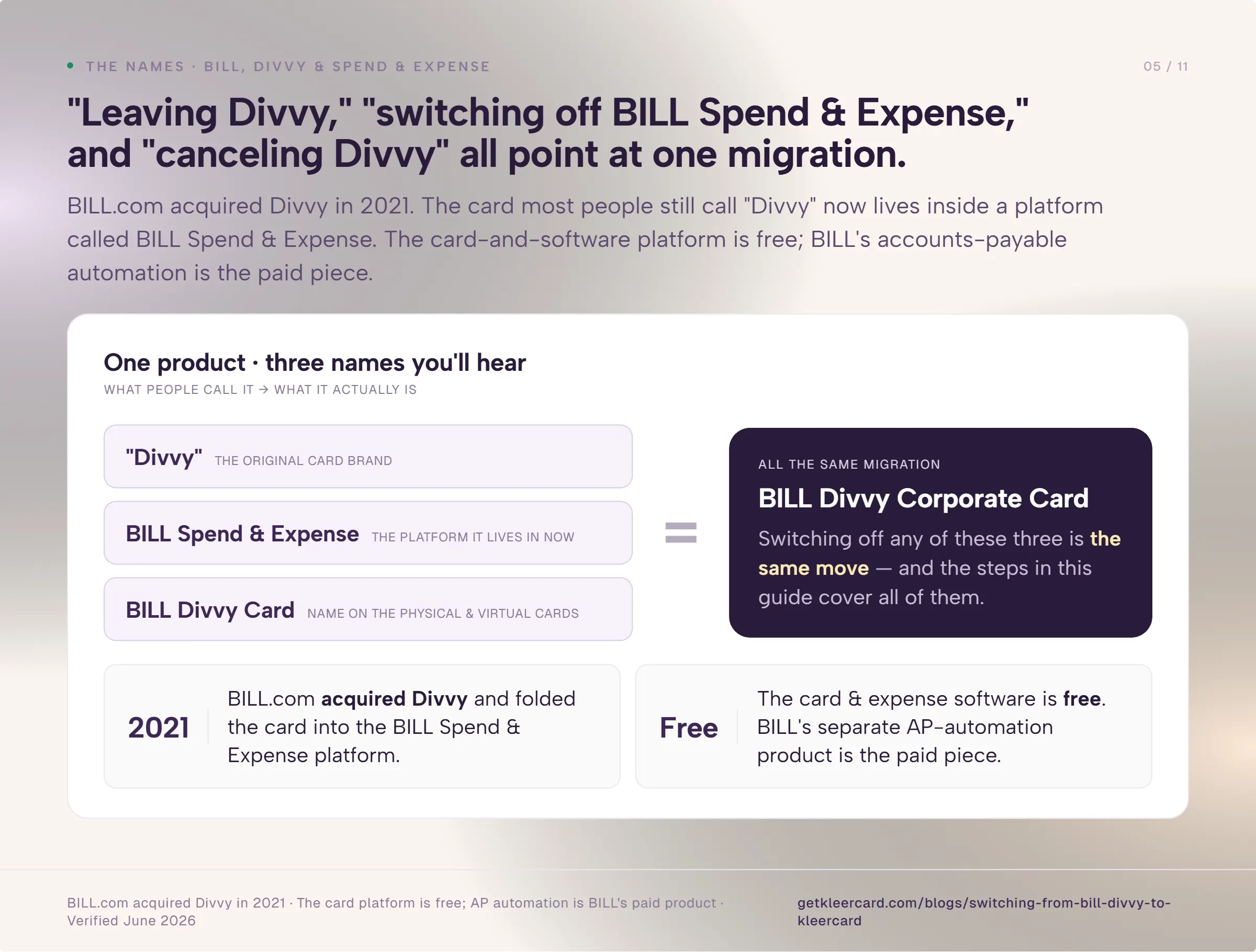
BILL.com acquired Divvy in 2021. The card most people still call "Divvy" now lives inside a platform called BILL Spend & Expense. The physical and virtual cards carry the BILL Divvy Corporate Card name. The card-and-software platform itself is free. BILL's accounts-payable automation product is the paid piece. It is a strong one. BILL was doing AP automation long before most of this space existed.
So "leaving BILL Divvy," "switching off BILL Spend & Expense," and "canceling Divvy" all point at the same migration. I will use BILL here.
BILL does not come up in my calls nearly as often as it did a few years ago. When BILL acquired Divvy, there were promises about where the combined product was headed. A fair amount of that never showed up.
Most organizations I talk to now are on a bank card, on Ramp, or running everything through a spreadsheet. If you are on BILL and it is working, that is fine. The reasons to move are specific. I will name them plainly.
| BILL Divvy | KleerCard | |
|---|---|---|
| Platform cost | Free card and expense software | Free up to 5 users; $29/month up to 15; $49/month up to 30; custom above that. No per-user fee. |
| Personal guarantee | None; limits set by bank balance | None |
| Accounting sync | QuickBooks Online, NetSuite, Sage Intacct, Xero | Adds Aplos, Realm, Shelby, ParishSOFT, PowerChurch, Blackbaud Financial Edge |
| Rewards | Points, but you forfeit a month's points below 30% credit-line spend, with a 12-month hold and 5,000-point minimum to redeem | No standard cashback; custom cashback above ~$30,000/month spend |
| Budgeting | Line-item budget controls (more granular) | Fund- and card-level budgets (simpler) |
| Onboarding | Self-serve videos and docs unless you spend six figures monthly | One-on-one setup calls for any size organization |
| Built for | For-profit SMBs with steady monthly spend | Nonprofits, churches, and K-12 schools |
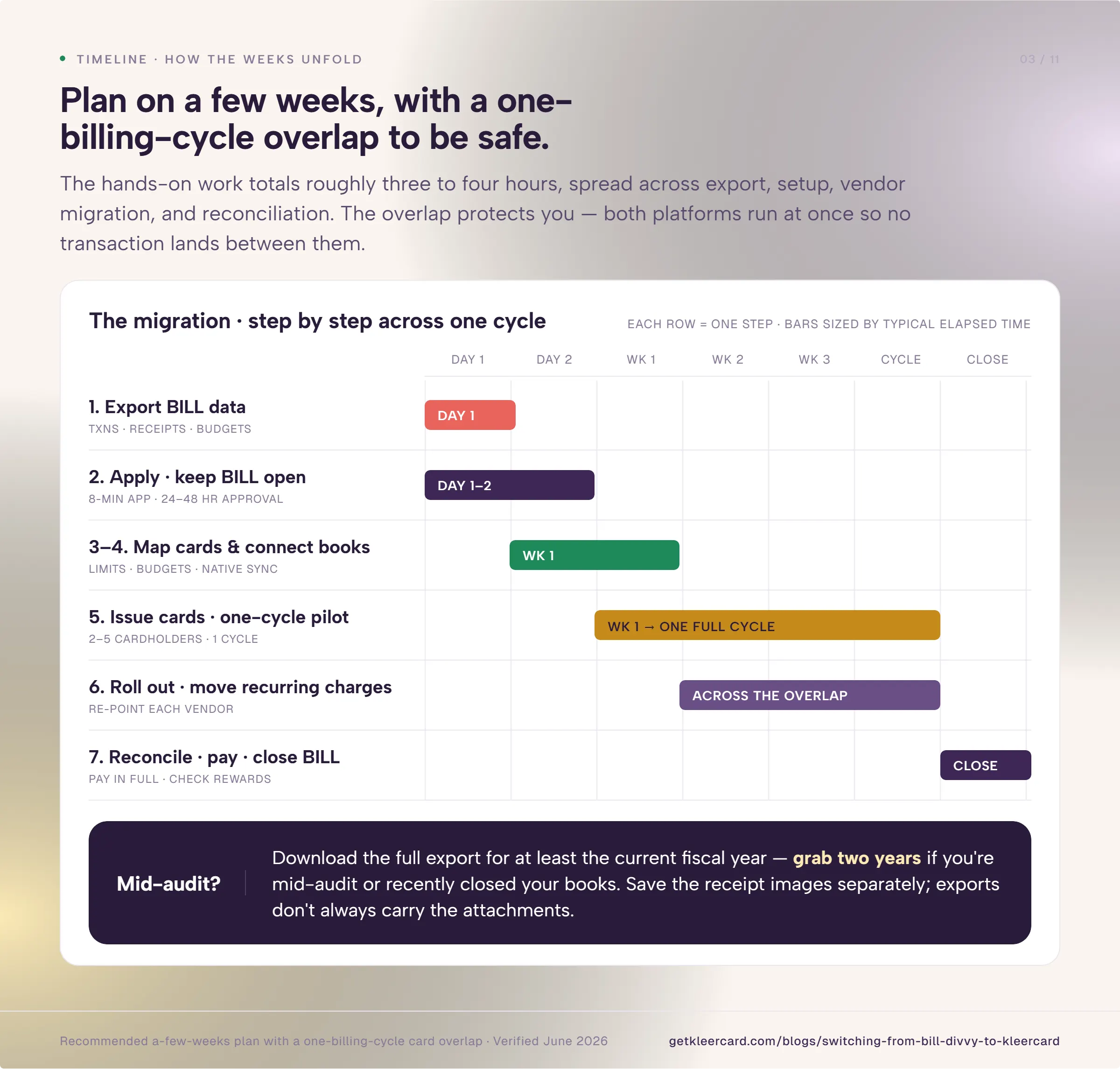
Plan on a few weeks. Count on roughly three to four hours of hands-on work spread across it.
The application takes around eight minutes. Approval lands in 24 to 48 hours. Physical cards arrive in five to eight days.
The rest of the time is the parallel pilot. You run a few KleerCards alongside BILL for one billing cycle before you move everyone.
Pull these together before you change anything:
That last item drives most of the work. A church coding into Shelby by fund and a business coding into QuickBooks by class are doing different jobs. A good migration keeps whichever one you depend on.
While your BILL Spend & Expense account is still open, pull your transaction history, receipt images, vendor list, and budget reports. Once an account closes, getting clean records back is slow.
Download the full export for at least the current fiscal year. Grab two years if you are mid-audit or recently closed your books. Save the receipt images separately. Exports do not always carry the attachments with them.
The churches I have onboarded usually finish the application in about eight minutes. You will need the EIN letter, bank details, and an ID for one signer.
There is no personal guarantee. This is helpful for the board treasurer or pastor who does not want a business card riding on their personal credit. If that is a sticking point for you today, read how nonprofit cards without a personal guarantee work.
Approval usually lands in 24 to 48 hours. Leave your BILL account open through all of this. Applying does not obligate you to cancel anything.
Take the cardholder list from Step 1 and decide who gets a KleerCard and at what limit. This is a good moment to clean house. Almost every organization I see is carrying a card or two nobody uses. Plus one shared card that three people pass around.
Our cards belong to the organization, not to a person's credit. When a staff member leaves, you reassign the card instead of starting over. Set a limit per card. Add merchant category restrictions where you want them. Build an approval step for anything over a threshold you choose.
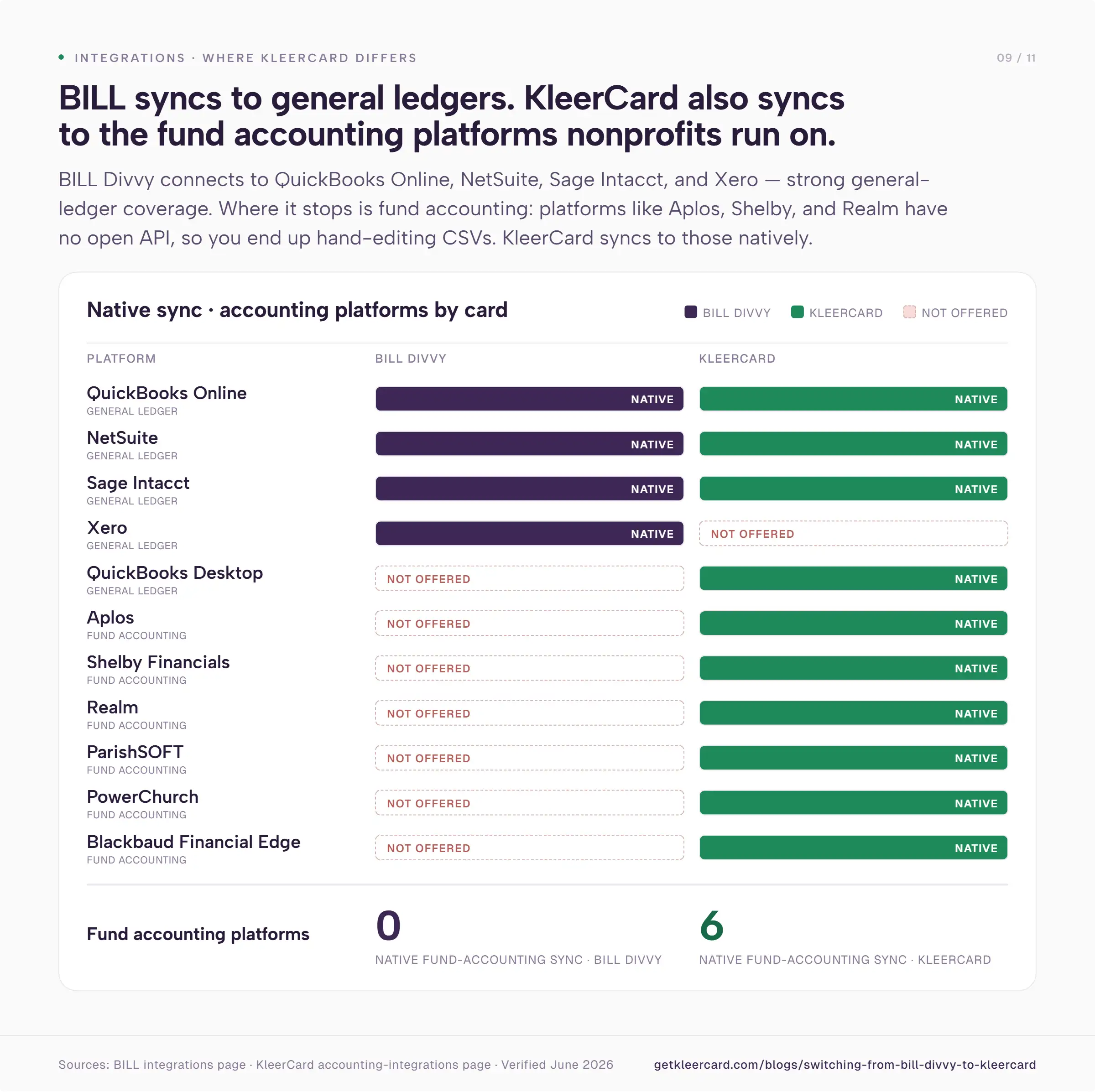
BILL Divvy syncs with QuickBooks Online, NetSuite, Sage Intacct, and Xero. If you live in one of those, the sync is fine.
The problem shows up with fund-accounting platforms. A lot of fund-accounting software like Shelby, Realm, and Aplos does not have an open API. You end up doing a custom CSV export. Half the time the platform cannot even produce the exact format your accounting software wants. Sometimes it is a line-by-line edit. You turn a single $15 charge into two rows so the double-entry balances. Do that across a month of transactions and you have lost an afternoon.
We built those exports into KleerCard so you don't have to do that manually. We include the offsetting double-entry formatting fund accounting expects. We offer native syncs for Aplos, Realm, Shelby, ParishSOFT, PowerChurch, and Blackbaud Financial Edge. You can see the full list on the accounting sync page.
Connect your platform now, before you issue many cards. The first transactions will land in the right funds from day one.
Cindy S., a finance manager at a multi-ministry church, had been keying her card statements into Shelby Financials by hand. It took about two and a half hours every month. Once the Shelby sync was running, that part of her month dropped to roughly 90 seconds. The cards were not the thing she had been stuck on. The re-typing was.
Issue two to five KleerCards and run them next to your BILL cards for one full billing cycle. Pick the heaviest spenders. Usually that is a senior leader and whoever does the purchasing.
During the pilot, your BILL cards keep working. You are testing the sync, the receipt capture, and your team's habits. You are not betting the whole organization on a clean cutover.
Virtual cards are ready immediately. Physical cards ship in about five to eight days. This parallel cycle answers the worry I hear most often: switching providers will leave a hole in the books. Nothing gets cut off until you have watched the new system handle a real month.
After the pilot cycle, issue the rest of the cards and move your recurring spend off BILL.
Each time you give out a KleerCard, take that team member's BILL card so you don't have cards for both platforms floating around.
Work through the subscription list from your prerequisites. Software renewals, ad accounts, the domain registrar, your donation-platform fees. These are tied to a specific card number. Each one needs the new KleerCard number or it declines on the next billing date.
We recommend using a different virtual card for each subscription. You can lock or rotate one number without touching the rest.
The app is simple enough that even the youth pastor will turn his receipts in on time.
Pay your final BILL balance in full. Reconcile the last statement against your accounting records so nothing slips between the two systems.
Before you close, check your rewards. BILL holds points for your first 12 months. It will not let you redeem under 5,000 points. It also forfeits a month's points any time you spend less than 30% of your credit line that month. You lose all accrued points if you stop being a customer before the first year is up.
The exact terms are in BILL's rewards program agreement. If you are near the 12-month mark or the 5,000-point floor, the timing of your cancellation has a real dollar value. Once you have redeemed what you can and saved your final records, close the account.
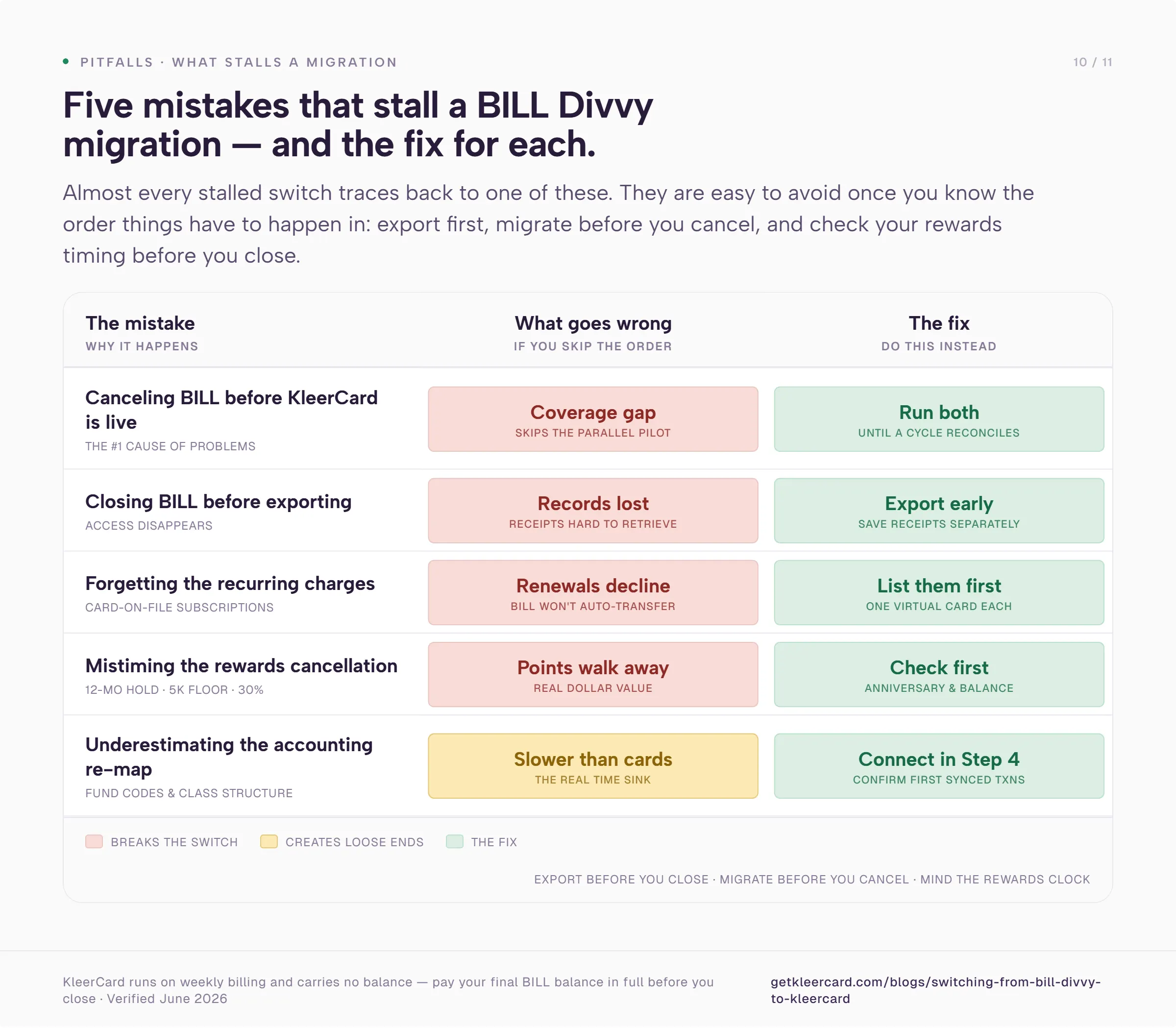
Canceling BILL before KleerCard is live. The parallel pilot exists for exactly this reason. Keep both running until you have reconciled a full cycle on the new card.
Forgetting the recurring charges. Card-on-file subscriptions are the number one source of post-migration surprises. Build the list before you start. Do not wait until the email platform stops sending.
Closing the account before exporting. Transaction history and receipt images are hard to get back once the account is gone. Pull everything in Step 1.
Mistiming the cancellation on rewards. If you are weeks from the 12-month redemption mark or the 5,000-point minimum, or you are about to drop below 30% of your credit line for the month, leaving at the wrong time can mean walking away from points you already earned.
Underestimating the accounting re-map. Rebuilding your fund codes or class structure takes longer than issuing the cards. Connect accounting in Step 4 and confirm the first synced transactions land where they should.
KleerCard is built for nonprofits, churches, and K-12 schools. The honest answer depends on which one you are and how you operate.
Reasons to move:
Reasons to stay:
Our full read on where Divvy is strong and where it falls short is in the BILL Divvy Corporate Card review.
For both Ramp and Divvy, unless you are spending six figures a month on a card, setup is a library of YouTube videos. You are on your own.
We do a one-on-one call with anyone who asks. If that is the help you need, the white-glove setup team handles the card mapping and the accounting connection with you. You can see how the rest fits together on the KleerCard for nonprofits page.
There is also a case where I will point you away from us entirely. If what you need is float, a way to put expenses on a card now and pay 30 or 60 days later against grants or receivables, we are not built for that.
We run on weekly billing. We do not carry balances. A line of credit or your commercial bank is the right tool.
Sign up for KleerCard to get started.
Owen Hill is co-founder of KleerCard, a corporate card built for nonprofits, churches, and schools. Before KleerCard, he served as Budget Director at Compassion International and ran Switch Consulting, a fractional CFO practice for nonprofits. KleerCard is reviewed alongside other tools throughout this article.
Plan on a few weeks. The application takes around eight minutes. Approval lands in 24 to 48 hours. Physical cards arrive in five to eight days. Most of the time is the parallel pilot. You run a few KleerCards alongside Divvy for one billing cycle before moving everyone.
Yes. BILL.com acquired Divvy in 2021 and folded it into a platform now called BILL Spend & Expense. The card itself is the BILL Divvy Corporate Card. Plenty of finance teams still call the whole thing Divvy. That is why you will see both names for the same product.
You can. BILL holds points for the first 12 months and requires at least 5,000 points to redeem. It forfeits a month's points if you spend less than 30% of your credit line that month. You lose all accrued points if you stop being a customer before the first year ends. Check your balance and your account anniversary before you close.
No. KleerCard does not require a personal guarantee. Approval does not run a personal credit check on every cardholder. The application verifies one signer and relies on your organization's financials. Board members and pastors can hold cards without tying them to personal credit.
Yes. KleerCard has native syncs for Aplos, Realm, Shelby, ParishSOFT, PowerChurch, and Blackbaud Financial Edge. It also has QuickBooks Online, QuickBooks Desktop, NetSuite, and Sage Intacct. For platforms without an API, we provide custom CSV exports formatted for fund accounting. These include the offsetting double-entry rows those systems expect.
No, and you should not. Keep your Divvy account open through the application, the accounting connection, and the parallel pilot. Only close BILL Spend & Expense after you have reconciled a full billing cycle on KleerCard and exported your historical data. You can apply for KleerCard whenever you are ready to start.


Speak to a member of our team and we can have you up and running in minutes, not weeks.