%202.svg)
Honest 2026 Ramp Card review for nonprofits and churches. Real pricing, eligibility, customer reviews, and where Ramp falls short for fund accounting.
If you're searching for a ramp card review or trying to decide whether the ramp credit card or ramp corporate card fits your church or nonprofit, the answer is never just about features.
Ramp runs on the Visa network with no annual fee on the base tier and cash back that can reach 1.5%. But the actual question is whether its design assumptions match how your organization moves money across funds, ministries, and seasonal giving cycles.
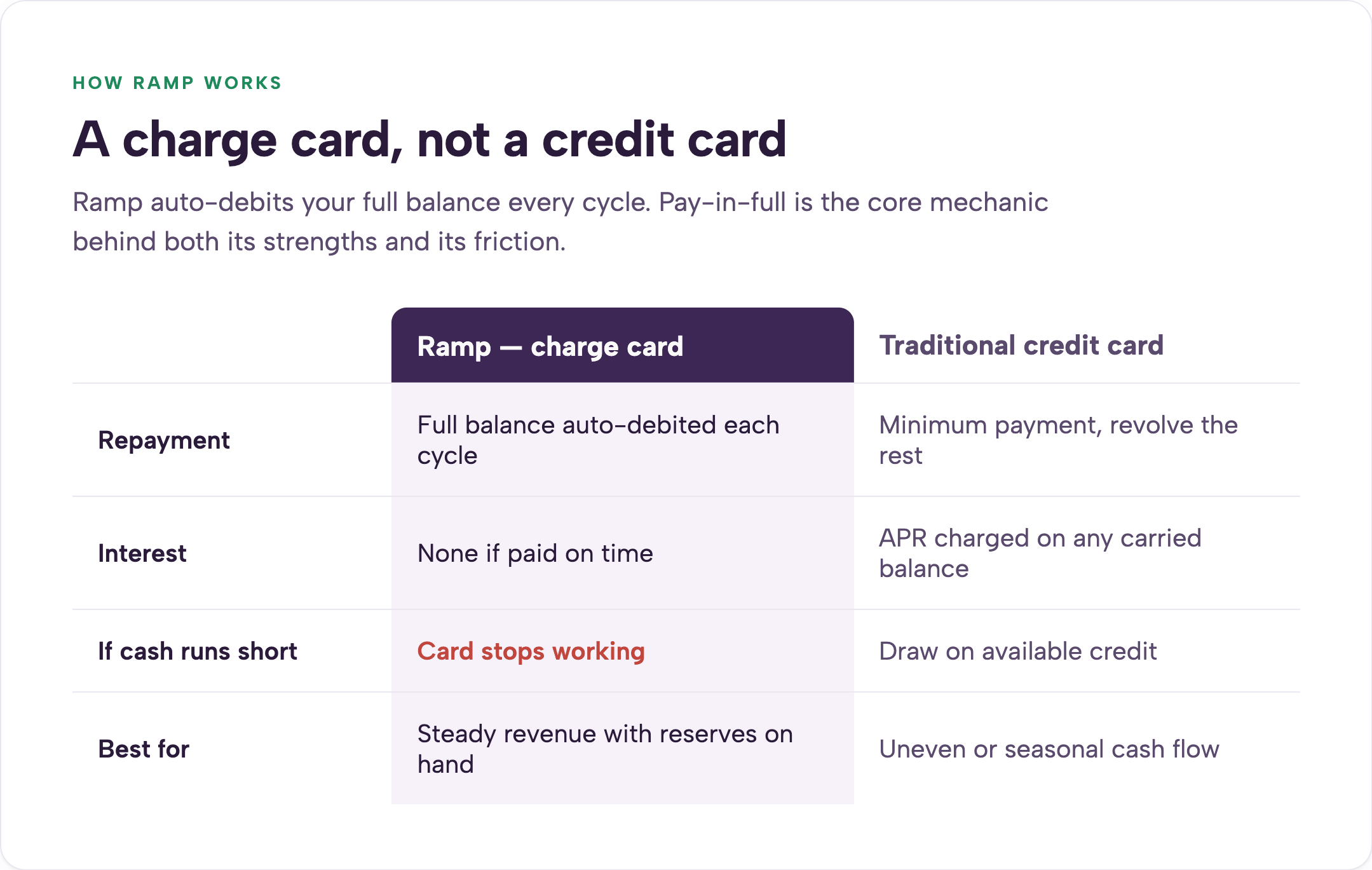
Ramp is a charge card, not a revolving credit card. You must pay the full balance each billing cycle through an automatic debit from your linked business checking account. There is no interest if you pay on time, and the card stops working if funds are unavailable.
This pay-in-full structure is the core mechanic that creates both its strengths and its friction for churches and nonprofits.
For nonprofit credit cards with no personal guarantee, see our guide.
Ramp works well for incorporated nonprofits that maintain steady revenue, keep at least $25,000 in a verified U.S. business bank account, and are comfortable mapping every expense to broad general ledger categories rather than specific funds or grants. It struggles when your work involves restricted donor intent, grant reporting requirements, irregular giving patterns, or native fund accounting across multiple ministries.
The platform was built first for startups. Nonprofit-friendly features were added later.
If your finance team already runs QuickBooks Online with an outsourced bookkeeper and values broad automation over precise fund-level tracking, Ramp can deliver real efficiency.
If your chart of accounts is built around funds, programs, or donor restrictions, the card often creates more manual rework than it removes. For practical guidance on how to track restricted funds in a church or nonprofit, read this article.
Ramp is a corporate charge card issued on the Visa network. Unlike a traditional credit card, it requires you to pay the full balance each billing cycle through an automatic debit from your linked business checking account. There is no interest charged if you pay on time, and the card simply stops working if the linked account lacks sufficient funds.
Ramp is not a bank. Cards are issued through a partner bank.
The company remains private. It reached a $44 billion valuation after its June 2026 funding round and now serves more than 70,000 customers.
For many churches, the pay-in-full mechanic collides with real cash-flow timing. December giving often funds summer camp and mission trip expenses six or seven months later. A card that requires immediate full repayment after every cycle can force uncomfortable borrowing or delayed ministry work even when the money is already committed in the budget.
The base tier carries no annual fee. Ramp Plus adds $15 per user per month. Enterprise pricing is custom.
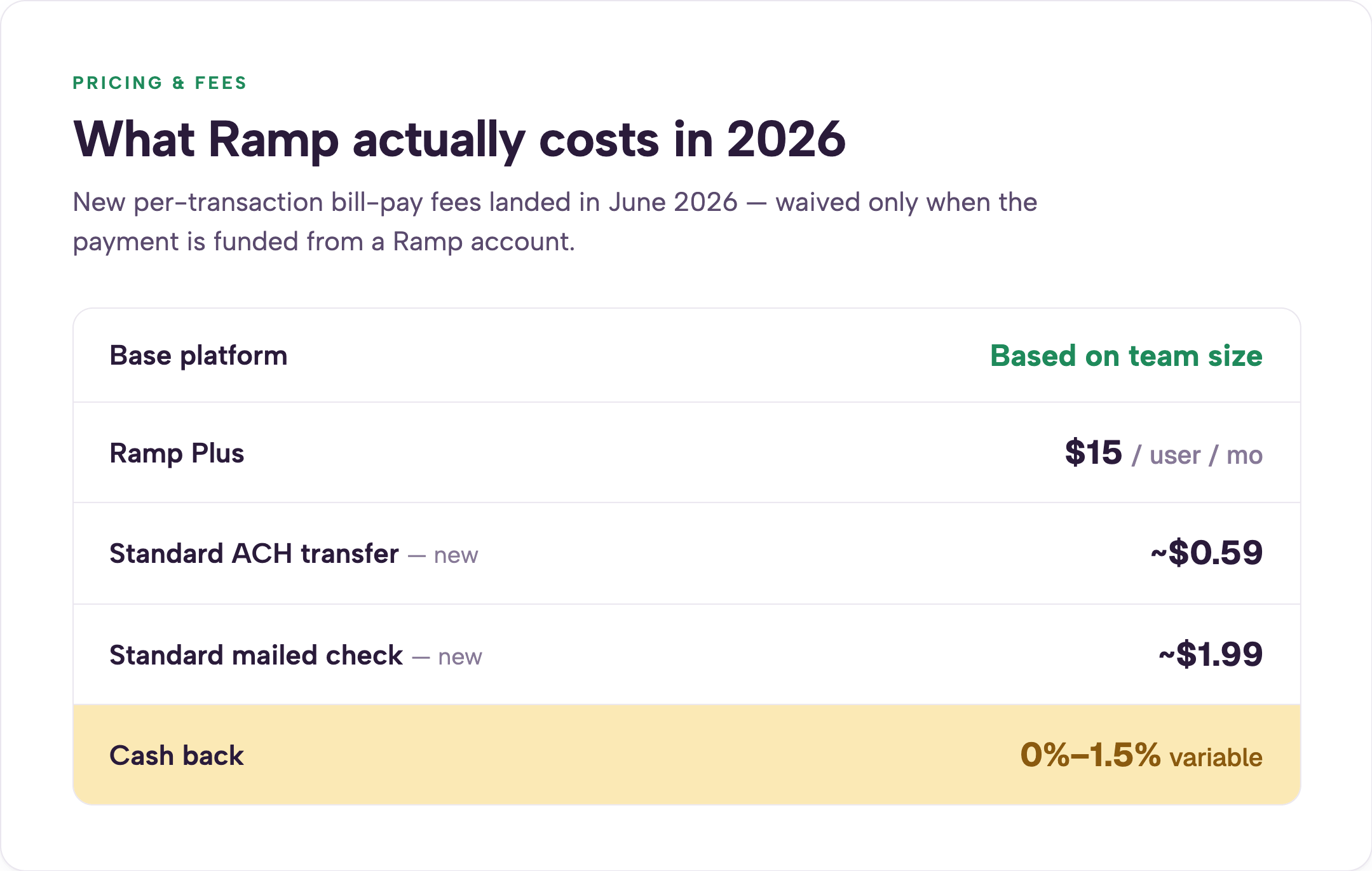
In June 2026 Ramp introduced per-transaction fees on its bill-pay features. Standard ACH now costs roughly $0.59. Standard checks cost about $1.99. Same-day ACH and wires cost more. These fees are waived when the payment is funded from a Ramp account. Cash back is now variable between 0 and 1.5%, with the exact rate set by Ramp for each account.
At $15 per user per month, Ramp quickly changes behavior inside volunteer-heavy organizations. A seasonal missions coordinator or summer intern becomes a $180 annual line item. The natural response in many churches is to share cards or pass virtual card numbers around to avoid the extra seat cost.
That practice destroys line-of-sight accountability.
When three people can spend on the same virtual number, finance loses the ability to trace any single transaction to one responsible person. The cleaner model is one card and one budget per spender.
Nonprofit finance leaders have reported platform fees of $5,000 to $10,000 appearing at renewal for smaller accounts. These are not published list prices. They surface in individual proposals and renewal conversations. Ramp’s own language on its pricing page already notes that “additional platform fees apply” in some cases.
In April and early May 2026 I spoke with 13 prospects who had been priced out of Ramp after receiving these fees. The timing aligns with Ramp’s $750 million June 2026 raise and its widely reported path toward an eventual IPO.
One nonprofit finance leader I spoke with told a Ramp salesperson she had unique nonprofit needs. The rep replied that he understood nonprofit finance because he used to do government accounting. She found the comparison offensive.
I also recently worked with a church treasurer who received a renewal proposal with a $7,500 platform fee after several years of using Ramp without issue. They switched platforms within two weeks. Subsidized smaller accounts are often the first to be repriced when a company needs to show rising revenue per customer.
This doesn’t make Ramp a bad product. It just makes pricing difficult to forecast on a fixed nonprofit budget. For nonprofit credit cards with no personal guarantee, see our guide.
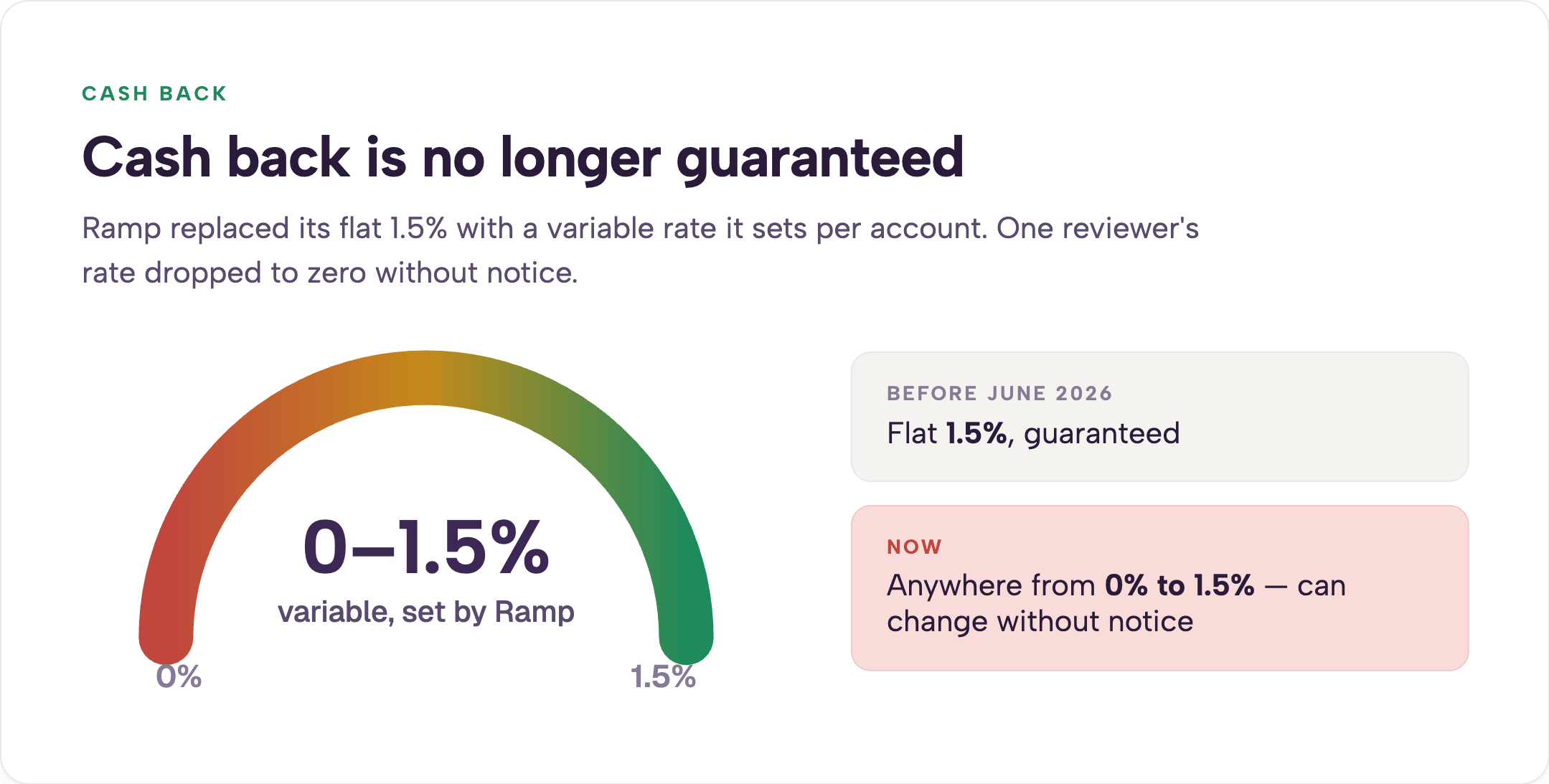
The shift from a predictable 1.5% to a variable rate set by Ramp caught some organizations off guard. One Trustpilot reviewer noted their rate dropped to zero without prior notice. If your annual plan assumes the higher rate, the actual cash back delivered can be thousands of dollars lower than expected.
Sign-up bonuses vary and sometimes do not exist at all. Recent 2026 offers have ranged from $500 to $1,000. Always confirm the current offer directly with Ramp before applying.
Ramp’s core feature set is genuinely strong. Here is how each holds up under nonprofit pressure.
Ramp requires the organization to be incorporated as a corporation, LLC, LP, or nonprofit. Sole proprietors and informal church plants are excluded.
Key requirements include a verified $25,000 minimum balance in a U.S. business bank account confirmed through Plaid. The organization must operate primarily in the United States and maintain a physical U.S. address. PO boxes, virtual offices, registered-agent addresses, and mail-forwarding services are rejected. No personal credit pull or personal guarantee is required.
The online application takes roughly ten minutes. Most approvals come through in minutes. A minority require manual review that can take one to three business days. A virtual card is available immediately upon approval. Physical cards arrive in seven to ten business days. The credit limit is dynamic and can shrink or restrict card access if the linked bank balance falls below the threshold.
One recurring friction point is the email requirement. Ramp expects every user to have an organizational email address. Many church treasurers and board volunteers use personal Gmail accounts. That mismatch creates setup friction that is entirely avoidable with other platforms.
Pros
Cons
Reviews vary sharply by source and reviewer base. On G2, Ramp holds a 4.8 rating across more than 2,000 reviews. Those scores come largely from vendor-solicited feedback and skew positive. Trustpilot sits at 3.5, down from 3.7 earlier in the year. Recent complaints center on support responsiveness, QBO sync failures, and disputed bill-pay releases.
Individual stories are hard to verify at scale, but the themes repeat across multiple accounts in 2026. On the Apple App Store, Ramp earns a 4.9 rating from more than 33,000 ratings. The pattern across the three sources is consistent. Strong technology and automation appear for organizations that fit the corporate model. More friction shows up once nonprofit-specific reporting and volunteer workflows enter the picture.
Ramp probably works if your organization is an incorporated 501(c)(3) with at least $25,000 in cash reserves, already runs QuickBooks Online or Sage Intacct, manages one or two broad money buckets, maintains relatively steady cash flow, and has a bookkeeper available to remap categories after the fact. A $2 million nonprofit with three programs and a part-time bookkeeper on QuickBooks Online is a common fit.
Ramp probably does not work if you are a church that tracks giving and spending across general, missions, building, benevolence, and youth funds. It also struggles if you manage grants with explicit donor intent, run a church-specific accounting platform, have highly irregular giving, operate as a church plant or unincorporated group, or stretch your finance function across part-time volunteers. Catholic or Orthodox multi-parish structures that require fund-level balance sheets often run into friction as well.
For a full explanation of how church fund accounting actually works, read this article. If you're weighing Ramp against a platform built specifically for this audience, see our full Ramp vs KleerCard comparison for churches and nonprofits.
The decision is not which platform is universally better. It is which set of trade-offs matches the way your organization actually operates.
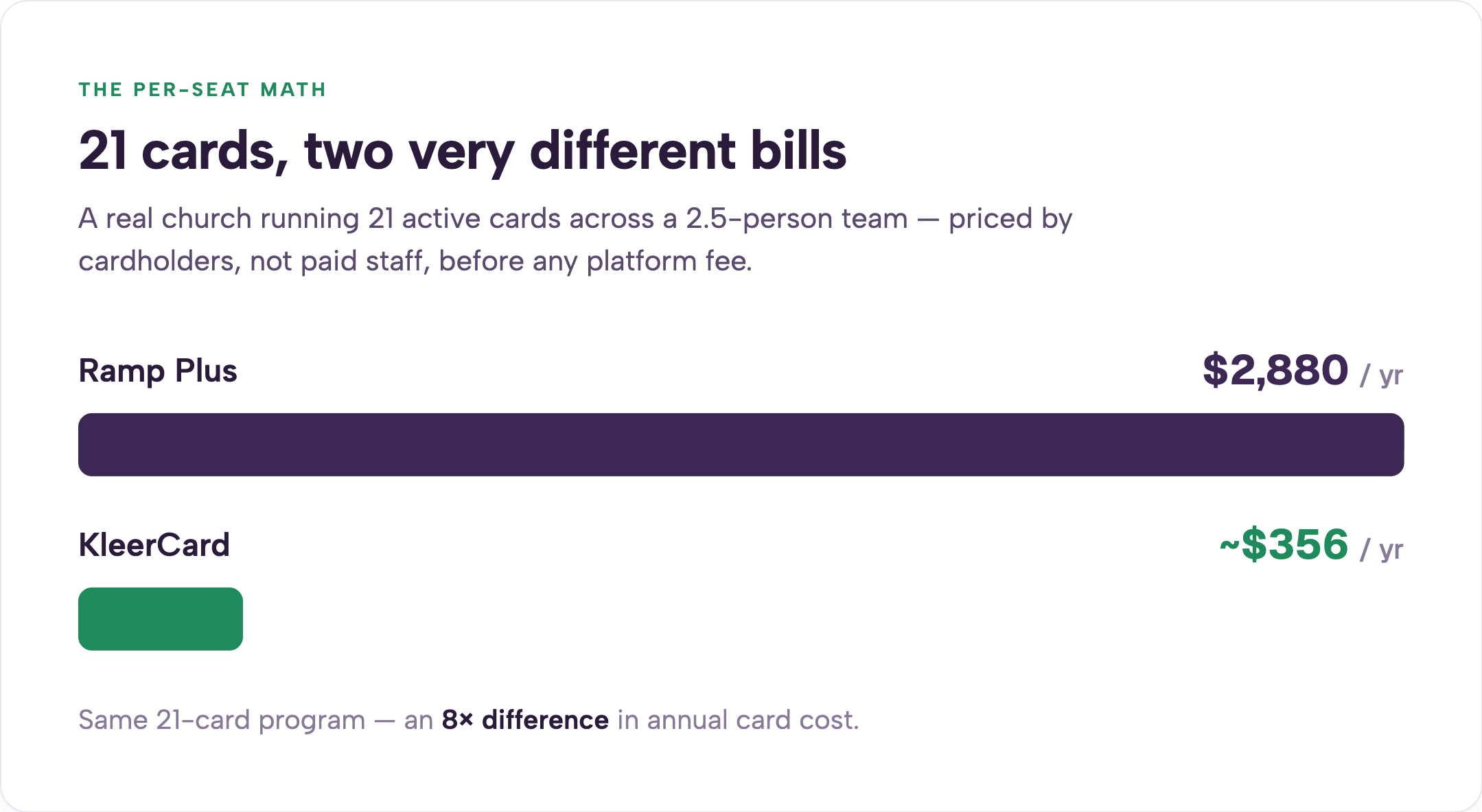
At my own church we run 21 active cards across a team of many volunteers, but only 2.5 employees. On Ramp’s per-seat pricing that would cost roughly $240 per month or about $2,880 per year before any platform fee. KleerCard runs the same program for approximately $356 per year. The math is straightforward once you count actual cardholders rather than paid staff.
Organizations that already operate like a business with clean general-ledger mapping and outsourced bookkeeping often extract real value from Ramp. The cash back is real money when the rate holds. KleerCard carries no standard cash-back program. We negotiate custom cash back only for organizations spending around $30,000 or more per month. Cash back credited to a nonprofit also raises an immediate question: which fund receives it?
My own concession is simple. If you run QuickBooks Online with an outsourced accountant and want the most widely adopted corporate tool on the market, Ramp is likely the stronger fit for you. Their underlying technology is strong.
When an organization has fewer than three to five people who actually need cards, neither Ramp nor KleerCard is usually the right answer. A simple business card from your existing bank handles the volume with less overhead.
The right card for your context may not appear on generic corporate review sites. BILL Divvy offers budgeting tools and no minimum balance, which can fit organizations below the $25,000 threshold.
Charity Charge was built specifically for 501(c)(3) organizations and requires no personal guarantee.
Devote Card positions itself as nonprofit-specific with QuickBooks integration and a smaller footprint.
ACCU Visa Ministry Rewards, AGCU Church card, and Christian Community Credit Union Ministry card each carry denominational or ministry-focused positioning.
A shortlist of current options lives here.
It works cleanly for incorporated nonprofits that already use QuickBooks Online or Sage Intacct, maintain steady cash flow, and map expenses to broad categories rather than specific funds or grants.
No. Ramp issues cards to the organization without a personal guarantee or personal credit pull.
Ramp requires a verified $25,000 minimum in a U.S. business bank account. Stories of higher thresholds circulate but the documented floor is $25,000.
Ramp is a charge card. The full balance must be paid each cycle through automatic debit from your linked checking account.
Cash back now ranges from 0 to 1.5% and is set by Ramp for each account. The rate is no longer guaranteed at the high end.
The base tier has no annual fee. Ramp Plus adds $15 per user per month. New per-transaction bill-pay fees of roughly $0.59 for ACH and $1.99 for checks took effect in June 2026.
Many churches can and do. Churches that need native fund accounting, direct integrations with church platforms, or flexible handling of seasonal and volunteer cardholders often find the model creates extra manual work.
Ramp Plus is $15 per user per month on top of the base platform.
The application takes about ten minutes. Virtual cards are usually available immediately. Physical cards arrive in seven to ten business days.
Ramp’s dynamic limit can shrink or restrict card access until the balance recovers.
BILL Divvy has no minimum balance requirement and can fit smaller organizations. Ramp offers stronger automation for organizations already inside the QuickBooks ecosystem. Neither provides native fund accounting or direct church-platform integrations. For a full review of BILL Divvy, see this article.
Ramp built a capable corporate card with strong automation and real-time visibility. The question every church and nonprofit must answer is whether that corporate design fits the way your organization actually moves money across funds, ministries, and seasonal cycles. When the card forces extra manual mapping or creates pricing uncertainty at renewal, the technology advantage shrinks quickly.
Two practical next steps help most teams decide. First, pull your last three months of statements and count how many transactions would require fund or grant re-coding under Ramp’s category model. Second, book a KleerCard demo and ask to see exactly how fund accounting appears on a card in real time. The right tool is the one that reduces friction rather than shifting it somewhere else.
For more options built specifically for nonprofits and churches, explore our nonprofit solutions page. To see the platform in action, schedule a demo here.
Pricing and terms referenced above are current as of July 2026. Always verify directly with the provider before applying.


Speak to a member of our team and we can have you up and running in minutes, not weeks.