%202.svg)
ee how Catholic parishes and dioceses use spend cards for local purchasing with central oversight. Controls, ParishSOFT sync, and no personal guarantee.
Catholic parishes buy classroom supplies, food for funeral receptions, maintenance parts, and youth-event materials every week. Most still do it with one or two shared cards, personal reimbursements, or cash.
That creates the same hide-and-seek problem I see in schools and Protestant churches that finally moved past it. The people closest to the need cannot buy what they need. Finance spends days chasing paper.
Restricted funds get mixed because no one tagged the charge correctly. Here is what a real credit-card and spend-management setup looks like for a Catholic parish or multi-parish diocese: the decision criteria that actually matter, how cards work with ParishSOFT and fund accounting, a clear side-by-side of the realistic options, and the controls that keep local flexibility without losing central accountability.
Here is how the realistic options stack up for the needs that actually show up in diocesan finance offices.
| Feature | KleerCard | Christian CU Ministry Cards (CCCU, ACCU, AGCU, AdelFi) | Charity Charge / Traditional Nonprofit Cards | Bank P-Card / Shared Office Card |
|---|---|---|---|---|
| No personal guarantee | Yes | Varies; often required | Yes | Often requires signer |
| Unlimited physical + virtual cards | Yes | Limited | Limited | Usually 1-5 total |
| Pre-transaction budget controls | Yes (load or self-load) | Basic monthly limits | Basic | High static limit |
| Real-time multi-parish dashboard | Yes | No | Limited | No |
| Receipt photo + auto-lock | Yes | Manual | Varies | Manual chase |
| ParishSOFT / fund accounting sync | Direct | Statement download only | Limited | Manual entry |
| Restricted-fund coding | Built-in dimensions | Post-hoc | Post-hoc | None |
| Best for | Multi-parish dioceses + large parishes that want controls + agility | Parishes that mainly want cash-back and already bank with the CU | Single-site nonprofits that need no-PG only | Districts that still force checkout of one high-limit card |
KleerCard sits in the space I call the controls of a traditional P-card with the agility of a corporate card. For a broader look at options, see our guide to the best credit cards for churches.
The Christian credit-union cards win on rewards and local banking relationships. They leave the control and reconciliation work to the finance team. Traditional bank cards force the hide-and-seek model that creates reimbursements and lost receipts.
I have seen school districts run an entire district on two cards. That is the extreme version of the same problem. Parishes and dioceses do not need to live there.
Most ministry credit cards were built for a single-site church with a handful of staff. A Catholic parish or diocese is different.
You have multiple locations under one finance office. Restricted funds that must stay clean: building fund, school, religious education, cemetery, and more.
Volunteers and ministry leads need to buy things the same day. A finance team cannot chase receipts across twenty parishes every month. And there is no personal guarantee sitting on the pastor or business manager.
The right card platform solves the access problem first. Give the right people a card with the right limit. Capture the receipt at the moment of purchase. Let the diocese see every transaction in real time.
That is the core of spend management built for churches.
When a parish has only one or two cards, staff and volunteers play hide-and-seek. The maintenance director needs a part from Home Depot to fix a toilet. The director of religious education needs craft supplies for the next class.
Both cards are already checked out to someone else on the other campus. People buy on personal cards and wait weeks for reimbursement. Or they simply do not buy, and the need goes unmet.
I have watched this exact pattern in schools with five cards for an entire campus of five hundred students plus a children’s center. Teachers stopped asking for the card. They just fronted the cost themselves.
A diocese that issues controlled cards to each parish removes that friction while keeping the budget authority where it belongs.
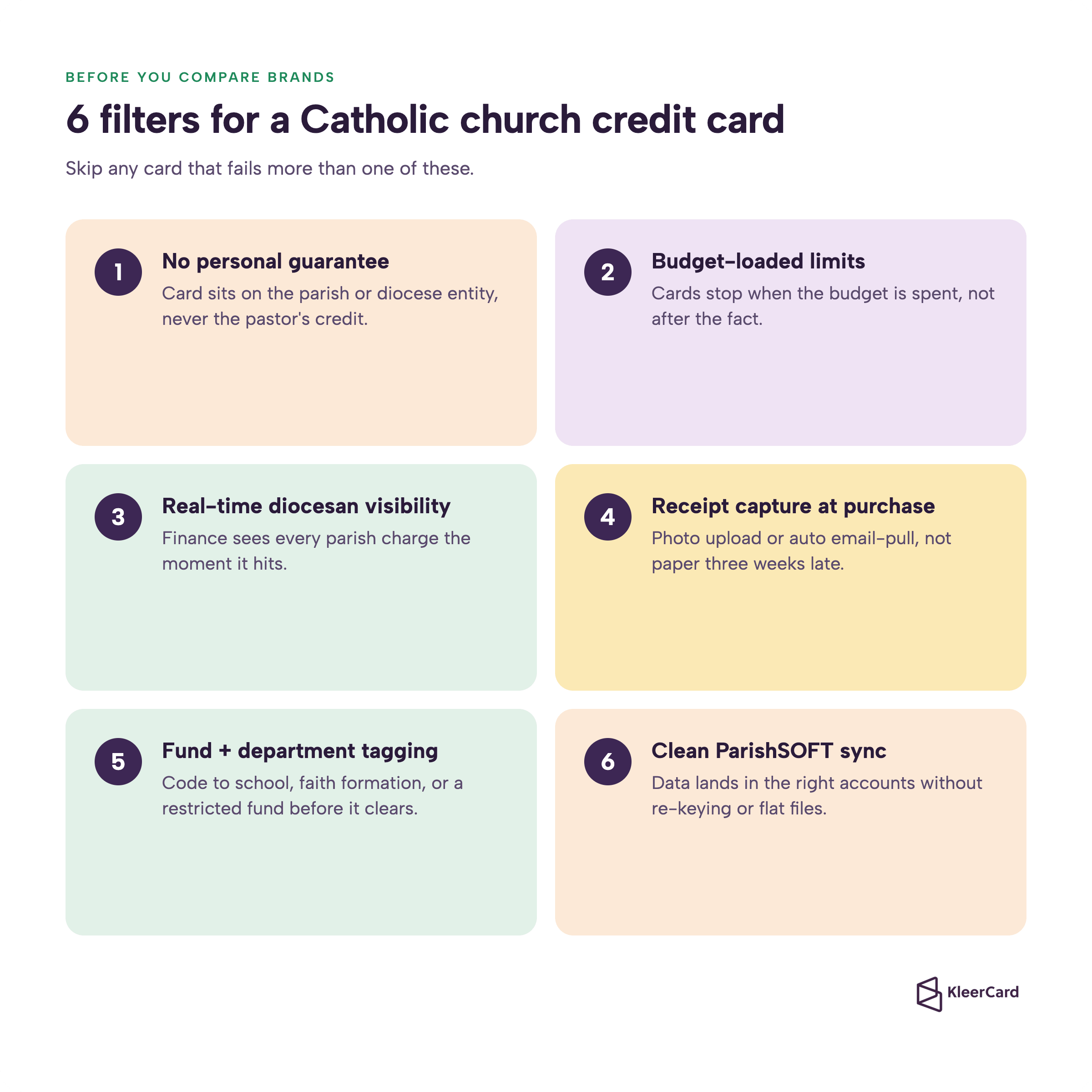
Use these six filters before you look at brand names. Skip any card that fails more than one of them.
If a card fails any of these, it will recreate the problems you already have.
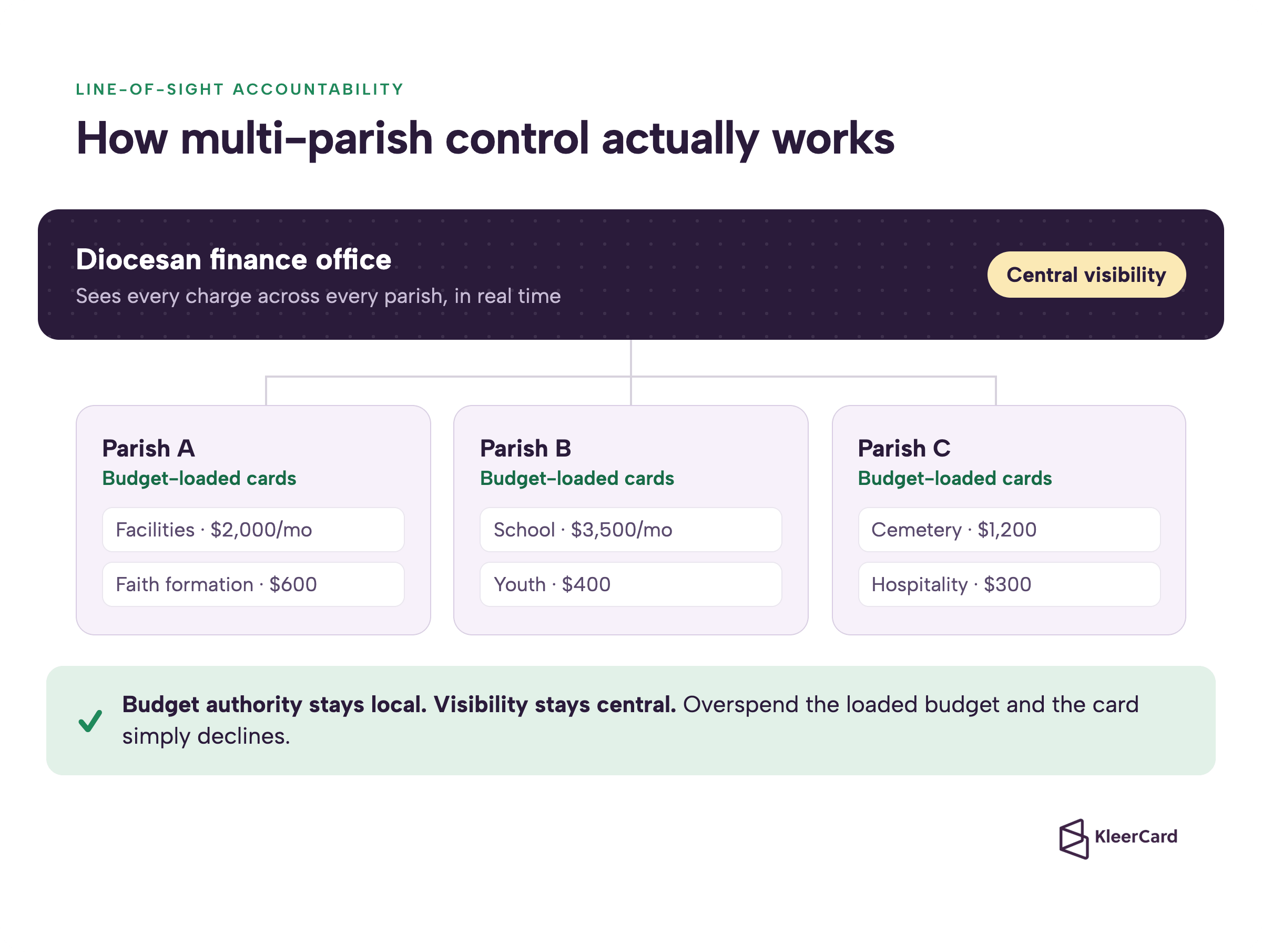
A diocese can issue a set of cards to each parish. Each card carries a monthly or project budget loaded by the parish business manager or diocesan finance. Merchant or category rules if needed (gas only for the van, no restaurants after certain hours). Automatic receipt capture and auto-lock after a set number of days without documentation.
The diocesan finance office sees every charge across every parish the moment it posts. No more waiting for paper or spreadsheet reports.
Parish leadership still owns the budget. If a principal or facilities director overspends, the card simply declines. The hot-seat conversation happens at the parish level, not after the diocese has already paid the bill.
That is line-of-sight accountability. One named person owns the spend.
Catholic organizations live on restricted gifts. Building funds, school endowments, religious-education donations, and cemetery care cannot mix. The right platform lets the cardholder or the parish bookkeeper tag the charge to the correct fund or class at the moment of coding. That data flows into ParishSOFT or the general ledger without manual re-keying.
I see the same pattern in schools that try to track classroom supplies separately by elementary, middle, and upper school. Creating four different “classroom supplies” accounts forces every purchase to be coded to the exact line.
The cleaner way is one classroom-supplies account plus a dimension for the school level. Then you can re-slice the data any way you need. The same principle works for parish ministries and restricted funds.
Most Catholic dioceses and larger parishes run ParishSOFT (or a related ACS/ParishSOFT stack) for accounting and family data. Our ParishSOFT integration pushes coded transactions and receipts directly into the system.
That removes the two biggest month-end time sinks: manually entering every credit-card line, and chasing missing receipts from ministry leaders who already spent the money weeks earlier. Direct accounting integrations make this possible without flat-file workarounds.
Finance teams that used to spend days reconciling now check a weekly dashboard and close the books in minutes. One school finance office we work with saw lost receipts drop from roughly five per week to fewer than five across seven months of the school year. Month-end credit-card close went from a lengthy manual process to a few minutes because they checked weekly.
Amazon used to be the hardest charge to reconcile. A line that simply said “Amazon” for an amount. Now the integration can bring the invoice and line items straight to the charge and tag it to the right cardholder.
The lower-school admin assistant buys tablecloths and balloons for an event. It lands with the itemization already attached. She codes it to the right account herself. Finance does not have to guess which event it was for.
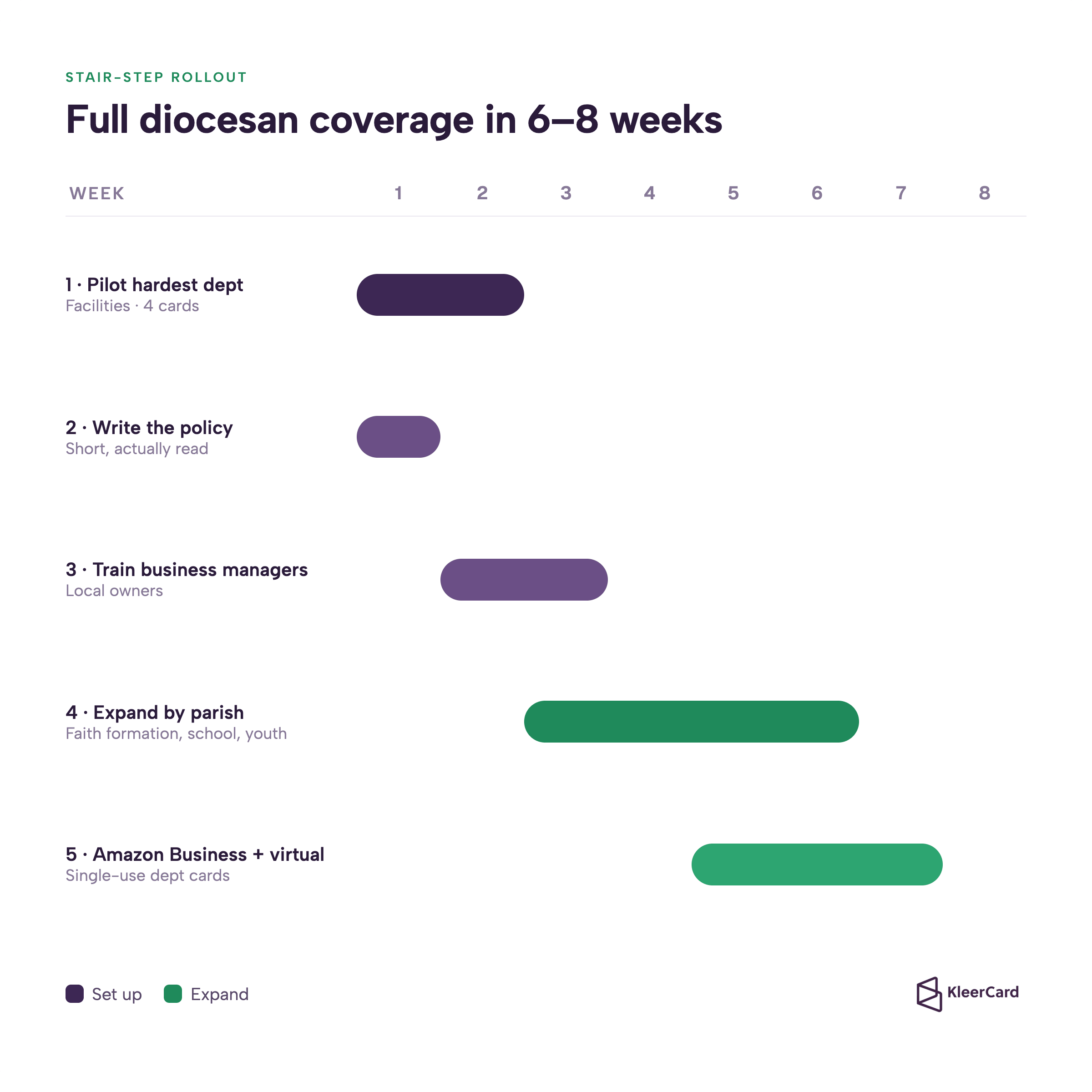
Start small. Iron out the policy and the workflow with one or two high-volume departments before you hand cards to every ministry.
Most dioceses reach full parish coverage in six to eight weeks when they follow this stair-step approach. I have watched schools do the same thing: start with operations, then administrators, then teachers and coaches. By the time lower-school teachers each get their own small classroom card, the process is already smooth.
The primary control is alignment of authority to spend with ability to spend. Merchant rules and time-of-day locks sit a level below that.
Load the exact budget the parish council or finance committee already approved. Give the card only to the person who is allowed to spend that budget. Require the receipt photo before the next funding load or before the card can be used again.
Everything else (merchant-category blocks, gas-pump-only cards for the parish van, auto-lock after three missing receipts) is secondary. When the budget itself is the control, most of the other rules become optional.
This model also solves the teacher and volunteer reimbursement problem. Classroom teachers or CCD catechists get a small reloadable card with a set limit for the year, something like $125 for classroom supplies.
They buy what they need, photograph the receipt, and never float personal cash for eight weeks waiting on a check. The lower-school principal at one school we work with is already looking forward to that rollout because it ends the flurry of reimbursement requests at every deadline.
I keep coming back to the same truth. The constraint is almost never trust or money. It is physical access to a card and the ability to document the spend without friction. Fix those two things and the rest follows.
This is what real expense management looks like for a diocese.
No. Platforms built for nonprofits and churches, including KleerCard, issue cards on the organizational entity. The pastor or business manager does not put personal credit at risk.
Traditional bank cards and some credit-union products still require a personal guarantor. Avoid those for parish or diocesan use. When a pastor leaves, reassigning the cards is simple because they were never tied to one person’s credit.
Issue parish-level cards with pre-set budgets. Diocesan finance sees every transaction in real time on a single dashboard. Parishes still decide what to buy within their approved budget.
The diocese only intervenes when a parish requests additional funding above its limit or when a receipt is missing after the policy window. You get line-of-sight accountability without sitting on every purchase order.
Yes. KleerCard offers a direct integration with ParishSOFT that pushes coded charges and attached receipts into the accounting system. That removes manual statement entry and keeps restricted funds correctly tagged. The same approach works with other common fund-accounting platforms used by Catholic organizations.
Some Christian credit-union cards offer 1-1.5% cash back. That can be useful for a single parish that already banks with the credit union.
For a multi-parish diocese the cash-back accounting question (which fund receives the credit?) and the loss of granular controls usually outweigh the reward. Most larger Catholic finance teams I talk to prefer predictability and clean fund tracking over a small rebate.
A realistic pilot with two or three parishes takes two to four weeks. Full diocesan rollout commonly lands in six to eight weeks when you start with high-volume departments, document the policy once, and train parish business managers as the local owners. Virtual cards can be live in a day or two while physical cards ship.
Yes. Issue a virtual card for a specific classroom budget, a VBS week, or a single Amazon order. The card expires or locks after the budget is spent.
That keeps personal Amazon accounts clean and prevents the accidental family purchase that has to be repaid by check for integrity reasons. Summer programs and part-time teachers especially benefit because there is no per-user cost spike for temporary cardholders.
Catholic parishes and dioceses do not need another high-limit plastic card that sits in a drawer. They need a system that lets the people closest to the need spend quickly while the finance office keeps real-time, fund-level visibility and clean books.
Choose a platform with no personal guarantee, budget-loaded cards, receipt capture at purchase, and a working ParishSOFT or fund-accounting sync.
Start with the messiest department. Write a short policy. Expand parish by parish.
When the card itself carries the control, reimbursements drop, lost receipts nearly disappear, and the diocese finally has the line-of-sight stewardship the faithful expect.
If you want to see exactly how this looks for a multi-parish setup, explore the Catholic diocese and parish spend management page or schedule a short demo.
We can walk through your current process and show the stair-step rollout that fits your size.


Speak to a member of our team and we can have you up and running in minutes, not weeks.