%202.svg)
Switch off Expensify in about six weeks: replace the reporting layer and the cards. A step-by-step migration guide for nonprofits, churches, and schools.
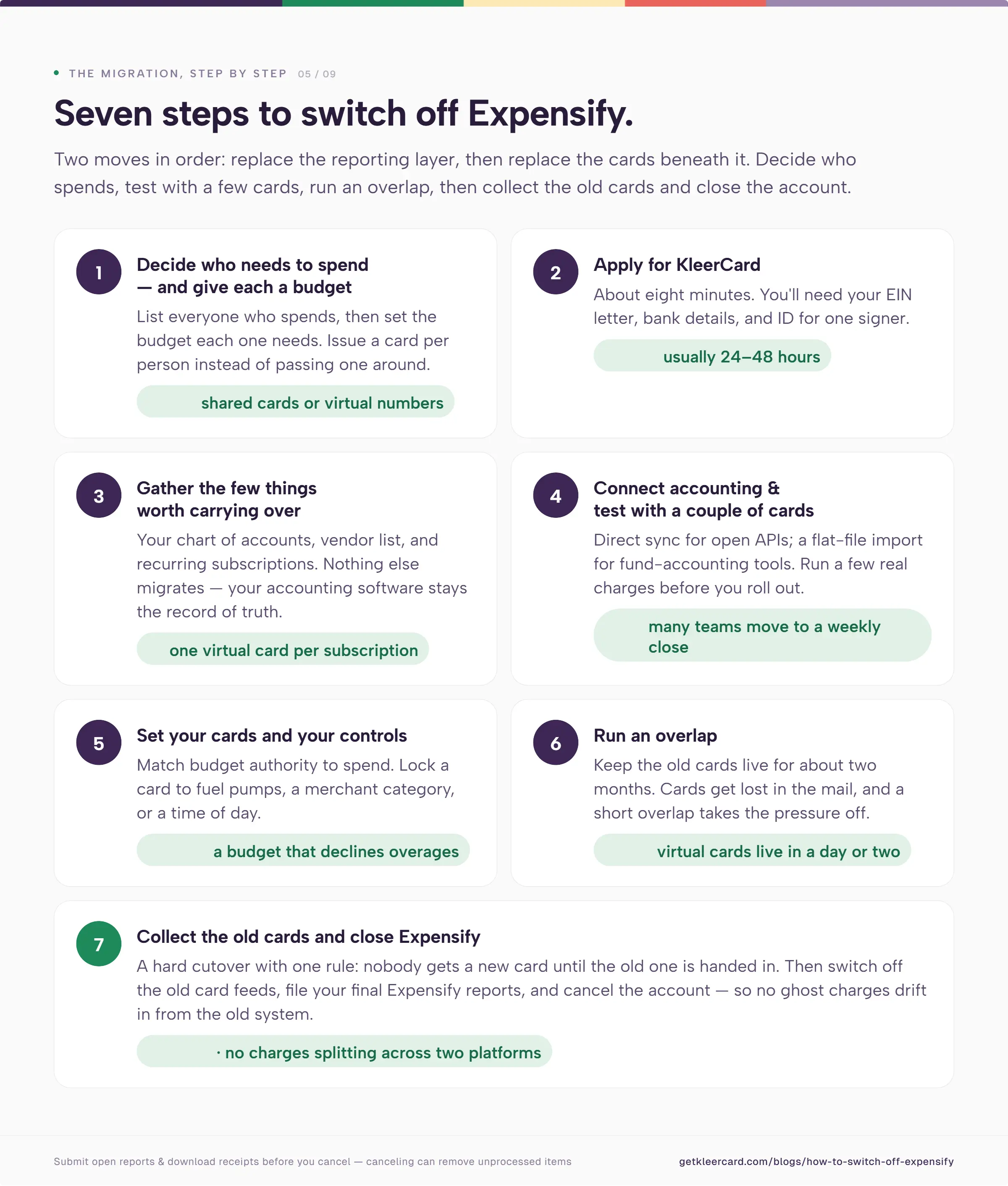
To switch off Expensify, you replace two things, not one: the reporting layer and the cards underneath it. That makes an Expensify migration different from swapping one card platform for another.
To migrate off Expensify, decide who needs to spend and set a budget for each person. Gather the few items worth carrying over—your chart of accounts, vendor list, and subscriptions. Apply for a replacement card platform like KleerCard. Connect your accounting software. Then run a short overlap before you collect the old cards and close the Expensify account.
Most nonprofits, churches, and schools I work with finish in about six weeks.
The organizations I help move off Expensify are rarely chasing a better expense report. They are solving a card problem that Expensify was never built to fix.
Expensify is a reporting layer. For most organizations I see, it connects to existing bank cards, pulls in the transactions, lets staff code them and attach receipts, then pushes the result into accounting software.
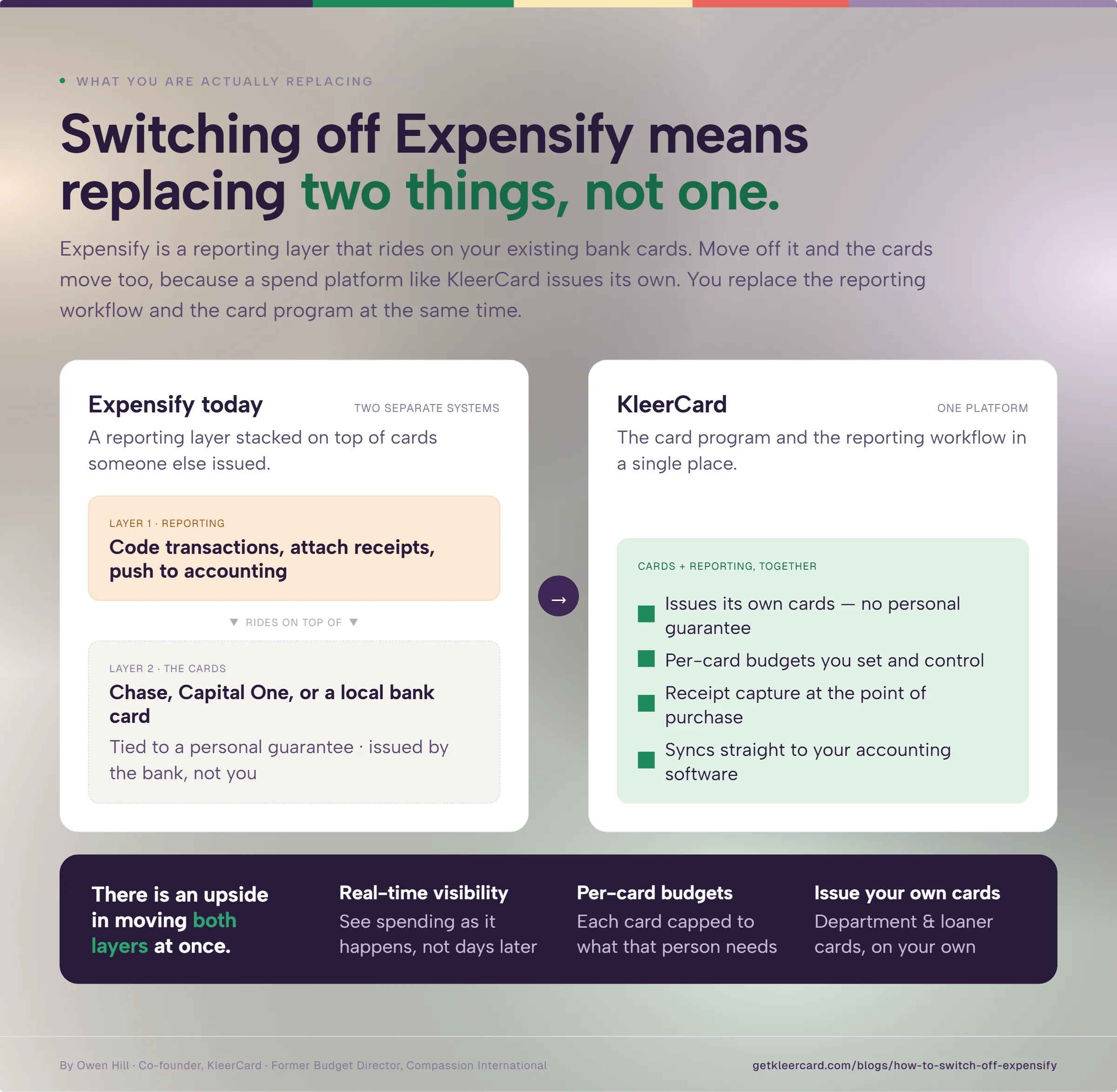
That shape changes your migration. The cards move too, because KleerCard and other spend management platforms issues their own. You are replacing the reporting workflow and the card program at the same time.
There is an upside in that. Moving off a Chase, Capital One, or local bank card onto a platform like KleerCard gives you real-time visibility and per-card budgets. You can also issue department or loaner cards on your own. Most teams are surprised by how much more control they have within a week.
A common reason organizations leave Expensify is the personal guarantee. A retiring executive director holds the cards in their name, and the incoming director does not want personal credit tied to the organization. Expensify cannot remove a personal guarantee, no matter how good its software is.
Churches hit the same wall when a card sits in the senior pastor's name. They look for a card built for church spending that the finance team controls, not one tied to a person.
Others need more cards than a bank will issue. Many run fund accounting in a tool that forces them to reformat exports by hand, and they want spend management built for nonprofits instead. Seasonal staff add another reason, since per-user pricing punishes a summer intern or a six-week instructor.
If you run a for-profit business that is content with Expensify, or if card cash back drives your decision, the case to move is weaker. In that situation, staying put may serve you better.
The figures below reflect Expensify's published billing structure and KleerCard's current plans.
| Expensify | KleerCard | |
|---|---|---|
| Built for | General business and corporate finance teams | Nonprofits, churches, and K-12 schools |
| Cards | Rides on your existing cards, with an optional Expensify Card | Issues its own cards, with no personal guarantee |
| Fund accounting | Syncs with QuickBooks, Xero, and NetSuite | Aplos, Realm, ChurchTrac, ParishSoft, Shelby, and Blackbaud, plus custom file exports |
| Pricing | Per active user (about $5 Collect, $9 Control, $18 without the card discount) | Flat tiers (free up to 5, $29 up to 15, $49 up to 30) |
| Seasonal and volunteer users | Billed per active user | Added inside your tier at no extra cost |
| Rewards | Expensify Card earns 1% cash back on US purchases (2% above $250,000 in monthly spend) | No cash back for most organizations |
| Approval rules | Multi-step, manager-first controls built for enterprises | Simple approvals, with no complex multi-tier chains |
| Nonprofit discount | None | Sector pricing built in |
KleerCard does not win every row. Expensify earns cash back on its own card that we do not offer most customers, and it lets you keep the cards you already like. The rows that decide it for fund accounting are card access, the accounting fit, and how seasonal staff get priced.
Most Expensify setups I see grew out of scarcity. A bank charges for each card, or a platform charges for each user, so leaders share one card or pass around a virtual number to dodge the cost.
Start your migration by listing everyone who spends for the organization. Then decide the budget each one needs. With KleerCard you can issue a card to each person, set a unique budget, and keep line-of-sight on every transaction because we don't charge per-user.
You can also load a fixed amount onto a reloadable card for a project, a quarter, or a year. Some organizations I work with hand out a card with a zero budget, so nothing can be spent until they release the funds.
A relief organization moving to us now hit this on its international trips. The staff member had a card, but volunteer leaders carried their own and asked for reimbursement later, which felt awkward to them.
We issued that staff member two more physical cards to hand out. He still owns them and sees every transaction, and no volunteer risks a personal card tied to everything else in their life.
The application takes about eight minutes. You will need your EIN letter, bank details, and ID for one signer. Approval usually lands within 24 to 48 hours.
Nothing migrates into KleerCard, because your accounting software stays your record of truth. Your Expensify history already lives there, and your KleerCard activity will flow there too.
So the list is short. Bring your chart of accounts and your vendor list, which we can import if you plan to run reimbursements or bill pay. Pull your recurring subscriptions together as well.
I put each subscription on its own virtual card. Zoom, Adobe, and the rest stay on autopilot and out of the monthly expense workflow.
Before you cancel Expensify, submit any open reports and download receipts that live only inside it. Canceling can remove unprocessed items.
Link KleerCard to your accounting platform. For software with an open API, we set up a direct accounting sync. For many fund accounting tools, which tend to lag on technology, we use a flat-file import instead.
Then run a few real charges through two or three cards and import them. This gives your finance team confidence before you roll anything out. Many organizations move to a weekly close once they see how current the data stays.
The strongest control is matching budget authority to what someone can spend. A high-limit card checked out from the office feels like control. A budget that declines anything above its limit gives you the substance.
Issue each person a card with a budget that fits how they spend. For a vehicle, you can issue a card that works at fuel pumps and nowhere else, then leave it on the key ring. You can also lock cards by merchant category or by time of day.
I recommend keeping your old cards live for about two months. Cards get lost in the mail, and a short overlap takes the pressure out of the move.
That window is not fixed. When a card program shut one organization down on two weeks' notice, we issued virtual cards within a day or two and loaded them into Apple Pay and Google Pay while the physical cards shipped.
Once the new cards arrive, take the old ones back on a hard cutover. One rule keeps it clean: nobody gets a new card until the old one is handed in.
Then switch your old card feeds off, file your final Expensify reports, and cancel the account. Now you run one system, with no ghost charges drifting in from the old one.
Most organizations finish in about six weeks. Approval runs 24 to 48 hours, physical cards ship in five to eight days, and the overlap covers a billing cycle or two.

A faster path exists when you need it. Virtual cards can go live within a day or two for an urgent cutover.
Receipts get captured at the point of purchase from a phone, instead of chased at month-end. Reminders go out on a schedule, and you can auto-lock a card after a set number of days without a receipt. Some organizations I work with lock cards after three days.
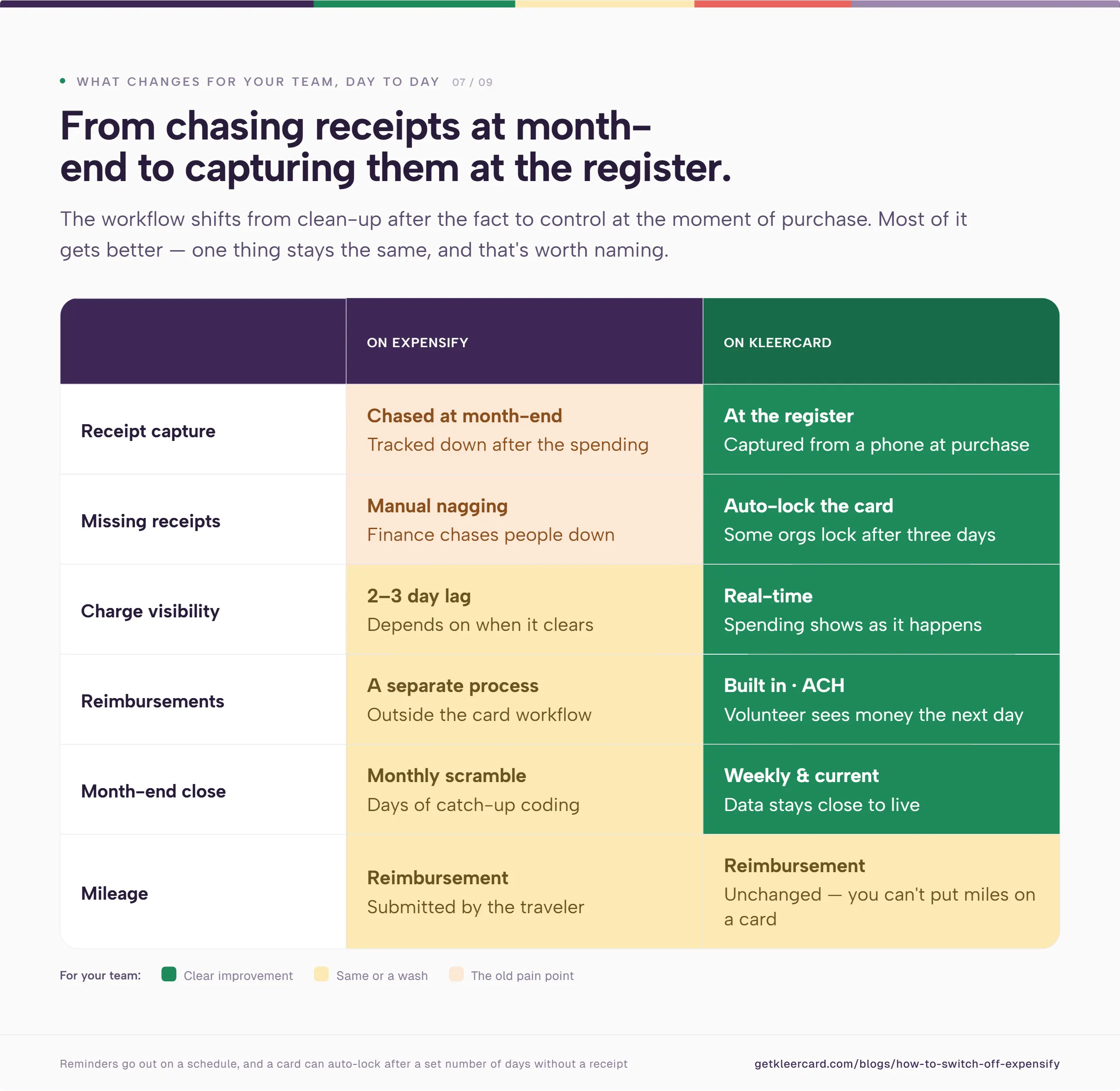
You also lose the lag. Expensify can take two or three days to show a charge, depending on when it clears. KleerCard shows spending as it happens.
Reimbursements change too. KleerCard handles bill pay and reimbursements in the same platform, so I set each person up as a vendor and pay by overnight ACH. A volunteer can submit a request and see the money the next day. Mileage still runs through reimbursement, since you cannot put miles on a card.

Canceling Expensify before you close it out is the expensive one. Submit open reports and pull any receipts that live only inside Expensify first.
Running both systems for too long is the next. A clean cutover, where old cards come back as new ones go out, stops charges from splitting across two platforms.
Skipping the test imports is another. A few real charges through your accounting software surface coding and mapping issues before they reach the whole team.
The last one is bringing the old scarcity mindset along. If you issue only a card or two to save money, you keep the shared-card and reimbursement problems you were trying to leave.
KleerCard does not run complex, multi-tier approval chains. If you need a rule where one person approves spending over $500, two people approve over $1,000, and an executive signs off above $5,000, KleerCard will frustrate you.
We also let finance do their work without waiting on a manager's approval first. Tools built for corporate America hold finance until each approval clears in order. That falls apart when the approver is at summer camp with no signal for five weeks. If you want enterprise-grade linear controls, KleerCard is not your tool.
Two more points worth weighing. The Expensify Card earns 1% cash back on US purchases (2% only above $250,000 a month). With KleerCard, cash back is custom for those spending more than $30,000 a month on cards.
Expensify also lets you keep the cards you already use. For a fund accounting organization, card access and accounting fit usually outweigh those points. For a for-profit team that lives on card rewards, they may not.
An Expensify migration is two moves done in order: replace the reporting layer, then replace the cards beneath it. Decide who spends, set their budgets, test with a few cards, run an overlap, then collect the old cards and close the account.
If your organization runs fund accounting, carries a personal guarantee it wants off, or pays per user for seasonal staff, this is the kind of move we built KleerCard for. You can read how the two stack up in our comparison of KleerCard and Expensify for churches, or scan the other Expensify alternatives worth a look.
When you are ready, you can start a KleerCard application in about eight minutes, or have our team run the white-glove setup for you.
Owen Hill is co-founder of KleerCard, a corporate card built for nonprofits, churches, and schools. Before KleerCard, he served as Budget Director at Compassion International and ran Switch Consulting, a fractional CFO practice for nonprofits.
No. Expensify does not offer a nonprofit discount. The lowest Expensify price comes from paying annually and using the Expensify Card for at least half of monthly spend. KleerCard prices for nonprofits, churches, and schools directly, with a free tier for up to five users.
You can, but the benefit of switching comes from moving card spend onto KleerCard. Expensify rode on top of those cards. KleerCard replaces them, which is what removes the personal guarantee and gives you real-time budgets and controls.
Expensify charges per active user, around $5 a month on Collect and $9 on Control, or $18 without the Expensify Card discount. KleerCard charges flat tiers: free for up to five users, $29 for up to 15, and $49 for up to 30. You can check current KleerCard pricing for the full breakdown.
Most organizations finish in about six weeks. Approval takes 24 to 48 hours, cards ship in five to eight days, and an overlap of a billing cycle or two reduces risk. An urgent cutover can run in a day or two using virtual cards.
Export it before you cancel. Your transaction history already sits in your accounting software, so nothing migrates into KleerCard, but receipts and open reports that live only in Expensify can disappear when you close the account. Submit open reports and download those receipts first.
Both. KleerCard is a card platform with expense management built in, so cards, receipt capture, approvals, bill pay, and accounting sync live in one place. With Expensify, the card and the reporting tool stayed separate.


Speak to a member of our team and we can have you up and running in minutes, not weeks.