%202.svg)
Most churches and nonprofits switch from Brex to KleerCard in about a week. A 7-step guide: export your data, set up funds, migrate vendors, and close Brex.
KleerCard makes the card this guide moves you toward. I co-founded it for churches, nonprofits, and schools, and we compete with Brex for that buyer. Full disclosure at the end.
Most churches, nonprofits, and schools complete the switch from Brex to KleerCard in about a week. It takes a few hours of hands-on work spread across the process.
You apply for KleerCard while your Brex account stays open. Then you export your Brex data, set up funds and approval rules, connect your accounting software, run a short pilot, move recurring charges, and close the Brex account at the end.
| Brex | KleerCard | |
|---|---|---|
| Built for | Venture-backed startups and globally distributed teams | Mission-driven nonprofits |
| Eligibility | ~$50K cash (funded startups); $1M+ annual revenue (bootstrapped); $400K+ monthly revenue (mid-market); nonprofits case by case | Three-cardholder minimum; no minimum bank balance; no personal guarantee |
| Ownership (May 2026) | Capital One subsidiary. Acquisition closed April 7, 2026. | Independent. Cards issued by The Bancorp Bank, N.A. on Visa Commercial. |
| Fund accounting | Not supported | Native fund classification at the point of swipe |
| Church/nonprofit integrations | None for Aplos, Shelby, Realm, ParishSOFT, ACS, Blackbaud, or PowerChurch | Direct integrations with all of those, plus QuickBooks Online, QuickBooks Desktop, NetSuite |
| Volunteer / personal-email cards | Expects organizational email addresses | Personal-email cardholders supported |
| Base pricing | Essentials free; Premium $12/user/month; Enterprise custom | Free up to 5 users; $29/month up to 15; $49/month up to 30; custom above 30 |
| Rewards | Points, up to 7x on select categories | Cashback on custom plans only, for organizations spending roughly $30K+/month on cards |
| Setup | Self-serve onboarding | One-on-one onboarding calls, first transaction in hours |
Figures published by Brex and KleerCard as of May 2026. Confirm current numbers before you apply.
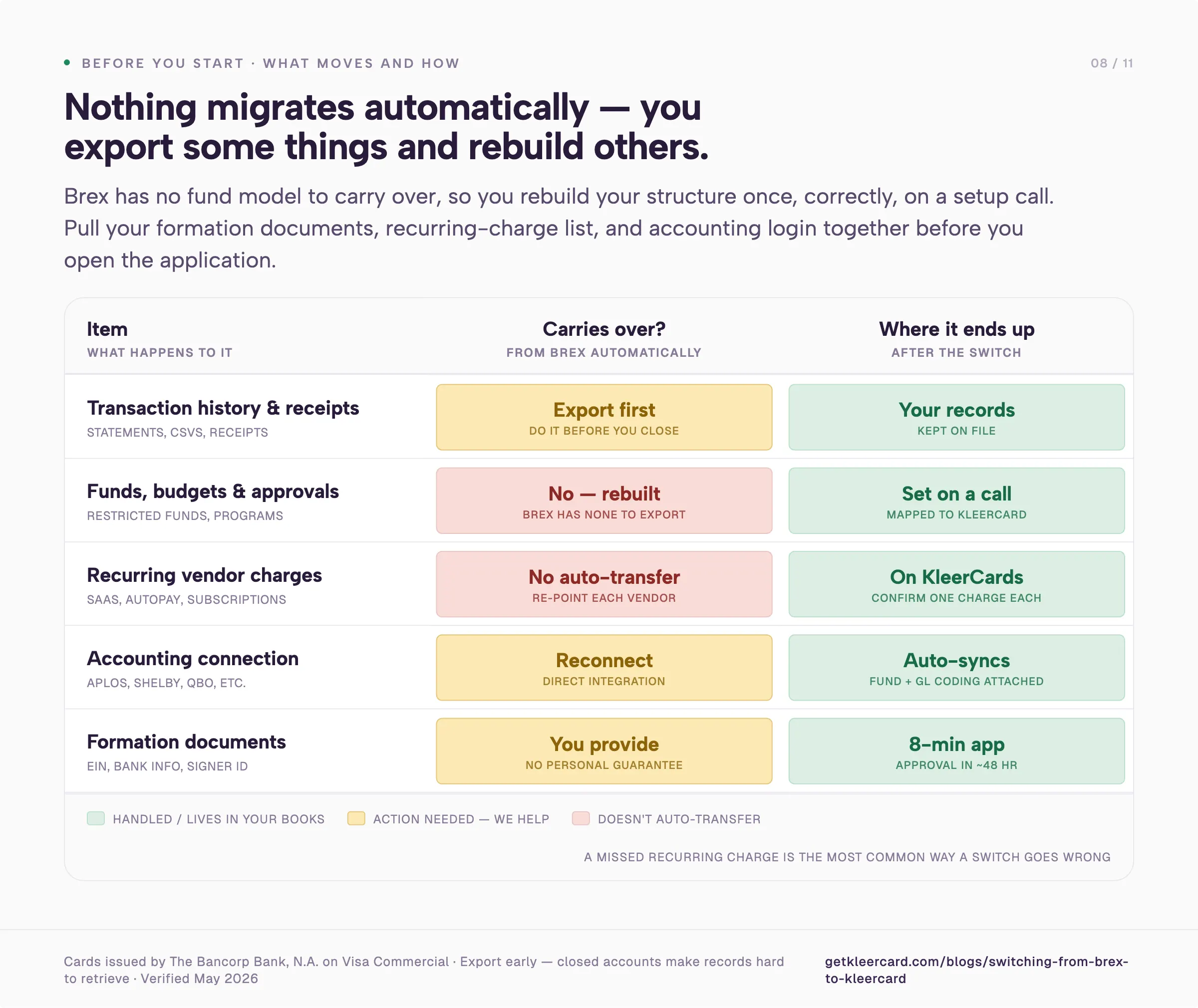
Pull three things together before you open an application.
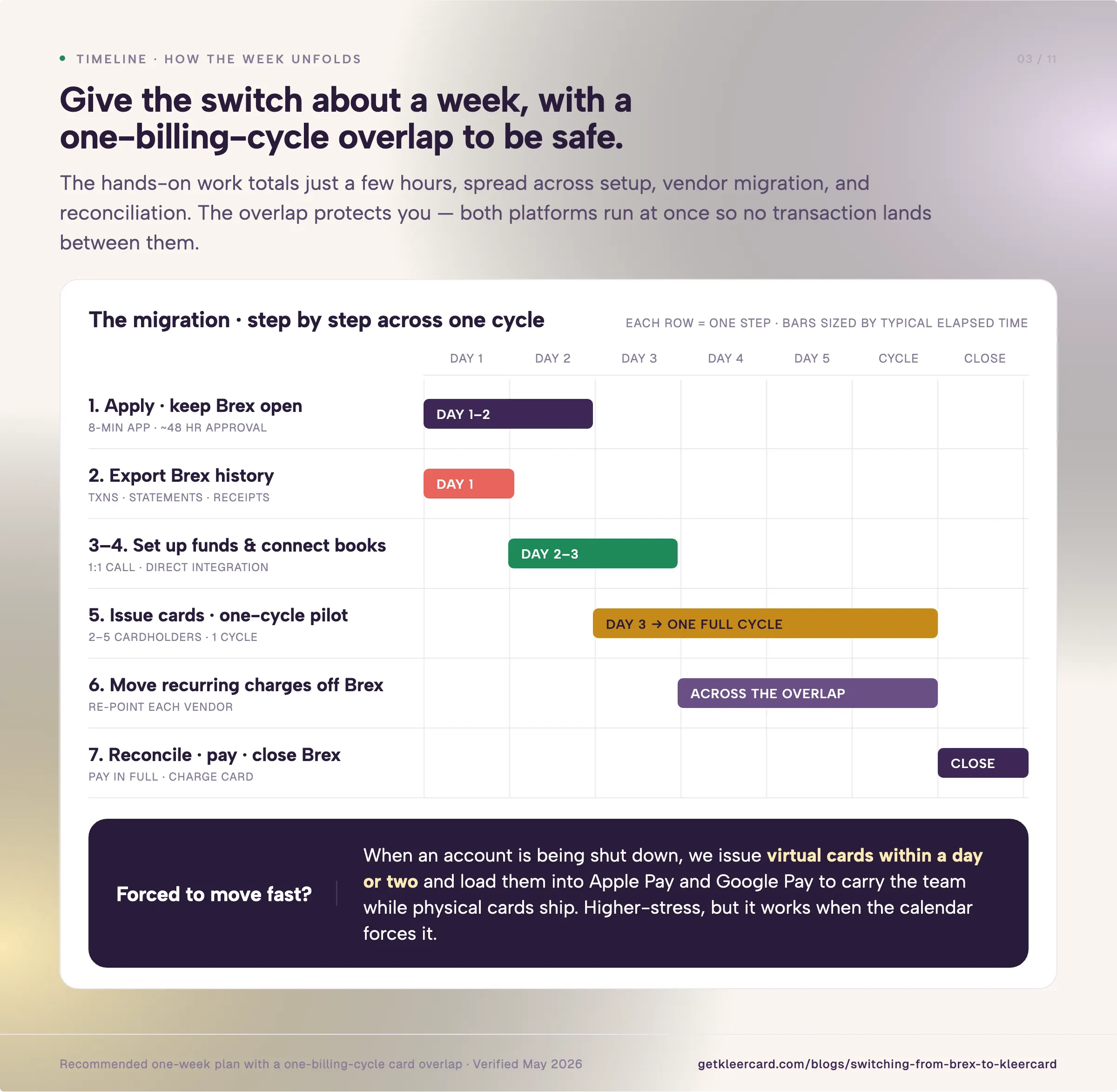
The whole move runs in seven steps.
Here is what each step involves.
Start by checking that KleerCard suits your organization. We make a card for groups that track spending against funds and hand cards to staff and volunteers. If that is you, the application takes about eight minutes. Approval usually lands within 48 hours. No personal credit check. No personal guarantee.
Keep your Brex account open. You will run both platforms in parallel for one billing cycle. There is no reason to cancel anything yet.
Pull your records out of Brex while you still have full access. The Accounting section of the Brex dashboard exports transactions to your accounting system or ERP. It also supports custom CSV downloads. Download your transaction history, your statements, and your receipts.
Use that same export to build your recurring-charge list. The transaction records show which vendors bill your Brex cards on a schedule. That list feeds Step 6. Closing a card account makes old records hard to retrieve. Get the data first.
Nothing carries over automatically. Brex has no fund model to carry over from. You rebuild your structure once, correctly, during setup.
This is the part we handle differently from the startup-focused platforms. Many people who run cards in this sector are volunteers. A treasurer took the role in January. A bookkeeper handles finance software as a side task.
Ramp and BILL Divvy hand you a set of YouTube videos. They expect you to configure the account yourself unless you spend six figures a month. That's not easy for a volunteer.
We get on a call and set the thing up with you. I will do a one-on-one with anyone who asks.
On that call you map your restricted funds, designated giving, ministry or program budgets, and capital campaigns to KleerCard fund classifications. The GL code follows the fund. You set merchant category restrictions and approval chains. A card issued to a youth pastor or a teacher can only spend where it should.
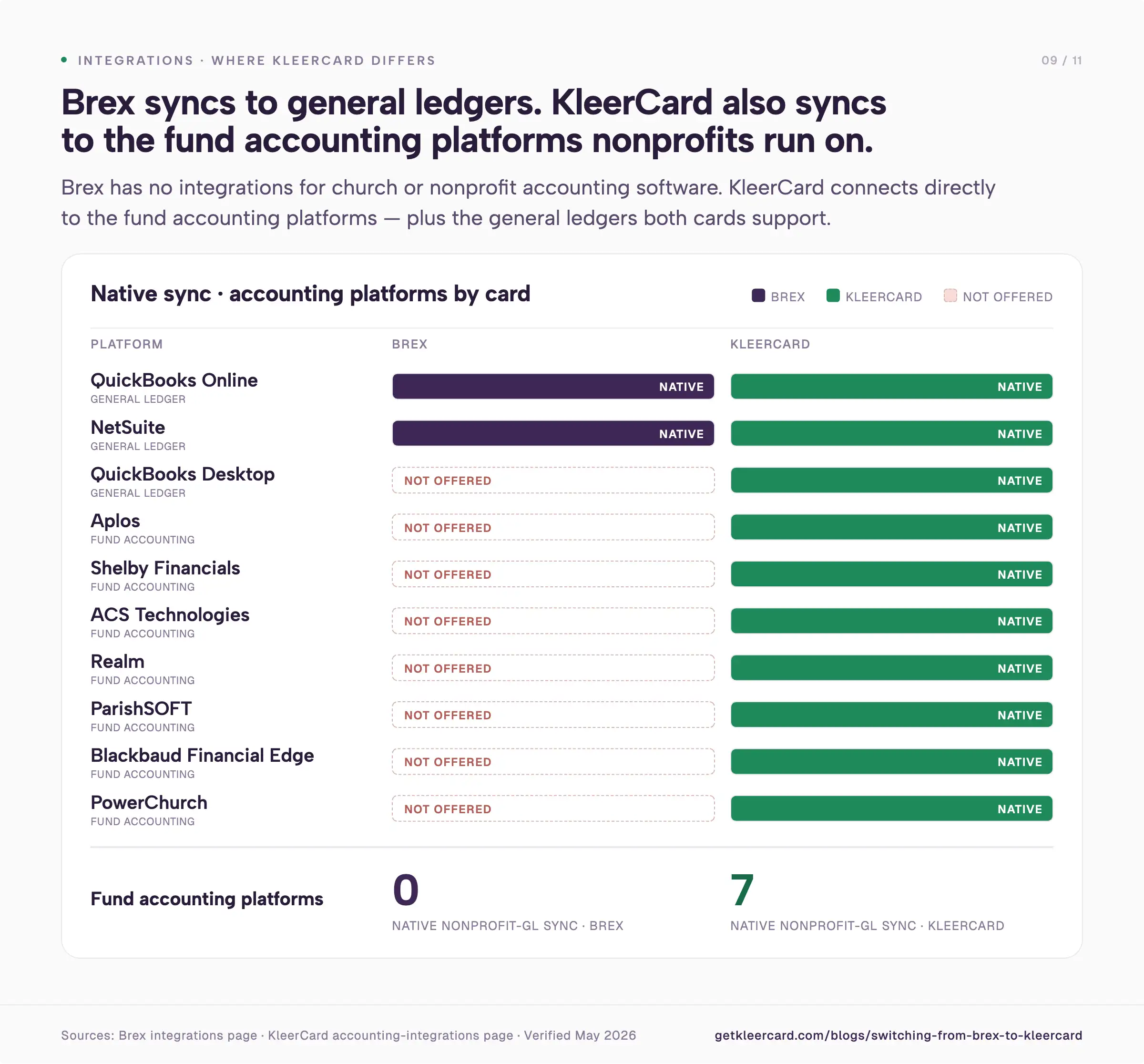
Connect KleerCard to your books. Direct integrations cover Aplos, ACS Technologies, ParishSOFT, Shelby Financials, Realm, Blackbaud, QuickBooks Online, QuickBooks Desktop, and NetSuite. This is the step that ends the monthly export and hand-reformat.
Once the connection is live, transactions sync into your accounting system with the fund and GL coding already attached.
Issue virtual cards right away. Physical cards arrive in roughly five to eight days by mail. Order them now if your team needs plastic.
Start small. Pick two to five cardholders. A treasurer and a couple of program leads work well. Run them for one billing cycle before you hand cards to everyone. A pilot gives you a real read on receipt capture, coding, and approvals.
The shift teams report after this is consistent. Emily, an HR and Finance Director at a nonprofit, saw her receipt collection drop from 40 hours a month to about an hour in the first month. Jared, an Executive Pastor, watched his month-end close shrink from three days to roughly seven minutes.
My own church runs 21 cards across 2.5 paid staff. The people holding those cards are volunteers and ministry leaders, not a finance department. The numbers move because the card and the accounting system talk to each other instead of meeting once a month in a spreadsheet.
Work through the recurring-charge list from Step 2. For each subscription and bill pay vendor, log into the vendor portal. Replace the Brex card on file with your new KleerCard.
Do this before you cancel anything on Brex. Brex states plainly that it will not automatically transfer recurring charges. You have to migrate the spend yourself. When you go to terminate a Brex card, Brex shows a summary of merchants that may be billing it on a schedule. That summary is a useful cross-check against your own list.
Confirm one successful charge on each vendor before moving to the next step.
Run both platforms through one full cycle so nothing slips through the seam. Reconcile your final Brex statement. Confirm no recurring charges still point at a Brex card. Pay the Brex balance in full. Brex is a charge card and carries no rollover.
Then cancel your Brex cards and close the account. Keep the data export from Step 2 in your records.
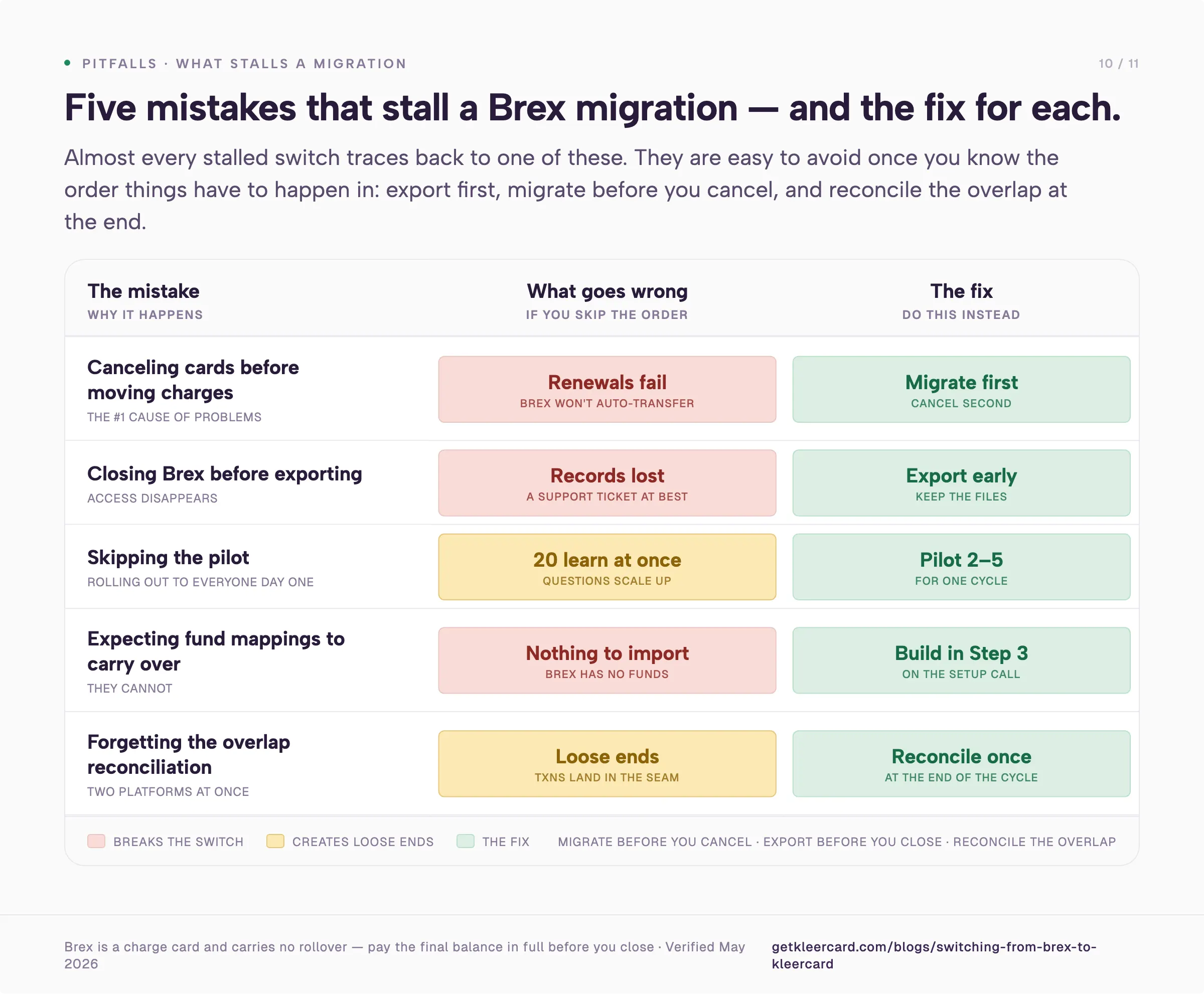
Canceling Brex cards before moving recurring charges causes the most problems. Brex does not auto-transfer recurring spend. A canceled card means failed renewals on whatever was billing it. Migrate first. Cancel second.
Closing Brex before exporting history creates another issue. Once the account is closed, getting transaction records and receipts back becomes a support ticket at best. Export early and keep the files.
Skipping the pilot leads to trouble. Handing cards to twenty people on day one means twenty people learning receipt capture at once. A two-to-five-person pilot for one cycle catches the questions before they scale.
Expecting fund mappings to come across does not work. They cannot come across. Brex has no fund structure to export. Build the time for that into Step 3.
Forgetting the overlap reconciliation leaves loose ends. Two platforms running at once means a few transactions land in the seam between them. One careful reconciliation at the end closes it.
If you need real credit, we are not your card. We do not do 30 or 60 days of float. We do not carry balances. We do not do long-term, high-interest debt.
When a foundation came to me last year needing to float net-30 and net-60 government contracts, I told them KleerCard was the wrong tool. I pointed them toward an SBA loan and commercial banking.
If you need a standing credit line to cover the time between invoicing and payment, you have better options than us.
If you are a venture-backed startup with heavy international spend and category rewards as a real budget line, Brex fits that profile better than we do. Our Ramp vs Brex comparison covers that audience.
If your priority is deep procure-to-pay automation and vendor-negotiation tooling, Ramp's product is further along on that than ours.
Brex evaluates nonprofits case by case. It asks for 501(c)(3) designation, articles of incorporation, and board governance documentation. The credit model was built for venture-backed startups with cash on hand. It was not built for organizations funded by donations or grants. Brex also has no native fund accounting. It has no integrations with church or nonprofit accounting platforms like Aplos, Shelby, Realm, ParishSOFT, ACS, Blackbaud, or PowerChurch.
Capital One completed its acquisition of Brex on April 7, 2026. Capital One says products, pricing, and support are unchanged for now. What stays uncertain is the product roadmap. Whether eligibility or underwriting tightens as Capital One's risk models layer onto Brex remains unclear. Whether the customer base drifts toward Capital One's larger commercial banking clients over time is also unknown. None of those questions have public answers yet.
Most organizations complete the move in about a few weeks. The KleerCard application takes roughly eight minutes. Approval usually lands within 48 hours. The recommended pilot runs for one billing cycle before full rollout. The hands-on work totals a few hours. It spreads across setup, vendor migration, and reconciliation.
Yes. Export your transaction history, statements, and receipts from the Accounting section of your Brex dashboard before you close the account. You still have full access at that point. After the switch, your KleerCard transactions sync into your accounting platform with fund and GL coding attached. Your books stay current going forward.
Only if you cancel before migrating those payments. Brex does not automatically transfer recurring charges to a new card. Any subscription or autopay still pointing at a canceled Brex card will fail. Update the card on file with each vendor first. Confirm one successful charge. Then cancel the Brex card.
No. KleerCard requires no personal guarantee. It runs no personal credit check. It has no minimum bank balance requirement. The practical floor is three cardholders. The application asks for your EIN letter, business bank information, and an ID for one signer.
If Brex stopped fitting your organization, whether through an eligibility change, the Capital One acquisition, or the fund-accounting friction that comes with a card built for startups, the switch to KleerCard is a one-week project rather than a quarter-long one. Export your data. Build your funds once. Pilot for a cycle. Migrate the recurring charges. Then close the account.
If your organization runs on fund accounting and you want a card that already speaks that language, you can start a KleerCard application here. If your needs point somewhere else, I hope this guide helped you sort that out. For the wider set of options in this space, Brex alternatives for nonprofits, churches, and schools goes deeper.
Owen Hill is co-founder of KleerCard, a corporate card built for nonprofits, churches, and schools. Before KleerCard, he served as Budget Director at Compassion International and ran Switch Consulting, a fractional CFO practice for nonprofits. KleerCard is reviewed alongside other tools throughout this article.


Speak to a member of our team and we can have you up and running in minutes, not weeks.