%202.svg)
Switching from Ramp to KleerCard takes about six weeks and almost nothing migrates. A nonprofit finance director walks through the 7-step process.
Switching from Ramp to KleerCard is simpler than many finance directors expect. Almost nothing moves.
Your accounting software stays your system of record, so there is no transaction history to migrate. You decide who gets a card, connect your accounting platform, run a short overlap, and trade each old Ramp card for a new one.
Most nonprofits, churches, and schools finish in about six weeks (including the overlap period).
I run our own church on KleerCard. Over the past year I have helped many nonprofits, churches, and schools through this exact switch. The hard part is rarely the technology itself. It is unlearning the habit Ramp's per-seat pricing trained into them.
Here is the process, an honest comparison, the parts of Ramp that KleerCard does not replace, and the seven steps I take customers through.
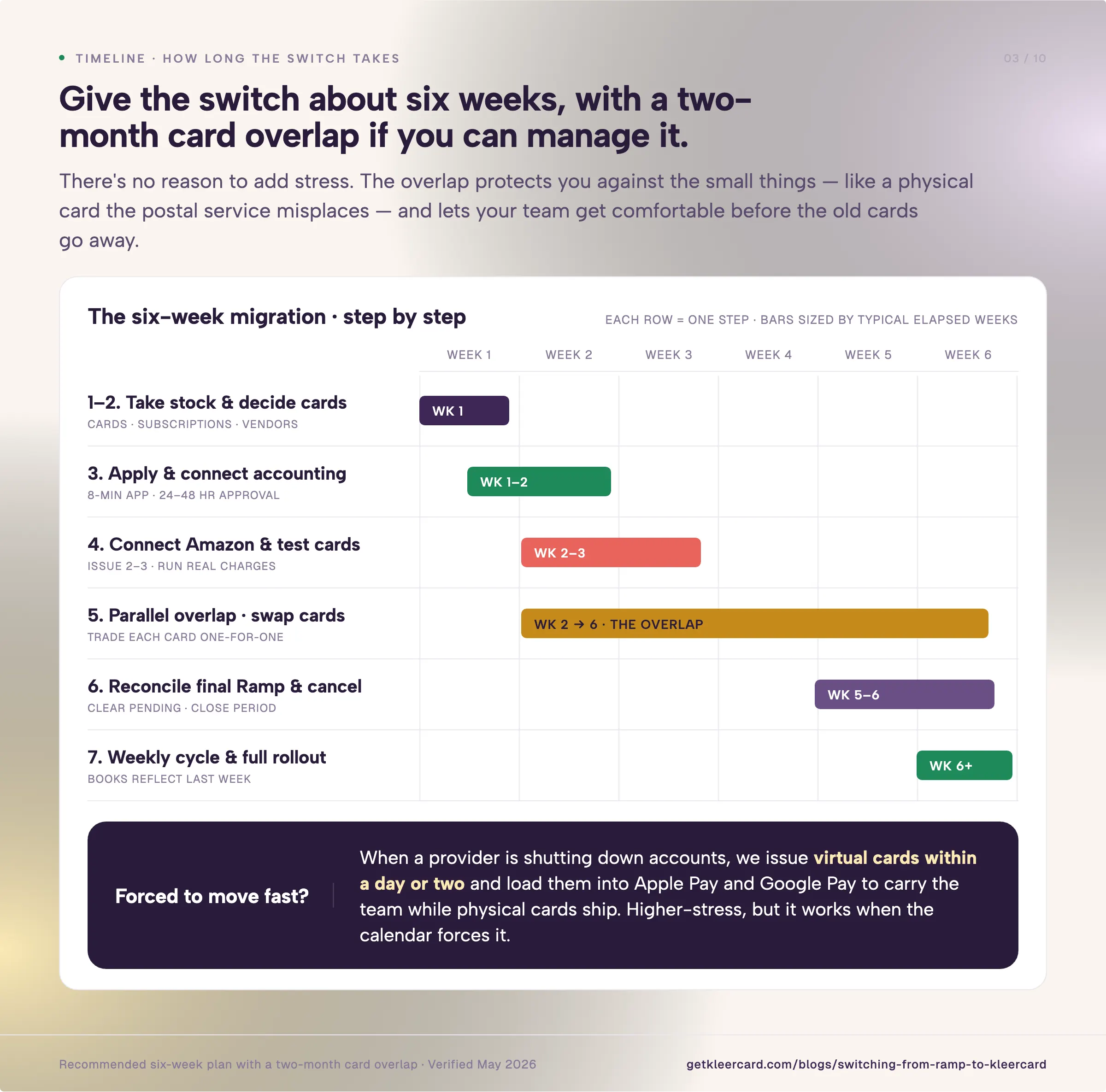
List every active Ramp card, who holds it, and every recurring charge sitting on it. Pull your subscription list and your vendor list.
Export your Ramp transaction history for your own records. This becomes your map for the rest of the switch.
Before issuing anything, work through who legitimately spends for your organization. Plan a card for each of them.
Decide where a reloadable or zero-dollar card fits better than an open monthly limit. This is the step that breaks the per-seat scarcity habit. It is also the one that pays off most.
The application takes about eight minutes. You provide your EIN letter, bank information, and ID for one signer.
There is no personal guarantee. Approval comes back in 24 to 48 hours.
On your first setup call, my team connects your accounting platform and maps your funds so transactions land in the right place.
Issue two or three cards and connect Amazon Business expense tracking so your Amazon purchases start flowing in cleanly.
Run a few real charges through. Test a few imports into your accounting software.
The point is to give your finance team the confidence to know exactly what the full rollout will look like before it happens.
Keep your Ramp cards live while the new cards arrive. As I hand someone their KleerCard, I take their Ramp card back in the same moment.
Nobody keeps both. That way I always know who has fully transitioned.
Once every old card is in and every new card is out, there are no ghost charges hiding on a second system.
Sync every expense up to your transition date into your accounting software. Wait a few days for any pending Ramp charges to clear, then close the period.
Confirm no recurring vendor is still pointed at a Ramp card, and cancel.
Most of our customers move to a weekly reconciliation rhythm. Your reports stop looking a month into the past and start reflecting last week.
That keeps your books current. Once the pilot month checks out, roll the remaining cards to the full team.
I recommend giving the switch about six weeks, with a two-month card overlap if you can manage it.
There is no reason to add stress to this. The overlap protects you against the small things, like a physical card the postal service misplaces.
It also lets your team get comfortable before the old cards go away.
When someone needs to move faster, we can. I worked with an organization whose previous provider was shutting down their accounts in two weeks.
We issued virtual cards within a day or two. We loaded them into Apple Pay and Google Pay to carry the team while the physical cards shipped.
We kept them running. That is a higher-stress path than a calm six-week transition. It works when the calendar forces it.
The reason the switch stays calm for most teams is that you do not configure it alone.
White-glove setup is included on every plan. My team runs a handful of thirty-minute calls to connect your accounting software, set budgets per person, and decide how strict you want to be on receipts and coding.
That last part matters more than it sounds. Some of my organizations run loose and flexible.
Others tell me to lock a card after three days if the holder has not turned in their receipt and coding. We can build either one.
The migration is less about standing up new software and more about shaping the tool to match how you want to run your finances.
The organizations that get the most out of the switch are the ones who use it to fix the habits Ramp's pricing forced on them in the first place.
Before you start, it helps to see where the two platforms differ for a mission-driven organization.
Ramp is a capable platform. For a for-profit team with paid staff and standard accounting it works well.
The points above are where it starts to work against a nonprofit. For a deeper feature-by-feature look, see our KleerCard vs Ramp comparison.
The reason I hear most is cost.
Ramp has raised a lot of money quickly. Most recently at a $32 billion valuation, with reports it is seeking more funding and eyeing a valuation of $40 billion.
To support numbers like that, a company has to grow revenue per customer. One way that shows up is the platform fee.
Ramp's platform fees scale with team size. The smaller nonprofit accounts I work with have seen $2,000 to $10,000 added at renewal. For a nonprofit on a fixed budget, a surprise five-figure fee is not viable.
On top of the platform fee, Ramp charges $15 per user per month on its paid Plus tier. For a company with a set headcount, that is reasonable.
For a nonprofit, it works against you. Volunteers might need a card for one season or event. Every seat runs around $180 a year, so leaders start rationing cards.
The other thing I hear, about both Ramp and BILL, is that they have grown complicated as they chase enterprise customers. More flags, more menus, more settings to dial in.
That depth serves the large organizations they are courting. It does not serve a ministry or a mission-driven nonprofit.
A community volunteer on a library district board told me she spent hours trying to do basic things in Ramp. She manages a couple hundred thousand dollars a year and wanted a tool she could open and use. More and more organizations choose us after that conversation.
There is friction in the setup, too. Ramp asks every user for an email at your organization's domain. That breaks the moment a summer-camp volunteer or a board treasurer is on a personal Gmail address.
The full breakdown lives in our Ramp card review.
The per-user cost creates a habit I see on nearly every Ramp account that comes to me. To avoid paying for another seat, a leader loans out their own card or passes a virtual card number to an intern or a volunteer.
The spending still happens. The accountability disappears. Months later, nobody can say for certain who bought what.
So the first real step of any switch is not technical. It is deciding who legitimately spends on behalf of your organization, and giving each of those people their own card.
When everyone has their own card, you get line-of-sight accountability: a unique budget per person and a clear record of every transaction they make.
Neither Ramp nor KleerCard requires a personal guarantee for this, which already puts both ahead of most bank-issued cards. If your bank still wants someone to personally guarantee the account, that is a separate problem worth solving, and our guide to nonprofit credit cards with no personal guarantee covers it.
This is where leaving Ramp changes how you operate.
Our church is bringing on an assistant pastor as a summer intern. On a per-seat platform, that is one more monthly fee I have to weigh against the value. On KleerCard there is no incremental cost to add him, so the answer is easy. He gets his own card with his own budget.
For people who do not need an open-ended monthly limit, I usually set up a reloadable card. You load a fixed amount, a project budget, a quarter, or a full year, and the card stops at that number.
You can even issue a card with a zero-dollar budget, so the holder has to request funds before they can spend anything. The control lives on the card instead of being bolted on after the fact.
A relief organization I am working with right now shows how far this goes.
They run international trips. In the past their volunteer leaders had to bring personal cards and ask for reimbursement later, which always felt awkward. We gave the staff lead two extra physical cards to hand to volunteer leaders on the trip.
The staff member still owns those cards and sees every transaction. If one gets lost or compromised, it is not anyone's personal card tied to the rest of their life.
They walked out of that conversation rethinking the whole way they run trips. This is the kind of operation KleerCard is built for. That is why our whole nonprofit spend platform is shaped around funds, programs, and volunteers rather than corporate departments.
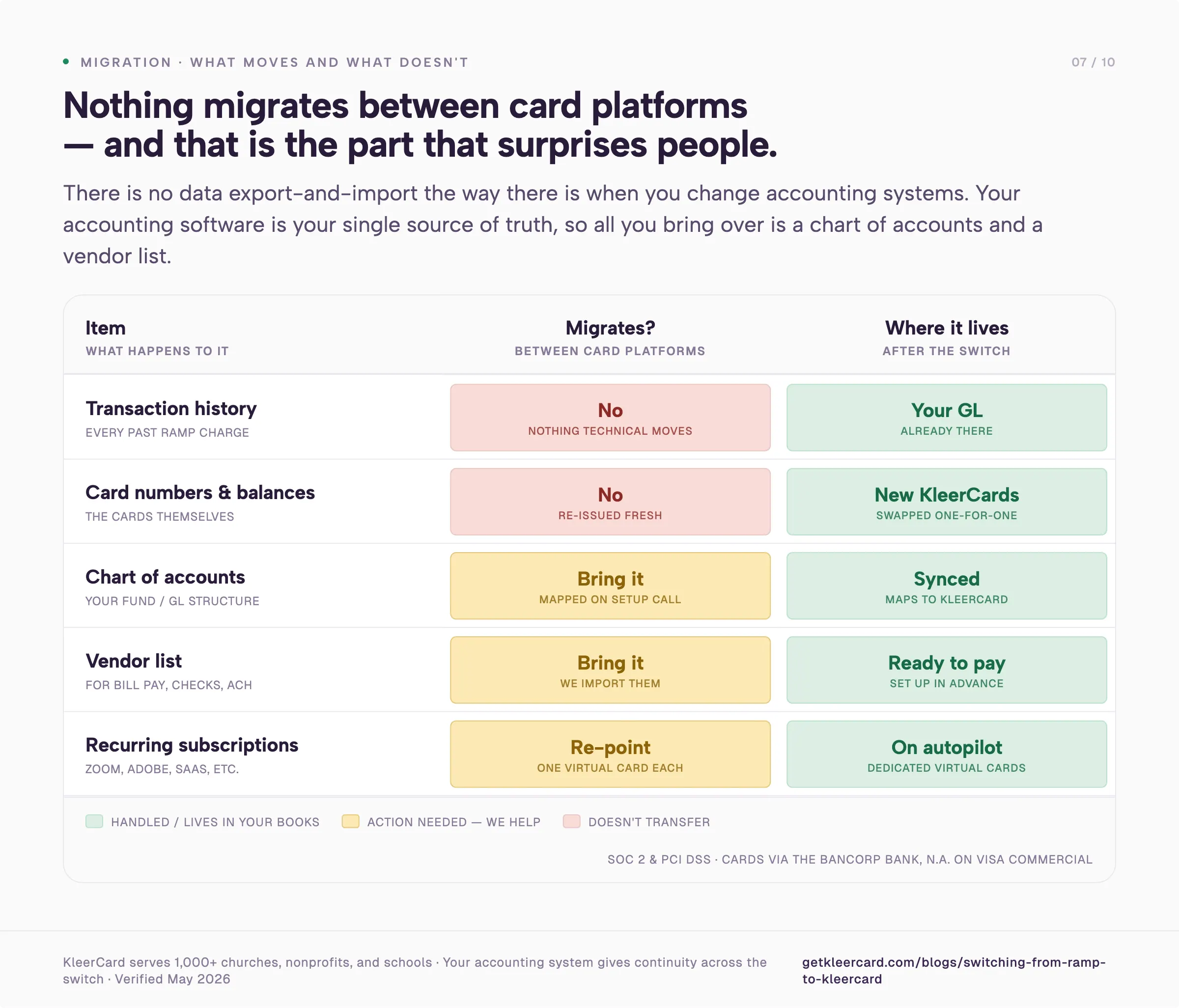
Here is the part that surprises people: nothing migrates between the platforms. There is no data export-and-import the way there is when you change accounting systems.
Your accounting software is your single source of truth. All of your Ramp history already lives there, and all of your KleerCard activity will flow there too.
That gives you continuity across the whole switch even though the card platform underneath changed.
The only information worth bringing over is your chart of accounts and your vendor list. If you plan to use bill pay for reimbursements, checks, or ACH, we import those vendors so they are set up and ready.
Where KleerCard differs from Ramp is the accounting tools we connect to. Ramp integrates with general ledgers like QuickBooks and NetSuite.
We connect to those as well, and to the fund accounting platforms nonprofits run on: Aplos, Shelby, ACS, Realm, ParishSOFT, and Blackbaud Financial Edge.
For QuickBooks Online and similar tools, we set up a direct API sync. For fund accounting platforms, where the software is often less modern, we configure a flat-file import.
You can see the full list on our accounting integrations page.
While you are listing things out, list your subscriptions. I tell almost every organization to put each recurring subscription on its own virtual card.
I code Zoom the same way every month, and Adobe the same way every month. Once each one sits on a dedicated card, those charges run on autopilot. Your monthly expense process is then free for the spending that needs a person to look at it.
One more thing worth saying plainly, since switching financial tools makes people nervous: KleerCard serves more than 1,000 churches, nonprofits, and schools.
It is SOC 2 and PCI DSS compliant. It issues cards through The Bancorp Bank, N.A. on the Visa Commercial network.
This is a move you can make with confidence.
I would rather tell you this now than have you find out after you switch. Ramp, BILL, and Expensify were built for corporate America. They carry controls that fit large companies and break for the way most nonprofits work.
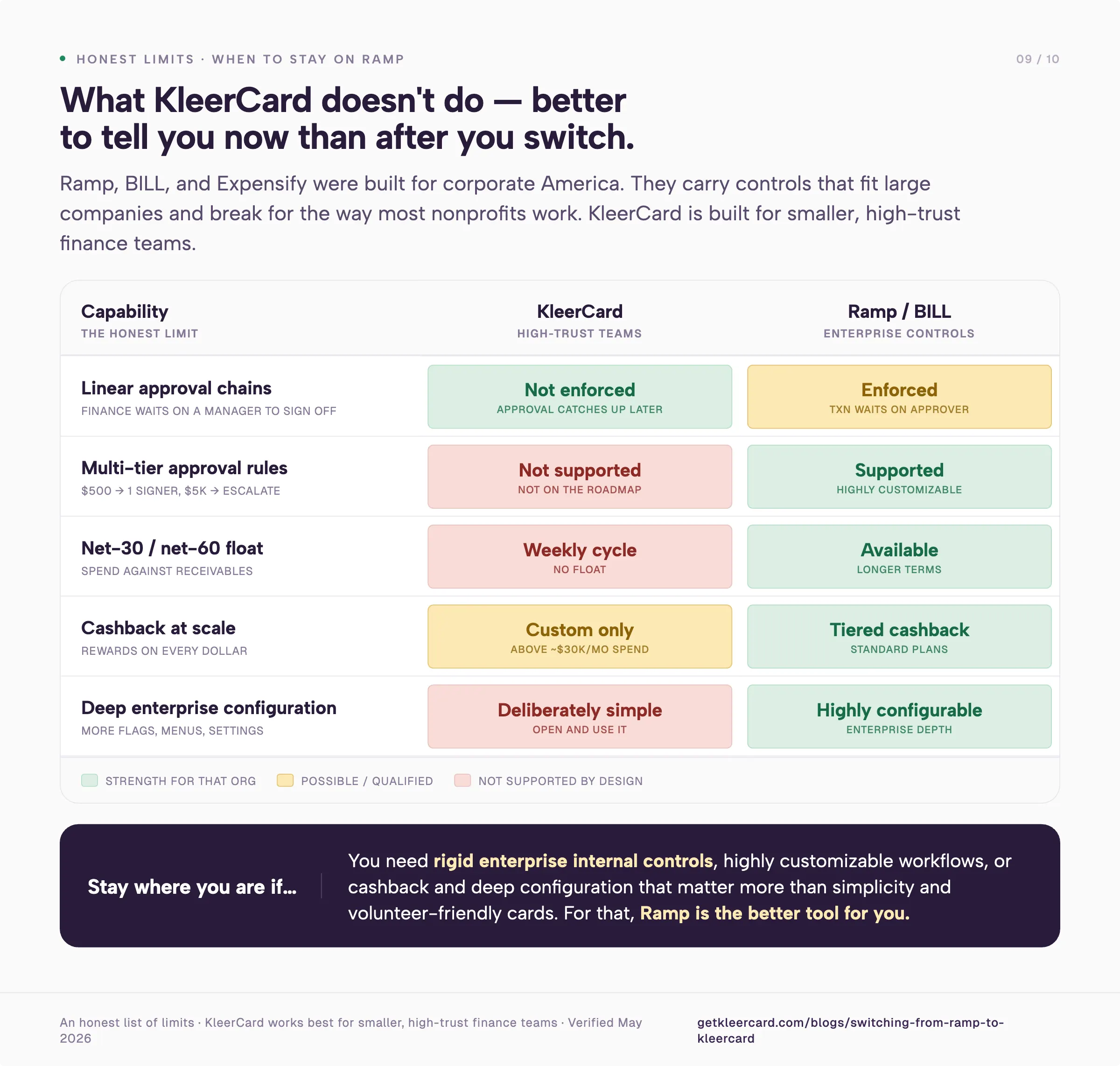
KleerCard does not enforce linear approval chains where finance has to wait on a manager before doing anything.
On some enterprise tools, a transaction sits until the approver signs off, and finance is stuck behind them. If your approver is at summer camp for five weeks with no cell signal, your finance team should still be able to close the books.
On KleerCard they can. The approval catches up when the person gets back.
KleerCard also does not support complex, multi-tier approval rules. The kind where a $500 charge needs one signer, a $1,000 charge needs two, and a $5,000 charge escalates up the chain.
We work with smaller, high-trust finance teams. That depth is not on our roadmap.
If your organization needs rigid enterprise internal controls or highly customizable workflows, KleerCard is too simple for you. You should stay where you are.
A few more honest limits. KleerCard runs on a weekly payment cycle, so it does not float spend against net-30 or net-60 receivables.
We do not pay cashback on standard plans. Organizations spending over $30,000 a month on cards can discuss custom pricing that includes it.
If cashback at scale and deep configuration matter more to you than simplicity and volunteer-friendly cards, Ramp is the better tool for you.
Leaving Ramp comes down to deciding who gets a card, connecting your accounting software, running a short overlap, and trading each old card for a new one.
Almost nothing moves. The cost drops sharply for organizations with volunteers and seasonal staff.
You can rethink your card program while you are at it.
If that fits your organization, you can open a KleerCard account in about eight minutes, or schedule a demo and walk through your specific Ramp setup with my team first.
If you want to run the numbers yourself, start with our plans and pricing for nonprofits.
Owen Hill is co-founder of KleerCard, a corporate card built for nonprofits, churches, and schools. Before KleerCard, he served as Budget Director at Compassion International and ran Switch Consulting, a fractional CFO practice for nonprofits. KleerCard is reviewed alongside other tools throughout this article.
Most organizations complete the switch in about six weeks, with a two-month card overlap when the calendar allows.
The application and approval take a couple of days. The rest of the time goes to issuing cards, running a short pilot, and reconciling your final Ramp statement.
When a provider shutdown forces a faster move, virtual cards can be issued within a day or two.
No. Your accounting software is your system of record.
Your full transaction history already lives there, not in Ramp. Nothing technical migrates between card platforms.
Export your Ramp history for your own files if you want a backup. Your accounting system gives you continuity across the switch.
Yes, and I recommend it. Keep your Ramp cards active while the new KleerCard cards arrive.
Swap each person's old card for the new one in the same moment. Running both in parallel removes the pressure.
Collecting each Ramp card as you go means no charges slip through on a second system.
No. KleerCard has no per-user fees and no platform fees.
Pricing is flat: Free for up to 5 users, $29 a month for up to 15, $49 a month for up to 30, and custom above that.
Adding a volunteer, intern, or seasonal staff member costs nothing extra. That is the whole point for organizations that ration cards on Ramp to avoid the per-seat fee.
Yes. KleerCard connects directly to the fund accounting platforms nonprofits run on, including Aplos, ShelbyNext Financials, ACS, Realm, ParishSOFT, and Blackbaud Financial Edge, alongside QuickBooks Online, QuickBooks Desktop, and NetSuite.
For platforms with an API, the sync is automatic. For those without one, we configure a flat-file import during setup.
No. KleerCard does not enforce linear approval chains or multi-tier rules where different dollar amounts route to different signers.
It is built for smaller, high-trust finance teams that value simplicity. If you need rigid enterprise internal controls or highly customizable workflows, Ramp or BILL will serve you better.


Speak to a member of our team and we can have you up and running in minutes, not weeks.