%202.svg)
How K-12 district business offices control spend across schools, grants, and funds — with per-card budgets, point-of-purchase receipts, and real-time visibility.
K-12 spend management is how a district business office controls, approves, tracks, and reconciles every dollar spent across its schools, departments, and grant programs. It covers purchasing cards, approval chains, restricted-fund rules, and the reconciliation that ties each purchase back to the general ledger.
Done well, it gives a finance team real-time visibility instead of a month-end surprise.
The card is rarely the hard part. Keeping spend visible and coded correctly across dozens of buildings and funding sources is, especially when the finance team is one or two people.
I co-founded KleerCard, and most of what I know about district spend came from the finance offices I talk to every week.
A district runs many budgets at once. Each school has a building budget. Transportation, food service, athletics, and technology each have their own. On top of that sits a stack of restricted grants, each carrying its own spending rules.
Money moves through all of them at once. A principal buys classroom supplies while a coordinator spends Title I dollars. An athletic director books travel, and a maintenance lead orders parts. Each purchase has to land in the right fund and GL code.
Most districts run this with a small business office. One or two people reconcile spending for thousands of students across multiple sites. Volume is high, dollar amounts are low, and the documentation rules are strict.
The post-ESSER environment tightened all of it. The extended liquidation deadline for the final round of federal ESSER relief funds ran through March 28, 2026. Districts are back on their base budgets now, with less room for error. Tracking that used to feel like a compliance chore now protects the budget.
A district purchasing card (P-card) is a credit card issued to authorized employees for small-dollar, routine purchases. It replaces purchase orders, petty cash, and check requests for the $40 box of paper towels and the $200 conference registration.

Most public districts get P-cards through a state cooperative purchasing agreement rather than negotiating directly. A handful of issuers dominate those contracts, with US Bank, Bank of America, and JPMorgan Chase behind many state programs.
South Carolina is a clear example. Its statewide P-card contract uses a Visa card issued by Bank of America, and every participating entity manages purchases through the bank's online card platform. The cooperative decides the card before the district ever shops.
The mechanics stay consistent across programs. The purchasing director sets merchant category code (MCC) blocks at the district level. Each card carries a single-transaction limit and a monthly cap.
Statements post around the 20th. Site administrators reconcile against receipts, and the district cuts one check a month for the whole program.
The controls are real, but coarse. A district can block restaurants and casinos. Per-card category budgets and time-based locks rarely exist on a bank P-card.
Receipt capture happens off the card. Cardholders collect paper, hand it to a bookkeeper, and someone keys it into the finance system after the fact. Weeks pass between a purchase and a coded, reconciled entry.
That lag is where audit findings come from. A January 2025 audit of Rush-Henrietta Central School District in New York shows the pattern. The New York State Comptroller reviewed 680 credit and purchase card charges totaling $168,831. Auditors flagged 538 of them, worth $156,982, with one or more exceptions.
The recurring problems were familiar. The district paid some charges before the claims auditor reviewed them. Others required pre-approval and never got it. Some lacked support, like a missing receipt or no documented purpose.
Most of those findings trace back to documentation timing rather than the card itself. When receipts arrive at month-end instead of at the point of purchase, the exceptions pile up.
A modern card platform ships the card and the software as one product. Controls, receipt capture, accounting sync, and reporting live in the same dashboard. The reconciliation happens as spending happens, not three weeks later.
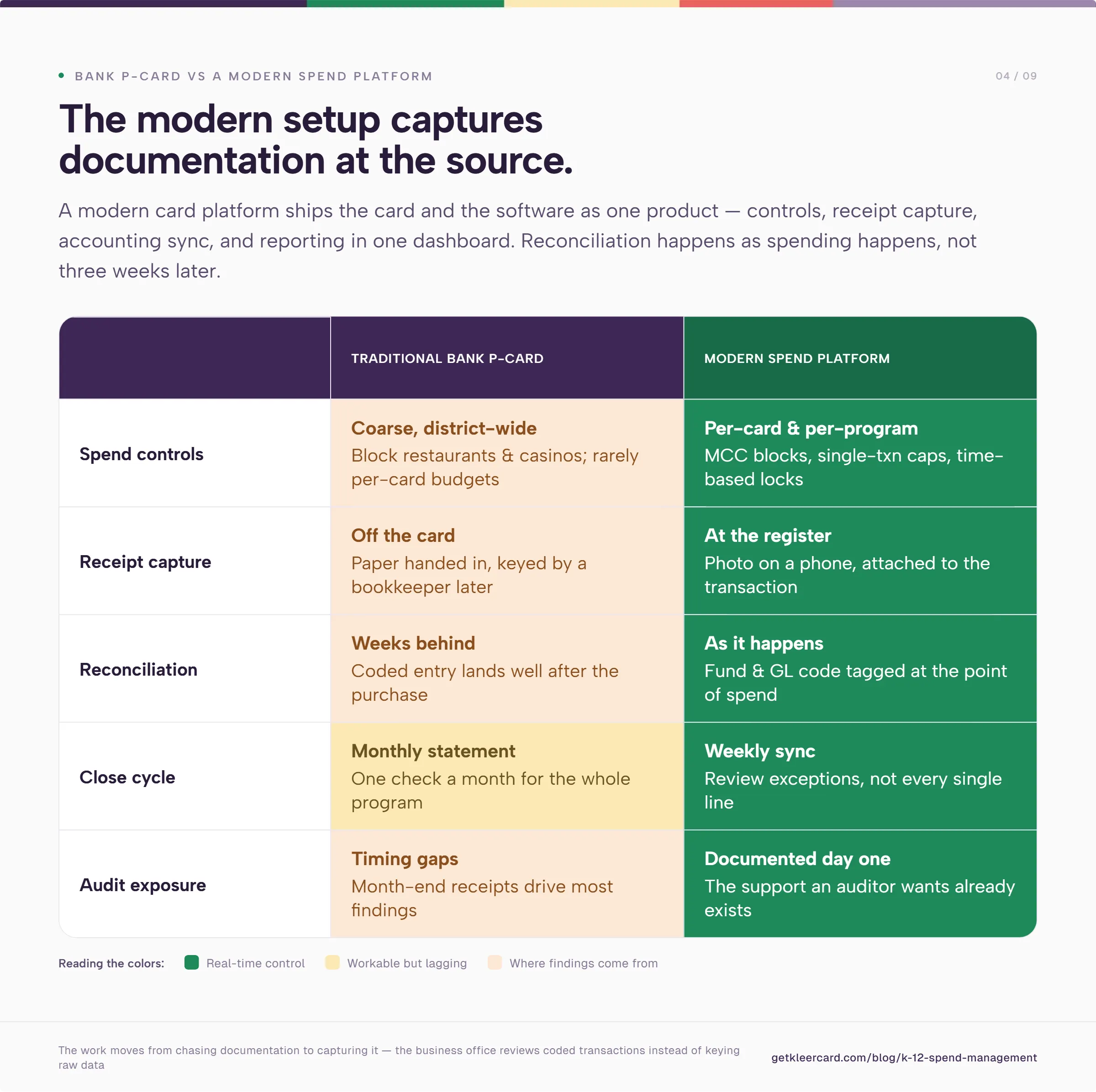
The work moves from chasing documentation to capturing it at the source. A staff member buys supplies and snaps a photo of the receipt on a phone. The platform attaches it to the transaction and tags the fund and GL code. The business office reviews coded transactions instead of keying raw data.
A practical rollout looks like this:
I push most of the organizations I work with toward a weekly cycle, because of what it does to reporting lag. Reconcile every week, and you are never reporting on something from a month ago. You are looking at spend current through the last few days.
A finance lead who reviews on Tuesday morning catches a miscoded grant charge in days, not at the year-end audit. That real-time expense visibility is the point of moving off a monthly statement.
Districts sit somewhere on a spectrum from total lockdown to full autonomy. I have talked to districts that run everything on two shared cards staff check out like a library book. Others hand a card to anyone who needs one and hope the policy holds.
Neither extreme holds up at scale. Two cards for a district create a bottleneck at every purchase. Open cards create the kind of exposure that shows up in an audit.
Most people get the shared card backward. A shared office card that staff check out feels like control. It carries a $10,000, $15,000, or $20,000 limit, because it has to cover the occasional conference or bulk order.
So the teacher holds a 16-digit number that can spend $20,000, whatever forms they filled out first. The checkout is a paperwork step. It does not limit what the card can spend.
Real control is the budget on the card, set to match what the person is authorized to spend. Give that teacher a card loaded with a real classroom budget, and they cannot spend a dollar past it. No high-limit card sits in a drawer, and nobody swipes it for a Tesla down payment.
A workable structure puts the controls on the card and a human in the loop only where it matters:
The goal is the controls of a P-card program with the agility of an individual corporate card. Most districts feel forced to choose. Many lean so hard on access controls that they add risk on one side and friction on the other. Match the authority to spend with the ability to spend, and the approval routing built around it gets lighter.
Auditors scrutinize restricted funds hardest. A Title I dollar can only buy Title I-eligible things. A grant for STEM equipment cannot cover a field trip. The spending rule follows the money.
The trouble starts with coding after the fact. A purchase hits a shared card, and someone sorts it into a fund weeks later. The line between restricted and general spending blurs. A single miscoded charge can put an entire grant draw at risk in an audit.
Tracking restricted funds cleanly means coding at the point of spend:
A virtual card per program is the cleanest version of this. A grant coordinator gets a single-use or recurring virtual card. It is capped at the grant amount, restricted to eligible merchants, with every charge pre-coded to the right fund. Nothing waits to be sorted later, and no one wonders which budget a transaction came from.
Spend management is only as good as the handoff to the general ledger. A platform can capture clean transactions and still leave the business office at manual entry. The deciding factor is whether it can move them into the district's accounting system.

District and school finance systems are their own ecosystem. Public districts often run Skyward, Tyler Munis, or a similar ERP-grade platform. Independent and private schools often use FACTS for tuition and accounting.
Faith-based and parish schools land on ParishSOFT, Blackbaud Financial Edge NXT, ACS Technologies, or ShelbyNext Financials. Plenty of smaller schools run QuickBooks.
One piece of advice I give every school: keep your accounting system separate from your tuition, student information, and classroom software. The pull toward a single integrated suite seems like it makes sense, but it costs you flexibility.
If administrators want to change the tuition or classroom tool, they should be able to do that without rebuilding the financial back end. And a better accounting setup should not require sign-off from every teacher who touches the classroom system.
On the accounting platform itself, I tend to talk people out of expensive school-specific software. Much of it is costly and hard to staff. You cannot find a bookkeeper or a YouTube tutorial for an obscure platform the way you can for QuickBooks.
QuickBooks Online covers most of what a school needs for about $38 a month on the entry Simple Start plan. That is far less than dedicated fund-accounting software.
The honest limitation is fund accounting. QuickBooks cannot run a true balance sheet per fund, so restricted-fund tracking takes a workaround. For day-to-day use, a school bending QuickBooks to fit is usually in better shape than one running a rigid, antiquated fund-accounting system. Those older systems break the moment you change anything.
The integration decides whether modern spend management saves time or moves the work around. A real accounting integration pushes coded transactions, fund tags, and receipts into the accounting system through mapped fields. The business office reviews entries instead of re-keying raw data. A platform without that connection forces the same manual reconciliation the district was trying to escape.
This is where public districts and independent schools diverge. A large public district inside a state cooperative usually has its card issuer fixed. It handles the accounting handoff with separate expense software and a monthly close.
An independent school, charter network, or parish school running a one- or two-person office feels every hour of manual reconciliation. A direct accounting integration matters far more there.
Amazon is where school spend control tends to slip. Across the finance offices I work with, Amazon often accounts for half or more of non-payroll spending. Schools rarely have a procurement department or negotiated vendor pricing. Staff default to Amazon for everything from printer ink to construction paper.

Most schools handle the risk by banning staff from loading the school card into a personal Amazon account. The concern is integrity rather than the dollar amount.
Order supplies through a personal account, and the same default payment method can pick up a $2.99 movie rental that evening. Now someone chases a tiny charge with a check request. A nonprofit cannot be seen letting donated dollars cover a movie night, however small the amount.
So the workaround becomes its own bottleneck. One office manager places every Amazon order. Teachers send a link and wait, hoping it arrives before the class needs it. When it does not, a teacher stops at Walmart on the way in and fronts the cost.
Amazon Business solves most of this, and it costs less than people expect. Creating an Amazon Business account is free. A tax-exempt 501(c)(3) can enroll in Amazon's tax-exemption program to stop paying sales tax on eligible purchases, also at no charge.
The account keeps personal and organizational spending separate. It gives an administrator full visibility into order history, including after a staff member leaves.
The paid Business Prime tier adds spend controls and guided buying. It starts around $179 a year for up to five users. A free Duo tier covers accounts that already carry a personal Prime membership.
Tie that account to a spend platform, and line items sync as itemized products instead of "Amazon.com" repeated 950 times across your reports. That is the case for treating Amazon Business expense tracking as part of the spend workflow.
KleerCard is a corporate card and spend management platform built for nonprofits, churches, and independent schools. The card is a Visa Commercial product issued by The Bancorp Bank, N.A.
The platform ships per-card budgets, MCC blocks, time-based locks, and virtual cards. Receipt capture and direct accounting integrations live in the same dashboard.
For schools, the integration list is where you can see the fit. KleerCard ships direct integrations for QuickBooks Online, QuickBooks Desktop, NetSuite, Sage Intacct, Blackbaud Financial Edge, Aplos, ACS Technologies, ParishSOFT, Realm, and ShelbyNext Financials, the platforms independent and faith-based schools run. There is no personal guarantee and no minimum bank balance to qualify, and the eligibility floor is three cardholders.
Here is how schools tend to use it. A classroom budget loads straight onto a teacher's card. The finance office knows whose receipt to ask about on a Hobby Lobby charge, with no shared card to check out.
A gas card can be locked to fuel pumps only, hole-punched onto the bus key ring. The standing rule is to fill up below half a tank. It cannot buy Funyuns inside the station or turn up on Amazon, so the van stops coming back with 17 miles to empty.
KleerCard is built for smaller, higher-trust finance teams, so it does not do everything. We skipped the rigid, linear enterprise controls that platforms like Ramp and BILL are built around.
Require a manager to approve every transaction before finance can touch it, and the whole thing stalls. Picture your approver at summer camp with no signal for five weeks. We let finance keep working and let approvals catch up.
We also do not build complex tiered approval rules, where one threshold routes to one person and a higher one routes up a chain. If your organization needs that level of workflow customization, KleerCard is the wrong tool.
Two more limits worth naming. KleerCard does not offer rewards or cashback to typical customers. Cashback is negotiated only for organizations spending roughly $30,000 a month or more on cards.
And we run on a weekly payment cycle. A school that needs to float purchases against net-30 or net-60 receivables is better served by a traditional line of credit.
Where the platform earns its place is the small business office. A seasonal user spike costs nothing extra to solve, because adding a temporary cardholder carries no per-seat fee. Summer camp leaders, part-time instructors, and event coordinators come and go without changing the bill.
For a one- or two-person finance team, this combination matters. Direct accounting sync, per-card control, and flat pricing add up to real-time visibility instead of another month-end scramble.
Owen Hill is co-founder of KleerCard, a corporate card and expense management platform built for nonprofits, churches, and independent schools. He previously served as Budget Director at Compassion International and founded Switch Consulting, a fractional CFO practice for mission-driven organizations.
A school district P-card is a purchasing card issued to authorized employees for small-dollar, high-volume purchases. It replaces purchase orders, petty cash, and check requests for routine buys. Merchant category code restrictions, dollar limits, and a monthly statement keep every transaction reconciled to the general ledger.
Districts track spending by assigning each card to a building, department, or program. They code every transaction to the matching fund and GL code. Modern platforms attach the receipt and the code at the point of purchase. The business office then reviews coded spend in real time instead of reconciling one monthly statement.
Districts keep restricted funds compliant by fixing the funding source before the purchase. That usually means a dedicated card or virtual card per grant, capped at the grant balance and restricted to eligible merchant categories. Coding each charge to the correct fund at purchase gives auditors the documentation they expect. It also keeps restricted dollars from blending into general spending.
A P-card usually implies an approval step before spending and tighter category controls. That gives the business office control but limits staff agility. A corporate card gives staff more freedom and loosens those controls. A modern setup aims for both: hard limits on the card, with an approval routed only when the amount or category calls for it.
Public districts inside a state purchasing cooperative usually have their card issuer set by the contract. Switching the underlying bank program is rarely procurement-permissible. Most districts in that position add a modern spend management platform alongside the existing P-card rather than replacing it. Schools that set their own procurement policy, like independents, charters, and parish schools, have full choice of card.
Setup on a modern platform runs in days, not the weeks a traditional bank program can take. A typical onboarding runs through an online application and approval within a day or two. Then comes a short pilot with a few cardholders, and a full rollout the following cycle once the workflow checks out.
District spend management turns on one question. Can the business office see and code every dollar as it is spent, instead of weeks later?
The districts that stay in control share a few habits. They put budgets and category limits on the card and capture receipts at purchase. They fix restricted funds to the right source before the buy, then hand clean entries into the accounting system.
The card matters less than the workflow around it. A public district inside a state cooperative builds that workflow on top of its existing P-card. An independent school or charter network builds it on a platform that ships the controls and the accounting integration together.
If your school sets its own procurement policy and runs a small business office, KleerCard is built for that setup. See how it works for schools at KleerCard for educators, or start an application.


Speak to a member of our team and we can have you up and running in minutes, not weeks.