%202.svg)
Is Ramp good for nonprofits? Honest 2026 comparison of where Ramp falls short, plus 7 alternatives for churches, nonprofits, and schools.
Is Ramp good for nonprofits? Ramp opened eligibility to nonprofits in 2024 and now serves thousands of them. For many organizations the product works cleanly. For churches, schools, and multi-fund nonprofits the fit is often tighter than the marketing suggests.
This guide compares the alternatives that actually serve nonprofits, churches, and schools. KleerCard is on the list. Where another option is stronger, that is stated directly.
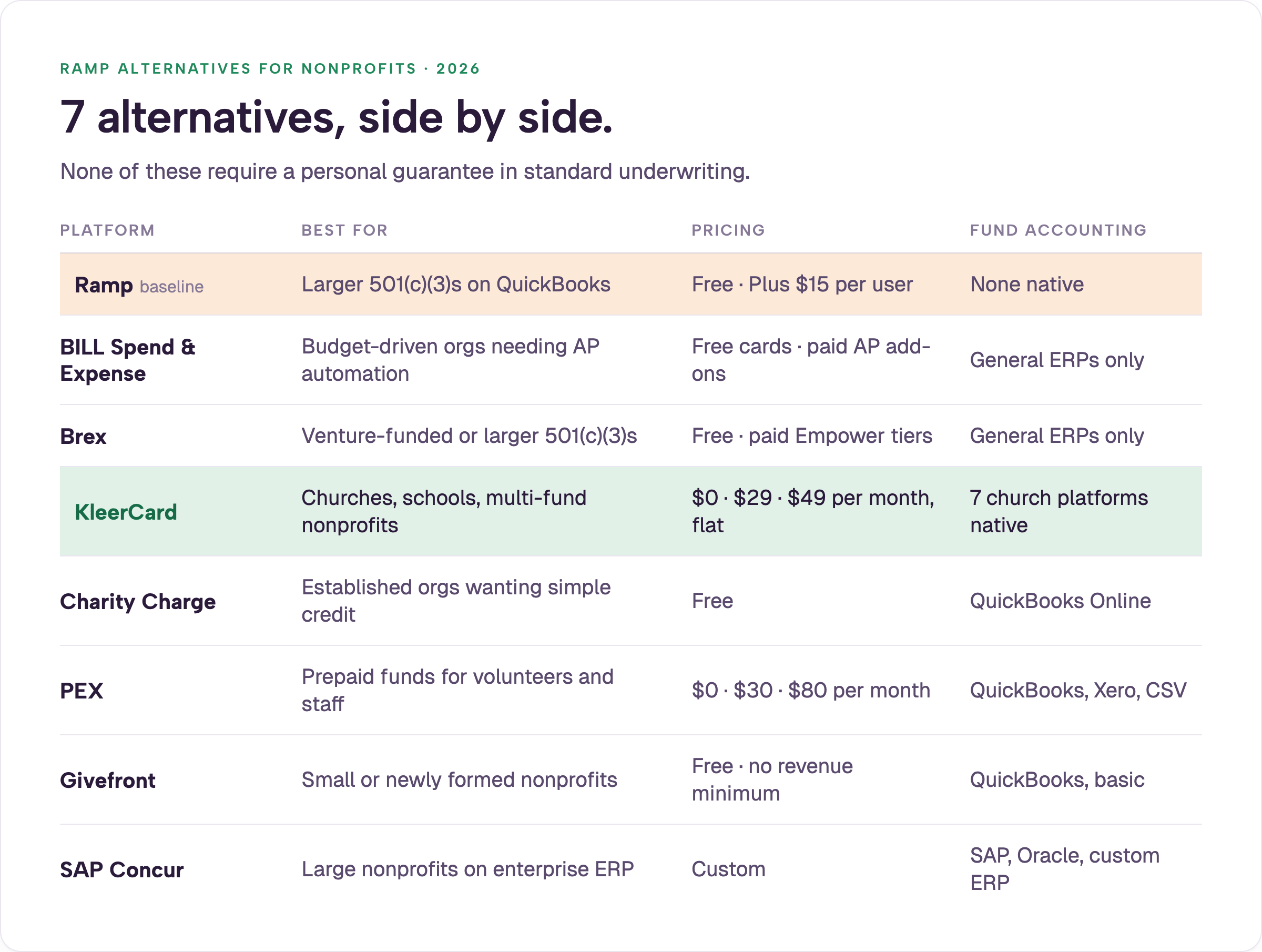
Seven Ramp alternatives worth shortlisting if you run a nonprofit, church, or school:
Ramp was built for tech startups, then opened to nonprofits in 2024. KleerCard, Charity Charge, Givefront, and PEX were built for nonprofits from day one. For the full comparison of cards with no personal guarantee, see the credit cards for nonprofits with no personal guarantee guide. You can also review the broader set of nonprofit credit card options.
.webp)
Ramp added nonprofit eligibility in mid-2024. Five structural mismatches keep showing up in conversations with finance leads.
1. No native fund accounting.
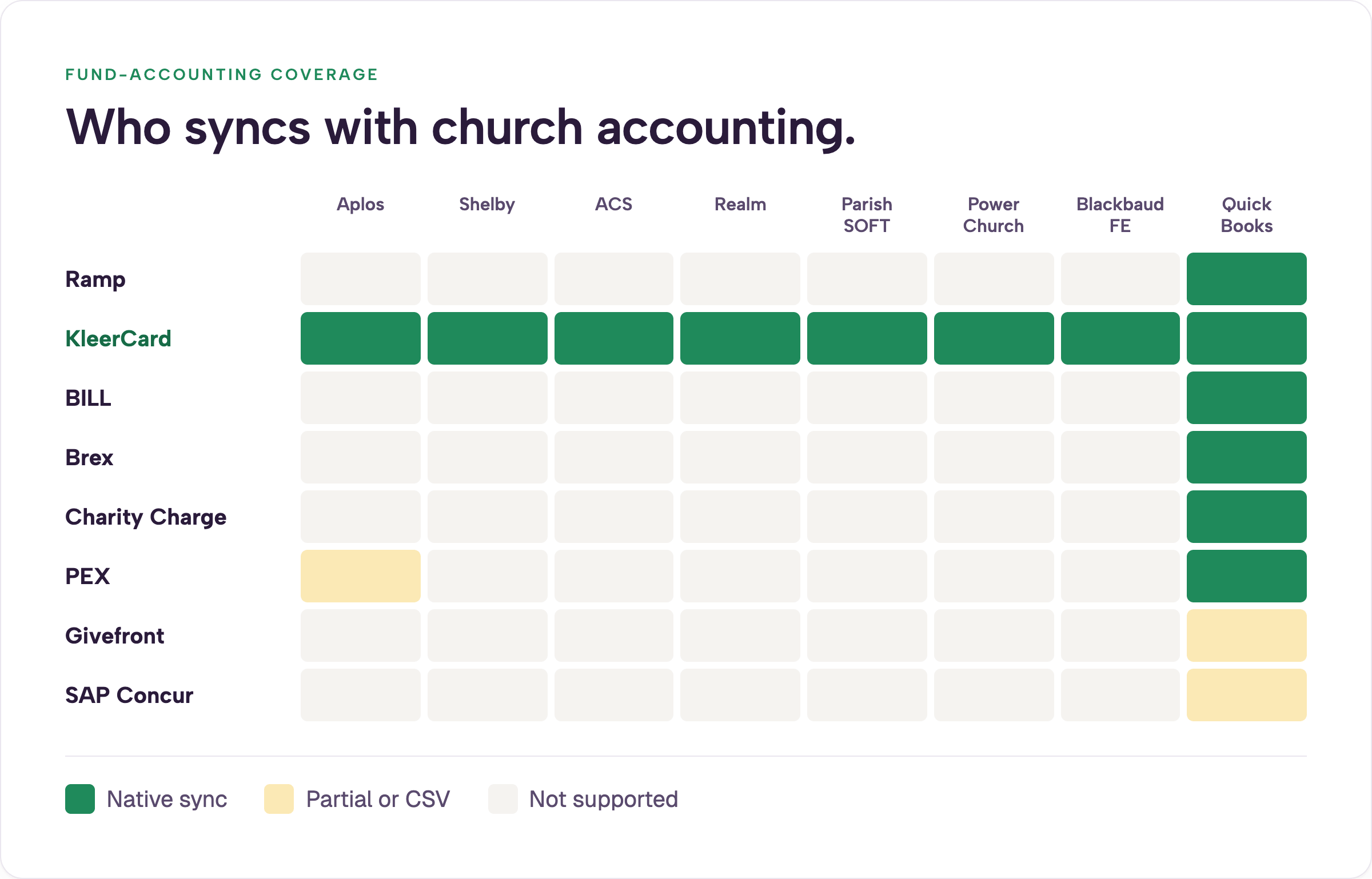
Ramp codes to general expense categories. Restricted gifts, grant codes, and ministry funds then require manual re-mapping inside Shelby, Aplos, ACS, Realm, or Blackbaud. Organizations that need the fund code attached at the moment of spend lose that layer. Platforms built for nonprofits handle this through direct accounting sync.
2. Cash-flow model built for startups.
Ramp is a charge card. The full balance is due monthly. Seasonal giving cycles and multi-year grant drawdowns create timing friction that steady SaaS revenue does not.
3. Per-user pricing breaks at small organizations.
Ramp Plus is $15 per user per month (as of 2026). A church with 2.5 paid employees and 21 active cards (staff plus volunteers) would pay roughly $315 per month, or about $3,780 per year, before any platform fee. Flat-fee alternatives stay under $600.
4. Platform fees on smaller accounts.
In late 2025 and early 2026 multiple nonprofits reported platform fees of $5,000 to $10,000 appearing at renewal for accounts under roughly $250,000 in monthly card spend. These fees are not published list prices. They surface in individual proposals. The pattern tracks with Ramp’s June 2026 raise at a $44 billion valuation (as covered in industry reports) and its path toward eventual IPO. Fixed nonprofit budgets cannot absorb surprise costs mid-year. For current published rates, see Ramp’s pricing page.
5. Organizational email requirement for volunteers.
Ramp expects every cardholder to have an organizational domain. Many church treasurers, board volunteers, and school coaches use personal Gmail or Outlook accounts. Workarounds create extra administration.
Larger 501(c)(3)s that already run QuickBooks Online, keep $25,000+ in cash, and map expenses to broad categories can use Ramp successfully. The mismatches appear most clearly for churches, multi-fund ministries, schools, and volunteer-heavy groups. The full product review lives in the Ramp Card review.
A library-district board volunteer managing a few hundred thousand dollars in annual spend described spending hours just to complete basic tasks inside Ramp. Community volunteers are not full-time finance staff. Complexity that works for a corporate controller becomes friction for them.
Best for mid-size nonprofits with predictable spend that need cards plus strong accounts-payable automation.
BILL acquired Divvy in 2021. The card platform remains free. The AP stack is the differentiator and is preferred by a large share of top accounting firms. Organizations with high invoice volume often find the combined offering hard to beat. See BILL’s site for current details.
Shortfalls for many nonprofits include per-admin pricing on the AP side and the absence of native integrations with Shelby, Realm, ACS, or Blackbaud. Manual CSV work remains. Rewards also depend on consistent credit utilization that seasonal organizations may not maintain.
For a deeper look, see the BILL Divvy corporate card review.
Best for organizations with $50,000+ in cash reserves, international activity, or venture-style funding.
Brex evaluates nonprofits case by case and asks for 501(c)(3) documentation and governance papers. Limits are cash-based. There is no personal guarantee. Multi-currency support and higher reward tiers are strengths.
The Capital One acquisition closed in 2026. Roadmap and pricing may continue to shift. Fund tracking, grant coding, and volunteer card support remain thin. The $50,000 cash floor excludes most small churches and school plants.
Best for organizations running Aplos, Shelby, ACS Technologies, Realm, ParishSOFT, PowerChurch, or Blackbaud Financial Edge.
KleerCard is a Visa Commercial card and spend platform issued by The Bancorp Bank. It carries SOC 2 and PCI DSS compliance, a 4.7 Capterra rating, and a 5.0 G2 rating. Pricing is flat per organization rather than per user: Free (up to 5 users), $29 Standard (up to 15), $49 Pro (up to 30), and Custom above that.
Differentiators that matter for this audience:
At my own church we run 21 active cards across a team that includes many volunteers but only 2.5 paid employees. On Ramp’s per-seat pricing that same setup would cost roughly $2,880–$3,780 per year before platform fees. KleerCard’s $49 tier covers it for under $600.
Customer results reported publicly: one executive pastor moved month-end close from three days to seven minutes. One HR and finance director dropped receipt collection from 40 hours per month to one hour in the first month. A finance manager who previously spent 2.5 hours entering statements into Shelby now finishes the same work in roughly 90 seconds.
Limitations are real. KleerCard does not offer complex multi-level conditional approval chains and has no intention of building them. Organizations that require linear manager-then-finance dependencies or highly customized workflow rules will find the platform too simple. Net-7 billing (weekly) also differs from the net-30 or net-60 terms some larger nonprofits prefer. Standard cashback is not included; custom pricing is available for organizations spending roughly $30,000+ per month on cards.
See KleerCard pricing and the solutions page for nonprofits. For a full side-by-side, see the KleerCard vs Ramp for churches and nonprofits comparison.
.webp)
Best for established nonprofits that want a straightforward Mastercard with no platform overhead.
Charity Charge is issued through Commerce Bank. More than 2,500 nonprofits use it. There is no annual fee and no personal guarantee in standard underwriting. Integration is with QuickBooks Online. Eligibility typically requires five years of operation and $100,000 in annual revenue, or two years and $500,000. Smaller organizations may qualify for the secured version with a refundable deposit.
This is the purest “credit card” option on the list. Spend-management depth is lighter than Ramp, BILL, or KleerCard. Receipt capture and virtual cards are more limited. For organizations whose primary need is a no-personal-guarantee card plus vendor rebates, Charity Charge delivers without the operational weight of a full platform.
Best for nonprofits and schools that need to put controlled funds in the hands of volunteers, coaches, or program staff.
PEX is built around prepaid loading and merchant-category restrictions. An administrator loads a budget; the cardholder cannot exceed it. Nonprofit and faith-based pricing tiers exist. An Aplos partnership makes the first five prepaid cards free for active Aplos customers.
Common use cases include gala or VBS supply budgets, stipend disbursements, fuel cards locked to gas stations, and tightly controlled benevolence payments. The control lives in the prepaid model itself.
Trade-offs include manual loading work at scale, the risk of a declined card when funds were not pre-loaded, and surface-level accounting integrations compared with bi-directional QuickBooks or Sage Intacct sync.
Best for volunteer-led nonprofits, new church plants, and 501(c)(3)s still in setup that need a free platform with no revenue floor.
Givefront issues Visa Commercial cards through First Internet Bank of Indiana. The platform is free for nonprofits and emphasizes fund-level coding. Most competitors set cash or revenue thresholds. Givefront does not.
The trade-off is maturity. The customer base and track record on disputes and support are shorter than those of Ramp, BILL, Brex, or KleerCard. For a brand-new plant with $40,000 in the bank or an all-volunteer mutual-aid network, the absence of minimums is often decisive.
Best for national nonprofits already running SAP, Oracle, or Sage Intacct.
Concur handles travel booking, expense reporting, and invoice workflows at enterprise scale. Implementation timelines run in months. Per-report and per-user pricing scales with complexity. SAP has begun sunsetting Concur for some smaller customers; one Utah church received a September 2026 shutdown notice and began shopping for a PowerChurch-compatible replacement.
For most churches, schools, and mid-size nonprofits landing on this article, Concur is the wrong size. It is included because it appears on generic “Ramp alternatives” lists and the audience needs to know where it does not fit.
A 10-cardholder nonprofit on Ramp Plus pays roughly $1,800 per year in subscription fees alone. The same setup runs free on Charity Charge or Givefront, $348 per year on KleerCard, or $360 per year on PEX CORE.
Churches need ministry-level fund tracking, volunteer cards, multi-campus support, integration with Realm, ParishSOFT, PowerChurch, Shelby or ACS, and accommodation for seasonal giving.
For restricted-fund tracking see how to track restricted funds in a church or nonprofit and the best accounting software for churches.
Schools need per-classroom or per-program budgets and clean ways for teachers and coaches to spend without constant reimbursement or card hunting. KleerCard is often the best fit.
For school-focused card options see the best credit card for teachers guide and the educators solutions page.
Switching corporate card platforms is operationally simpler than most teams expect. The pattern that works:
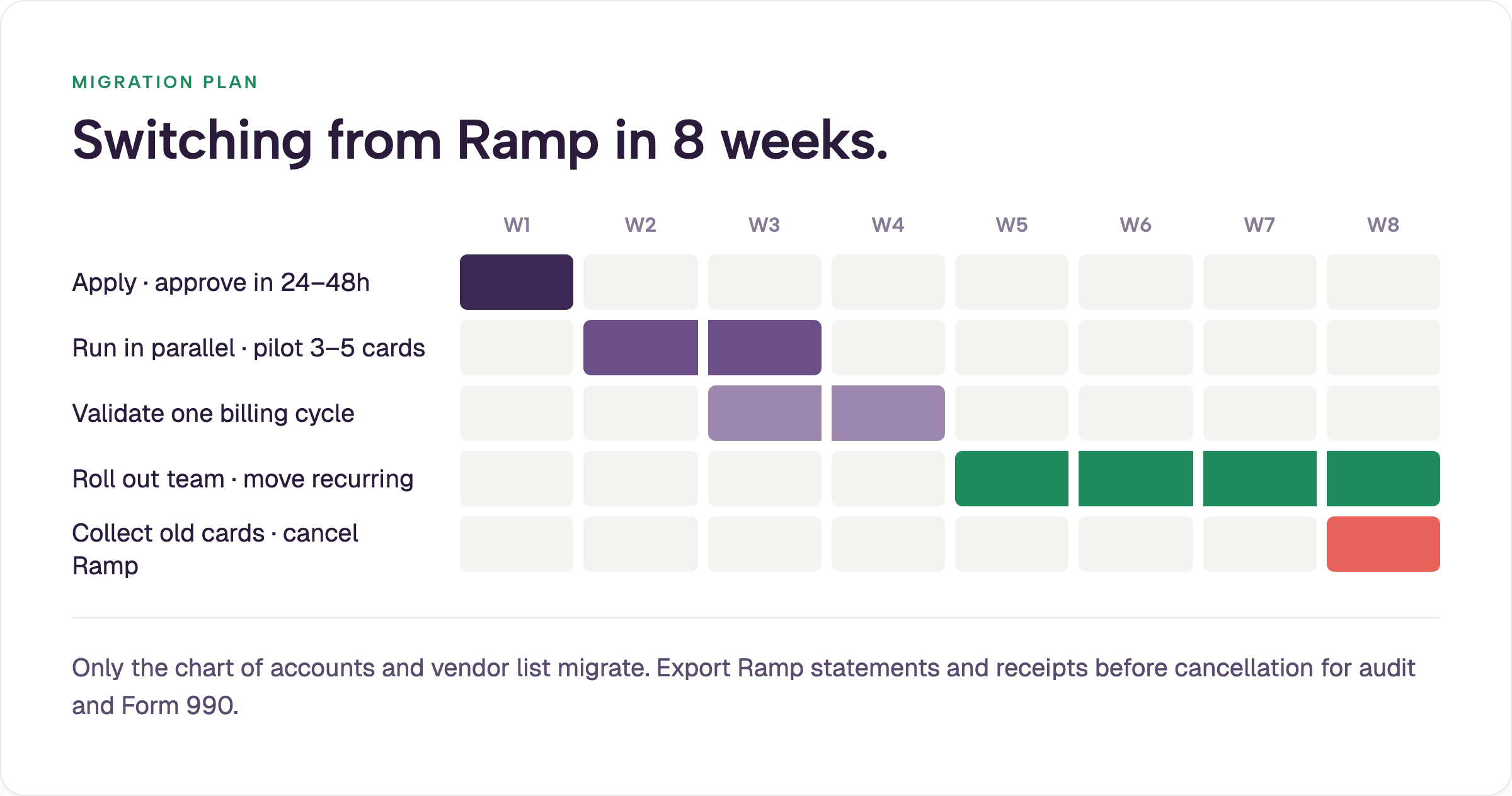
Week 1. Apply with the new provider. Most applications clear in 24–48 hours. Confirm no personal guarantee is required (none of the options in this article require one in standard underwriting). Teams that want guided implementation can use white-glove setup.
Week 2. Run both systems in parallel. Issue physical and virtual cards to a pilot group of three to five people. Keep Ramp live for existing recurring charges so nothing breaks.
Weeks 3–4. Validate the workflow through one billing cycle. Confirm receipts capture, accounting sync reconciles, and budget controls behave as expected. Spot-check that fund codes land correctly.
Month 2. Roll out to the full team. Move recurring charges one vendor at a time. Once every old card is collected and every new card is active, cancel Ramp. The hard handoff rule prevents dual processes: a user does not receive the new card until the old Ramp card is returned.
Nothing meaningful migrates except the chart of accounts and, if you will use bill pay and reimbursements, the vendor list. Historical transaction data already lives in your accounting system, which remains the system of record. Export Ramp statements and receipts before cancellation for audit and Form 990 purposes.
Two months of overlap is the low-stress recommendation. Six weeks is workable. Two weeks is possible when forced (virtual cards can usually be live in a day or two via Apple Pay or Google Pay while physical cards ship). Test the Amazon integration early if Amazon is a meaningful share of spend; many nonprofits report 50–60 percent of non-payroll purchases occur there.
The deeper shift is mindset. Many teams arriving from Ramp have developed a scarcity habit of sharing one card or passing virtual numbers to avoid per-seat cost. The better model is line-of-sight accountability: every legitimate spender gets their own card and a budget that matches the authority they actually hold. When authority to spend and ability to spend are aligned, most secondary controls become unnecessary.
If complex multi-level approval chains or linear manager-then-finance dependencies are non-negotiable, KleerCard is not the right fit. Finance can still close the books while an approver is unreachable for weeks at summer camp; that flexibility is intentional for nonprofit realities.
If KleerCard is on the shortlist, apply here. Virtual cards are typically available the same week.
Ramp accepts nonprofits that meet its standard requirements, including a verified $25,000 U.S. business bank balance. It works cleanly for organizations with steady cash flow, QuickBooks Online or Sage Intacct, and expense categories that do not require native fund coding. It is a poorer fit for churches and schools that track restricted funds, rely on volunteers with personal email addresses, or experience seasonal giving cycles.
The strongest alternatives for nonprofits, churches, and schools are BILL Spend & Expense for AP volume, Brex for larger or venture-funded organizations, KleerCard for fund-accounting integrations, Charity Charge for simple no-fee credit, PEX for prepaid volunteer disbursements, and Givefront for very small or new nonprofits. SAP Concur fits only large organizations already on enterprise ERPs. Ready to explore? Apply for KleerCard or review the options above.
Ramp does not publish a separate nonprofit price list. Nonprofits pay the same rates as other customers: Free core platform, Plus at $15 per user per month, or custom Enterprise. Additional platform fees of $5,000–$10,000 have appeared at renewal for some smaller accounts. BILL, Charity Charge, Givefront, and KleerCard’s standard tiers avoid per-user fees.
No. Ramp does not require a personal guarantee. None of the alternatives listed in this article require one in standard underwriting either.
Yes. Export all statements, receipts, and transaction data before canceling. Your accounting system remains the permanent record. Confirm every transaction is synced through the cancellation date.
Ramp is a general-purpose spend platform that added nonprofit eligibility in 2024. KleerCard is built specifically for churches, nonprofits, and schools, with native integrations to common fund-accounting platforms, no organizational-email requirement for volunteers, and flat organization-level pricing instead of per-user fees. See the full KleerCard vs Ramp comparison for churches and nonprofits.
Two months of parallel running is the recommended window. Six weeks works for most teams. Emergency cutovers of two weeks are possible with virtual cards while physical cards ship.
Owen Hill is co-founder of KleerCard. He previously served as Budget Director at Compassion International and works as a fractional CFO for nonprofits and churches. He writes from direct experience running both the technology and the day-to-day financial operations of mission-driven organizations.


Speak to a member of our team and we can have you up and running in minutes, not weeks.