%202.svg)
How to set up and run a school district credit card or P-card program: board policy, card structure, spend controls, rollout, reconciliation, and audit-readiness.
Many school districts still run entire campuses on one or two shared cards that staff check out like library books. Teachers routinely front classroom supplies on personal cards and wait weeks for reimbursement. This setup creates bottlenecks, lost receipts, and frustration on both sides of the budget.
A school district credit card program, often called a purchasing card or P-card program, issues cards to authorized employees for small-dollar, high-volume purchases. It replaces purchase orders, petty cash, and out-of-pocket reimbursements.
Dollar limits, merchant category code blocks, and monthly reconciliation tie every charge back to the general ledger. Public districts inside a state purchasing cooperative often have the card issuer already decided. Independent, charter, and parish schools set their own policy and choose their provider.
Districts usually pick between two setups.
A locked-down model hands out very few cards with heavy approval steps. It protects against misuse but stalls routine buying.
An open model gives staff cards with little restriction. It moves fast but exposes the budget to risk.
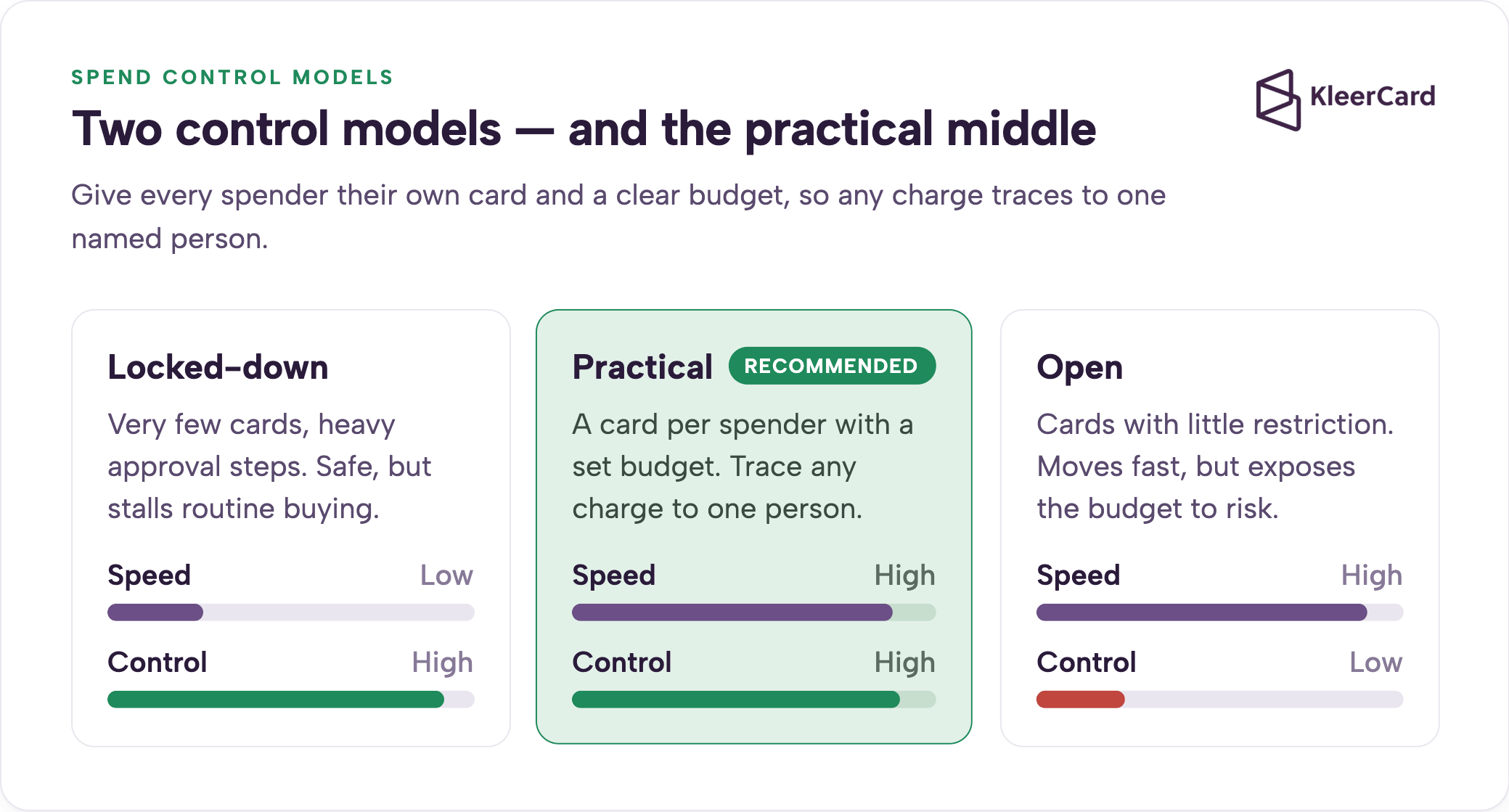
The practical model aims for the controls of a traditional P-card with the agility of an individual corporate card. Every spender gets their own card and a clear budget. Finance can trace any charge to one named person.
The old “one office card everyone checks out” approach creates a false sense of safety. A single high-limit card with no per-card controls can be swiped for almost anything. The real control stays procedural rather than built into the card itself.
Public districts often take the locked-down approach to an extreme. I have spoken with districts that operate with only two cards for the entire system. Teachers or coaches must locate the card, check it out, and return it. When the card is already checked out or sitting on another campus, the purchase either waits or the teacher fronts the cost personally.
Before a modern program, the daily reality looks like this. A $40 box of paper towels requires a purchase order. Petty cash drawers sit in offices with handwritten logs. Reimbursement requests arrive in batches at the monthly deadline. Teachers buy classroom supplies on personal cards and wait weeks to be paid back.
The cost shows up in staff hours spent chasing documentation and in the weeks-long reimbursement waits that hit teachers hardest. The teacher-reimbursement problem is really a procurement-tooling issue. When a district has no clean way for a teacher to buy what a classroom needs, the teacher buys it personally and waits to be paid back.
One finance leader at a private Christian school described the old routine this way. Staff played a constant game of hide-and-seek to find the shared card. Teachers often gave up and used their own money. Reimbursement requests came in batches of ten or twelve right at the deadline.
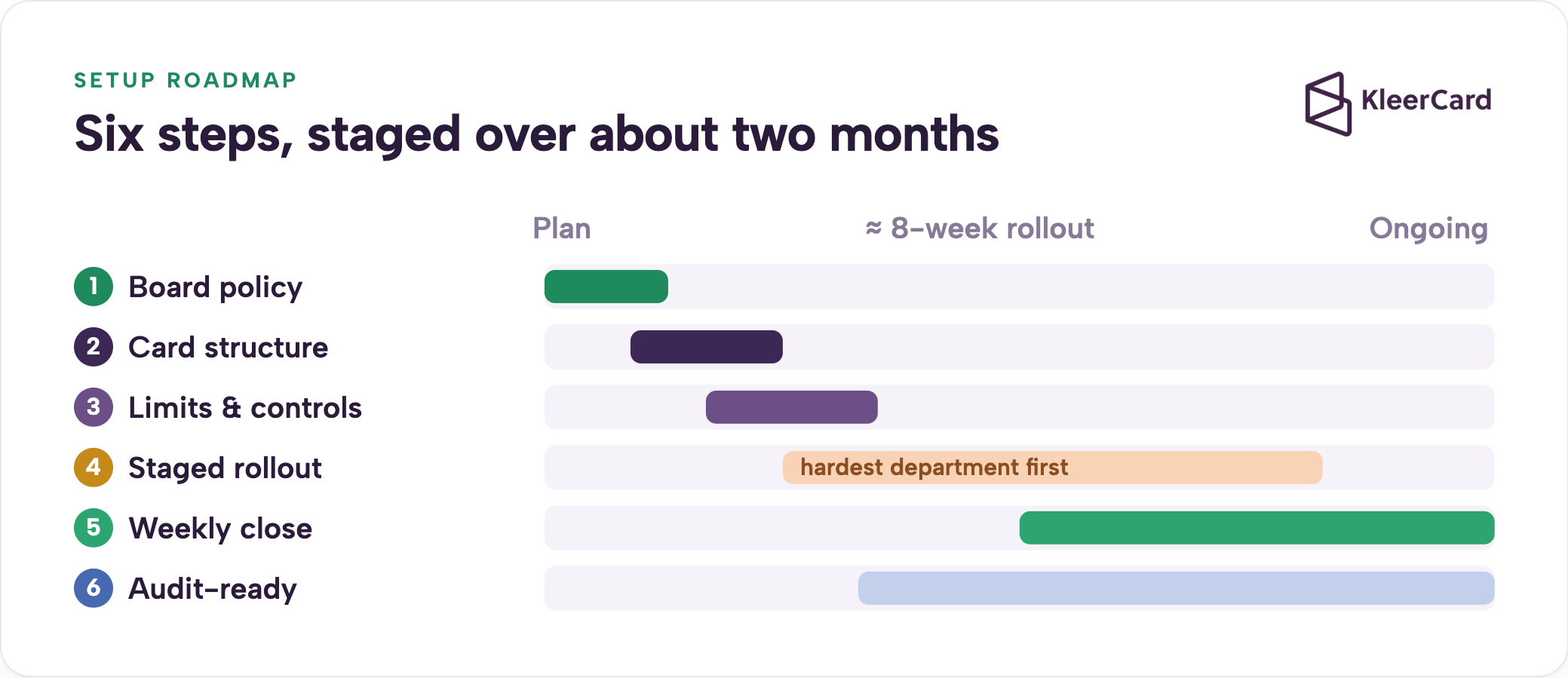
Auditors start with governance, so begin there. The board authorizes the program and adopts a written credit card or purchasing card policy that the broader procurement policy supports.
A workable policy covers at minimum:
Reference GFOA purchasing card guidance and sample district policies. The cardholder agreement is the single document most often missing in audits.
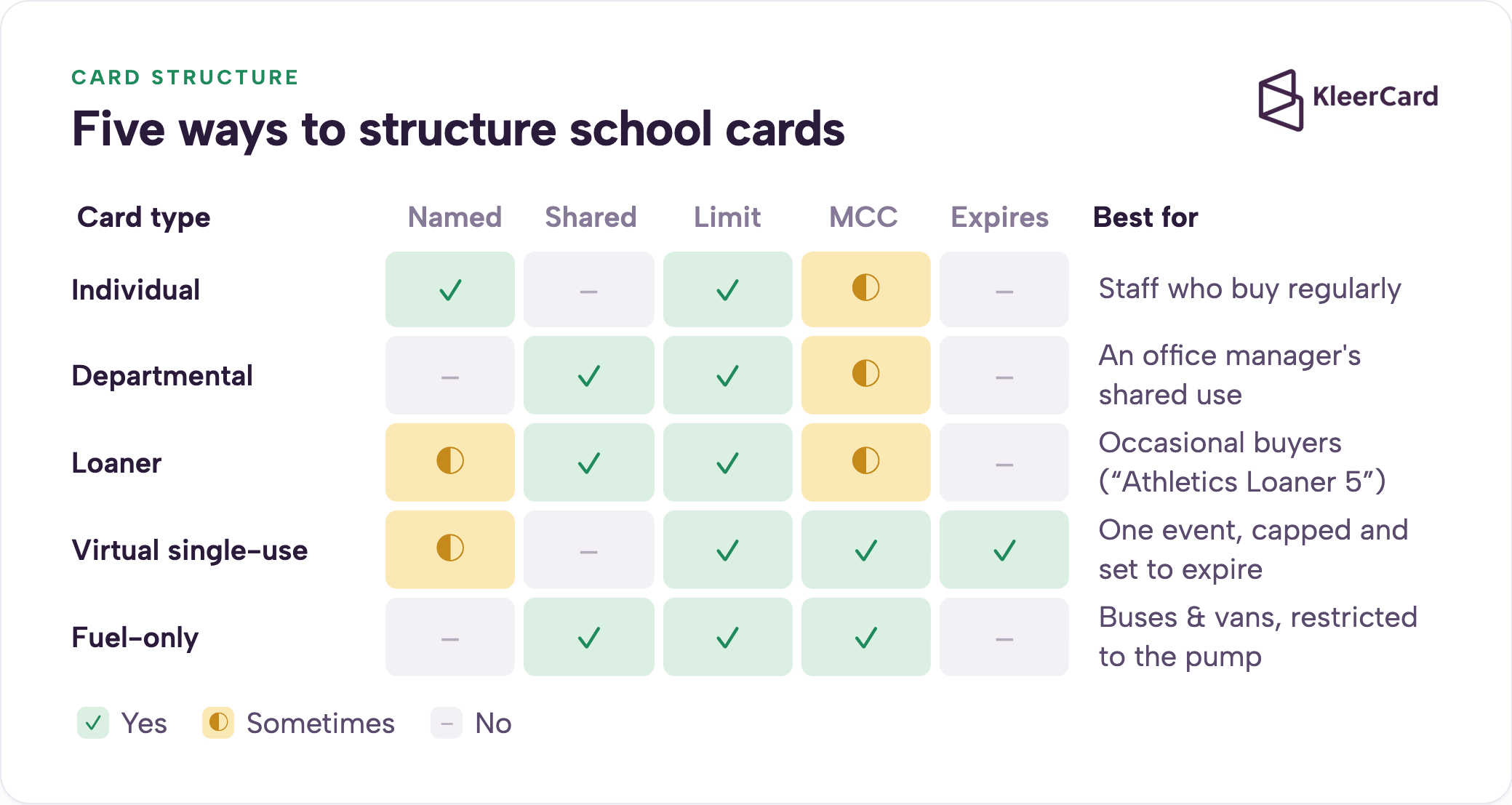
Move from policy to card design. Schools use several card types depending on the need.
Individual cards tie to one named person with a set limit. Departmental or building cards sit with an office manager for shared use. Loaner cards carry department labels for staff who buy occasionally. Virtual single-use cards work for a specific event, capped and set to expire. Fuel-only cards restrict to gas pumps for buses or vans.
A teacher who only buys during summer camp can hold a card in her own name and upload receipts as she goes. There is no extra cost to add her for those months. A fuel card that only works at the pump can ride on the vehicle keyring without becoming a snack-and-soda card.
Finance offices label shared cards clearly on the dashboard. Examples include “Fine Arts Loaner 1” or “Athletics Loaner 5.” Any charge still traces to a department even when the card is shared.
One school moved from five campus-wide cards to more than sixty individual and loaner cards. Administrators now hold multiple cards per department, including clearly labeled loaners. The summer camp director, who is also a teacher, keeps a card in her name because her spending spikes in the summer and drops during the school year.
Controls should make the program safe without slowing it down.
Set single-transaction limits sized to the cardholder’s role. Add monthly limits per card and per department. Block merchant category codes that fall outside allowable expenses. Give administrators a self-service limit up to a set ceiling, with anything above routing to the head of school or CFO. Establish a bid or purchase-order threshold above which the card is not the right tool. Apply international and online restrictions where the district requires them.
Pair every control with accountability. The budget owner answers for an overspend rather than finance policing every charge in advance.
One school set a $5,000 ceiling that administrators can authorize themselves. Larger requests route to the head of school. The head of school’s message is clear: you own your budget, and overspending puts you in the hot seat. Fine arts teachers with their own cards submit funding requests that route to their administrator for approval. Staff without cards use a simple Google form that routes to the right administrator and then to finance, which directs them to the correct loaner card.
A staged rollout gives the business office time to refine the workflow.
Start with the messiest department, often operations, maintenance, and vehicles. Iron out the process there first. Bring administrators on so they can coach their own staff.
Expand to teachers, coaches, and support staff with per-person limits. Run a pilot billing cycle with a handful of cardholders before full rollout. Require short training and a signed agreement before any card becomes active.
One K-12 finance office moved from five campus-wide cards to more than sixty over about two months using this order. The operations team caught on within days.
A private Christian school followed the same pattern. They began with operations, added four people, and saw quick adoption. They moved to administrators next, then expanded further. Lower-school teachers received their own cards with set limits in the following August rollout.
The practical advice is to start small, get comfortable with how a group actually uses the cards, figure out what policies need adjustment, and then expand. Stair-step the rollout instead of flipping a switch for everyone at once.
A weekly close keeps month-end short. Cardholders photograph the receipt at purchase, upload it, and code the charge. Finance reviews weekly rather than waiting for a monthly statement.
One school that moved to weekly reconciliation reported month-end shrinking to a few minutes. They lost fewer than five receipts across roughly seven months. Before the change, they chased or lost about five receipts a week.
Amazon is the hardest line item for most schools. Route all Amazon buying through a single business account. Charges then arrive with itemized detail attached to the buyer instead of a statement line that simply reads “Amazon” with no context.
One school’s Amazon integration now syncs the receipt, invoice, and line items directly to the charge and tracks it to the cardholder. The lower-school administrative assistant buys tablecloths and balloons for an event. The charge lands with the itemization already attached, and she codes it to the correct account without finance guessing which event it supported.
See our Amazon Business expense tracking guide for setup details.
Daily workflow directly affects audit outcomes. A New York State Comptroller review that examined hundreds of district card charges found most carried at least one exception. The common patterns were missing or non-itemized receipts, sales tax paid on tax-exempt purchases, and charges paid before the claims auditor reviewed them.
Translate each finding into a control. Capture itemized receipts at purchase. Keep the tax-exempt certificate on file and present it to vendors. Add a review step before payment. Strong controls and real-time receipt capture lower audit exposure. Manual month-end collection raises it.
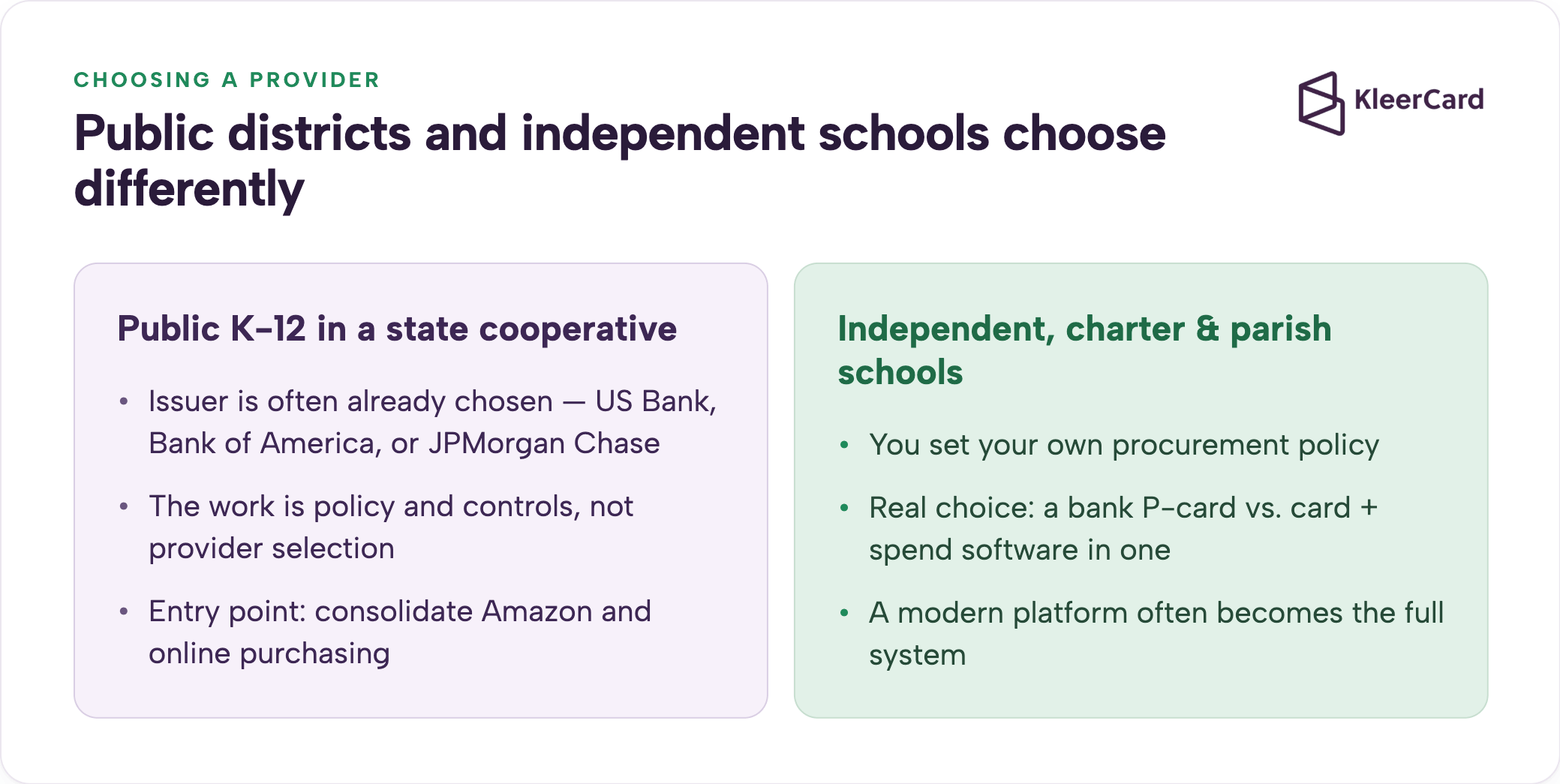
Provider choice looks different depending on the district type. A public K-12 district inside a state cooperative usually buys its cards through the cooperative’s issuer. The program work is policy and controls more than provider selection.
An independent school, charter network, or parish school sets its own procurement policy and has real choice between a bank P-card and a modern card platform that ships the card and the spend software together.
For a large public district already inside a US Bank, Bank of America, or JPMorgan Chase cooperative contract, the realistic entry point is consolidating Amazon and online purchasing rather than replacing the existing P-card. Explore solutions for educators.
KleerCard is a Visa Commercial card paired with spend software, issued by The Bancorp Bank, N.A. It requires no personal guarantee and no minimum bank balance.
The features map directly to the steps above. Per-card budgets, merchant category blocks, virtual and single-use cards, receipt capture in the app, and direct integrations with the accounting systems schools run, including QuickBooks, NetSuite, Blackbaud, Aplos, ACS Technologies, ParishSOFT, Realm, and Shelby. Flat-rate pricing means adding a seasonal or part-time cardholder carries no per-seat cost.
See our full accounting integrations.
A bank P-card still makes sense in some cases. A large district inside a state contract that needs the cooperative’s rebate structure and an auditor-familiar format should stay with that option. For independent schools, KleerCard often becomes the full system because it combines the card and the spend software.
What is a school district purchasing card (P-card) program?
A P-card program issues credit cards to authorized school employees for small-dollar, high-volume purchases, replacing purchase orders, petty cash, and reimbursements. Limits, merchant category blocks, and monthly reconciliation tie each charge to the general ledger.
How do you set up a credit card program for a school district?
Start with board authorization and a written policy, decide who gets cards and how they are structured, set limits and merchant controls, roll out in stages beginning with the hardest department, and reconcile on a regular cycle with itemized receipts.
What should a school district credit card policy include?
Authorized users and approvers, dollar and merchant limits, allowable expenses, tax-exempt handling, required documentation, a signed cardholder agreement, reconciliation timelines, and an annual review under board oversight.
How many cards should a school district issue?
There is no fixed number. Many programs give a card to anyone with regular purchasing responsibility and use shared loaner or single-use cards for occasional buyers, so spending is traceable to a person or department rather than bottlenecked at one shared card.
Can teachers have their own school credit cards?
Yes. A school can issue each teacher a card with a set monthly limit, such as a small classroom budget, so they buy supplies directly and upload receipts instead of fronting costs and waiting on reimbursement.
Do school districts pay sales tax on purchases?
Most public districts and many nonprofit schools are tax-exempt, so cardholders should present the tax-exempt certificate at purchase. Sales tax charged on exempt purchases is a frequent audit finding and is recoverable from the vendor.
A strong school card program is a governance and workflow project more than a card-shopping project. The board policy, the card structure, the controls, the rollout order, and the weekly close are what keep it both fast for staff and clean for auditors.
If your school sets its own procurement policy and wants the card and the spend software in one system, see a demo or compare options. For a public district inside a cooperative contract, start with the comparison guide and the Amazon-purchasing entry point. Sign up for KleerCard to get started in minutes.
Owen Hill, Co-founder of KleerCard. I’ve worked directly with dozens of K-12 finance teams and private schools on spend management and controls.


Speak to a member of our team and we can have you up and running in minutes, not weeks.