%202.svg)
Download a free church budget template. Get typical percentage ranges, fund-accounting columns, and a layout that shows which money is actually free to spend.
A church budget template is a pre-formatted spreadsheet that organizes projected income from tithes, offerings, and restricted gifts against expense categories such as personnel, facilities, ministries, missions, and administration. Most churches start with a spreadsheet someone built years ago. The problem is that spreadsheet rarely shows which money is free to spend and which money is spoken for.
I have sat through enough board meetings to know the pattern. A restricted gift lands in the bank. It shows up as revenue and as cash. The surplus looks healthy.
Then someone asks how much is actually available for the roof repair or the next payroll, and the answer takes an Excel export and a set of manual subtractions. That is the gap a good church budget template has to close.
In my work with nonprofits at Compassion International and later through Switch Consulting, and from hands-on experience running books on Blackbaud Financial Edge, Microsoft Great Plains, and QuickBooks Online, I have seen the same friction across churches of every size.
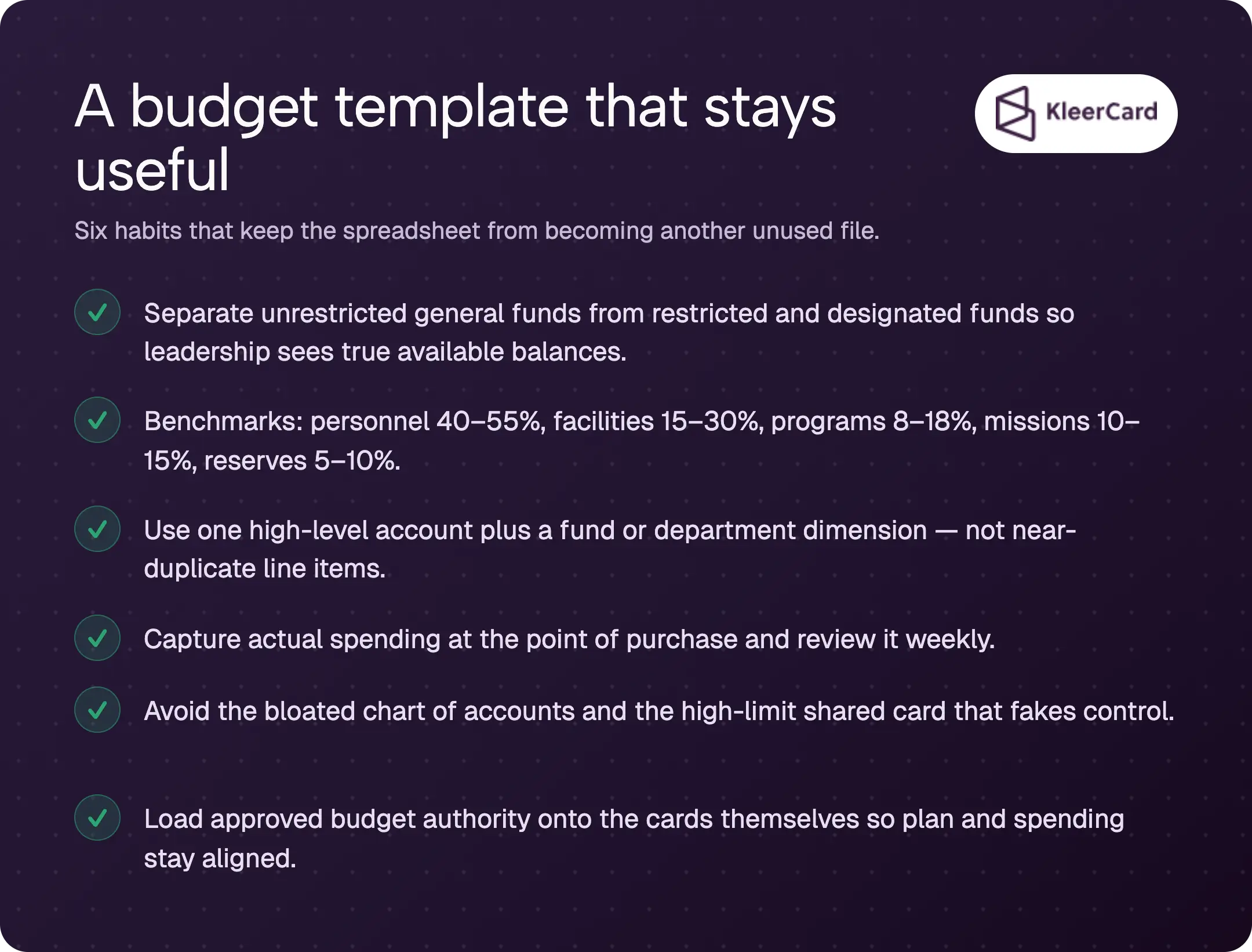
This guide gives you a usable structure, the common percentage ranges, a sample layout that respects fund accounting, and the practical habits that turn the numbers into weekly visibility. You will leave with a free church budget template structure you can open in Excel or Google Sheets and the steps that keep it from becoming another unused file.
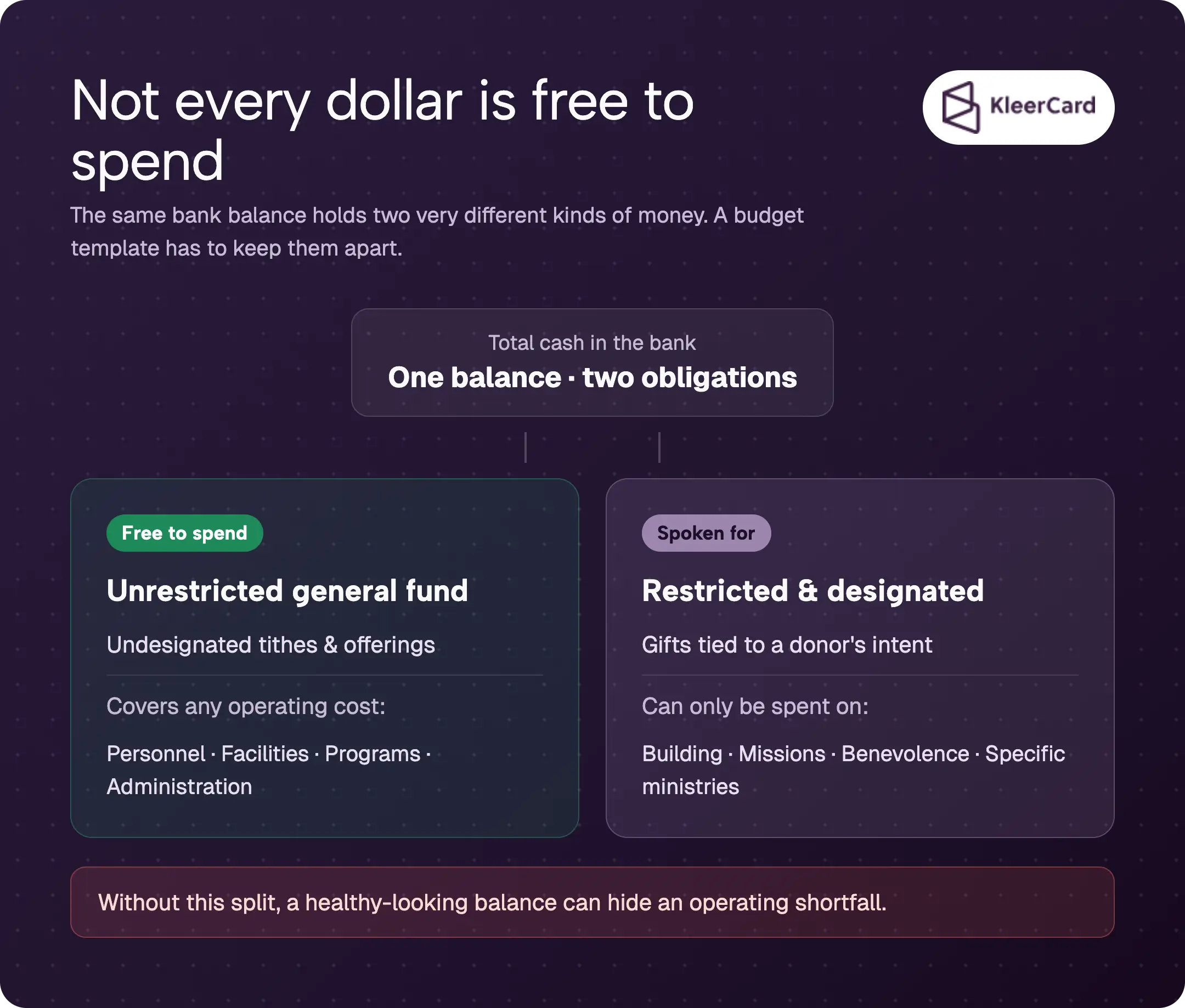
A church budget template is a pre-formatted financial planning document that helps a church organize projected income against planned expenses and then track actual results month by month. It usually includes columns for projected amounts, actual amounts, variance, and notes, plus separate views for annual totals and monthly detail.
Unlike a business budget built around profit, a church budget is a stewardship tool. Donor-restricted gifts create legal obligations. The template has to make those restrictions visible. Without that visibility, a healthy-looking bank balance can hide an operating shortfall.
The IRS requires written acknowledgments for certain contributions and treats restricted gifts with specific rules that a clean template helps you honor.
Most free templates stop at income and expense categories. The ones that last also include a clear way to tag money by fund or department so the same spreadsheet can answer both “how much did we spend on youth ministry” and “how much is left in the building fund.”
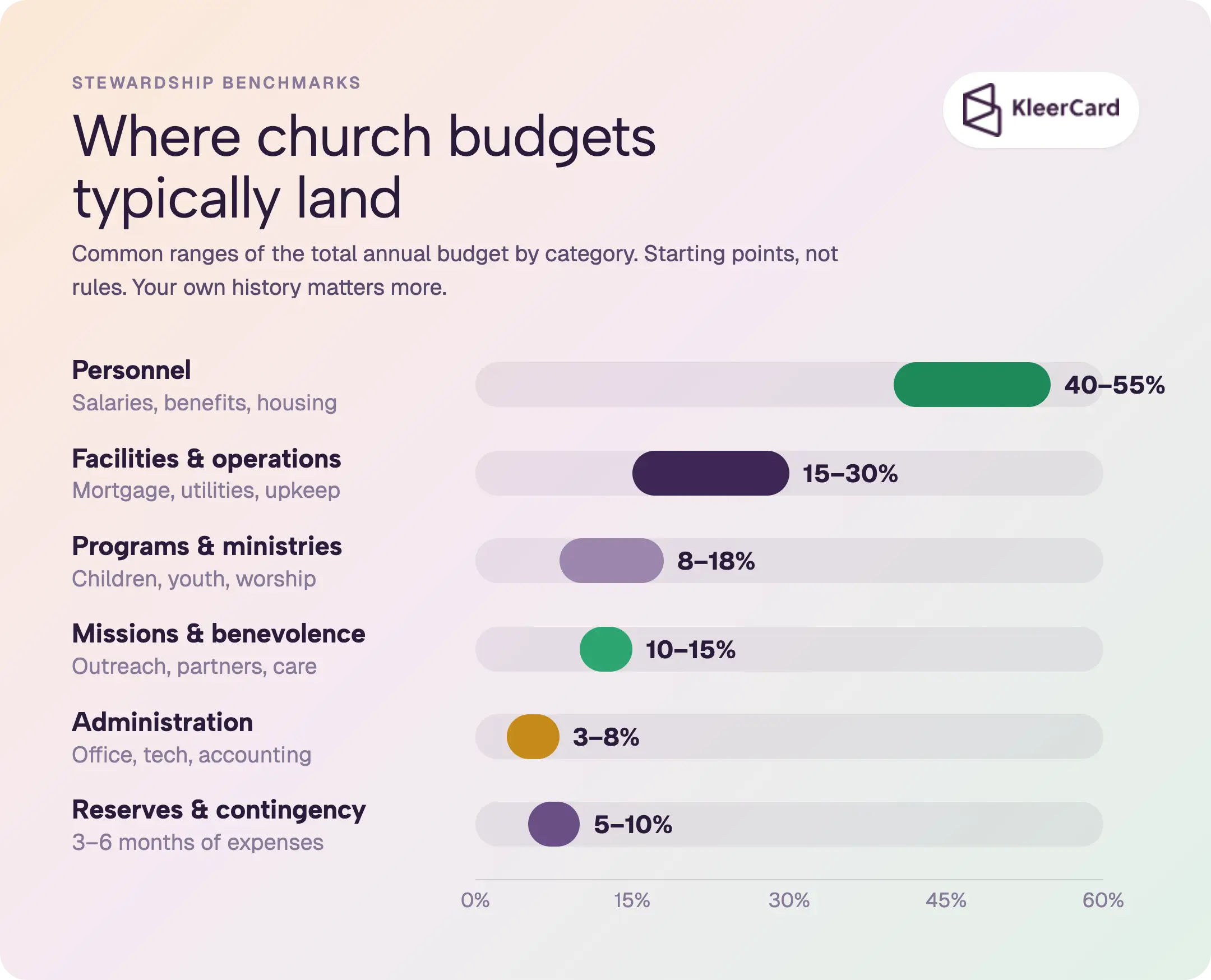
Healthy church budgets tend to fall into consistent ranges once you look across enough congregations. The numbers below reflect patterns seen in surveys of churches of various sizes, including analyses of roughly 1,000 churches such as those published by Vanderbloemen.
Treat them as starting points, not fixed targets. A church with a large mortgage will land differently from one that owns its building free and clear.
| Category | Typical % Range | Notes |
|---|---|---|
| Personnel (salaries, benefits, housing allowances) | 40–55% | Highest single line for most churches. Smaller churches often sit higher. |
| Facilities and operations (mortgage/rent, utilities, maintenance, insurance) | 15–30% | Includes janitorial and capital reserves. |
| Programs and ministries (children, youth, worship, adult discipleship) | 8–18% | Flexible once fixed costs are covered. |
| Missions and benevolence (local outreach, global partners, member care) | 10–15% | Many churches aim for at least 10 percent. |
| Administration (office, technology, accounting, insurance) | 3–8% | Keep lean so ministry dollars stay available. |
| Reserves and contingency | 5–10% | Build toward three to six months of expenses. |
These ranges come from the kinds of data sets that appear in industry studies of church finances. Your own history matters more than any average. Start with last year’s actual spending, then adjust for known changes in attendance or facility costs.
Lifeway Research has reported median congregation income around $165,000 in recent years, with wide variation by size.
Smaller churches often push personnel higher because a full-time pastor is the largest fixed cost. Larger churches may spread the same roles across more giving units and free up room for programs. The useful question is whether the allocation still leaves room for the mission the congregation has agreed to fund, not whether the numbers match an average.
Church accounting runs on fund accounting. Money given for the building fund cannot be spent on utilities without violating donor intent. A budget template that ignores that reality will produce reports that look accurate and still mislead the board.
I learned this the hard way at my own church. A thousand-dollar gift restricted to the building fund showed up as both revenue and cash. On the profit-and-loss statement it inflated the surplus. The software could not produce a balance sheet that isolated that fund.
Every month I exported the numbers to Excel and manually subtracted every restricted balance so leadership could see what was actually available. That process is slow and error-prone. The same limitation appears in many common platforms, including certain QuickBooks configurations that do not easily produce per-fund balance sheets.
The cleaner approach is to build the template so every line item carries a fund tag. Keep one high-level account for a category such as “ministry supplies” or “business meals,” then add a dimension for the specific ministry or fund. Reports become simple re-slices instead of custom builds.
When a church tells me its chart of accounts has to be unique because the ministry is special, that is usually a sign the chart is already too complex. Everyone does accounting. The labels for departments or funds will differ. The underlying data structure should stay the same. Over-fragmentation is the most common structural mistake I see.
A practical high-level skeleton that feeds a budget template looks like this:
You can find a fuller sample chart of accounts and the reasoning behind it in our church accounting guide. The goal is a template that answers both the annual planning question and the weekly “how much is left” question without a second set of books.
For broader stewardship standards, see the ECFA Standards of Responsible Stewardship.
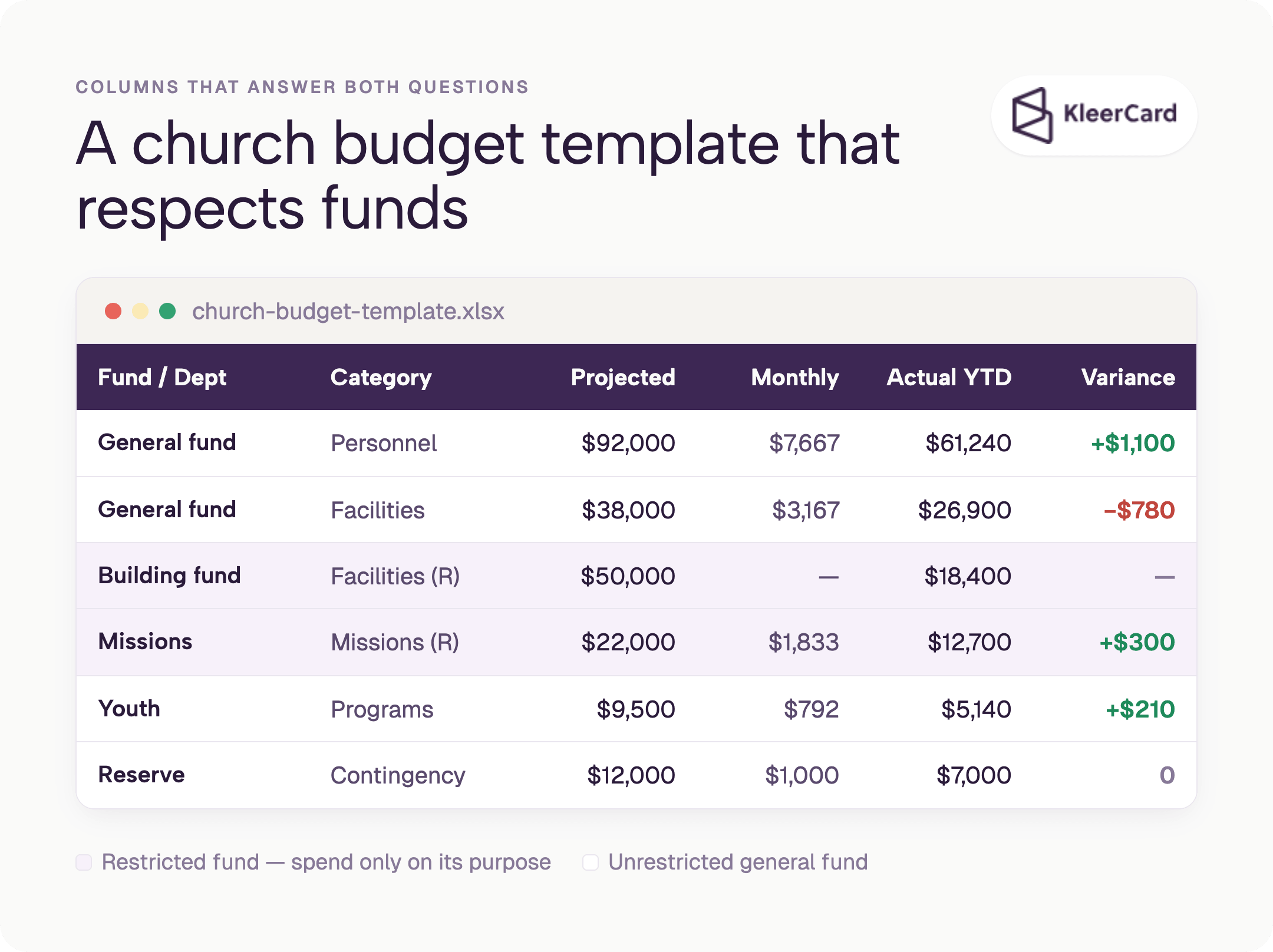
A free church budget template built in Excel or Google Sheets needs a consistent set of columns so leadership can see both unrestricted and restricted balances without monthly Excel exports.
The same column discipline works for churches of any size. It is what keeps projected numbers and actual spend in one view so month-end is a check, not a reconstruction.
Open a new spreadsheet and create these columns at minimum:
Add a second tab for monthly detail if you want to track cash flow seasonality. Many churches see giving drop in the summer and spike in December. Building that pattern into the monthly targets prevents mid-year surprises.
Keep a separate summary tab that rolls everything up for the board. The board does not need every line item. They need to see whether the general fund is on track, whether restricted funds are being spent according to purpose, and whether the reserve is growing or shrinking.
You can build this structure in Excel or Google Sheets with simple SUM and percentage formulas. No macros are required. The value comes from the discipline of using the same columns every month, not from complicated automation.
Once the columns are set, the next step is loading real budget authority onto the cards or accounts that people actually use. See expense management for how that works in practice.
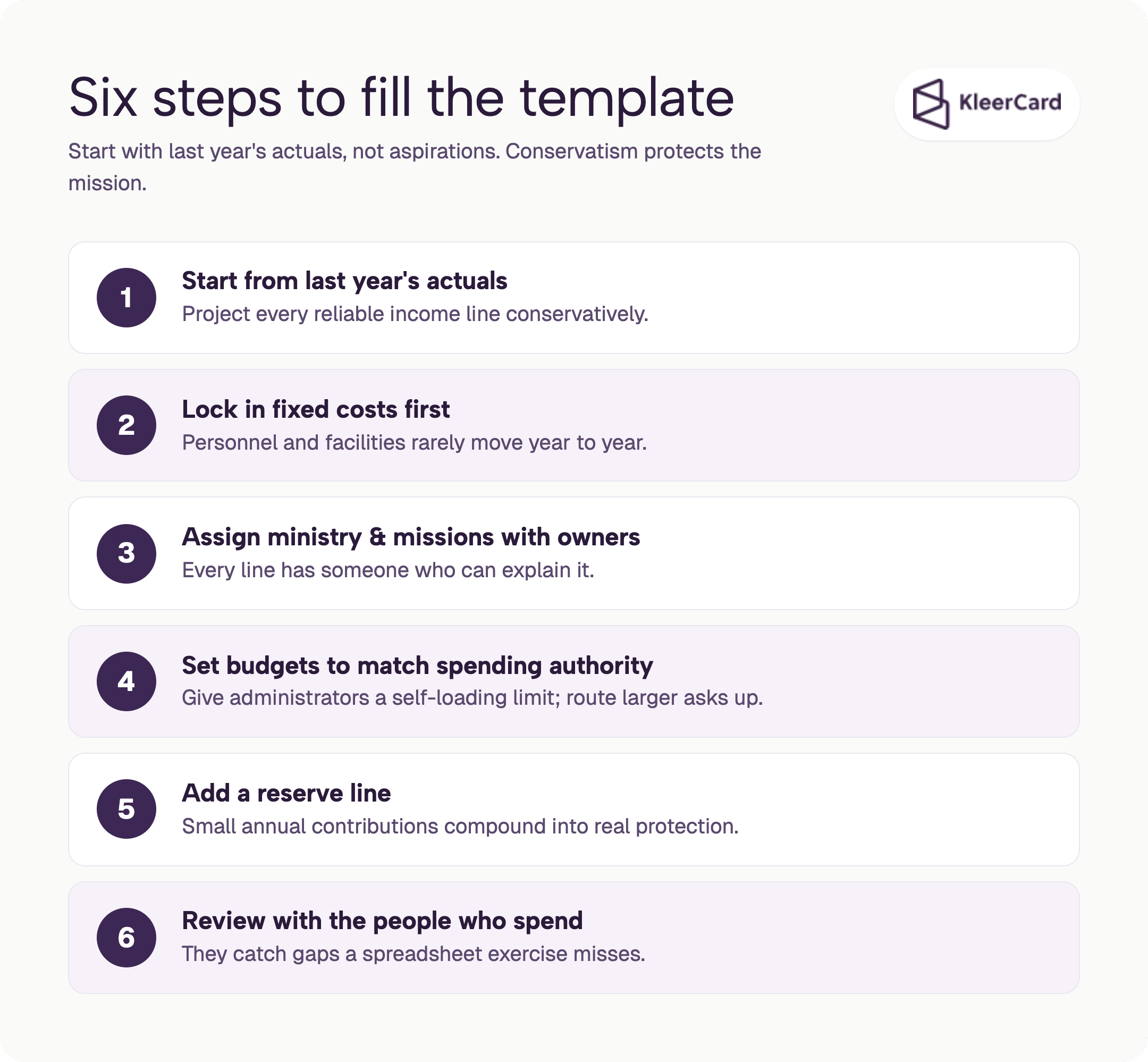
Start with last year’s actual numbers, not with aspirational goals. Conservatism protects the mission.
Once the board approves the numbers, load the monthly targets into the template and treat the variance column as a living document. The step-by-step process of turning mission goals into numbers is covered more fully in our guide on how to create a church budget.
The template is the container. The process is what fills it with reliable data. For teams that want help standing the system up cleanly, white-glove setup is available.
The template is only as good as the data that feeds it. Most churches still chase receipts at the end of the month and then wonder why the variance column is full of surprises.
The pattern I see repeatedly is a handful of shared cards for an entire campus. A teacher or ministry leader who needs a supply has to hunt for the person who currently holds the card. Often they give up and front the cost themselves. Finance then spends hours matching reimbursements and lost receipts to the right budget line.
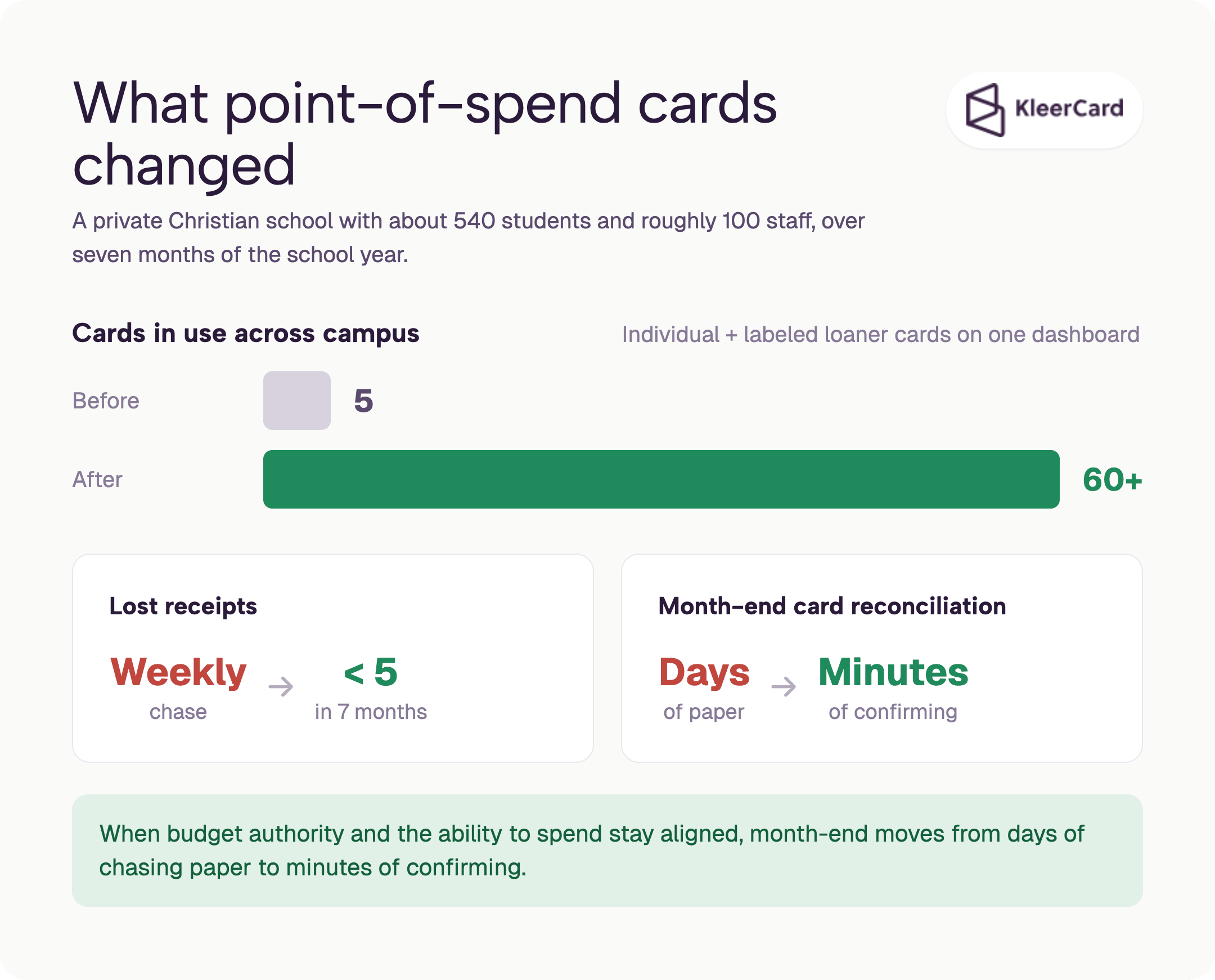
A private Christian school with about 540 students and roughly 100 staff faced the same access problem. They started with five cards across the whole campus.
After they moved to more than sixty cards, a mix of individual cards and labeled loaner cards tracked on a single dashboard, lost receipts dropped to fewer than five across seven months of the school year. Month-end reconciliation of the card activity moved from a lengthy process to a few minutes because charges were already coded and receipted weekly.
The same logic applies to churches. Give the maintenance director a card with a weekly check-in instead of making him locate someone across two campuses just to buy a toilet part at Home Depot.
Issue loaner cards labeled by department so an administrator can hand one out without surrendering their own. Capture the receipt at the point of spend. The budget authority and the ability to spend stay aligned.
Solutions for churches and solutions for nonprofits are built around exactly this model of line-of-sight accountability.
Amazon purchases used to be especially painful. A charge would appear on the statement as “Amazon” for an amount, and finance would have to reverse-engineer the order and the purpose.
When the receipt and line items sync automatically to the cardholder, the buyer can code the purchase to the right fund or ministry before the charge ever hits the books. Official Amazon Business tools make the tax-exempt and separation features available for verified organizations; pair them with Amazon Business expense tracking for the full workflow.
Weekly review of coded and receipted transactions keeps the monthly close short. Churches that adopt this rhythm report the same shift I have seen elsewhere: month-end moves from days of chasing paper to minutes of confirmation. The spend layer itself becomes the control.
For a deeper look at how this works in practice, see our guides on expense management, receipt tracking, and the month-end close process and receipt tracking. You can also schedule a demo to see the weekly rhythm live.
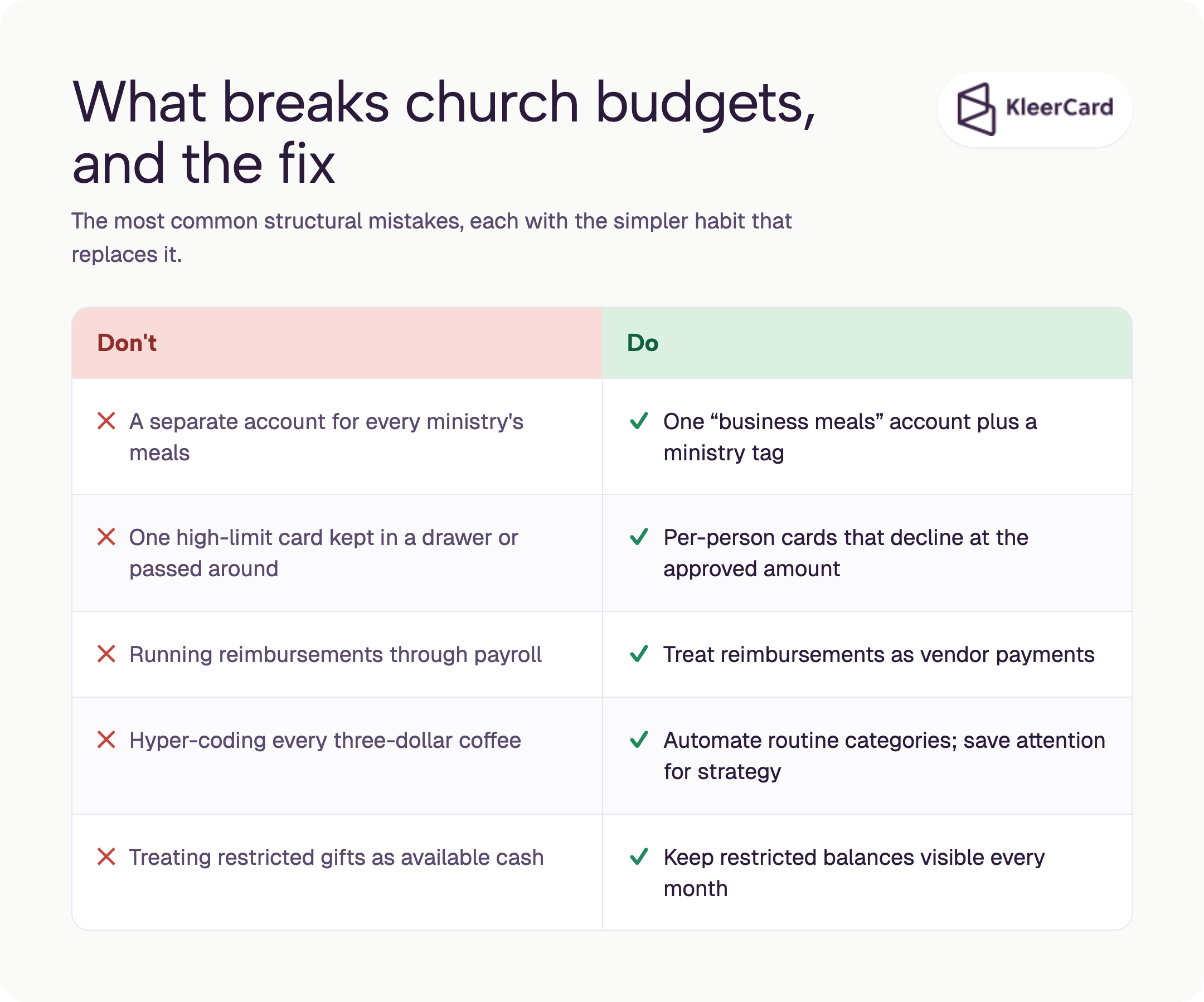
The most frequent structural mistake is treating every ministry as unique and creating separate accounts for nearly identical expenses. Missions meals, worship meals, and pastors meals all become their own lines. Then the simple question “how much did we spend on meals last year” requires a custom report.
One “business meals” account plus a dimension for the ministry solves the problem and still produces accurate high-level numbers. The belief that “we are special” almost always produces a bloated chart of accounts.
Bookkeepers are paid for accuracy. Leaders need usefulness. Align the coding rules to the decisions that actually matter. Hyper-precise coding of every three-dollar coffee creates friction with almost no decision value. Automate the routine categories and save the human attention for the lines that change strategy.
A high-limit card kept in a drawer or passed around creates the illusion of control. In practice anyone who can locate the card can spend far beyond the intended budget, the kind of access that could theoretically put a down payment on a vehicle.
Real control is a card that only works up to the approved amount for that person or department. When the budget is exhausted the card declines. That is the primary control. Merchant-category or time-of-day rules are secondary.
For practical card options that support this approach, including those that do not require a personal guarantee, see the best credit cards for small churches, nonprofit credit card, and credit cards for nonprofits with no personal guarantee resources.
Running reimbursements through payroll forces an extra split at bank reconciliation and breaks automatic checks because no payroll taxes apply. Treat reimbursements as vendor payments instead. The money moves faster and the books stay cleaner. Details on that workflow live in bill pay and reimbursements.
Finally, ignore restricted funds at your peril. A gift that looks like available cash but cannot be spent freely will eventually produce a board conversation no one wants to have. Build the template so those balances stay visible every month.
What should a church budget include?
A church budget should include projected income by source, expense categories by fund or department, columns for projected versus actual amounts, variance calculations, and clear separation of unrestricted and restricted funds. Add a reserve line and a simple board summary view.
Those same columns work for churches of any size. The discipline of projected-versus-actual tracking matters more than the size of the spreadsheet.
What are typical church budget percentages?
Personnel usually falls between 40 and 55 percent, facilities between 15 and 30 percent, programs between 8 and 18 percent, and missions between 10 and 15 percent. Reserves of 5 to 10 percent are a healthy target.
These are observed ranges, not rigid rules. See the Vanderbloemen healthy church budget percentages for one published analysis of roughly 1,000 churches.
How much should a church spend on staff?
Most churches land between 40 and 55 percent of the total budget on personnel costs including salaries, benefits, and housing allowances. Smaller churches often sit higher because a full-time pastor is the largest fixed cost relative to total giving.
How do I handle restricted funds in the template?
Tag every income and expense line with its fund. Keep unrestricted general-fund activity separate from temporarily restricted funds such as building, missions, or benevolence. Review the restricted balances monthly so the board can see what is actually available to spend. The Excel-export workaround I used for the St. John’s building fund is exactly the friction this structure avoids.
Can a small church use the same template structure?
Yes. The same structure works for a small church budget template. The columns stay the same. The number of line items simply shrinks. Focus on the major categories and a handful of ministry tags. The discipline of projected-versus-actual tracking matters more than the size of the spreadsheet.
How often should we review the budget?
Review coded and receipted transactions weekly. Do a fuller variance review monthly with the people who own the spending lines. Present a clean summary to the board on the regular cycle the church already uses. When the private Christian school with 540 students and about 100 staff moved to weekly coding, month-end closed in a few minutes instead of days.
A church budget template only works when the people who spend can do so inside the limits the board has already approved.
In practice that means moving from a handful of shared cards (the pattern that forced a private Christian school with about 540 students and roughly 100 staff to chase five lost receipts every week) to individual and labeled loaner cards that enforce budget authority at the point of spend.
That same school cut lost receipts to fewer than five across seven months and reduced month-end card reconciliation to a few minutes once weekly coding and point-of-spend capture were in place.
Open a blank spreadsheet, load last year’s actuals, set the columns described earlier, and then put the approved limits onto the cards themselves. When budget authority and the ability to spend stay aligned, the variance column stops producing surprises.
Look at how solutions for churches handle department-level cards, point-of-spend receipts, and weekly visibility.
You can also review the best credit cards for small churches, explore the product, check pricing, schedule a short demo, or request white-glove setup to stand the system up cleanly. The goal is a budget that still works after the board meeting ends.


Speak to a member of our team and we can have you up and running in minutes, not weeks.