%202.svg)
KleerCard vs BILL Divvy for nonprofits, churches, and schools. Pricing, fund accounting integrations, spending controls, and how to choose between them.
By Owen Hill, co-founder of KleerCard. Former Budget Director at Compassion International. Founded Switch Consulting, a fractional CFO practice for nonprofits.
The short answer: KleerCard and BILL Divvy are both corporate charge cards with no personal guarantee and built-in expense management. The fit depends on your accounting platform and spending pattern:
I'm Owen Hill, co-founder of KleerCard. Before this, I was Budget Director at Compassion International and ran a fractional CFO practice for nonprofits called Switch Consulting. I'm not a neutral source, and I want to be plain about that. I've also recommended BILL to organizations where it fit them better than we did.
The sections below go through both products, the trade-offs each one carries, and the situations where one or the other is the clearer choice.
| Feature | KleerCard | BILL Spend & Expense (BILL Divvy) |
|---|---|---|
| Card network | Visa Commercial | Visa |
| Issuer | The Bancorp Bank, N.A. | Divvy Pay, LLC bank partners |
| Personal guarantee | Not required | Not required |
| Credit underwriting | Organization financials | Organization financials; soft credit pull common |
| Pricing (software) | $29/mo Standard up to 15 users; $49/mo Pro for 15+ users; free tier with $7,500 wallet balance | $0/user/month for Spend & Expense |
| Bill pay (AP) | Included on Pro; ACH and check available | Sold separately as BILL AP/AR, $45 to $89/user/month |
| Rewards / cashback | None on standard plans; custom pricing with cashback for orgs spending $30K+/month on cards | Tiered points; rate tied to weekly payments and credit-line utilization |
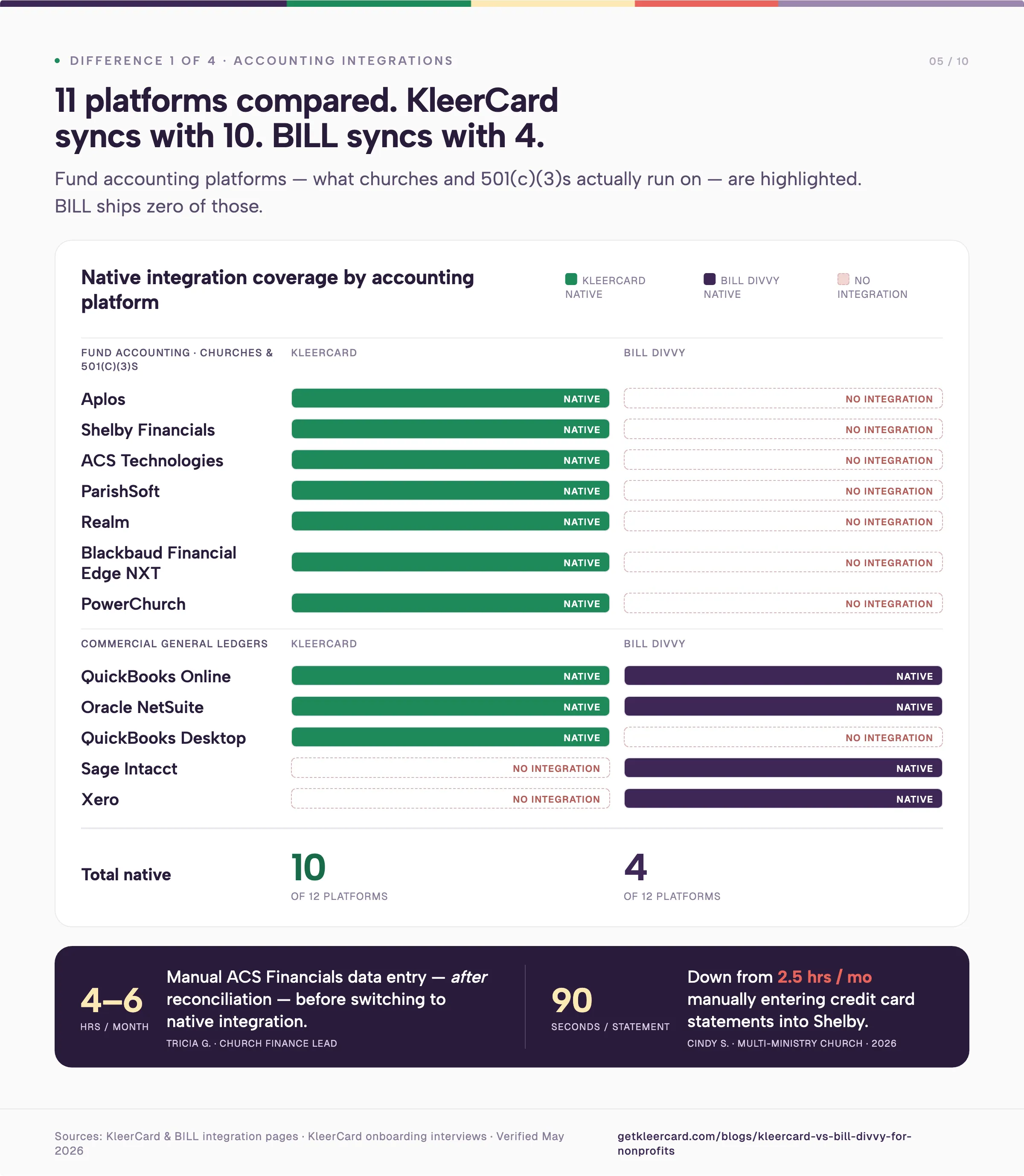
| Fund accounting integrations | Aplos, Realm, Shelby, ParishSOFT, ACS Technologies, Blackbaud, PowerChurch | None native; QuickBooks Online, Sage Intacct, Oracle NetSuite, Xero only |
| Single-use virtual cards | Yes | Budget-and-expiration virtual cards; no true single-use card |
| Time-of-day card restrictions | Yes | No |
| Foreign transaction fees | None | Yes |
| Compliance | SOC 2, PCI DSS | SOC 1 Type II, SOC 2 Type II |
KleerCard was built for churches, schools, and nonprofits specifically. BILL Spend & Expense is a general-purpose corporate card and budgeting platform that nonprofits also use. If your books are in QuickBooks Online or Sage Intacct and you don't need single-use cards or church-specific integrations, BILL Divvy may serve you well.
Learn how to switch from BILL Divvy to KleerCard.
BILL Spend & Expense is the rebranded Divvy product. BILL.com acquired Divvy in 2021 for $2.5 billion and renamed the combined platform in 2023. The card is a Visa corporate charge card. The software around it manages budgets, captures receipts, and syncs to mainstream accounting platforms. For a deeper read, see our full BILL Divvy Corporate Card review.
BILL's pitch is unified spend: corporate cards, expense management, and AP automation under one vendor. BILL confirms on its pricing page that "Spend & Expense is free from subscription and per-user software fees." AP automation sits in a separate paid subscription, starting at $45 per user per month.
A few things BILL Divvy does well:
Budget-first card design. Every card ties to a budget. A music ministry with a $200 monthly budget on the card sees purchases above the cap declined at the merchant. The pattern extends to departmental budgets, event budgets, and approval workflows above defined thresholds. For organizations that already think in budget envelopes, the model is familiar.
Credit lines from $1,000 to $5 million. BILL underwrites on organizational financials, cash flow, and bank balances rather than personal credit, per Nav's BILL Divvy review. Approval is generally fast and doesn't require a personal guarantee. For nonprofits with healthy reserves, that range covers most needs.
A working ecosystem on QuickBooks, Sage Intacct, NetSuite, and Xero. If your books live in one of those, BILL ships a real sync. Transactions, categories, and receipts move into the accounting ledger without manual export.
Free spend management software. The card platform costs nothing at the user level. For a small nonprofit comparing it against tools that charge per user, the headline math looks good.
The headline price is honest. Total cost of ownership shifts once you add up administrator overhead and the reconciliation work that comes from missing church-software integrations, both of which the pricing section below covers.
We built KleerCard for nonprofits, churches, and schools specifically. The card is a Visa Commercial card issued by The Bancorp Bank, N.A. No personal guarantee. Underwriting depends on the organization's financials.
KleerCard syncs natively with the accounting platforms churches and nonprofits use. The integration list includes Aplos, Realm, Shelby, ParishSOFT, ACS Technologies, Blackbaud, QuickBooks Online, QuickBooks Desktop, and NetSuite. See the integrations page for the current list.
A few things we built differently from BILL Divvy:
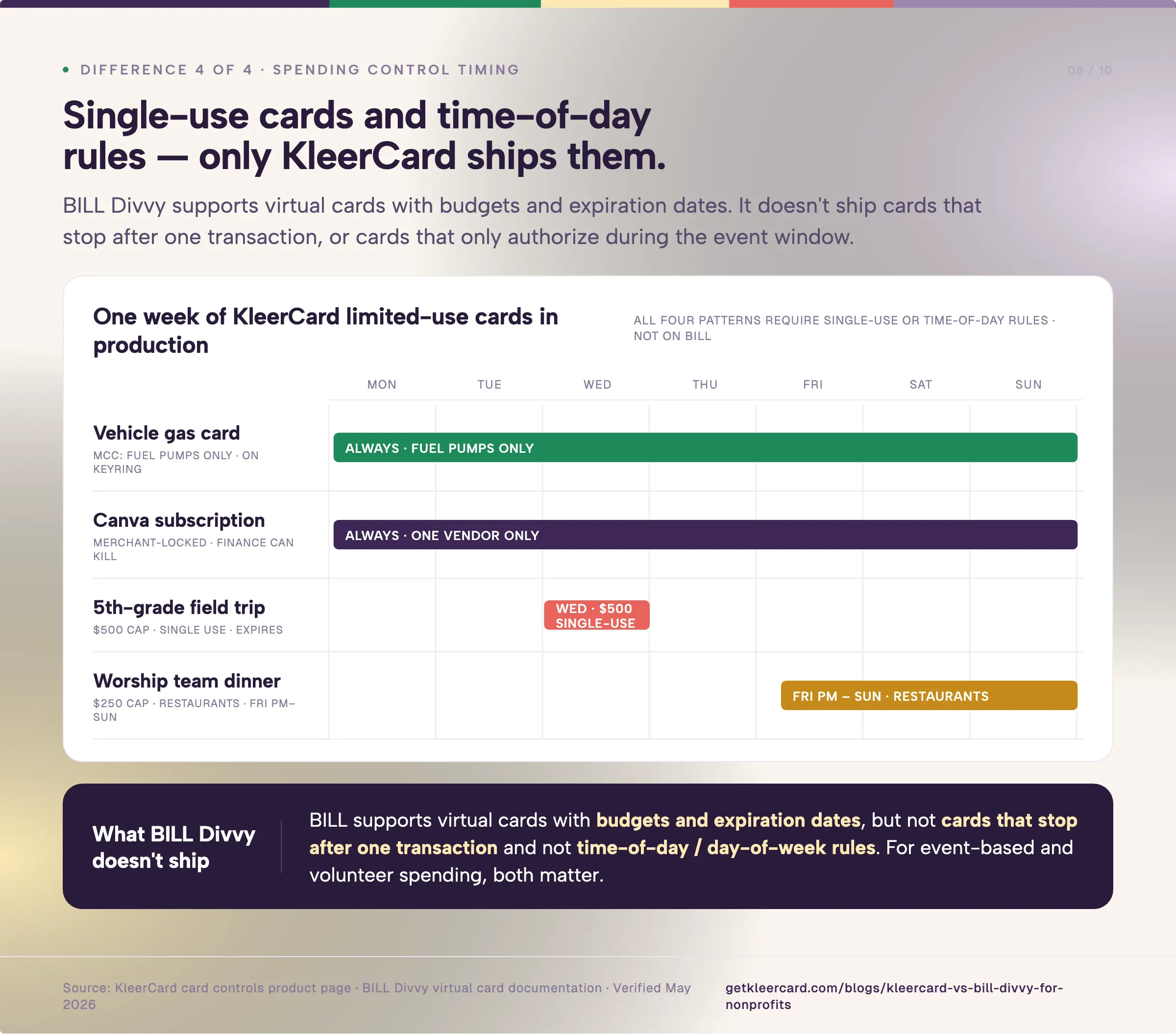
Limited-use virtual cards (similar to single-use cards). Restrict spending based on time, category, spending cap, or more. Here are some examples of how our customers use these:
Direct fund accounting integrations. Aplos, Realm, ShelbyNext Financials, ParishSOFT, ACS Technologies, and Blackbaud all need custom CSV exports from for-profit platforms, often with offsetting double-entry rows to satisfy fund-balance reporting. We built those integrations directly.
Amazon Business receipts and expenses, auto-matched. For organizations where a meaningful share of spend runs through Amazon Business — supplies for VBS, classroom materials, office and facility purchases — KleerCard connects directly to the Amazon Business account and matches each Amazon order to the card transaction automatically. The receipt, the itemized line items, and the transaction all connect together. No screenshotting order pages, no forwarding confirmation emails, no chasing receipts after the fact. BILL Divvy supports receipt capture but doesn't pull Amazon order details directly.
Bill pay and reimbursements included on Pro. ACH and check payments, vendor management, and approval workflows come bundled. On BILL, AP automation sits in a separate paid product line.
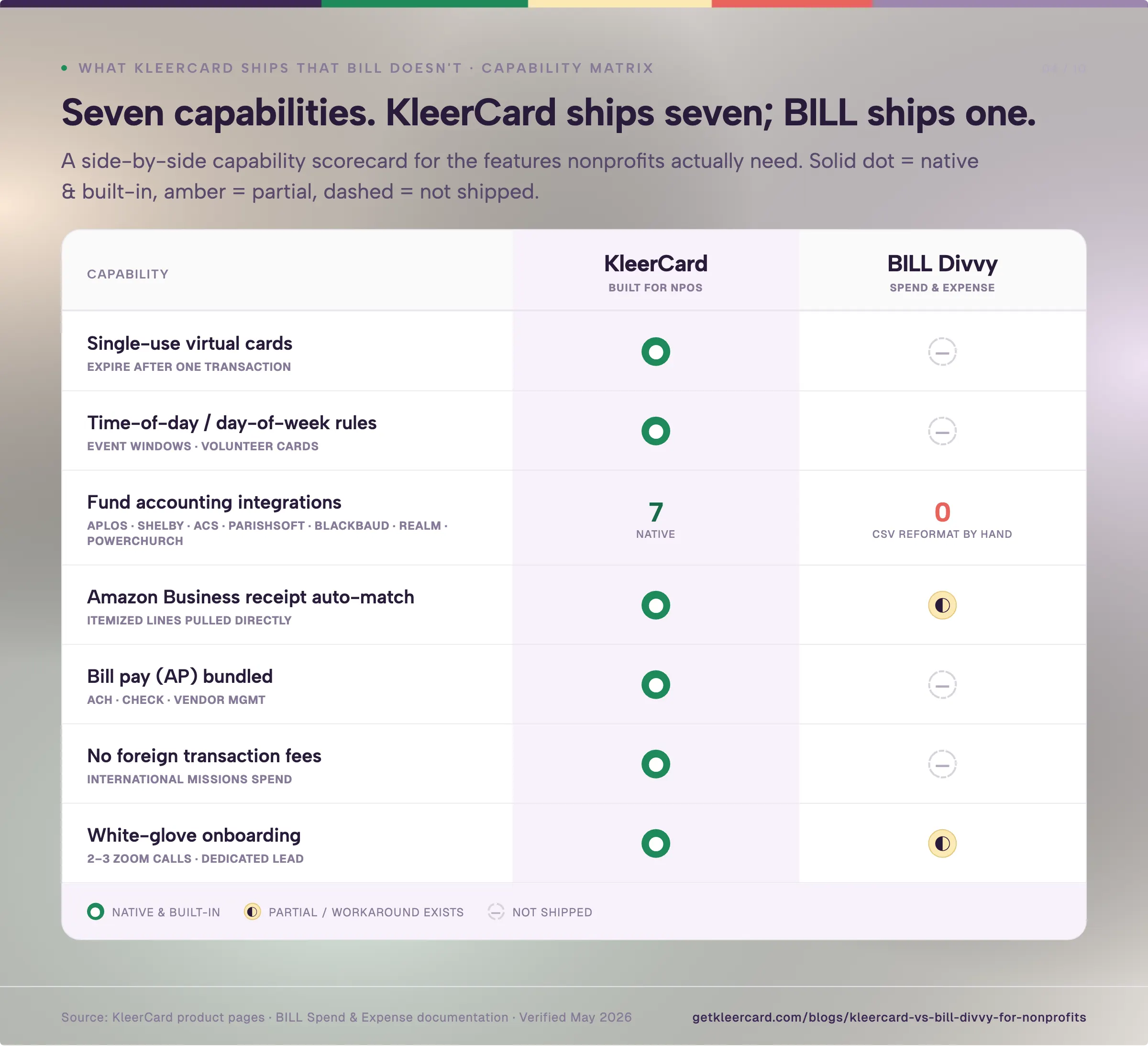
Four operational realities tend to drive the decision when nonprofits choose between these two cards.
If your books live in Aplos, Realm, Shelby, ParishSOFT, ACS Technologies, Blackbaud, or PowerChurch, BILL Divvy won't sync directly. You'll export CSVs from BILL and import them into your accounting platform every reconciliation cycle, often reformatting to handle restricted fund codes and offsetting entries.
KleerCard syncs natively with each of those platforms. Two customer examples from spring 2026 demos:
If your books are in QuickBooks Online, NetSuite, Sage Intacct, or Xero, both platforms handle the sync and this row doesn't separate them. The integration difference matters most when church accounting software is involved.
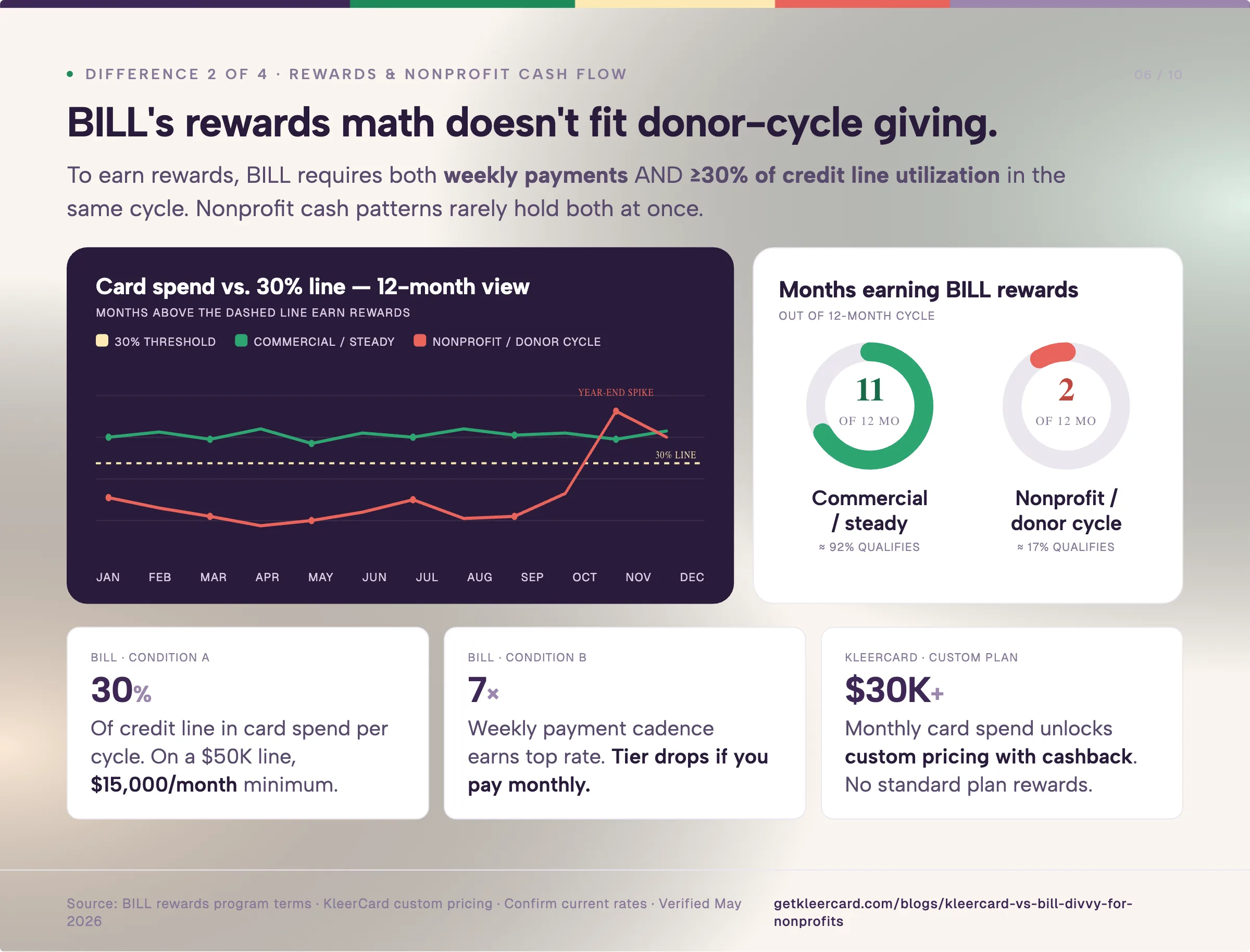
BILL Divvy earns rewards as tiered points on eligible spend. The earning rate is tied to how often you pay your balance (weekly payments earn the top rate) and, on the standard unsecured line, requires you to spend at least 30% of your credit limit in the cycle to earn or retain rewards for that month, per BILL's published rewards program terms. The exact rate varies by line and payment cadence. Confirm current terms with BILL directly before assuming a number.
That structure rewards organizations with steady monthly spend that consistently clears 30% of the line on weekly payments. Churches with year-end giving spikes followed by slower months see an uneven earning curve. Small nonprofits whose card spend rarely reaches 30% of a $25,000 or $50,000 line will see most months earn little.
KleerCard doesn't offer cashback on standard plans. Organizations spending over $30,000 a month on cards can get custom pricing that includes cashback. For most churches and schools, the per-card spending limits and merchant category controls do more work than 1% back would.
If rewards are what you want and your spend is high and steady, BILL Divvy or Ramp will serve you better than we will.
BILL Spend & Expense is free at the software level. The total cost depends on two things: administrator overhead at organizations that need multiple admin seats, and the reconciliation hours that pile up when the accounting integration isn't native.
Customer conversations through 2026 have referenced BILL administrator pricing in the $50 to $65 per month range for nonprofits needing multiple admin seats. BILL's published pricing page doesn't list a per-admin fee for Spend & Expense, so this may apply only to certain tiers or be tied to bundled AP/AR subscriptions. Confirm with BILL directly during your evaluation.
KleerCard's pricing is flat per organization rather than per user. White-glove setup is included.
For a church running 15 to 30 cardholders, here's how KleerCard's costs work out:
| Setup | KleerCard cost | Notes |
|---|---|---|
| 5 cardholders, card only | $29/mo Standard | Up to 15 users included |
| 15 cardholders, card only | $29/mo Standard | Same tier |
| 21 cardholders, with bill pay | $49/mo Pro | My own church's setup |
| Any size, free tier | $0/mo | Requires $7,500 wallet balance |
A wider note on the category in 2026. Ramp has been adding platform fees of $5,000 to $10,000 at renewal time for smaller nonprofit accounts, a pattern consistent with Ramp's reported IPO preparation. CenterCard, after its Amex acquisition, now asks churches under $4 million in revenue for individual personal guarantees on card accounts. Several KleerCard customers came over from each of those situations this spring. None of that decides this comparison on its own, but it's why pricing predictability is a more common question on demos now than it was a year ago.
BILL Divvy's controls work well for ongoing budgets. A card tied to a $200 monthly budget declines a $250 purchase. A card restricted to office supply categories won't authorize a charge at a restaurant.
BILL Divvy doesn't ship a single-use card or a time-of-day restriction. For event-based spending, both matter. A youth pastor leading a one-night retreat doesn't need a recurring monthly card. A teacher running a single field trip doesn't need an open-ended $500 virtual card living in the system for a year afterward.
KleerCard has a variety of helpful limits you can place on cards, including single-use cards that expire after the transaction, and recurring cards with time-of-day rules that match the actual event window.
Both cards run on Visa, so merchant acceptance and core fraud protections are comparable. Card network is one row where these two products don't separate.
If most of these describe your organization, BILL Divvy is the clearer fit:
For organizations matching that profile, BILL's free software, established ERP integrations, and unified ecosystem add up to a real product. Nav's review and our own BILL Divvy Corporate Card review both go deeper.
If most of these describe your organization, KleerCard is the clearer fit:
For these organizations, you’ll notice a difference at month-end close. Three named outcomes from KleerCard customers: Jared, an executive pastor, reported month-end close shrinking from 3 days to about 7 minutes after switching. Emily, an HR and finance director at a nonprofit, reported receipt collection dropping from 40 hours a month to 1 hour in the first month. John S., a treasurer, estimated the operational savings covered the cost of well over 500 meals annually.
Manuel R., a CFO at an Indiana church with global ministry presence, came to KleerCard from a 20-cardholder Chase setup. His pain was familiar: missing receipts, manual approval chases, and condensed departmental summaries entered into Shelby instead of direct transaction imports. About half his organization's spend ran through Amazon Business. The switch consolidated cards, expense management, and Amazon integration onto one platform priced for the headcount.
If your situation sits between BILL and KleerCard, start with the integration question. Books in QuickBooks Online with no fund accounting needs? Both work. Books in Aplos or Shelby? Go with KleerCard.
Some organizations are better served by neither KleerCard nor BILL Divvy.
If your cash flow depends on floating funds against net-30 or net-60 contracts (common for government work or reimbursable grants), neither charge card model will help. KleerCard runs on a net-7 weekly billing cycle. BILL Divvy is structured similarly. SBA loans, commercial banking lines of credit, or specialized AR financing tend to fit those situations better. I had this conversation last month with Raymond, a deputy director at a Tennessee education and workforce nonprofit. His government contracts needed 30 to 60 days of float against receivables. KleerCard wasn't the right tool, and I told him so before he applied.
If you're a church plant, an unincorporated ministry, or a brand-new 501(c)(3) without revenue history, your application may not clear underwriting on either platform. For early-stage organizations, our guide to credit cards for nonprofits with no personal guarantee covers the realistic options.
Three questions resolve most of the comparison:
If you want to see KleerCard running with your own fund accounting platform, sign up takes about five minutes. Or compare across the category in our best credit cards for nonprofits guide. If BILL Divvy fits your situation better, go that direction. The right finance tool is the one your team will use.
Yes. BILL.com acquired Divvy in 2021 for $2.5 billion and rebranded the product to BILL Spend & Expense in 2023. The card is officially the BILL Divvy Card, though many users still call it Divvy.
No. The card is a corporate charge card underwritten to the business. Approval depends on the organization's financials, cash flow, and bank balances rather than personal credit, per Nav's review of BILL Divvy.
Not on standard plans. Organizations spending over $30,000 a month on cards can get custom pricing that includes cashback. For most churches and schools, the spending controls do more work than a 1% return would.
No. BILL Spend & Expense integrates with QuickBooks Online, Sage Intacct, Oracle NetSuite, and Xero. Aplos, Realm, ShelbyNext Financials, ParishSOFT, ACS Technologies, and Blackbaud users will export CSVs from BILL and import them manually each reconciliation cycle.
BILL Spend & Expense is $0 per user per month for the card and spend management software. Add-on BILL AP/AR automation runs $45 to $89 per user per month. KleerCard's pricing is $29 a month for up to 15 users on the Standard tier and $49 a month for organizations with 15+ users or bundled bill pay. A free KleerCard tier exists with a $7,500 wallet balance. Total cost depends on cardholder count, whether you need bill pay, and how much manual reconciliation work a missing native integration creates.
KleerCard adds two controls BILL Divvy doesn't ship: single-use virtual cards that expire after one transaction, and time-of-day card restrictions. For event-based spending and volunteer programs, both matter. For ongoing monthly budgets and merchant category restrictions, the two platforms cover similar ground.
Yes. Application approval takes 24 to 48 hours, followed by two to three onboarding meetings with our implementation lead as part of white-glove setup. Physical cards ship in five to eight days; virtual cards are available immediately. Most customers run a two- to five-cardholder pilot for one billing cycle before rolling out across the team.
Both Visa networks have international acceptance. BILL Divvy charges foreign transaction fees on international purchases. KleerCard doesn't. For missions-heavy spend patterns, the fee difference compounds across the year.
BILL reports account activity to the Small Business Financial Exchange (SBFE®), per Nav's review. SBFE is a data exchange, not a credit bureau, that may provide information to participating business credit bureaus.
Owen Hill is co-founder of KleerCard, a corporate card built for nonprofits, churches, and schools. Before KleerCard, he was Budget Director at Compassion International and ran Switch Consulting, a fractional CFO practice for nonprofits. KleerCard is reviewed alongside other tools throughout this article. Pricing for BILL Spend & Expense and KleerCard reflects published rates as of May 2026 and may change. Confirm current numbers with each vendor before signing.


Speak to a member of our team and we can have you up and running in minutes, not weeks.