%202.svg)
Honest 2026 Devote Card review for nonprofits and churches. Exact pricing from $179/mo, cash-secured model, spend controls, pros, cons, and who it fits best.
The Devote Card is a cash-secured Visa charge card built for nonprofits. It sits inside a broader spend and treasury platform that issues unlimited physical and virtual cards, ties spending to funds or grants, and syncs to accounting software.
I co-founded KleerCard and serve as treasurer at my church. I have spent years in nonprofit financial operations, including budget leadership roles, and I review tools like this the same way I evaluate them for our own books: does the model match how restricted funds, volunteer spend, and month-end actually work?
This review covers the current 2026 product, exact pricing, how the pre-funded model works, what the controls deliver, where the platform falls short for churches and multi-fund teams, and who should shortlist it. Pricing and features were verified against the official Devote site in August 2026.
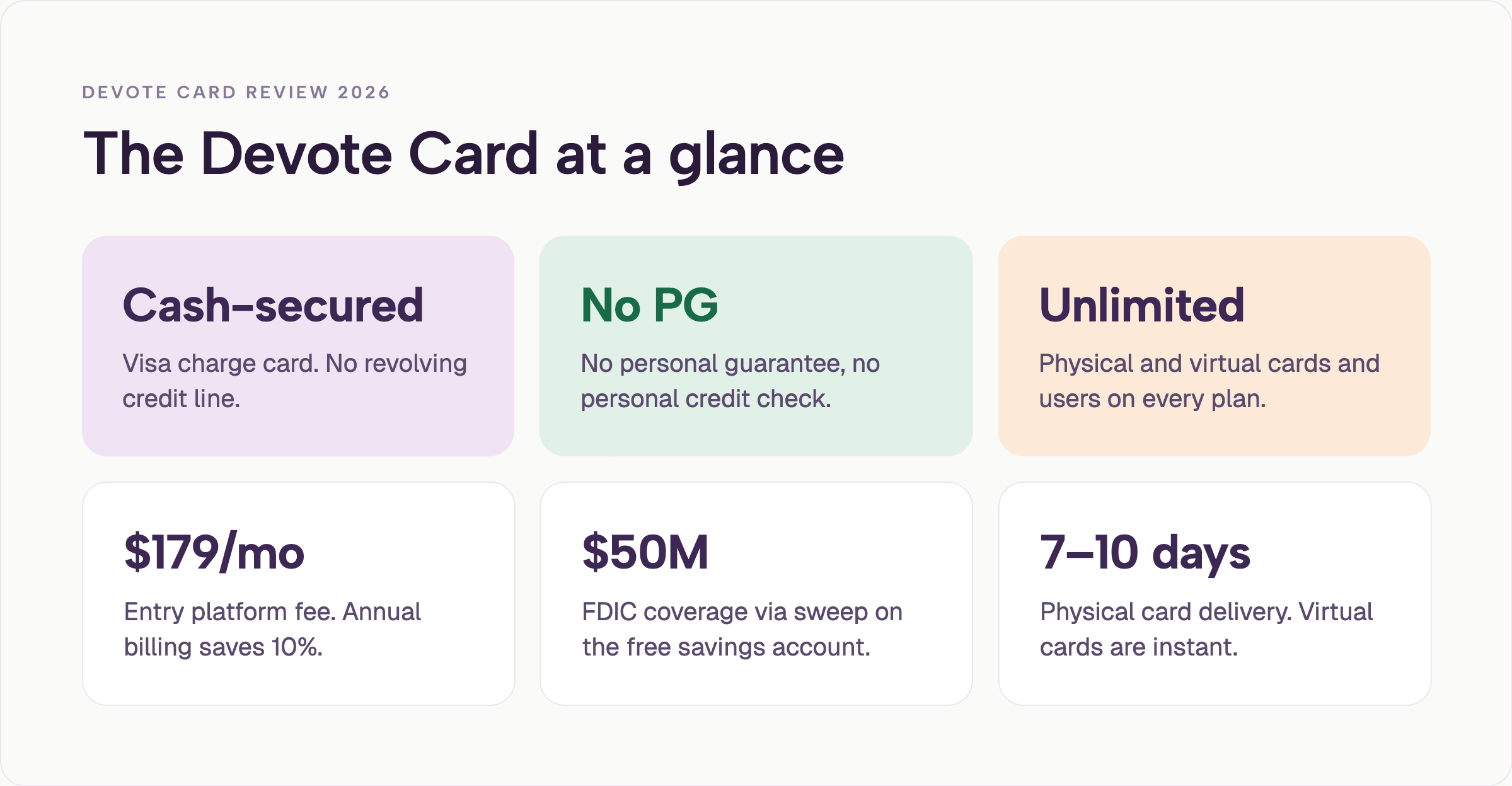
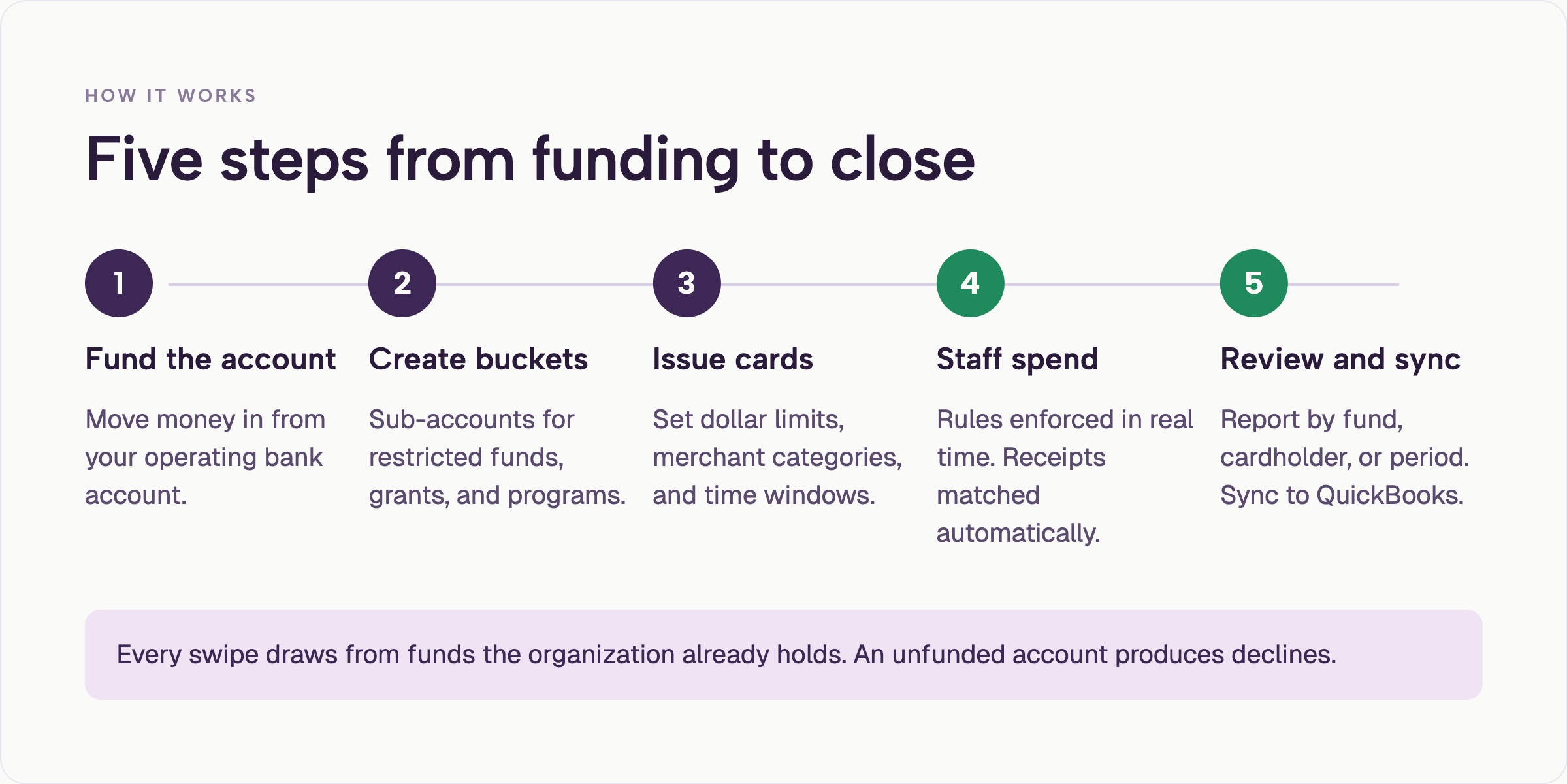
Devote issues cash-secured Visa charge cards connected to a Devote account. You move money from your bank into Devote, segment it into buckets for operating, grants, programs, or reserves, and issue cards tied to those buckets. Every swipe draws from the organization’s own funds. Full product details are available on the official product page.
The Devote Card is a charge card, not a revolving credit product. There is no new debt, no personal credit check, and no personal guarantee. Cards can be physical or virtual. Limits, merchant categories, and time windows can be set per card. Out-of-policy swipes are declined. Receipts can be matched by photo or email, and transactions can sync to accounting software.
NerdWallet has recognized Devote as a top spend-management platform for nonprofits. Their scoring noted unlimited cards, granular spend controls, real-time QuickBooks sync, and nonprofit-specific features such as grant and sales-tax tracking. See the NerdWallet recognition page for the details Devote publishes.
As a church treasurer, the difference between a cash-secured charge card and a revolving credit product matters. A cash-secured card keeps the organization spending money it already has. A revolving product creates a payable that has to be managed against giving cycles and restricted balances.
Physical cards typically arrive in 7–10 business days. Virtual cards are available immediately. Additional operational details appear in the Devote card FAQs.
The sequence is simple once the Devote account is funded. The real work sits in steps two and three: deciding which funds get their own buckets and which people get cards tied to those buckets. That is the same decision most churches face when they move off a single shared admin card. Organizations that prefer guided implementation can also review options such as white-glove setup.
Devote uses simple flat monthly pricing with no per-user or per-card fees. Annual billing saves 10 percent.
| Plan | Monthly Price | Best For | Key Inclusions |
|---|---|---|---|
| High-Yield Savings | Free | Holding reserves | Up to $50M FDIC via sweep, works alongside any plan |
| Impact | $179 | Small teams and newer nonprofits | Unlimited physical & virtual cards, basic spend & expense management, automated receipt collection, basic accounting integrations, email support |
| Catalyst | $359 | Growing organizations needing fund visibility | Everything in Impact + restricted fund & grant tracking, unlimited subaccounts, dedicated account executive, guided onboarding, advanced integrations, Devote Donations tool |
| Visionary | $719 | Complex or multi-entity organizations | Everything in Catalyst + priority features, multiple entity support, quarterly financial optimization review |
Prices were reduced from prior list rates of $199 / $399 / $799. Confirm current figures on the official pricing page before budgeting, as plans can change. For comparison of platform cost structures, see also KleerCard pricing.
The monthly fee is the main cost of the Devote Card. There are no setup fees or per-card charges. Organizations that keep large balances in the free high-yield account can offset some cost through interest, though the platform fee remains.
For a small church or nonprofit already stretching every dollar, Devote’s $179 a month is real money. For a larger organization that previously paid per-seat fees or staffed heavy manual reconciliation, the same fee can look reasonable once unlimited cards and fund tagging are in place. The decision usually turns on whether the automation and controls actually reduce staff time enough to cover the platform cost.
I see the same calculation play out in conversations with finance teams. The organizations that keep the Devote platform are usually the ones that can point to specific hours saved on receipt chasing and fund coding. The ones that walk away often decide the monthly fee exceeds the remaining manual work after they have already simplified their card process.
The Devote Card offers unlimited physical and virtual cards that ship or activate with no extra cost. Each Devote card can carry its own dollar limit, merchant-category restrictions, and time-of-day or date-range rules. Auto-lock is available when receipts are overdue or a trip ends.
Devote transactions are tagged to the assigned fund or grant from the first swipe. Receipts can be captured by photo or email and matched automatically. Reporting can be pulled by fund, program, cardholder, or period for board or auditor review.
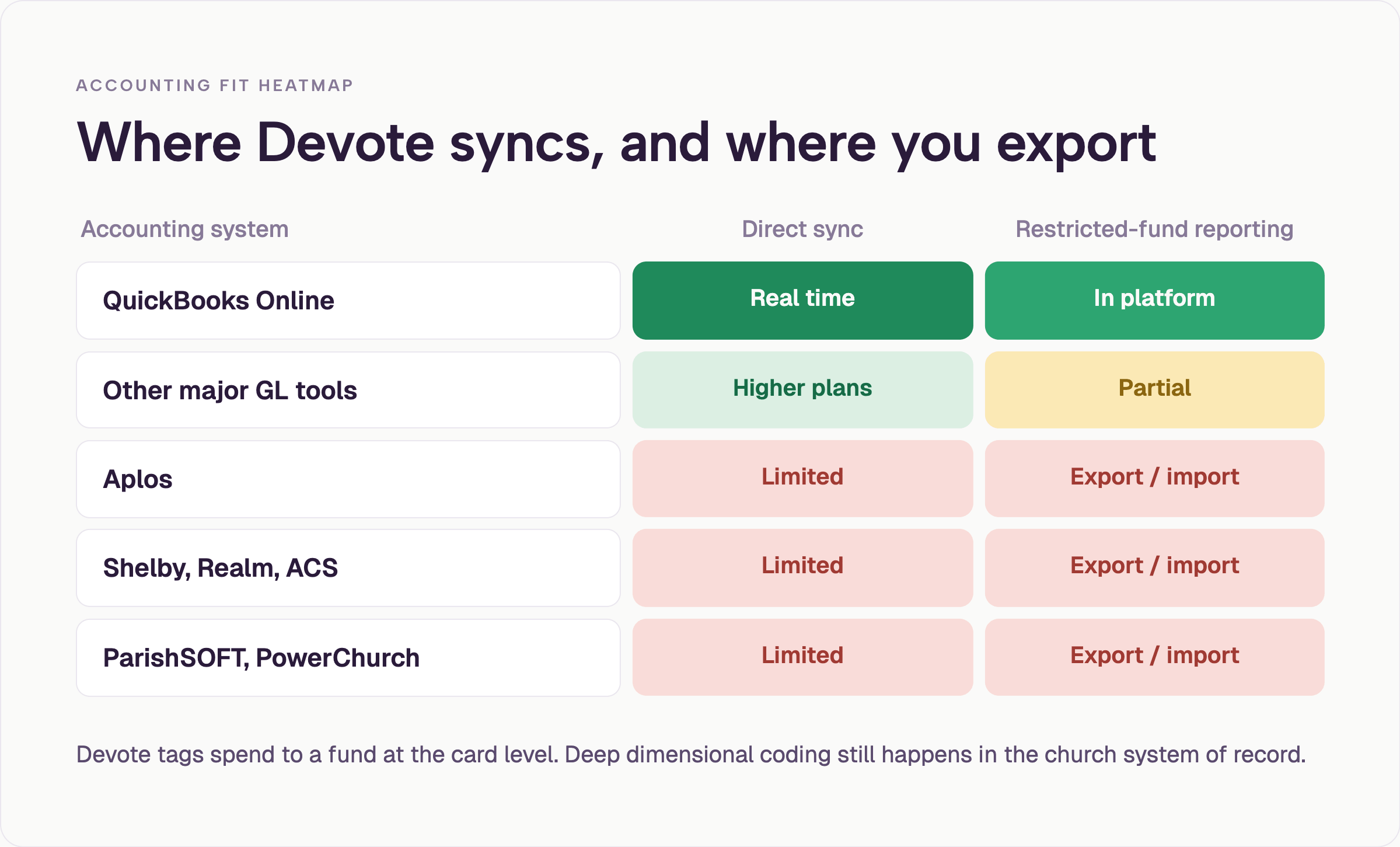
Accounting integrations for the Devote Card center on QuickBooks Online with additional support for other major tools on higher plans. Sales-tax tracking and grant reporting features are available. Devote Points is the rewards program. Teams evaluating deeper fund accounting workflows can also compare how expense management platforms handle native church software connections.
A mobile experience exists for receipt capture, card freeze, and basic visibility on the Devote platform. Cards can be added to digital wallets.
Devote’s control model is strong for organizations that think in funds and limits. A youth pastor can carry a Devote card tied only to the youth ministry budget. A temporary virtual Devote card can be issued for a mission trip with a hard stop date. Those patterns solve the classic shared-card and reimbursement problems I see in most churches.
When every department or ministry previously waited for the one admin card or submitted personal reimbursements, the shift to individual controlled Devote cards changes daily operations. Receipts stop disappearing into inboxes. Spending stays inside the approved bucket. The treasurer no longer has to reconstruct intent after the fact.
Devote’s reporting and export side is where the fit depends on your ledger. QuickBooks Online users get the smoothest path. Teams whose books live in Shelby, Realm, ACS Technologies, ParishSOFT, Aplos, or PowerChurch will still move data through export and import for the deepest fund-level work. That is the same friction many platforms create when they are built around general-ledger tools rather than church fund accounting.
If your close process depends on dimensional coding that already lives inside your church management system, plan to test the full export-to-import loop with the Devote Card before you rely on the platform for audit-ready fund reports.
Devote’s no personal guarantee structure is the reason many churches look at the product in the first place. After the CenterCard-to-Amex transition, more programs began requiring personal guarantees for organizations under certain revenue thresholds. A product that underwrites the organization itself removes that friction for the board and the treasurer.
Unlimited Devote cards matter in practice. When one admin card is shared across ten ministry teams, receipts go missing and month-end becomes a chase. Issuing a controlled Devote card per person or per temporary project changes the accountability without adding headcount.
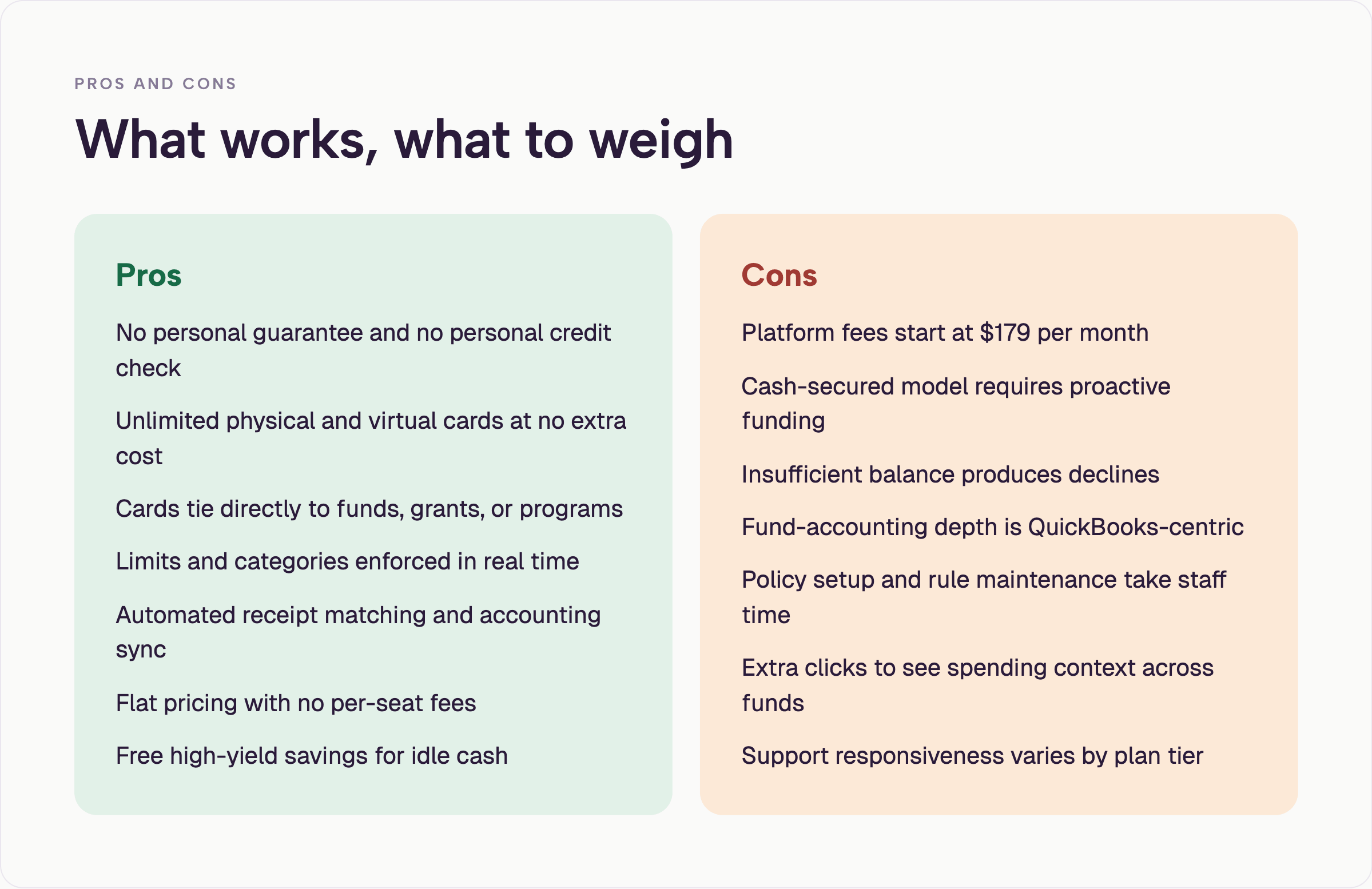
Devote’s platform fee of $179 per month (or higher) is the most common sticking point I hear. A free or low-cost card with basic controls can feel more practical when the annual budget is modest and the finance role is part-time or volunteer. The pre-funding requirement of the Devote Card adds another operational layer. You have to keep the account loaded or legitimate purchases get declined. That discipline is healthy for restricted funds, but it requires someone to watch the balance.
Devote’s church software fit is the second consistent limitation. Devote tags spend to funds at the card level. The deepest dimensional reporting and closed-period controls still live in the church’s primary accounting system for most of the platforms listed above. Test the export before you commit to the Devote Card.
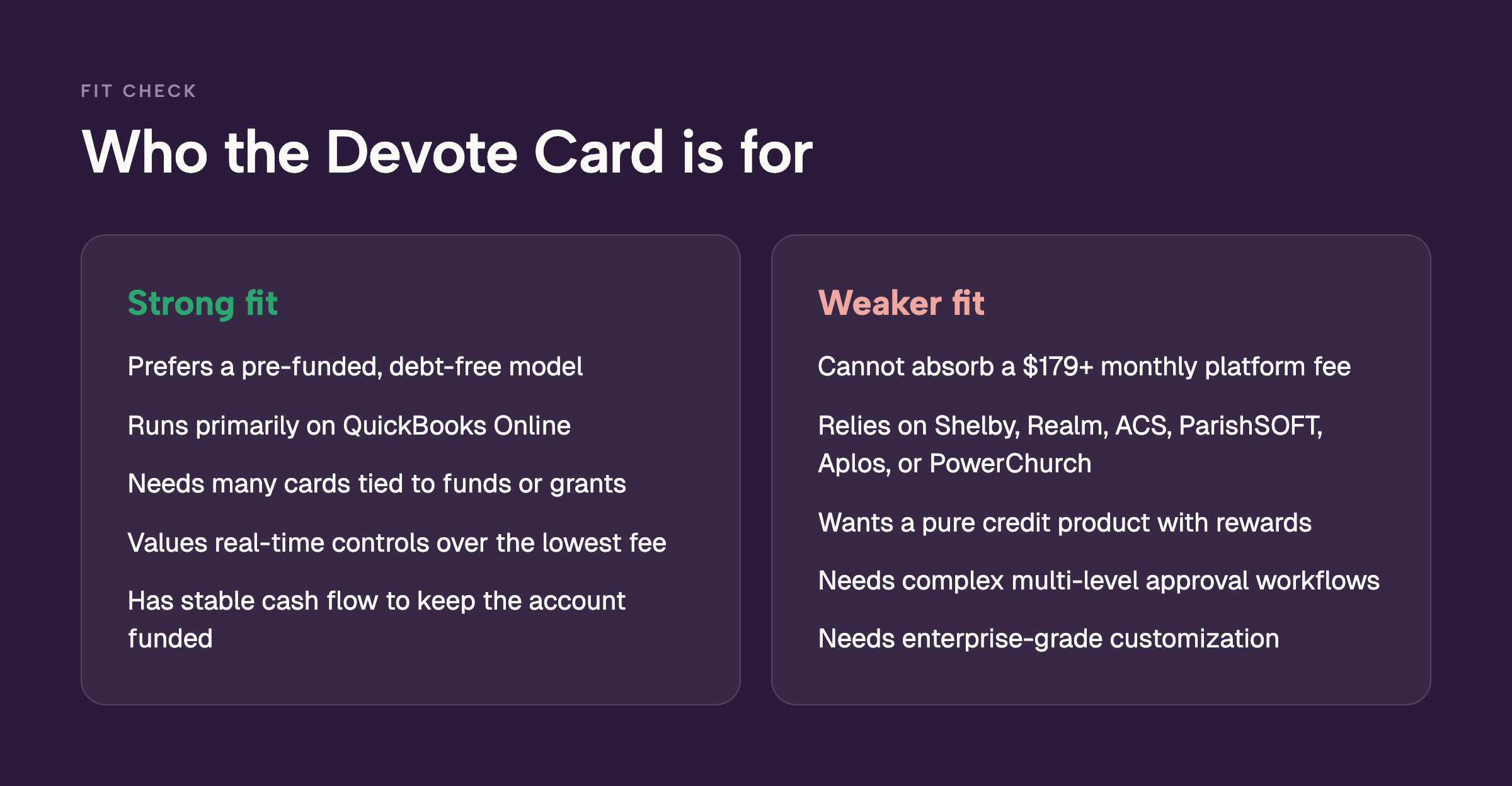
Devote fits organizations that:
The Devote Card is a weaker fit for:
If your books already live in QuickBooks Online and you are comfortable loading the account each month, the Devote Card is a clean operational match. If your primary system is a church fund-accounting platform and you want the card data to land already coded with full dimensions, the export step becomes part of every close. That is the practical filter I use when churches or other nonprofits ask me about it.
Many churches and multi-fund nonprofits evaluate the Devote Card after dealing with shared bank cards, reimbursement delays, or personal-guarantee requirements on traditional cards. The ability to issue a Devote card to a youth pastor tied to the youth ministry budget, or a temporary card for a mission trip, solves the shared-card problem cleanly.
The trade-off with the Devote Card appears in two places.
First, the platform fee sits higher than several alternatives that also serve nonprofits.
Second, while Devote tags spend to funds, the deepest church-accounting exports and dimensional reporting often still live in the church’s primary software. Teams that already close the books in Shelby or Realm will want to test the export and reconciliation workflow before committing.
Organizations that have moved from one shared admin card to dozens of controlled cards typically report fewer lost receipts and faster month-end closes once the system is fully adopted. The same pattern holds when the Devote platform can talk directly to the accounting system of record.
I have watched the same shift play out across churches of different sizes. The shared card creates bottlenecks and incomplete documentation. Individual controlled Devote cards remove the bottleneck.
The remaining question is whether the Devote Card’s fund tagging is deep enough for your close process or whether the real work still happens after the export. That is the test that determines whether Devote becomes a net time saver or another system to reconcile.
The organizations that get the most value from the Devote Card tend to be the ones that treat the card platform as the control layer and their existing accounting system as the system of record. When those two systems talk cleanly, month-end shortens. When the export still requires manual re-coding of restricted funds, the time savings shrink. That is the practical filter I apply when a church asks whether Devote will actually lighten the load.
No. The Devote Card is a cash-secured Visa charge card. You fund the Devote account with organizational money and spend those funds. There is no revolving credit line and no personal debt created.
No. Cards are issued to the organization. There is no personal credit check and no personal guarantee required in standard underwriting. This is one of the features that makes the Devote Card relevant for churches and nonprofits that want the account to stay with the organization through staff and board changes. See also the broader options for credit cards for nonprofits with no personal guarantee.
Platform plans start at $179 per month (Impact). Catalyst is $359 and Visionary is $719. Unlimited cards and users are included. Annual billing saves 10 percent. The high-yield savings account is free. Confirm current details on the official pricing page.
Yes. Every Devote plan includes unlimited physical and virtual cards with no per-card fees.
The transaction is declined on the Devote Card. This protects restricted funds but requires clear communication of rules to cardholders so legitimate purchases are not blocked.
Integrations center on QuickBooks Online and other major general-ledger tools. Native depth for Shelby, Realm, ACS, ParishSOFT, Aplos, and PowerChurch is limited; most teams export and import for full fund accounting. For platforms built around native church-software connections, see expense management options.
Yes. Devote offers mobile access for receipt capture, card controls, and visibility. Cards can also be added to digital wallets.
The Devote Card is a legitimate, nonprofit-focused charge card and spend platform. It delivers unlimited cards, fund-tied controls, and automation that many organizations need. The monthly platform fee and cash-secured funding model are the main points of friction for smaller or cash-flow-sensitive teams. Church and multi-fund teams should verify the accounting export workflow against their specific software before deciding.
If the pre-funded model and QuickBooks-centric workflow match your operations, the Devote Card is worth a demo. If platform cost or deeper church-software integration is the priority, evaluate alternatives that start at lower or zero monthly fees and maintain native connections to Aplos, Shelby, Realm, or ACS.
For a side-by-side look at other options, see the Devote Card alternatives guide and the broader lists of best credit cards for churches and credit cards for nonprofits with no personal guarantee. Organizations that want a platform built around church fund accounting and volunteer cards can also review the KleerCard nonprofit credit card, KleerCard for churches, or the nonprofit solutions page.
If you are ready to compare how a purpose-built platform handles the same workflows, you can schedule a demo or explore white-glove setup.


Speak to a member of our team and we can have you up and running in minutes, not weeks.