%202.svg)
Compare 2026 nonprofit budgeting software by fund tracking, grants, and price. See what small teams need, and why approved budgets slip without spend controls.
If you are shopping for nonprofit budgeting software, you are usually trying to do one of two things. Either the board wants a cleaner way to build next year's plan, or the current workbook cannot keep funds, grants, and departments from colliding.
Those are planning problems. They are not the same as needing a new general ledger, and they are not the same as needing a better way to hand a teacher a card. I mix those three up in conversations more often than I would like to admit, so this page stays on the planning tools.
I am Owen Hill. I am a treasurer at St. John's and I have built nonprofit budgets in QuickBooks, Financial Edge, and Great Plains. I am not a CPA. Check current vendor pricing before you buy. Last reviewed September 2026.
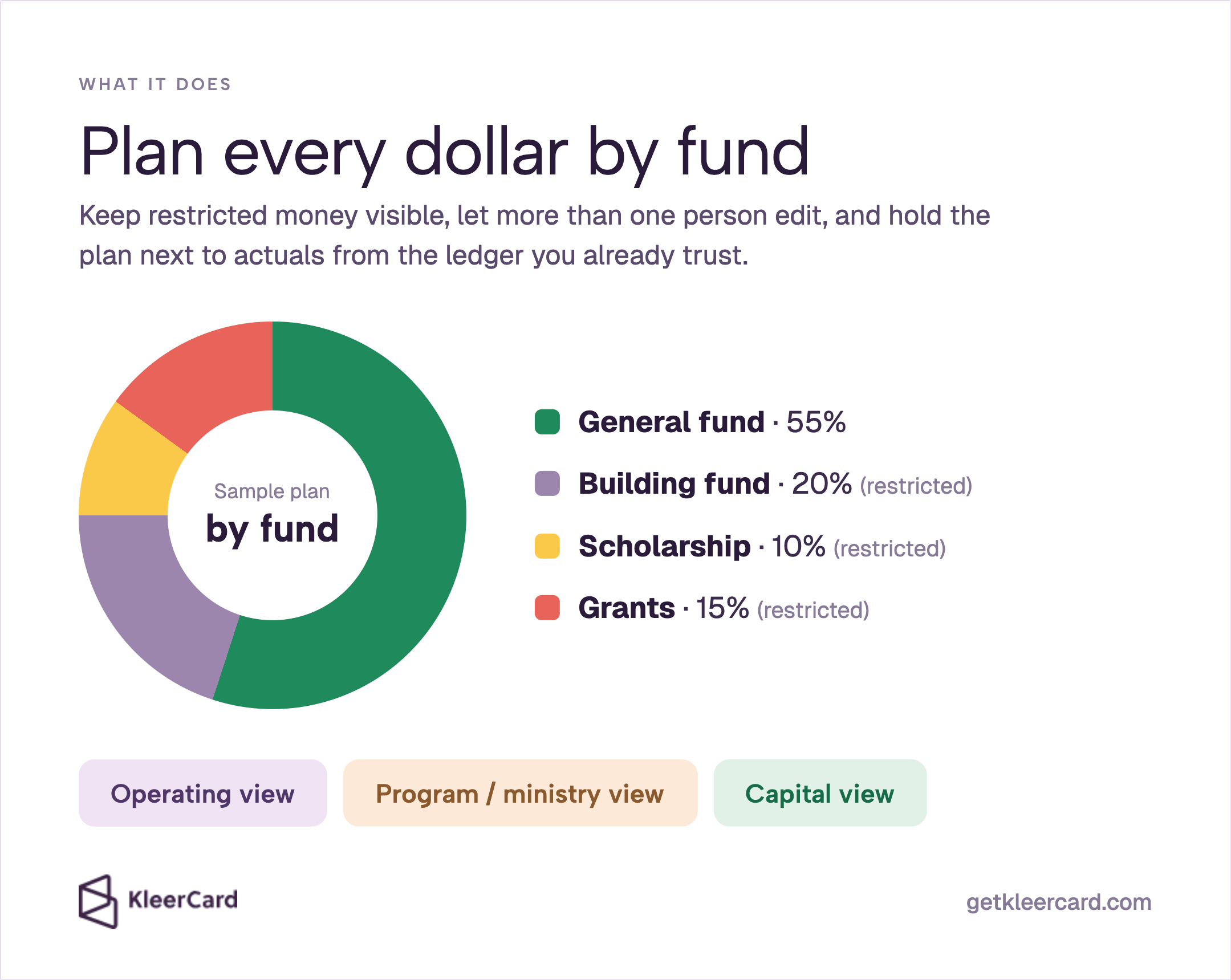
Nonprofit budgeting software helps you plan revenue and expenses by fund, program, or grant, then hold those plans next to actuals as the year moves. The useful versions keep restricted money visible, let more than one person touch the file, and pull actuals from the accounting system you already trust.
A lot of products get sold under this name. Some are accounting platforms with a budget module. Some are dedicated planning tools that sit on top of the ledger. Some are generic forecasting suites that never learned what a restricted gift is. If a tool cannot keep a grant line separate from unrestricted operations, you will rebuild the same workbook inside a new login.
The budget file the board usually wants has an operating view, a program or ministry view, and a capital view. It also needs revenue by source and a restricted versus unrestricted split. The National Council of Nonprofits treats that approved file as a guide you keep checking against cash during the year, not as a document you file and forget.
If you do not have a grid yet, start with a nonprofit budget template and come back when the workbook starts to break.
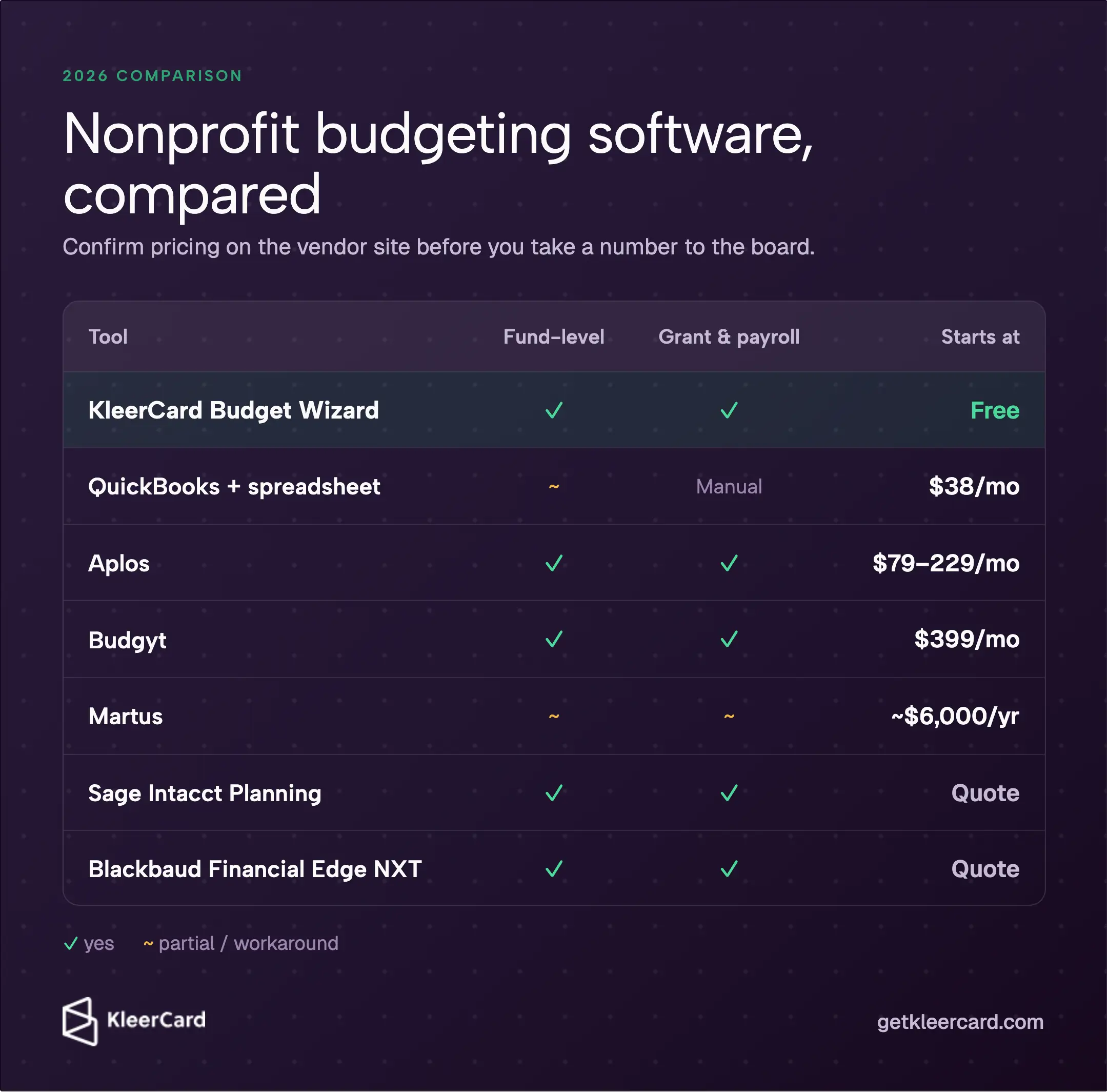
Prices move. Confirm them on the vendor site before you take a number to the board.
I left a few names off on purpose. Cube, Vena, Datarails, and Limelight show up in generic FP and A roundups. Xero shows up in small-business lists. They can hold a budget. They are not built around fund and grant reporting, so they are a poor first shortlist for most nonprofits.
KleerCard Budget Wizard is on the table because it helps you build the plan. Budget owners each fill in their own numbers against a chart of accounts you control. Reminders go out on a due date you set. You export one combined file for review and approval. It will not compare the plan to live actuals in the ledger (yet). Use it when the annual cycle is stuck in a group spreadsheet.
Givefront is free and will tag expenses by fund or grant. I would treat it as light tagging, not as a replacement for Aplos or Budgyt.
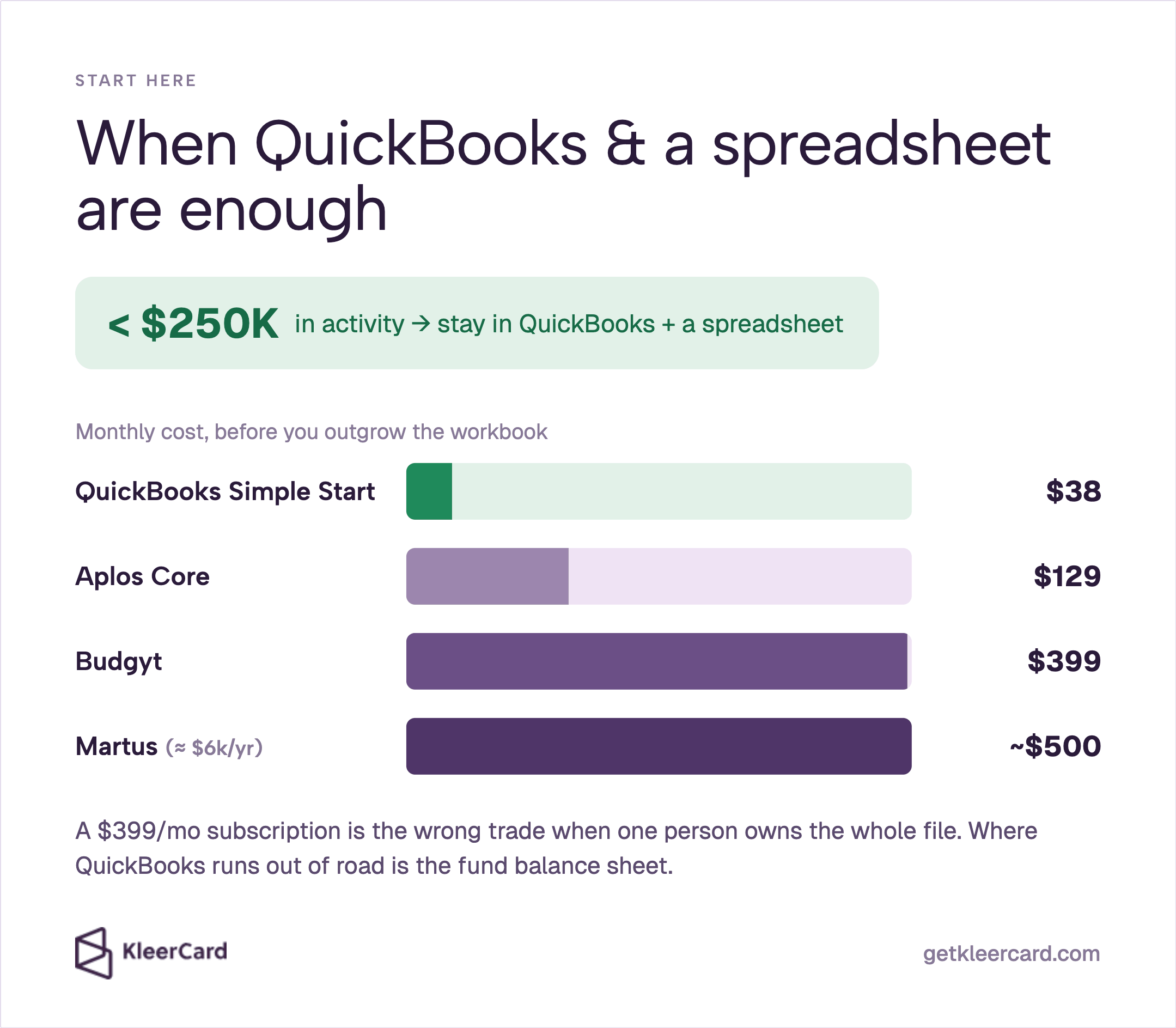
This is still the right starting point for a lot of small shops. QuickBooks Online includes a basic budget, and classes can stand in for funds when restrictions are simple. Pair that with a workbook that keeps restricted lines away from unrestricted operations, and you can run a board meeting.
Intuit current plans start at $38 a month for Simple Start.
Where QuickBooks runs out of road is the balance sheet. If you need to see cash in the building fund and cash in the general fund on the same morning, classes will not give you that. I export a balance sheet at St. Johns and subtract restricted balances in Excel so the board is not looking at cash we cannot spend. A $1,000 building-fund gift looks like profit and like cash. It still cannot pay the electric bill. Intuit fund-accounting help walks through classes and then sends you to Profit and Loss by Class, not to a fund balance sheet.
Wave is free bookkeeping. It is not a fund-level planning tool.
A dedicated planning subscription at $399 a month or $6,000 a year is usually the wrong trade when one person owns the whole file. Cleaning up the chart of accounts does more for that team than a new logo on the budget.
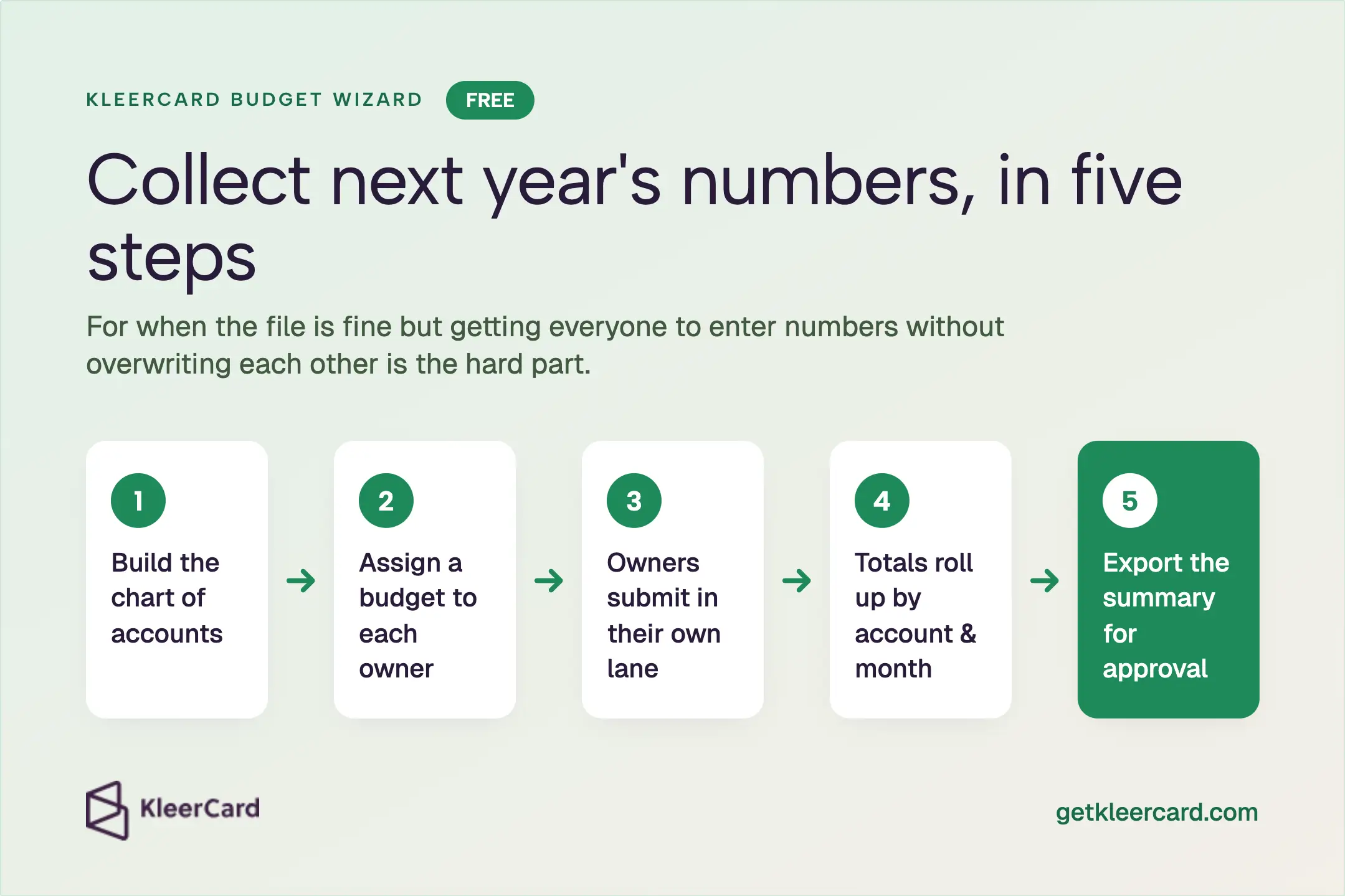
A spreadsheet fails in two different ways. Sometimes the formulas cannot hold funds and grants. Sometimes the file is fine and the problem is getting eight ministry leaders to enter numbers without overwriting each other.
KleerCard Budget Wizard is aimed at the second problem. It is free. You import or build the chart of accounts, assign a budget to an owner, and they submit in their own lane. Nobody else can add lines. The totals roll up by account and by month. You download the summary when you are ready for the board or church council review.
That is useful at the end of the annual cycle, when you need input, a clean export, and a yes from the people who have to live with the numbers.
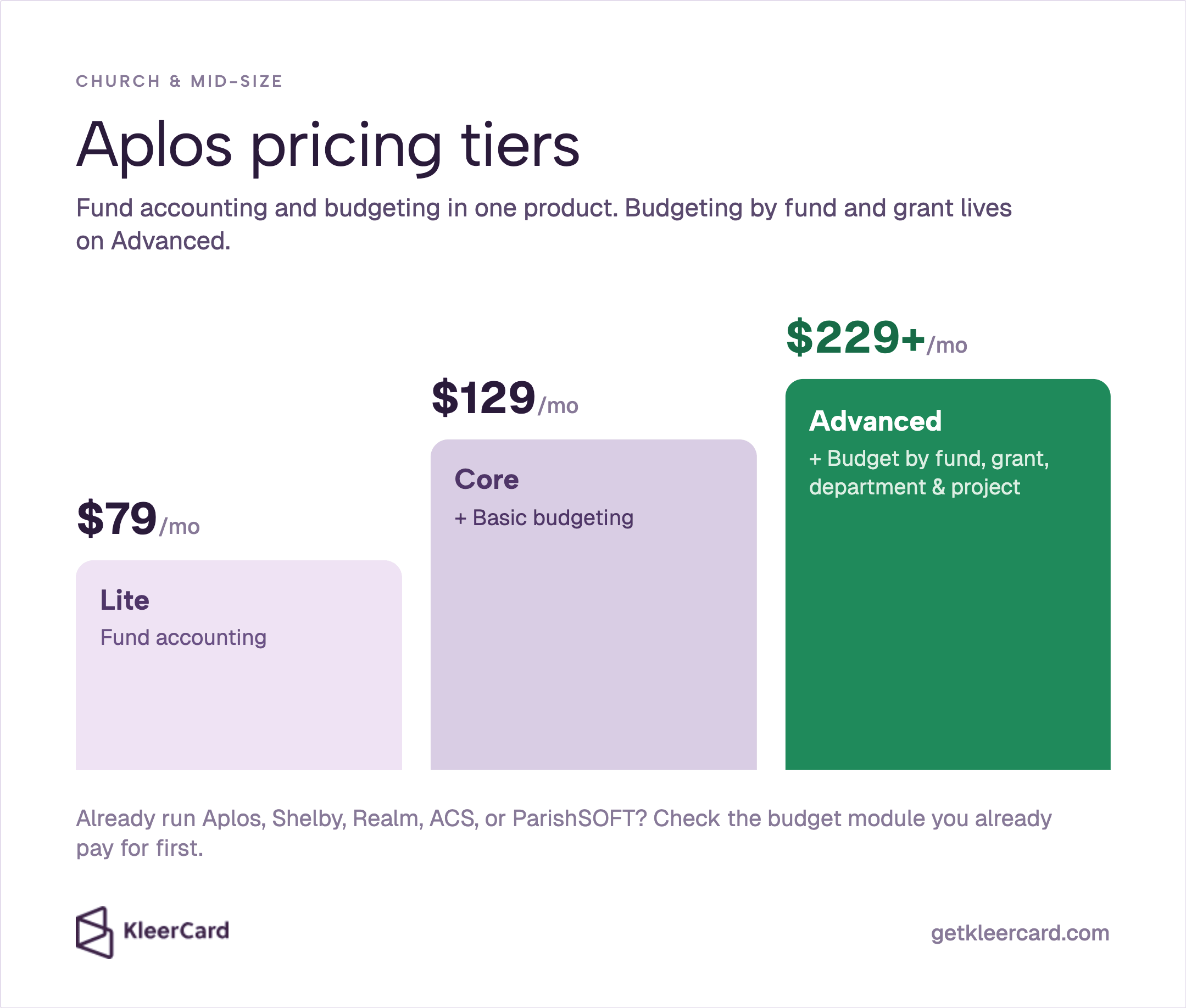
If you already run Aplos, Shelby, Realm, ACS Technologies, or ParishSOFT, look at the budget module you already pay for before you add a separate planning product. For many congregations that module solves the problem.
Aplos is the cleanest published-price option I know when you want true fund accounting and budgeting in one product. Core includes basic budgeting. Advanced adds budgeting by fund, grant, department, or project. Confirm the current map on Aplos pricing, because Advanced is now quoted from $229 a month rather than as a single sticker price.
If the open question is the ledger itself, that is a different tool. Use a church accounting software comparison rather than this page.
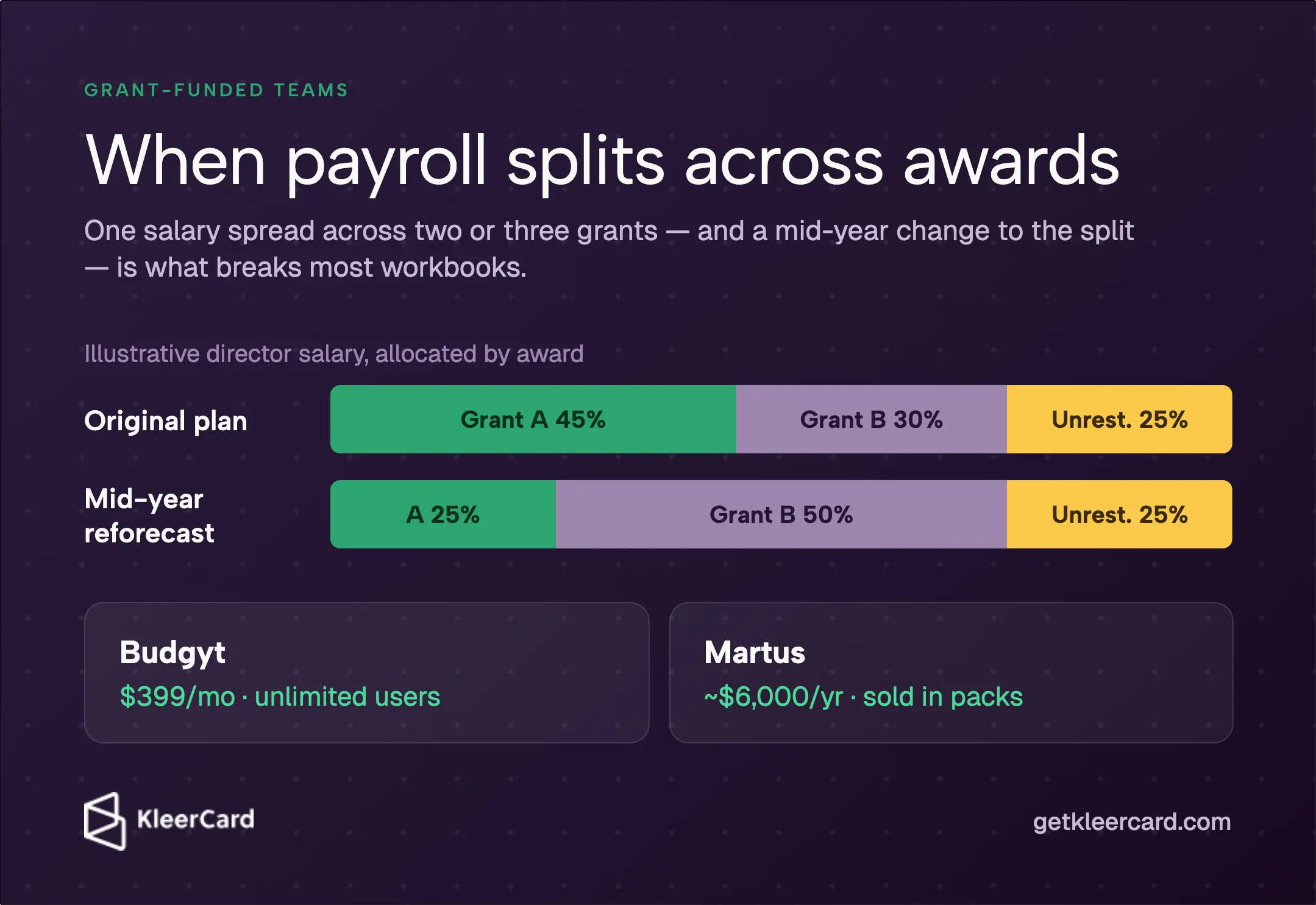
This is the case where a dedicated tool is easiest to defend. Payroll split across two or three awards, and a mid-year grant that changes the split, is what breaks most workbooks.
Budgyt publishes a nonprofit plan at $399 a month with unlimited users and grant-aware payroll allocation. G2 reviews sit near 4.8. I have not implemented Budgyt myself. I have implemented Financial Edge, and the jobs that made that work worthwhile were grant tracking and mid-year reforecasts.
Martus starts near $6,000 a year and sells users in packs. Both products sync with common ledgers. Neither one is the accounting system.
If federal awards expended will cross $1 million in a fiscal year, ask your auditor whether your planning file needs to support a Single Audit trail. That threshold is awards expended, not awards received. I would not buy software on that sentence alone.
Sage Intacct Planning and Blackbaud Financial Edge NXT belong with organizations that already have finance staff and already live in those platforms. They can hold dimensions, allocations, and multi-entity consolidations. However, their pricing often lands in the tens of thousands of dollars a year.
If you are not already on Intacct or Blackbaud, I would not start there just to get a nicer budget worksheet.
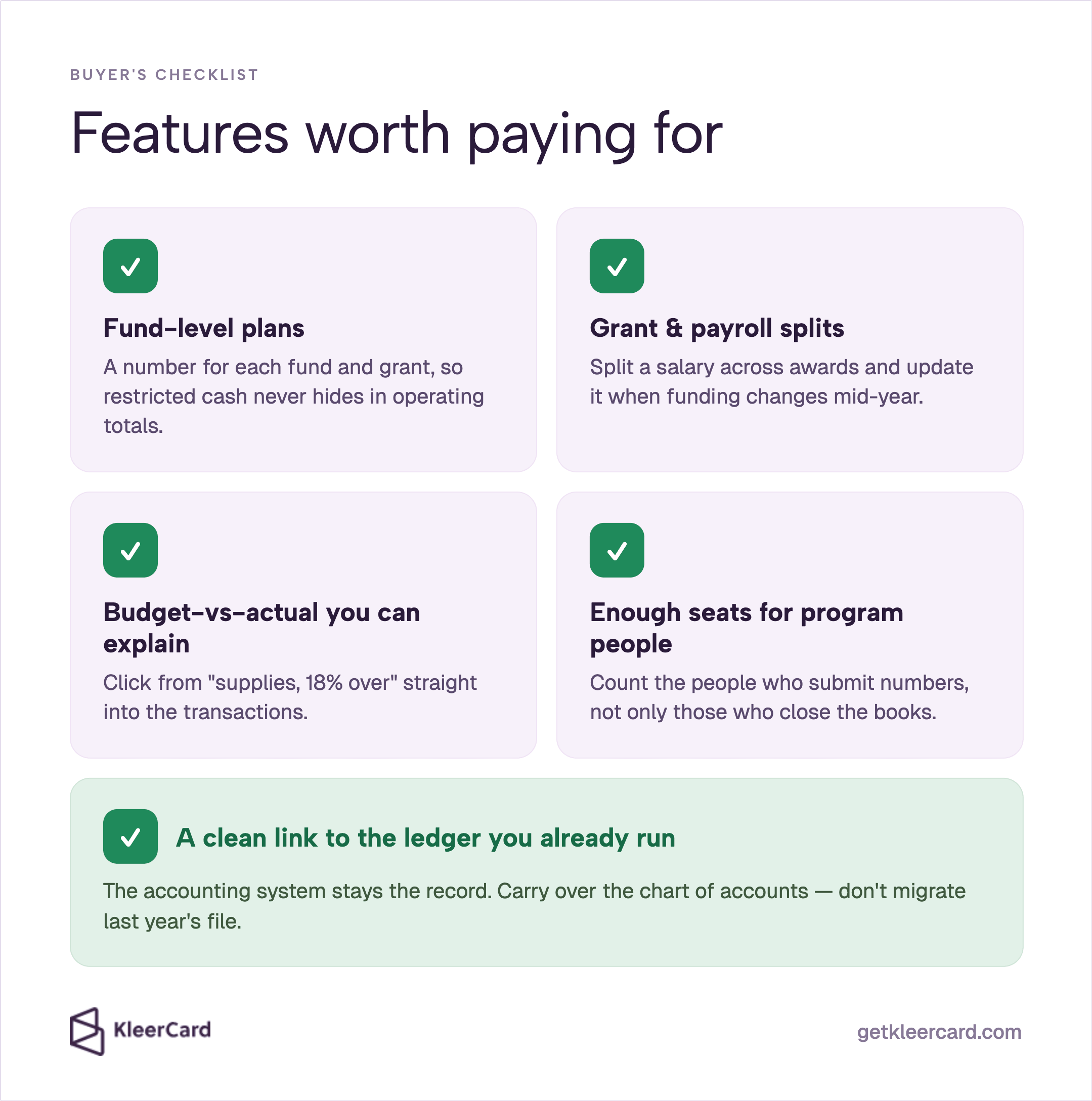
Fund-level plans. If the budget cannot be sliced by fund, restricted cash hides inside operating totals. You want a number for the general fund, the building fund, the scholarship fund, and each active grant, using the same chart of accounts. If that chart already has four near-duplicate classroom-supplies accounts, the planning tool will inherit the mess. One supplies account plus a program or campus dimension is cleaner. Day-to-day coding of restricted lines is covered in how to track restricted funds.
Grant and payroll splits. Grant-funded organizations spend most of the budget on people. The tool has to split a salary across awards and update that split when funding changes. Spreadsheets can do this. Spreadsheets also break. Pay for the feature when a mid-year change currently costs you a week of formula repair.
Budget versus actuals you can explain. A variance with no drill-down ends the board conversation. You want to click from “classroom supplies, 18% over” into the transactions, and that only works if actuals arrive during the month.
Enough seats that program people can enter numbers. If every extra user costs money, finance keeps program directors out of the file and then wonders why the inputs are late. Flat-rate or department-based pricing fits churches and schools that involve a lot of part-time leaders once a year. Count the people who submit numbers, not only the people who close the books.
A clean link to the ledger you already run. The accounting system stays the record. You do not need to migrate last year planning file. Carry over the chart of accounts and, if you use it, the vendor list. I would not tie the ledger to a student information system or a tuition platform just because a salesperson offered a bundle.
A private Christian school I work with runs Shelby for the books, FACTS on the student side, and Paycom for payroll. That split is what let them change how staff spend money without rebuilding the chart of accounts. It works for them, but is a bit complicated for many of the nonprofits we work with.
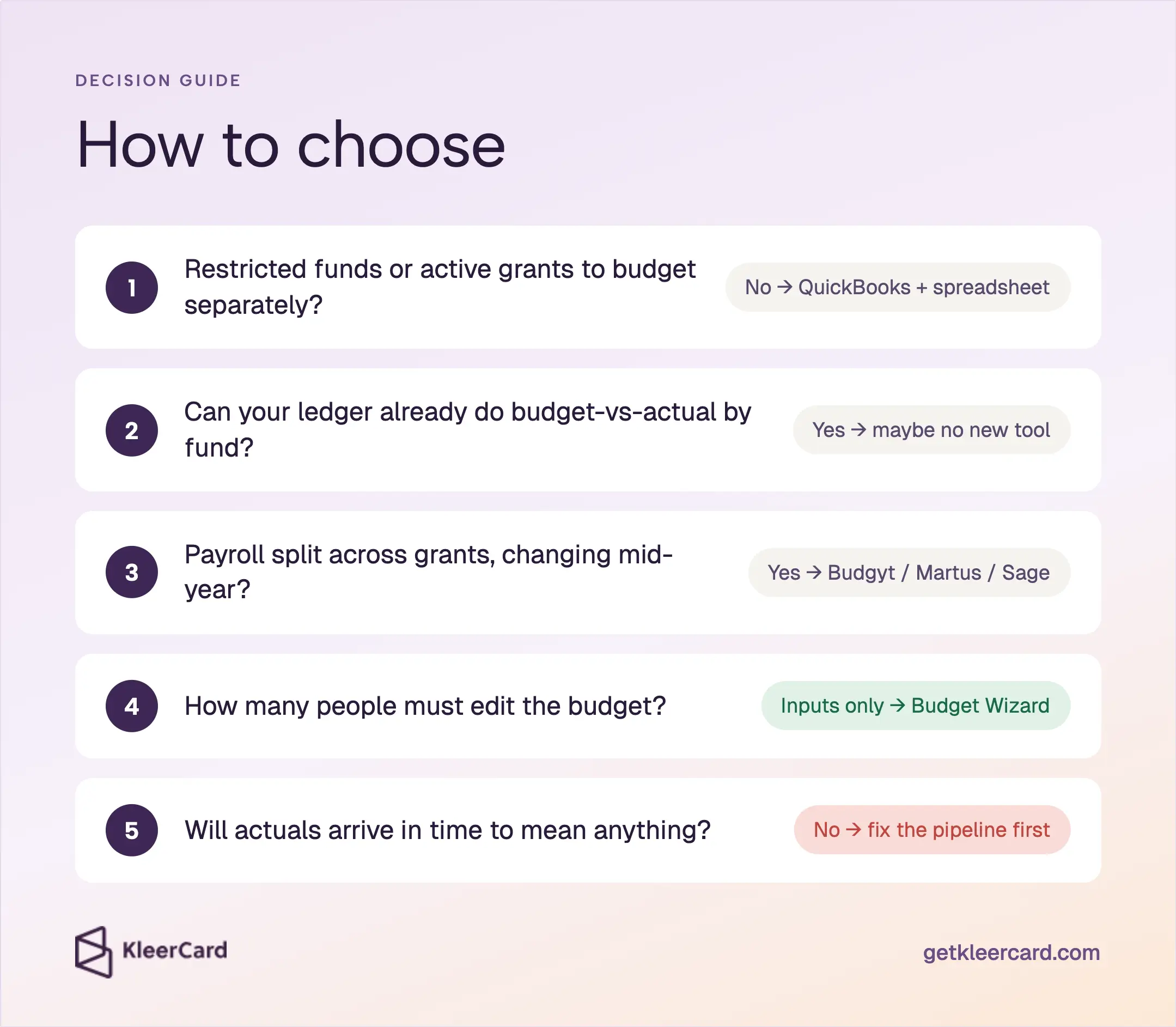
Give a new tool some overlap with the old file. Two months is a comfortable window. Six weeks can work if someone owns the cutover.
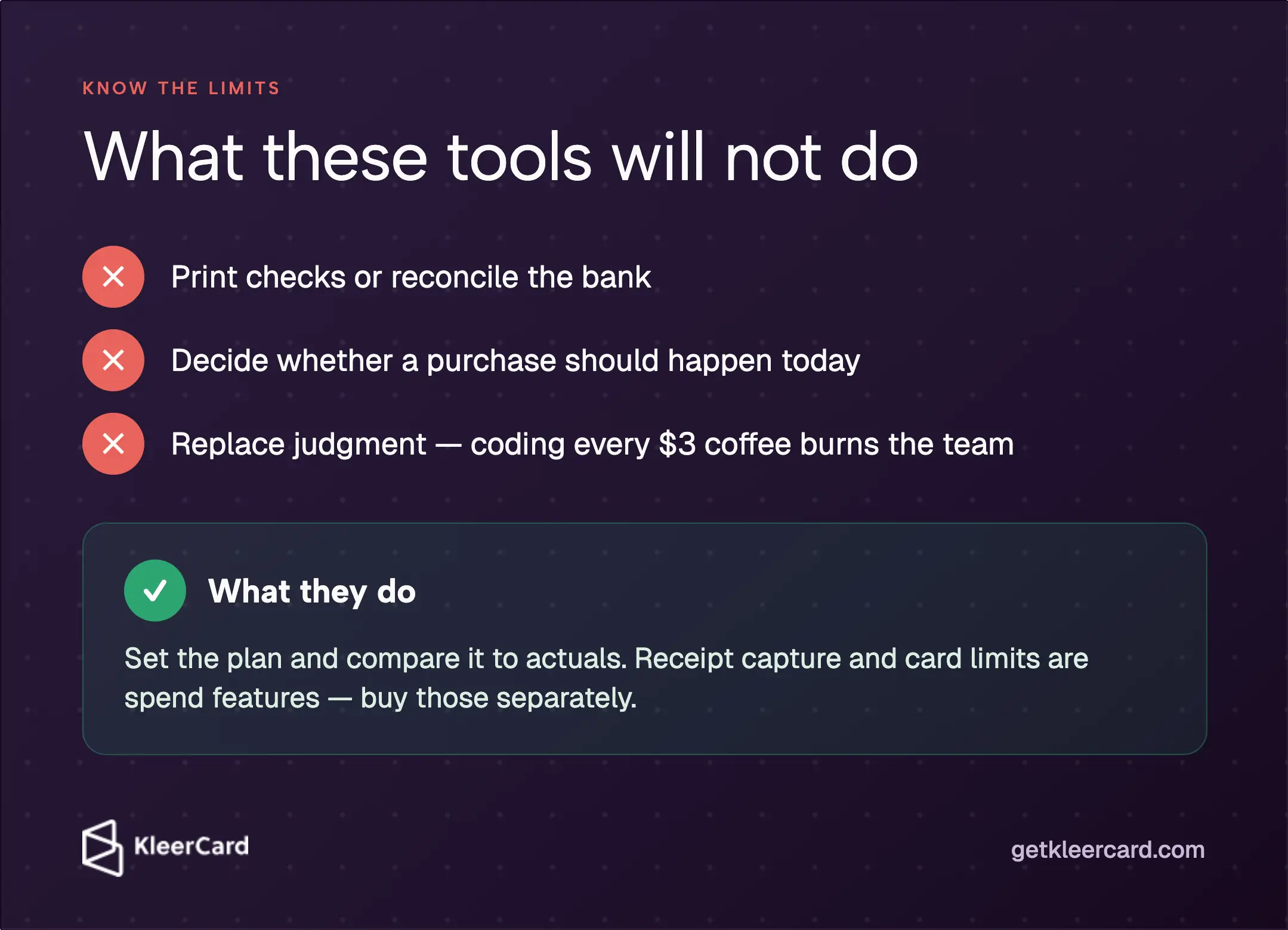
They will not print checks, reconcile the bank, or decide whether a purchase should happen this afternoon. They will not replace judgment either. Coding every $3 coffee to its own vendor and purpose burns the team and still produces reports nobody uses. High-level buckets that match the decisions the board actually makes are enough for most lines.
I work on the spend side of this problem at KleerCard. If the plan is already clear and the year still runs hot, that is usually where I look first. It is a different purchase than the ones in the table above.
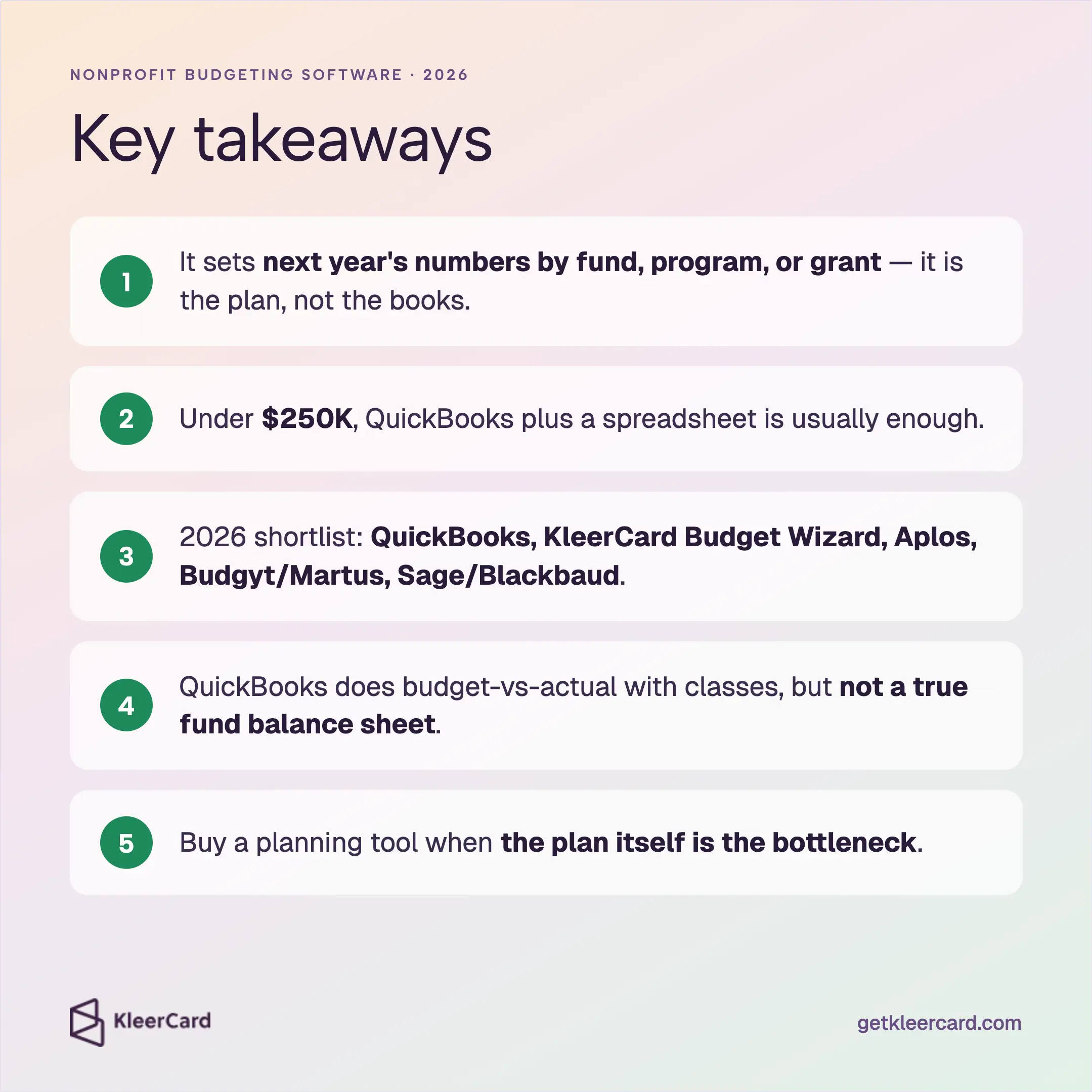
There is not one answer. Under about $250,000, QuickBooks plus a spreadsheet is enough for most teams. Grant-funded shops that split payroll should look at Budgyt or Martus. Churches often stay inside Aplos or whatever ledger they already run.
A careful spreadsheet plus the budget module already inside your ledger. If several people have to submit next year numbers, KleerCard Budget Wizard is a free way to collect those inputs, export the file, and get approval without passing around one workbook. Givefront will tag spend by fund or grant if you also want that. Wave is free bookkeeping, not fund-level planning. The paid FP and A tools in this category start in the hundreds of dollars a month.
Accounting software is the system of record for transactions, funds, and statements. Budgeting software is the planning layer: next year numbers, and the comparison to actuals. Many ledgers include a basic budget module. Dedicated tools add collaboration, grant allocation, and reforecasting that a ledger was never designed to do.
It works for simple organizations. You can build budgets and track programs or funds with classes. It will not produce a true per-fund balance sheet. Pair it with a clean chart of accounts if restrictions matter.
No. QuickBooks, Aplos, Sage Intacct, or Financial Edge still records the transactions. The planning tool sets the numbers and compares them to those actuals.
Match the subscription to the complexity you actually have. Under about $250,000 in activity, stay in the ledger and a spreadsheet. Mid-size grant-funded teams pay $399 a month and up for dedicated planning. Enterprise modules on Sage Intacct or Blackbaud are quote-based and assume you have staff to run them.
Fund-level plans, budget-versus-actual reports that drill to transactions, grant and payroll allocation if you have awards, a link to the current ledger, and a way for program leaders to submit numbers without breaking the file. Receipt capture and card limits are spend features. Buy those separately if the planning product leaves them out.
Yes. Restricted gifts, program expenses, and board reporting show up in both places. Church teams often run Aplos, Shelby, Realm, or QuickBooks and need a usable budget module more than they need a new forecasting platform. Church budgeting is a separate process question.
Buy nonprofit budgeting software when the plan itself is the hard part - too many departments, too many grants, or a workbook that no longer survives contact with payroll. If the plan is already clear, you probably do not need another platform.
If you want help thinking through that split, schedule a time and we can look at the file you already have.


Speak to a member of our team and we can have you up and running in minutes, not weeks.