%202.svg)
QuickBooks Online cannot run a true fund balance sheet. Here is why, what churches and schools do instead, and when the workaround is still the right call.
At my church, a $1,000 gift restricted to the building fund shows up in QuickBooks Online as both cash and profit. The money is sitting in the bank.
On the profit-and-loss report, the gift looks spendable on utilities or payroll. The church cannot spend it that way.
QuickBooks Online cannot produce a balance sheet that isolates that fund. Every month I export the statement of financial position to Excel and subtract the restricted balances by hand so leadership can see what is actually available.
I am Owen Hill, co-founder of KleerCard and treasurer at my church. I have run church and school books on Blackbaud Financial Edge, Microsoft Great Plains, Xledger, QuickBooks Online, and QuickBooks Desktop. Before KleerCard I served as Budget Director at Compassion International and ran Switch Consulting, a fractional CFO practice for nonprofits.
Wherever QuickBooks Online is the general ledger, classes and sub-accounts can approximate activity by fund. They cannot produce a true fund balance sheet.
This article explains the mechanism behind that reporting gap, the five workarounds churches and schools actually use, what each one costs, and when staying on QuickBooks is still the rational call. It also covers the school version of the same problem: a restricted scholarship or classroom budget that looks like operating surplus until someone does the math off-platform.
A fund balance sheet, often titled the statement of financial position by fund, is a snapshot of one restricted or unrestricted pool as of a specific date. It answers a question every treasurer gets in a board meeting: how much is left in the building fund, the scholarship fund, or the missions fund, and what claims sit against it.
How fund accounting works is simple in principle. Each restricted or unrestricted pool is a self-balancing ledger. Temporarily restricted gifts, such as a building campaign, and permanently restricted gifts, such as an endowment, stay solvent on their own, and spending stops when that pool is empty.
Church fund accounting exists because donor purpose creates a legal pool that the organization-wide profit figure cannot describe. Under FASB ASU 2016-14, not-for-profit statements of financial position present two net-asset classes: with donor restrictions and without donor restrictions.
A true fund balance sheet goes one level deeper. It shows the cash, receivables, payables, and remaining net assets that belong to a single purpose, not just the two-column nonprofit rollup.
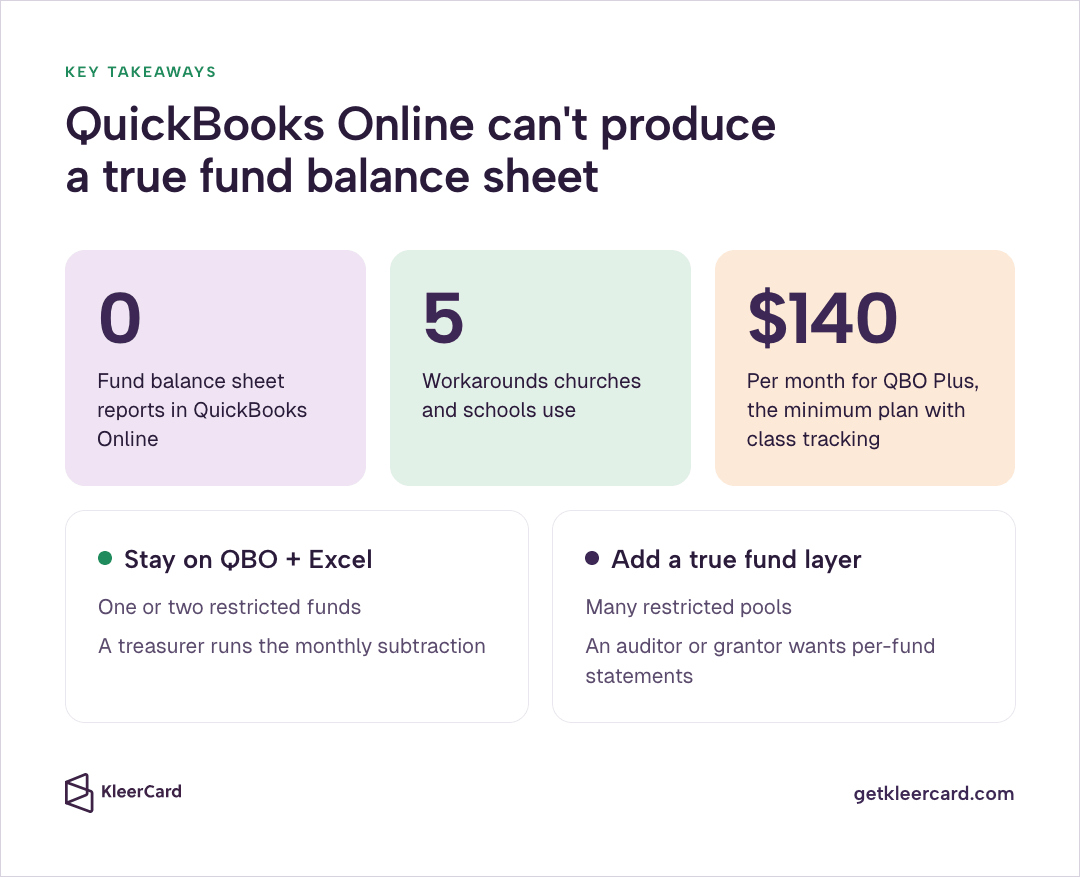
QuickBooks Online can produce an organization-wide balance sheet, which nonprofits often rename the Statement of Financial Position. That organization-wide report totals every account. It does not isolate one fund.
Profit and Loss by Class, sometimes called P&L by Class, can show revenue and expense for a class tagged as “Building.” It cannot show the building fund’s cash, payables, or remaining net assets as a self-balancing set of books.
| Report | What it answers | What QBO can produce |
|---|---|---|
| Organization balance sheet / Statement of Financial Position | What the whole church or school owns and owes today | Yes, standard report |
| Profit and Loss by Class | Income and expense tagged to a class this period | Yes, on Plus and Advanced |
| Fund balance sheet | Assets, liabilities, and net assets for one fund as of a date | No, not in QuickBooks Online |
| Statement of Activities by restriction | Revenue, releases, and expenses in with/without donor-restriction columns | Approximate only, after export and rebuild |
When leadership asks “how much do we have left in the building fund,” the answer should take seconds. On QuickBooks Online it takes an export and a formula.
Churches still have to present a full statement set to the board even when QuickBooks Online cannot produce a fund balance sheet. See the church accounting guide and the nonprofit financial statements walkthrough. The journal entry when a restricted gift first hits cash sits in debits and credits.
Church fund accounting is the practice behind those statements. For the month-to-month discipline after a gift posts, see how to track restricted funds.

QuickBooks Online cannot produce a true fund balance sheet. A balance sheet in QBO is built from account headers on the chart of accounts. Classes attach only to transaction lines. Because those headers are not linked to classes, QBO cannot filter the Statement of Financial Position by fund.
That limit is not a rumor from competing software vendors. Intuit’s own support team has said it in the community and in the current Balance Sheet by class or location article (updated August 5, 2026).
You cannot filter the Balance Sheet report by class, because the report uses header data while classes live on transaction details. Displaying columns by class is possible and inaccurate. Header accounts such as Accounts Receivable and Accounts Payable land under “Not Specified.”
In the current fund accounting help article, Intuit walks churches and nonprofits through class tracking and bank sub-accounts, then tells them to run Profit and Loss by Class. That help article never offers a Balance Sheet by Class for QBO.
The same Intuit article defines fund accounting as a method that stops spending when a fund is empty. Classes do not do that. A teacher or facilities director can still code a charge to a class whose remaining balance is already zero.
Location tracking is a partial exception. Location can sit on both the header and the detail of a transaction, so some QBO files can display a balance sheet by location. That location view helps a two-campus church see campus-level cash.
Location tracking does not turn a class named “Building Fund” into a fund ledger. Restricted gifts limit purpose. Location tracking is for campuses and sites.
QuickBooks Online still cannot produce a true fund balance sheet from a location column.
QuickBooks Desktop is different and still not a clean answer. Desktop Premier and Enterprise include a Balance Sheet by Class report. Intuit flags that Desktop report as an advanced report that recalculates class allocations every time it runs and can show unexpected results.
Journal entries that do not balance by class, paychecks split across classes, and multi-currency transactions all create “unbalanced classes” and unclassified amounts. Intuit documents those failures in its unsupported-transaction list (updated August 5, 2026). Churches that moved to Desktop to get the report often spend the next year cleaning those unclassified buckets.
The design limit is older than any current pricing page. QuickBooks was built for a business with one pool of equity. A church or school needs many pools that must stay solvent on their own. Classes are labels. Funds are ledgers. Labels cannot do the work of ledgers.
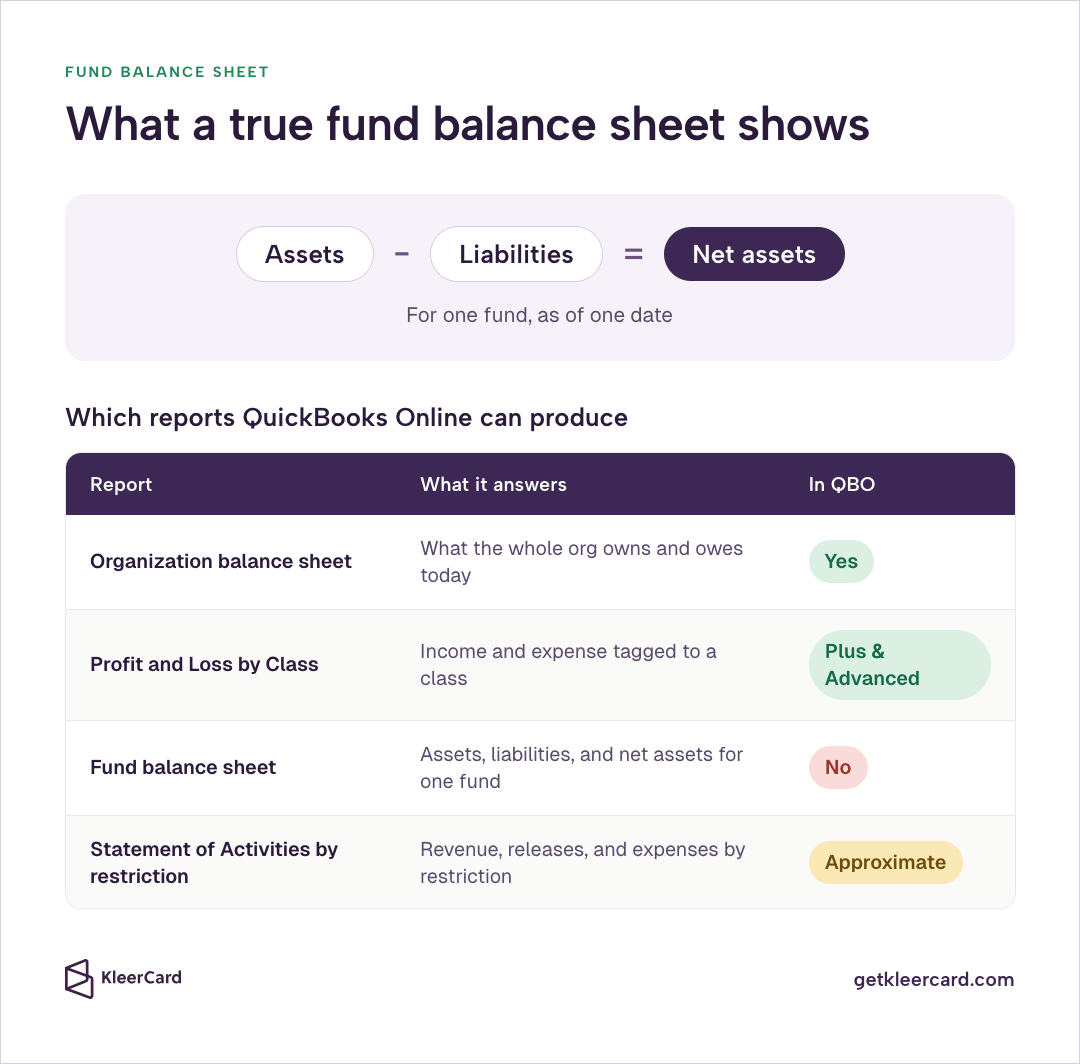
Class tracking is available only on QuickBooks Online Plus and Advanced. Intuit’s class-tracking guide tells Simple Start and Essentials users to upgrade before they turn it on. Plus allows up to 40 combined classes and locations. Advanced allows unlimited classes.
That Plus requirement matters for the budget conversation. Simple Start remains $38 per month after the August 1, 2026 renewal changes. The class workaround that most “QBO can do fund accounting” articles describe lives on Plus, which moved to $140 per month for renewals on or after August 1, 2026, or Advanced at $340 per month, per Intuit’s price-change page.
A church that bought Simple Start because it was cheap does not have the class-tracking workaround until it pays for Plus.
Even on Plus, the official recipe is the same four steps Intuit publishes: turn on class tracking, create a class per fund, optionally add bank sub-accounts under one checking account, and run Profit and Loss by Class. That official recipe tracks activity.
That official recipe does not produce a QuickBooks Online fund balance sheet. It also does not enforce a spending limit when a fund is empty, or stop someone from coding a utility bill to the building class.
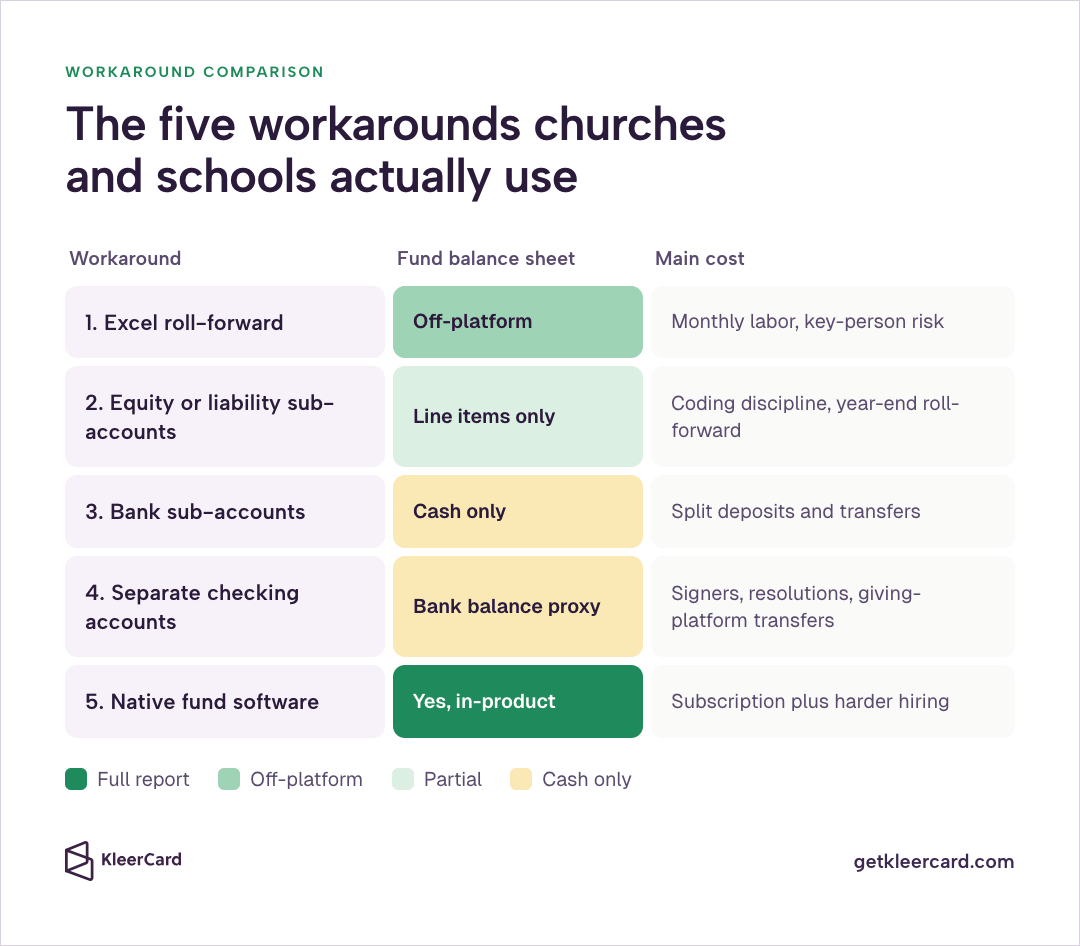
QuickBooks Online cannot produce a true fund balance sheet, so congregations and independent schools land on one of five patterns. The five patterns are a monthly Excel roll-forward, equity or liability sub-accounts, bank sub-accounts under one checking account, a separate checking account per fund, and a move to native fund software.
None of those five patterns is theoretical. Each one is a response to the missing QuickBooks Online report.
If spend control is the pain, schedule a demo.
This Excel roll-forward is the workaround I use at my church. Export the QBO balance sheet. Subtract every restricted balance by hand. Add a few lines at the bottom that say “available for operations” after the building fund, the missions fund, and any other restricted pool are pulled out.
On a $1,000 building-fund gift that the church did not spend that month, the export shows extra cash and extra surplus. The Excel lines pull that thousand out so the board is not looking at money the church cannot legally use for rent or a benevolence check.
The Excel method is honest and cheap. It also depends on a person remembering to do the subtract every month, using the same fund list, and catching gifts that posted to the wrong class.
When that bookkeeper is out, the board packet goes out with restricted cash still looking like operating surplus. I have seen that packet create a spending conversation the church could not legally finish.
The same monthly subtract is the core of how to track restricted funds when QuickBooks Online cannot produce the fund balance sheet.
QuickBooks Online still cannot produce a true fund balance sheet with equity or liability sub-accounts. What you get is line items on the organization-wide sheet.
Some bookkeepers create a parent net-asset or “other current liability” account named Restricted Funds, then nest a sub-account for Building, Missions, Benevolence, or Scholarships. Restricted gifts credit the sub-account instead of unrestricted contribution income. Spend against the purpose debits the same sub-account.
This sub-account layout is the cleanest in-QBO structure I see. The organization-wide balance sheet then lists each fund balance as its own line. The catch is discipline.
Every deposit and every disbursement has to hit the right sub-account. Year-end close still rolls activity into retained earnings unless you maintain a roll-forward. Releases from restriction, the entry volunteer treasurers miss, still have to be booked by hand.
For how those accounts should sit in a nonprofit chart, see the nonprofit chart of accounts structure.
Treating designated gifts as liabilities rather than net assets also diverges from current FASB presentation. The liability treatment can be a practical internal control. Auditors still want extra mapping before they will accept it as the statement of financial position.
Bank sub-accounts do not give QuickBooks Online a true fund balance sheet. The sub-accounts track cash claims only.
Intuit’s fund accounting help article recommends the pattern. Keep one real bank account. Create a QBO bank sub-account for each fund. Record deposits and withdrawals against the sub-account so the parent shows the combined cash.
Bank sub-accounts keep the bank reconciliation in one place, which is the right compliance instinct. The sub-accounts do not track that fund’s payables, prepaid expenses, or net assets.
The sub-accounts also break down the first time someone records a transfer, a split deposit, or an Amazon order that should hit two funds and forgets to split the line.
QuickBooks Online still cannot isolate net assets by purpose, so a separate checking account only proxies the fund. The bank balance stands in for the fund balance.
This separate-account workaround is the one most volunteer treasurers invent on their own, and I understand why. If the building fund has its own bank account, the bank balance is the fund balance. No export required.
The operational cost shows up the first time a treasurer rotates off. Every account needs designated signers and a board resolution. The new treasurer has to visit the bank, get notarized, and wait on new checks or debit cards.
Most church giving platforms connect to a single operating account, so a restricted online gift still lands in general cash. Someone then logs into two or three banks and moves money with no approval trail.
When the credit card bill hits the operating account, someone has to transfer building-fund cash back to cover the portion that belonged to the campaign. That inter-account transfer has no card-level control and no receipt attached to the original swipe.
A related pattern is worse: a separate QuickBooks company file per fund. Totals then live in Excel. Interfund transfers get entered twice. Each file needs its own reconciliation. I have never seen that multi-file setup survive a treasurer handoff.
Aplos, Realm / ACS, ShelbyNext Financials, FACTS, ParishSOFT, PowerChurch, and Blackbaud Financial Edge NXT all produce a balance sheet by fund as a standard report. MIP Fund Accounting and Sage Intacct do the same for larger grant-heavy nonprofits.
We are also building KleerFi Accounting, a ledger specifically for fund accounting. It is in alpha testing. You can join the waitlist on that page.
Native fund software is what churches and schools use instead of a QuickBooks Online fund balance sheet, once the Excel roll-forward becomes a second ledger.
Aplos publishes a plain definition of fund balance as the net resources left in one fund after liabilities. QuickBooks Online has no equivalent report.
The trade is cost and staffing. Specialized church and school platforms often run from tens of dollars a month into the tens of thousands a year. Help is thinner. YouTube does not have a video for every click. A bookkeeper who knows QuickBooks is easier to hire than a bookkeeper who knows an obscure school suite.
I still recommend native fund software when you hold many restricted pools, take grant money that requires a per-fund statement, or have an auditor who will not accept an Excel subtraction.
Compare options in best accounting software for churches, best school accounting software, and nonprofit accounting software. The Aplos comparison lives in Aplos vs QuickBooks for churches.
| Workaround | Produces a fund balance sheet? | Main cost | Best fit |
|---|---|---|---|
| Excel roll-forward | Off-platform, yes | Monthly labor and key-person risk | Few restricted funds, QBO already in place |
| Equity or liability sub-accounts | Line items on the org-wide sheet | Coding discipline and year-end roll-forward | Bookkeeper who will maintain the structure |
| Bank sub-accounts | Cash only | Split deposits and transfers | One checking account, simple funds |
| Separate checking accounts | Bank balance as proxy | Signers, resolutions, giving-platform transfers | Very small orgs with two or three funds |
| Native fund software | Yes, in-product | Subscription plus harder hiring | Many funds, grants, or audit pressure |
QuickBooks Online cannot produce a true fund balance sheet for a scholarship or classroom budget any more than it can for a church building fund.
A private Christian school runs Shelby Financials for the general ledger and FACTS Financial Intelligence on the student side. Restricted fund types sit on their own accounts inside Shelby. The finance manager oversees inflow and outflow against those accounts.
Shelby is what that campus uses instead of forcing QuickBooks Online to be a fund ledger.
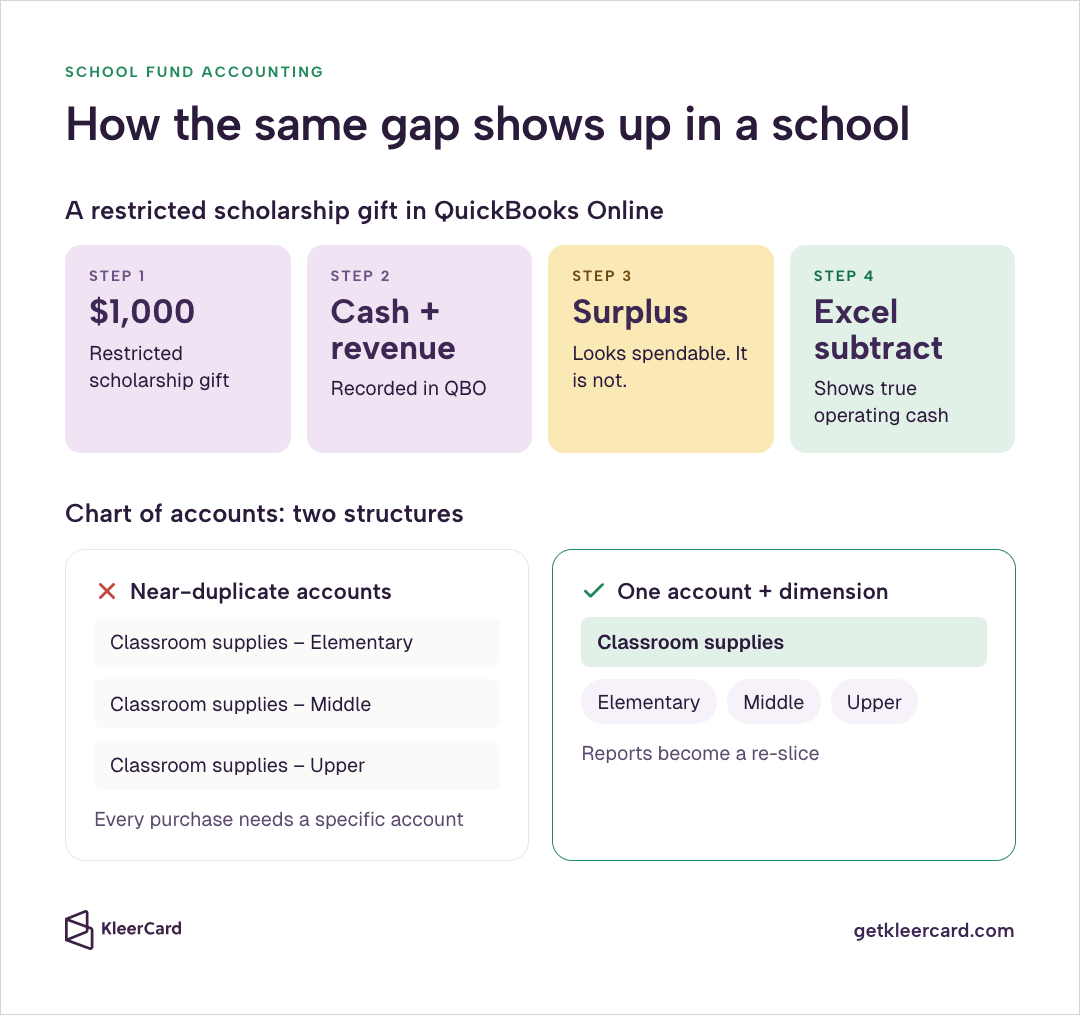
Schools that stay on QuickBooks Online hit the same reporting wall. A family gives $1,000 to a restricted scholarship. QBO records cash and revenue. The surplus looks spendable. It is not.
The business office exports the QuickBooks Online balance sheet and subtracts scholarship, capital, and designated classroom balances so the head of school can see operating cash.
A messy chart of accounts makes that QuickBooks Online export worse. Schools often create separate “classroom supplies” accounts for elementary, middle, and upper school. Every teacher purchase then has to be coded to a specific account.
The cleaner structure is one classroom-supplies account plus a dimension for school level. Reports become a re-slice rather than a custom build. The same rule applies to funds. One supplies account plus a fund or class dimension beats four near-duplicate accounts that still cannot produce a fund balance sheet.
Details on that chart structure sit in the nonprofit chart of accounts guide and in bookkeeping mistakes that waste time.
One more school-specific trap: tying the general ledger to the student information system or tuition platform. When accounting, tuition, and classroom tools share one vendor stack, finance cannot change the ledger without upending operations, and operations cannot change the SIS without rebuilding the financial back end.
Keep the ledger independent, whether that ledger is QBO with a workaround or Shelby with native funds.
That campus later changed the spend layer, from five shared cards to more than 60, without waiting on a new general ledger. The walkthrough is in the private Christian school case study.
The fund report and the card program are separate problems. Confusing them is how schools stay stuck.
White-glove setup kept that card program on the finance office instead of on teachers.

Most “ditch QuickBooks” articles skip this section. I will not.
QuickBooks Online is still the system I see in more churches than anything else. Bookkeepers and CPAs already know the product. Payroll connects. Bank feeds work. Third-party tools plug in.
For a small congregation with one or two restricted funds and a treasurer who will maintain an Excel roll-forward, QuickBooks Online Plus plus a monthly Excel subtract beats a specialized platform the church cannot staff.
I would rather work with a church that forces QBO to do 90 percent of the job and accepts a monthly subtraction than with a church that bought an obscure fund-accounting suite and cannot find anyone to run it.
At my church that still means the monthly Excel subtract on the building-fund gift. Accounting is a structured way of thinking about revenue and expenses. If a platform feels “special,” check whether the chart of accounts is over-built before you blame the software.
Move off QBO, or add a true fund layer, when any of these are true:
Until then, stay honest about the missing fund balance sheet, keep the Excel file, and put your energy into the part of the workflow QBO also does not manage: how money leaves the building.
QuickBooks Online still cannot produce a true fund balance sheet. KleerCard for churches, KleerCard for nonprofits, and KleerCard for schools sit on the spend layer. Those card products do not replace the general ledger. KleerFi Accounting is the fund-accounting ledger in alpha; join the waitlist there if you want to test it.
Coded card activity can land back in QBO through accounting sync without turning QuickBooks into fund software.
The ledger software decision itself belongs in the QuickBooks for churches review and the best accounting software for churches comparison.

A fund balance sheet tells you what is left. QuickBooks Online still cannot produce that report, and the report would not decide who can swipe a card against the remainder anyway.
The failure I see most often is a high-limit office card in a drawer, paired with a restricted budget that lives in a spreadsheet. A teacher or a facilities director has authority on paper and no practical way to spend it.
Those staff members front the cost, turn in a reimbursement, and finance reconstructs the fund coding from a faded receipt. Or they find the office card, which could as easily pay for a Tesla as for a toilet rebuild, and the drawer card was never a real control.
Running those reimbursements through payroll makes the close harder. Treat the person as a vendor and pay them separately.
The control that matches a fund restriction is a budget loaded onto a named card inside an expense management workflow. The named card cannot exceed the remaining authority. Receipts attach at the point of spend. Finance can see the same charge the cardholder sees.
The private Christian school on Shelby moved from five shared office cards to more than 60 named cards without changing its general ledger. Building-fund Amazon Business orders stop landing as a naked “Amazon.com” line when Amazon Business expense tracking already carries a cardholder, a receipt, and a fund code.
For the card decision itself, use the best credit card for churches comparison, credit cards for nonprofits with no personal guarantee, and the nonprofit credit card product page. Schools can start from best credit cards for school districts and KleerCard for educators.
The broader expense management platform is what holds the budget on the card. For the receipt and close workflow that makes the Excel roll-forward faster, see month-end close and receipt tracking.
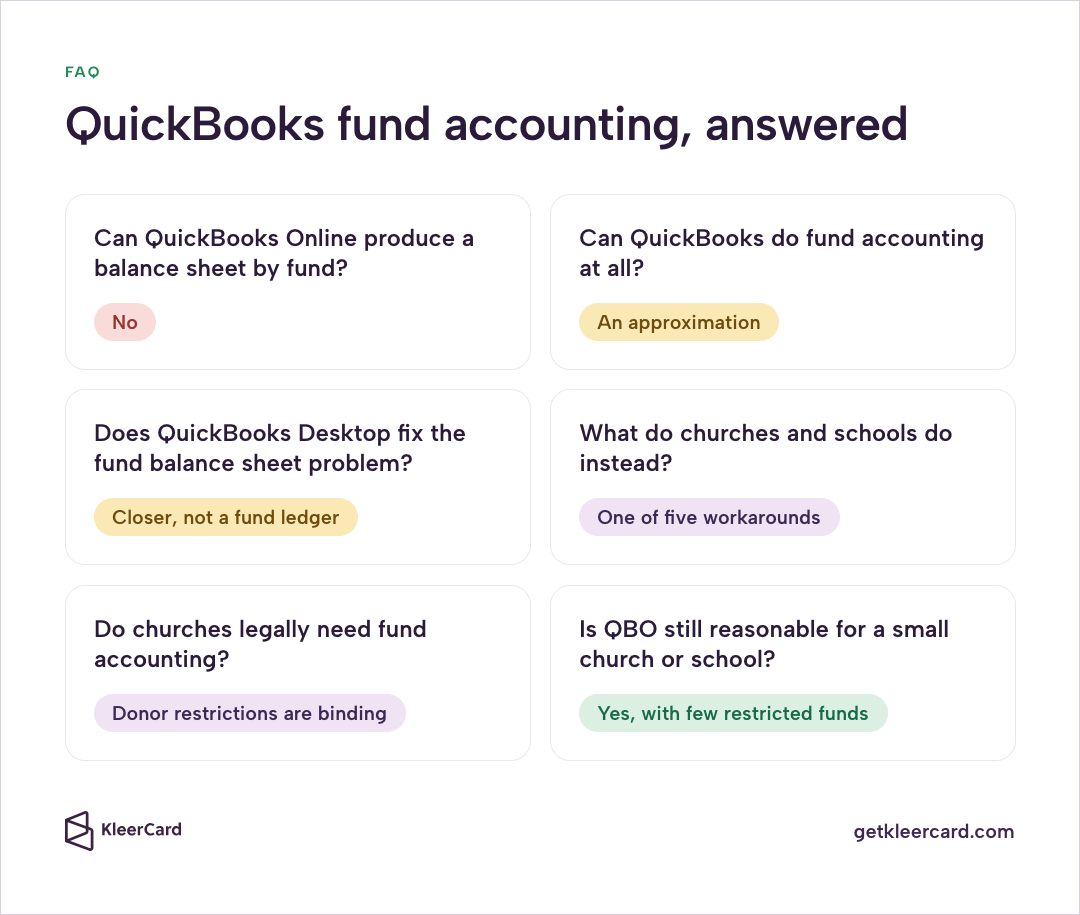
No. QuickBooks Online cannot produce a true fund balance sheet. The balance sheet is built from account headers. Classes attach only to transaction lines, so QBO cannot filter the Statement of Financial Position by fund. Intuit’s published workaround is Profit and Loss by Class plus optional bank sub-accounts.
Fund accounting in QuickBooks is an approximation. Turn on class tracking on Plus or Advanced, tag each transaction, and run Profit and Loss by Class. That P&L by Class report shows income and expense by fund for a period. It does not maintain a self-balancing ledger per fund, enforce a remaining balance at the point of spend, or produce FASB-style statements by restriction without export work.
Desktop Premier and Enterprise include Balance Sheet by Class. Intuit warns that the Desktop report recalculates allocations each time and can show unbalanced or unclassified amounts when journal entries, payroll, or multi-currency splits do not balance by class. The Desktop report is closer than QBO and still not a native fund ledger.
They export to Excel and subtract restricted balances, nest equity or liability sub-accounts, add bank sub-accounts under one checking account, open a separate checking account per fund, or move the ledger to native fund software such as Aplos, Shelby, FACTS, Realm, or Financial Edge. Separate bank accounts create signer and giving-platform problems. Native software produces the report and costs more to staff.
Donor-restricted gifts create a legal obligation to honor the purpose. State charitable trust rules sit on top of that duty.
So do IRS expectations for written acknowledgments on gifts of $250 or more. FASB ASU 2016-14 then requires the statement of financial position to present net assets with and without donor restrictions.
You can meet the spirit of those rules on QBO with a maintained workaround. You cannot point to a QBO fund balance sheet as proof. The practice itself is church fund accounting. The compliance layer sits in IRS rules for churches.
Yes, when restricted funds are few and someone will maintain the monthly subtraction or the sub-account structure. QBO remains the easiest system to staff. Move when grantors, auditors, or the number of restricted pools make the Excel file a second general ledger. Compare that call in the QuickBooks for churches review.
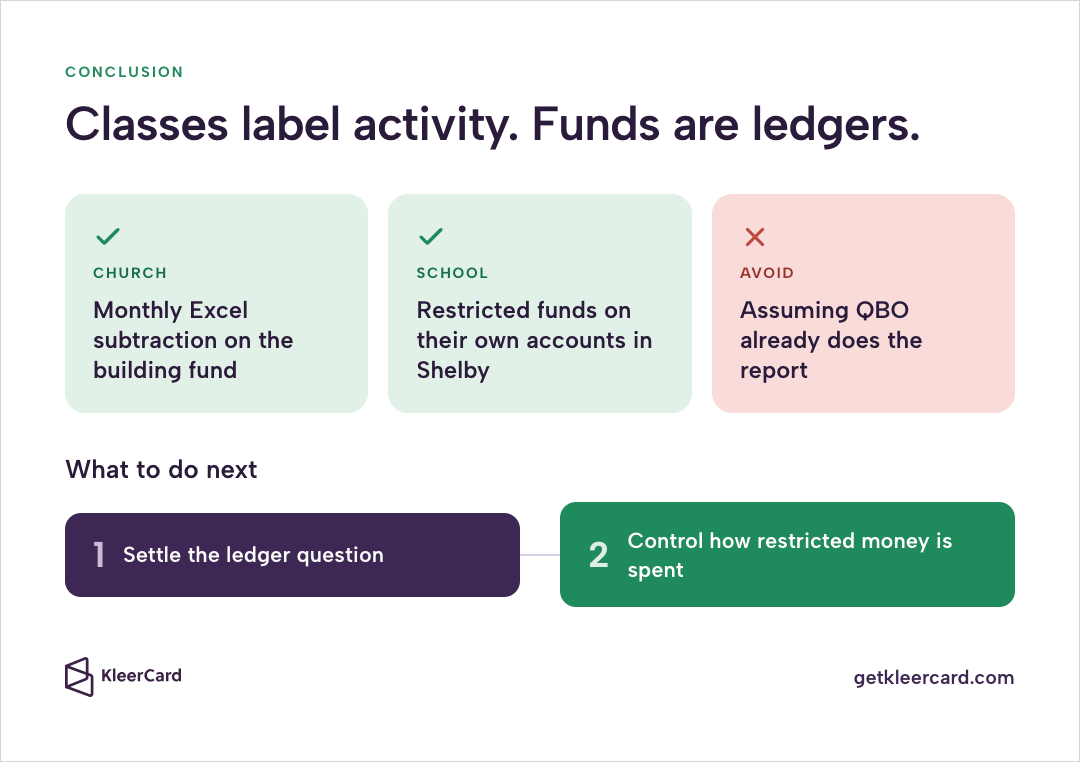
QuickBooks Online cannot produce a true fund balance sheet because the product was not built to treat funds as ledgers. Classes label activity. They do not own assets, liabilities, and net assets for a single purpose.
Intuit’s Balance Sheet by class article and fund accounting help article say the same thing. The honest responses are a maintained workaround, a move to native fund software, or both.
At my church the workaround is a monthly Excel subtraction on a $1,000 building-fund gift that otherwise looks like profit. At the school on Shelby, restricted fund types live on their own accounts instead. Both are valid. Pretending QBO already does the report is not.
Get the ledger question settled, then look at how restricted money is actually spent. Shared cards and reimbursements will undo a clean fund report faster than a missing software feature.
If you want help with that spend layer, schedule a demo, sign up, or review pricing.


Speak to a member of our team and we can have you up and running in minutes, not weeks.