%202.svg)
Missing receipts stretch month-end close into days. See how schools and churches drop lost receipts from 5 per week to under 5 in 7 months .
Month-end close stretches when receipts are missing. Finance teams spend days hunting paper, emails, and card statements instead of reviewing already-coded transactions.
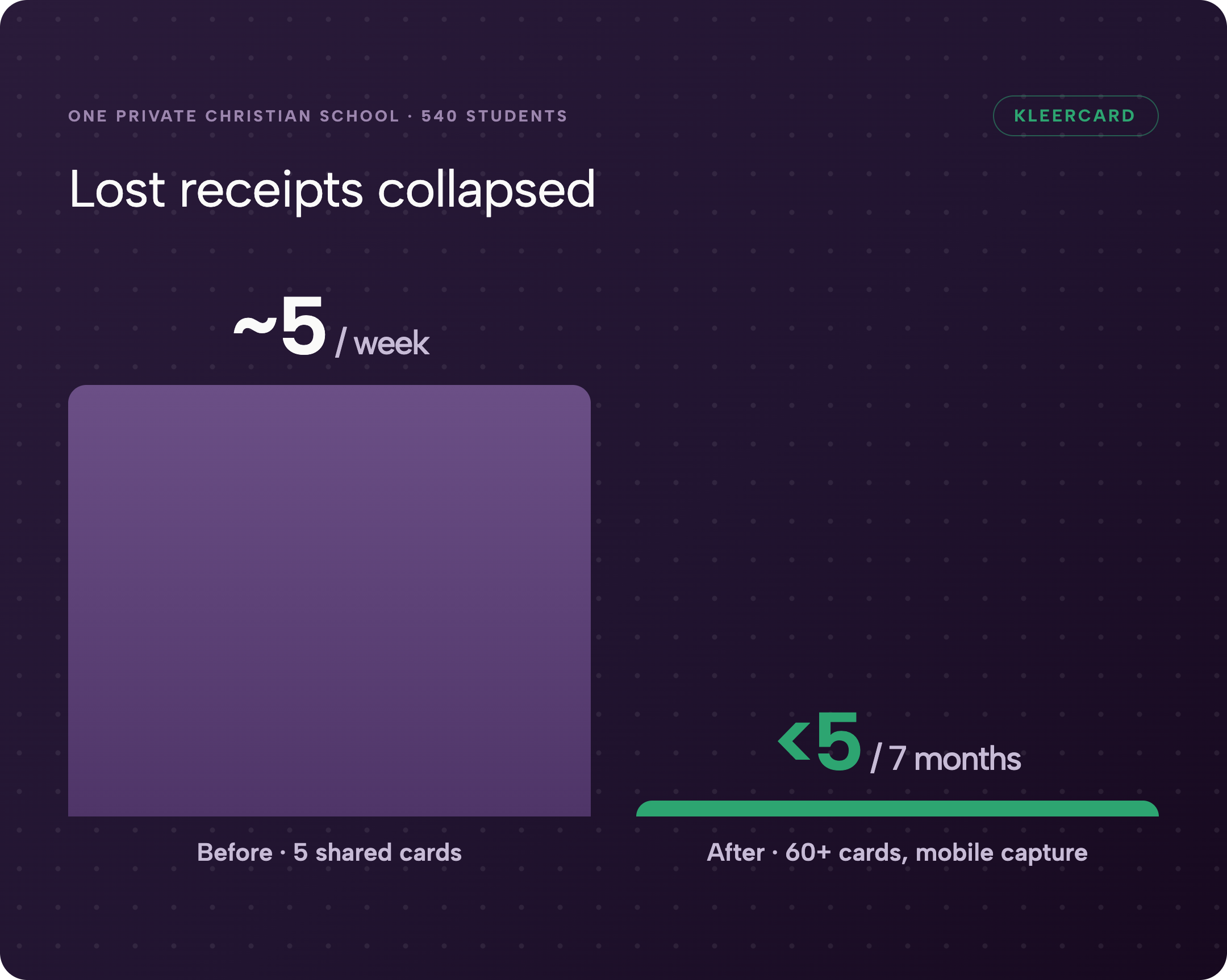
At one private Christian school with 540 students and about 100 staff, lost or chased receipts ran roughly five every week under a five-card shared system. After moving to more than 60 individual and loaner cards with mobile capture, the school recorded fewer than five lost receipts across seven months of the school year. Month-end credit-card review dropped from a lengthy statement process to a few minutes.
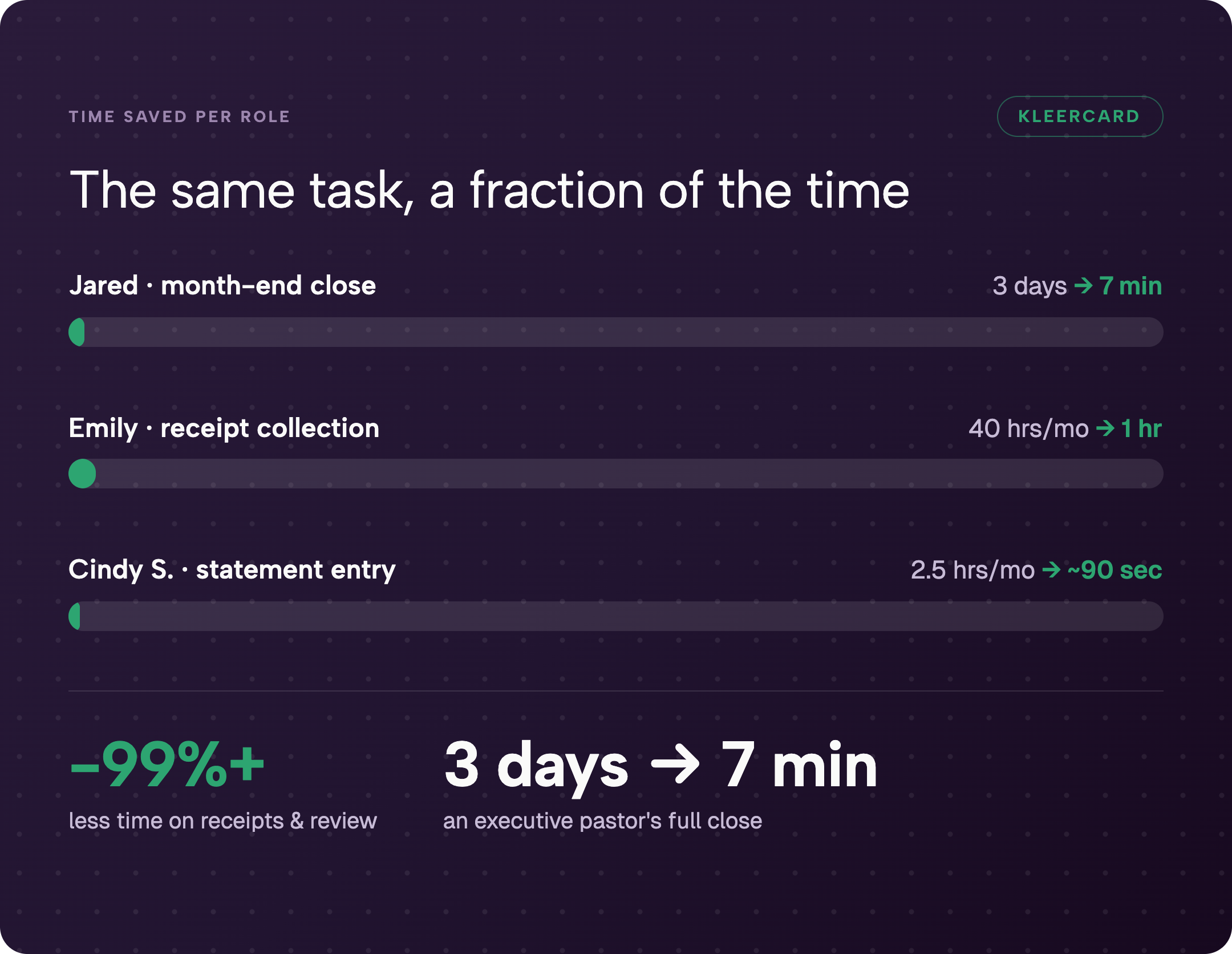
An executive pastor moved close from three days to seven minutes. A finance director cut receipt collection from forty hours a month to one hour in the first month. The pattern is consistent: capture the receipt and the coding at the moment of spend, and month-end becomes a review rather than a reconstruction.
I have seen this same friction across churches and nonprofits after years at Compassion International and Switch Consulting working with systems like Financial Edge, Great Plains, and QuickBooks. In those roles I watched finance teams spend days reconstructing documentation that could have been captured at the point of spend.
This guide walks through the month-end close process, shows why receipts are the most common bottleneck for nonprofits, churches, and schools, and lays out the practical changes that compress the timeline.
The month-end close process is the set of accounting tasks performed at the end of each month to review, reconcile, and finalize all financial transactions so accurate statements can be produced and the period locked.
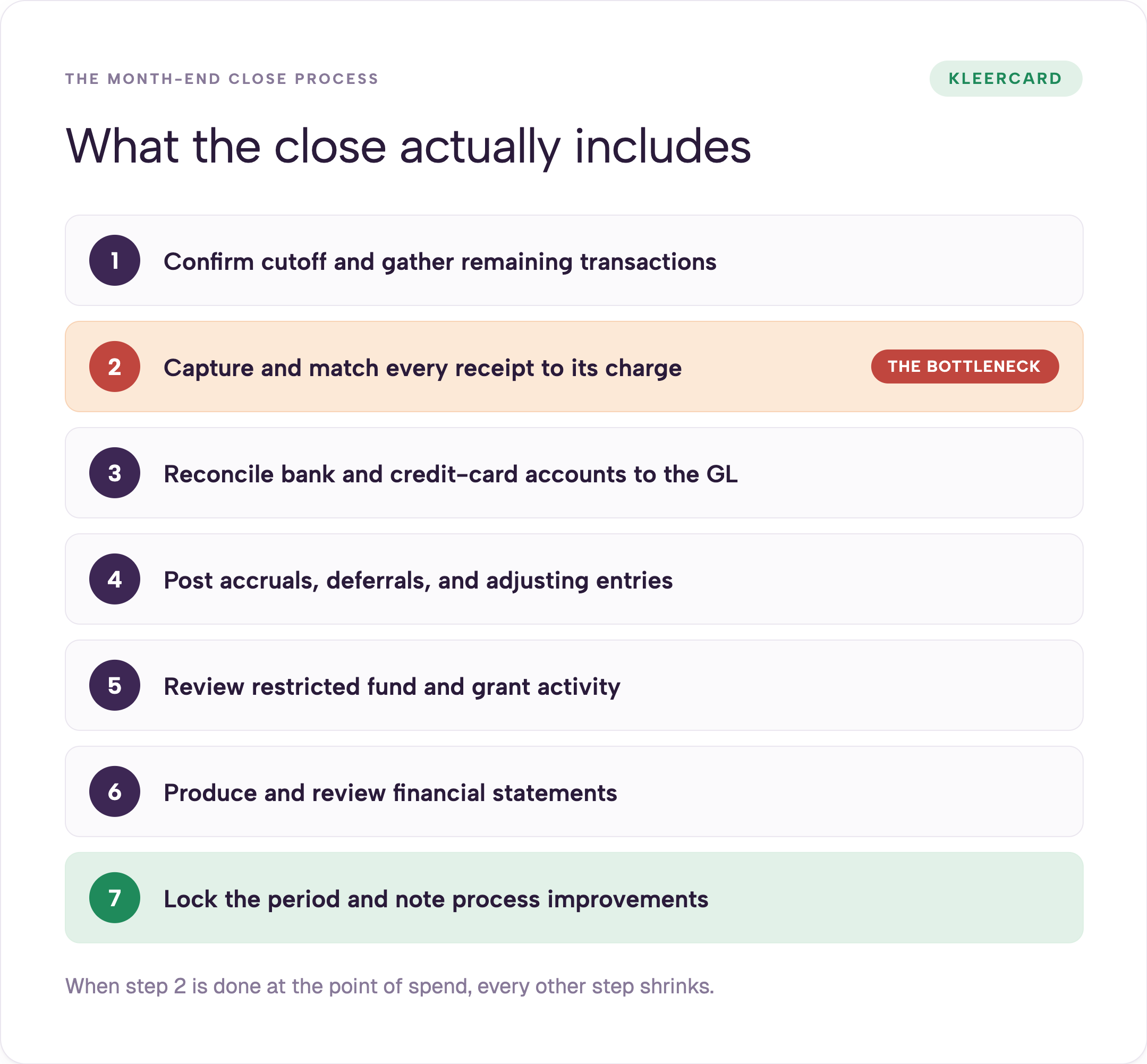
Core steps that appear across high-performing teams:
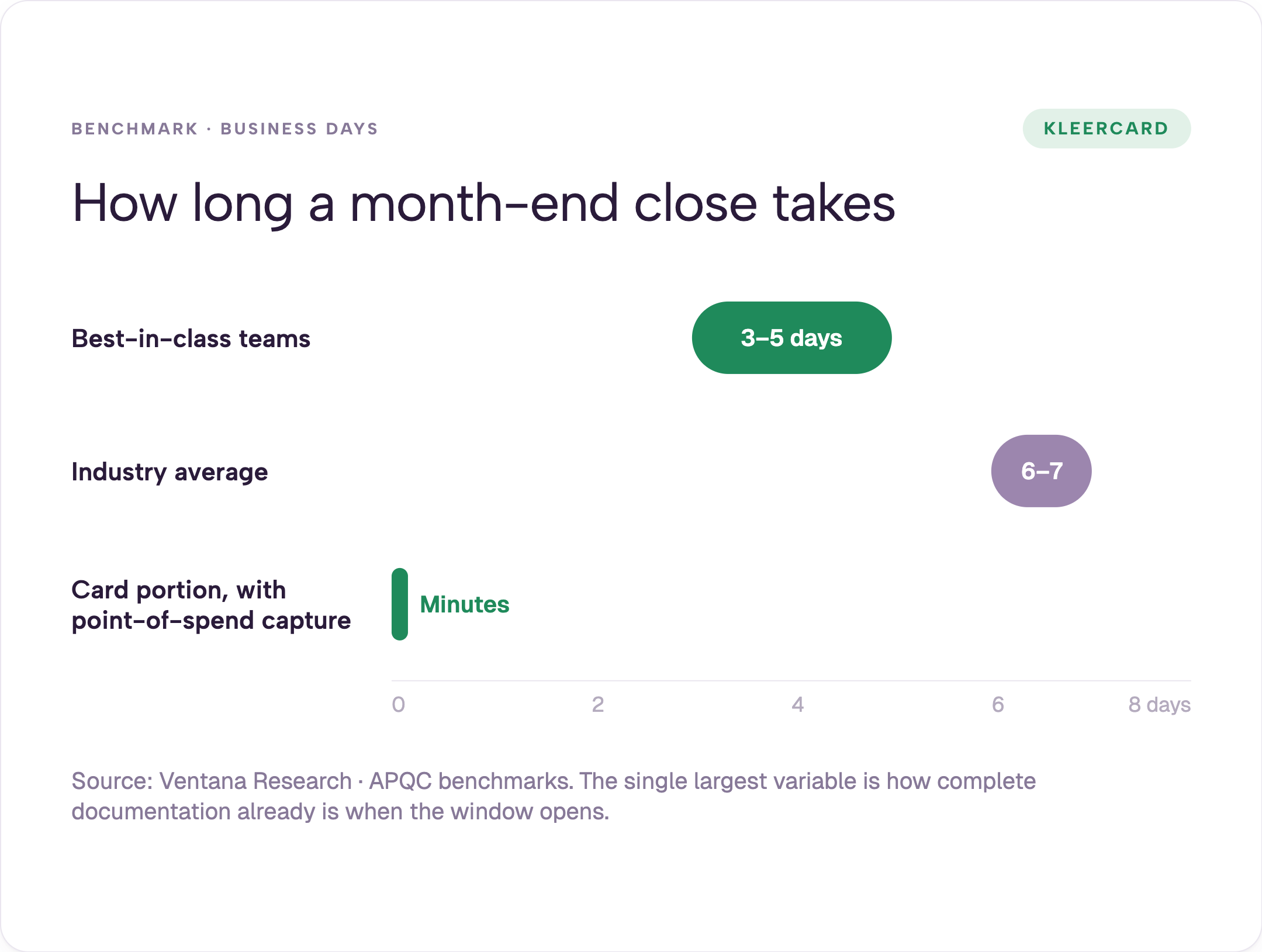
Best-in-class teams finish in three to five business days. Industry benchmarks from sources such as Ventana Research and APQC put the overall average closer to six to seven business days, with many smaller organizations taking longer. The single largest variable is how complete the documentation and coding already are when the close window opens.
When receipts and coding arrive throughout the month instead of in a final scramble, the rest of the list shrinks. That is the difference between a multi-day process and a short review. At the private Christian school with 540 students and about 100 staff, the weekly rhythm meant the final credit-card pass took only a few minutes once the documentation work was already finished. The same pattern appears when teams adopt receipt tracking that forces capture at the moment of spend.
Most checklists list “chase missing receipts” as one step. In practice it is the step that expands every other step.
Before the private Christian school with 540 students and about 100 staff changed its card system, teachers and staff often fronted purchases on personal cards because the five shared cards were already in use or hard to locate across two campuses. Reimbursement requests arrived in batches of ten or twelve at the deadline. Finance then spent hours matching those requests to statements and tracking down lost paper.
Amazon charges were especially painful. The statement showed only “Amazon” and an amount. Finance had to locate the order, identify the buyer, and assign the correct program or fund.
After the switch, the private Christian school with 540 students and about 100 staff saw lost receipts fall from roughly five per week to fewer than five total over seven months. The maintenance director no longer hunted for a card to buy parts at Home Depot. He used his own card, photographed the receipt on the spot, and uploaded it. Lower-school administrators ordered tablecloths and event supplies on Amazon and the line-item detail arrived already attached to their card.
Cindy S., a finance manager at a multi-ministry church using Shelby, previously spent 2.5 hours each month on manual statement entry. After the data arrived already coded, that work dropped to roughly ninety seconds. Emily, an HR and finance director, reduced receipt collection and coding from forty hours a month to one hour in the first month.
Staff discipline is rarely the real issue. The system that forces documentation after the fact instead of at the moment of spend creates the lag. I have seen the same pattern in churches that still run one shared admin card for multiple ministry teams. Youth and worship pastors end up inconsistent on receipts because the process itself creates the lag.
Organizations that move to controlled cards through KleerCard for nonprofits or KleerCard for churches remove that lag at the source. The same shift supports expense management that keeps documentation current week by week.
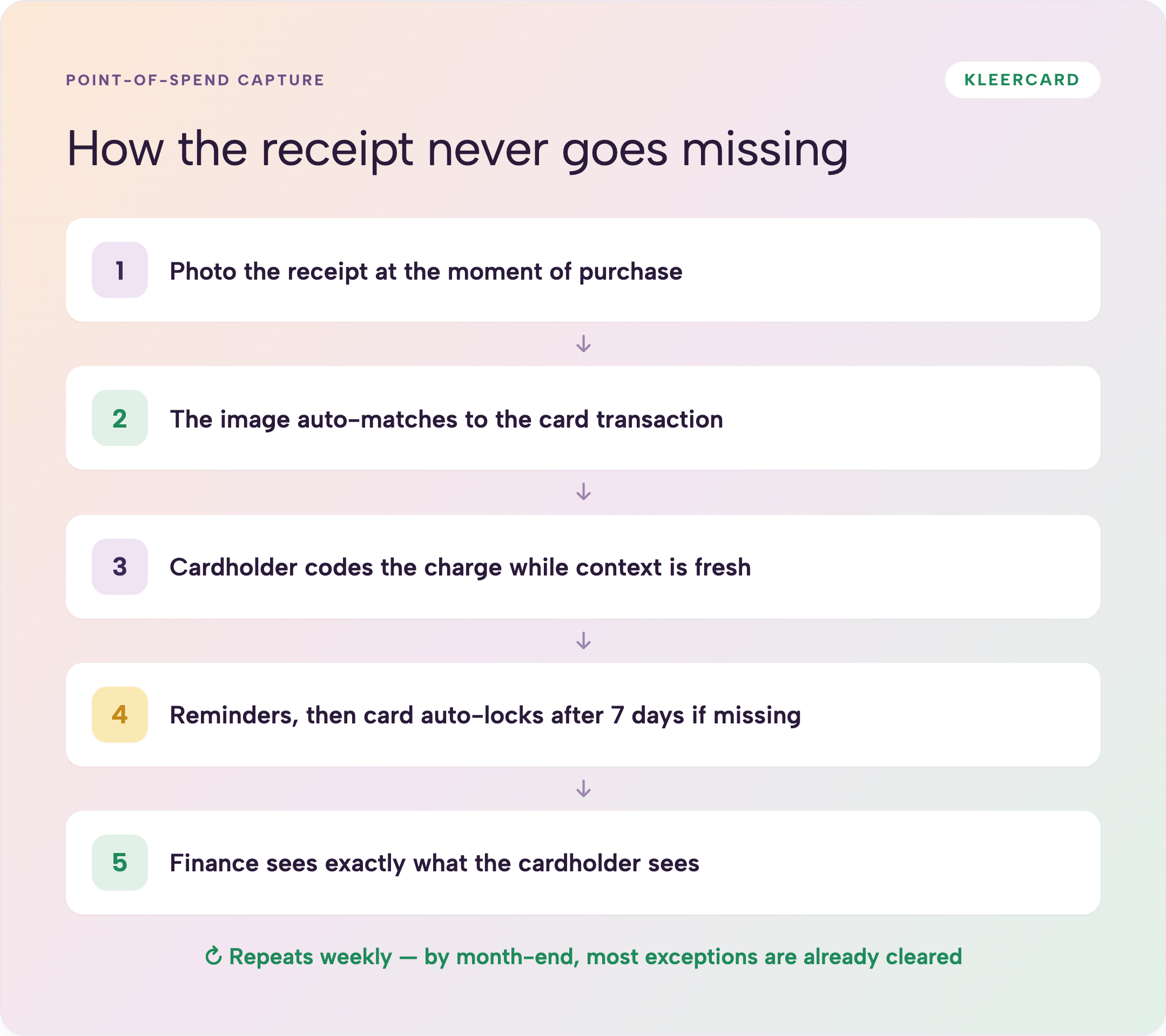
When every cardholder photographs the receipt and codes the transaction before the charge even settles, the month-end work is already done.
At the private Christian school with 540 students and about 100 staff, lost receipts fell from roughly five every week to fewer than five across seven months and the credit-card review now takes a few minutes because of these practical mechanics:
Weekly reconciliation becomes the natural rhythm. By the time the calendar month ends, most exceptions have already been cleared. The final review takes minutes instead of days.
Amazon Business integration removes another common source of delay. Line-item detail and the original invoice attach directly to the charge and to the named cardholder. Finance no longer reverse-engineers undifferentiated Amazon lines. Amazon Business line-item integration alone cuts hours for any organization where Amazon is a top vendor. See the official Amazon Business site and the practical Amazon Business expense tracking workflow for how the line-item sync works.
The same receipt tracking approach works whether the card is an individual classroom card or a labeled department loaner. The key is that the person who spends is the person responsible for the documentation while the purchase is still in front of them. This pairs with the broader expense management process so the close never starts from a pile of missing paper. You can schedule a demo to see the weekly capture rhythm on a live account.
Use this checklist as the working process. The receipt and coding work happens throughout the month; the close itself is verification.
Pre-close (ongoing and final three to five days of the month)
Close execution
Post-close
Organizations that keep the weekly rhythm report that the execution phase shrinks dramatically because the data is already clean. The private Christian school with 540 students and about 100 staff now checks credit-card activity weekly. By the end of the month the review takes a few minutes, if that.
This approach pairs cleanly with the rest of the expense management workflow and the nonprofit credit card features that support budget-aligned cards. A perfect checklist is not the point. The point is a process where the heavy documentation work never piles up at the end. You can schedule a demo to map the checklist to your current close calendar.
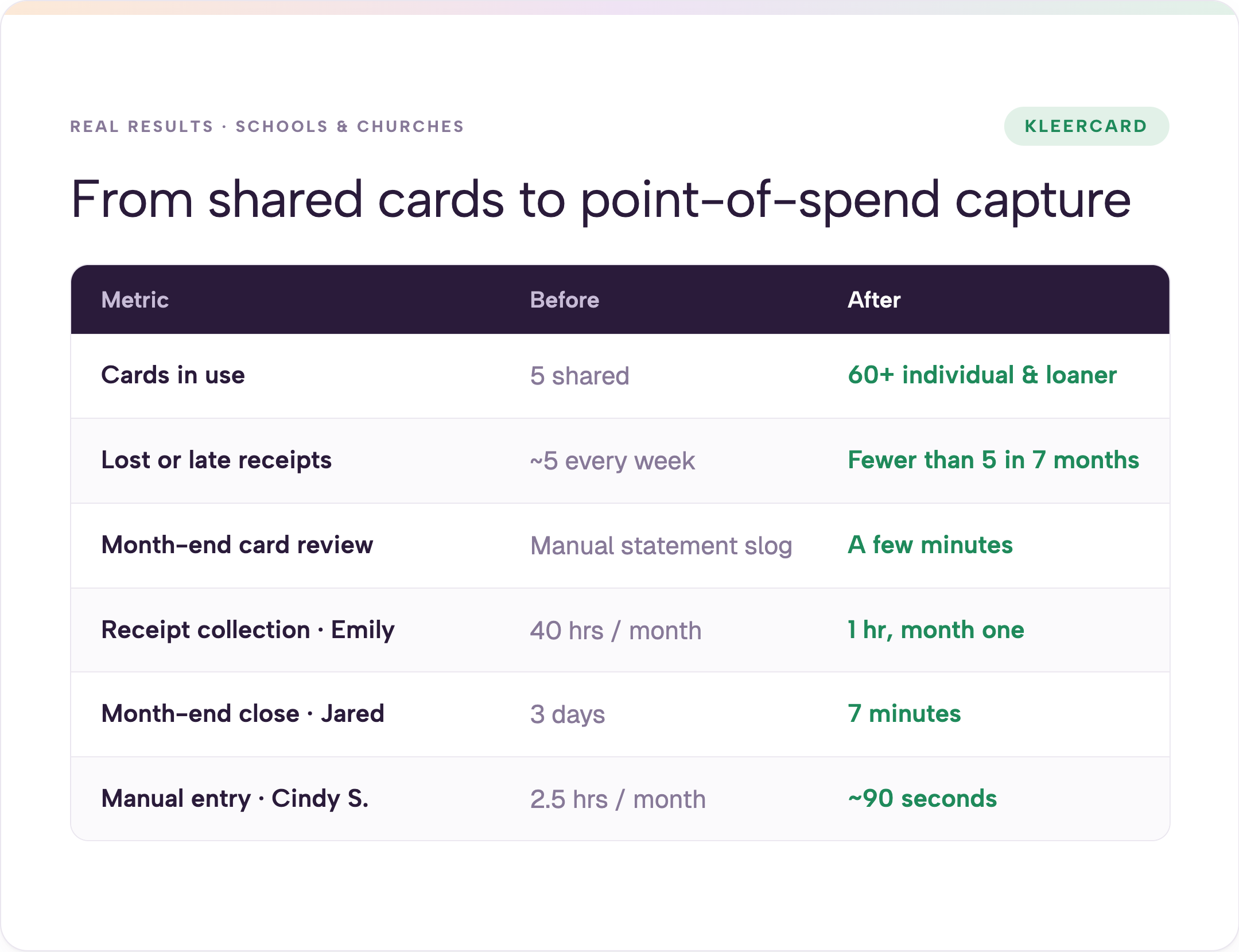
| Metric | Before | After |
|---|---|---|
| Cards in use | 5 shared | 60+ individual and labeled loaners |
| Lost or late receipts | ~5 every week | Fewer than 5 across 7 months |
| Month-end credit-card review | Lengthy manual statement process | A few minutes of review |
| Receipt collection (Emily) | 40 hours per month | 1 hour in the first month |
| Month-end close (Jared) | 3 days | 7 minutes |
| Manual statement entry (Cindy S.) | 2.5 hours per month | ~90 seconds |
The private Christian school with 540 students and about 100 staff also eliminated the weekly reimbursement flurries that previously hit the finance office at every deadline. Lower-school teachers are scheduled to receive individual cards with modest classroom limits so the same pattern continues into the next school year.
I have watched the same compression at other organizations. Jared, an executive pastor, moved his month-end close from three days to seven minutes once receipts and coding arrived throughout the month. Emily cut forty hours of receipt collection to one hour in the first month. Cindy S. went from 2.5 hours of manual statement entry into Shelby down to roughly ninety seconds.
The full story of how the private Christian school with 540 students and about 100 staff moved from five shared cards to more than sixty sits in how a private Christian school went from 5 cards to 60+. The metrics in the table above are the same ones that appear there. Similar patterns appear across best credit cards for small churches that adopt the same controlled-card model. After seeing the results table, many teams schedule a demo to test the weekly rhythm on a small pilot group.
Changing the close requires changing how people spend.
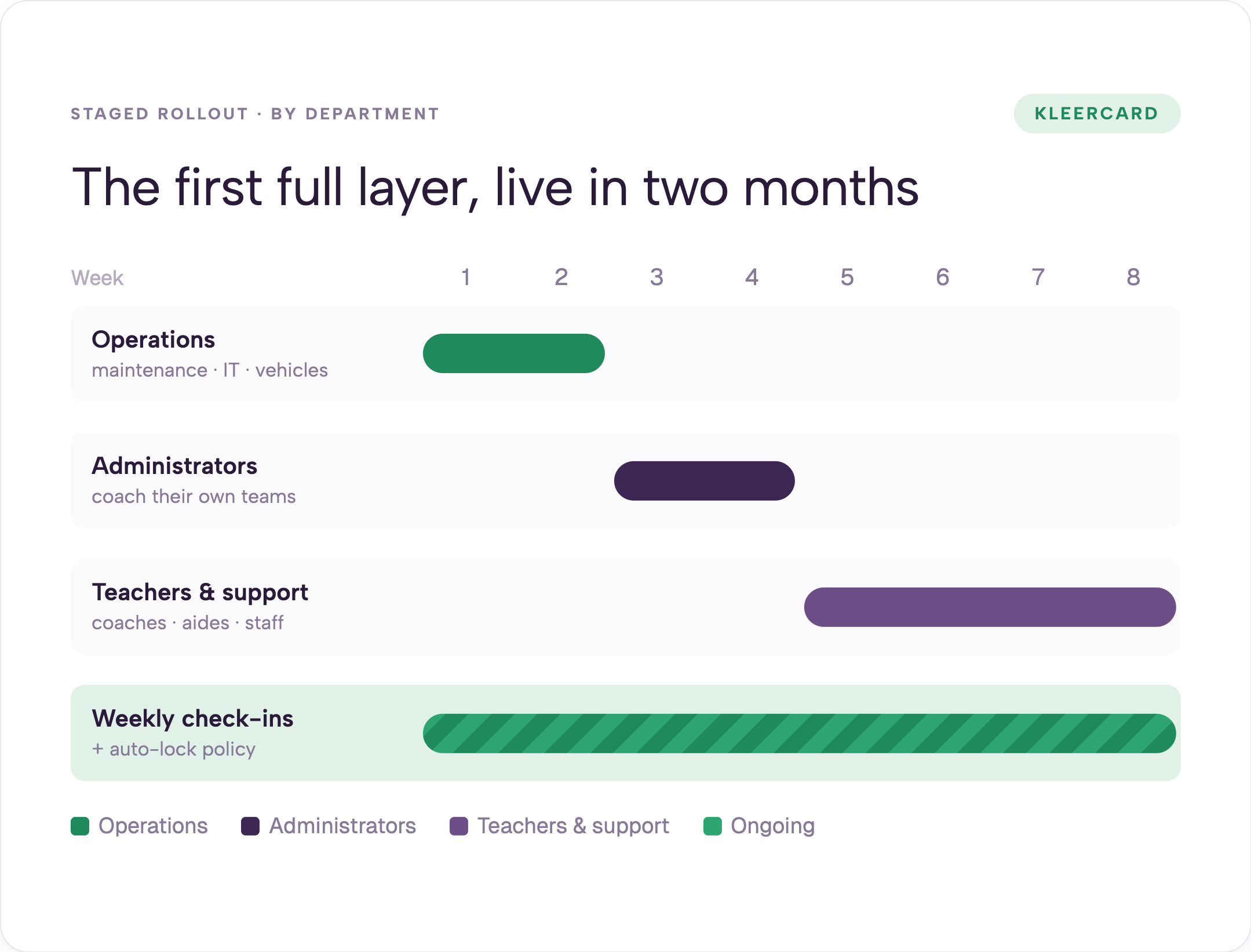
Start with the highest-friction department. The private Christian school with 540 students and about 100 staff began with operations (maintenance, IT, vehicles) because that group ran the most frequent and unpredictable purchases. Four people received cards first. They learned the photo-and-code workflow within days. Administrators came next so they could coach their own teams. Teachers, coaches, and support staff followed. The first full layer was operational within two months.
Loaner cards labeled by department (Fine Arts Loaner 1, Athletics Loaner 5) give controlled access without forcing every staff member to carry a card. Administrators hold multiple cards and track them on the dashboard. Self-loading limits (the private Christian school with 540 students and about 100 staff uses $5,000 for administrators) cut approval red tape for routine spend while still routing larger requests upward.
The primary control is alignment of authority to spend with ability to spend. A card loaded only with the approved budget simply declines once the limit is reached. High-limit shared cards create the opposite of control: anyone who locates the plastic can spend far beyond any single budget. This approach is consistent with GFOA purchasing card guidance that emphasizes clear limits, written policies, and accountability at the individual level.
Weekly check-ins and auto-lock policies keep documentation current without month-end drama. I use the same weekly rhythm at my own church, where we run 21 cards across a staff of 2.5 people. The weekly checks keep the books current and remove the month-end spike.
If you are still evaluating the right card model, the comparison in nonprofit credit card options shows how budget-aligned cards and real-time visibility work together. Current pricing is designed for small finance teams, and the white-glove setup process keeps implementation to a few short calls. You can also schedule a demo to map the staged rollout to your own departments. Organizations that need cards without a personal guarantee will also find the no personal guarantee options relevant.
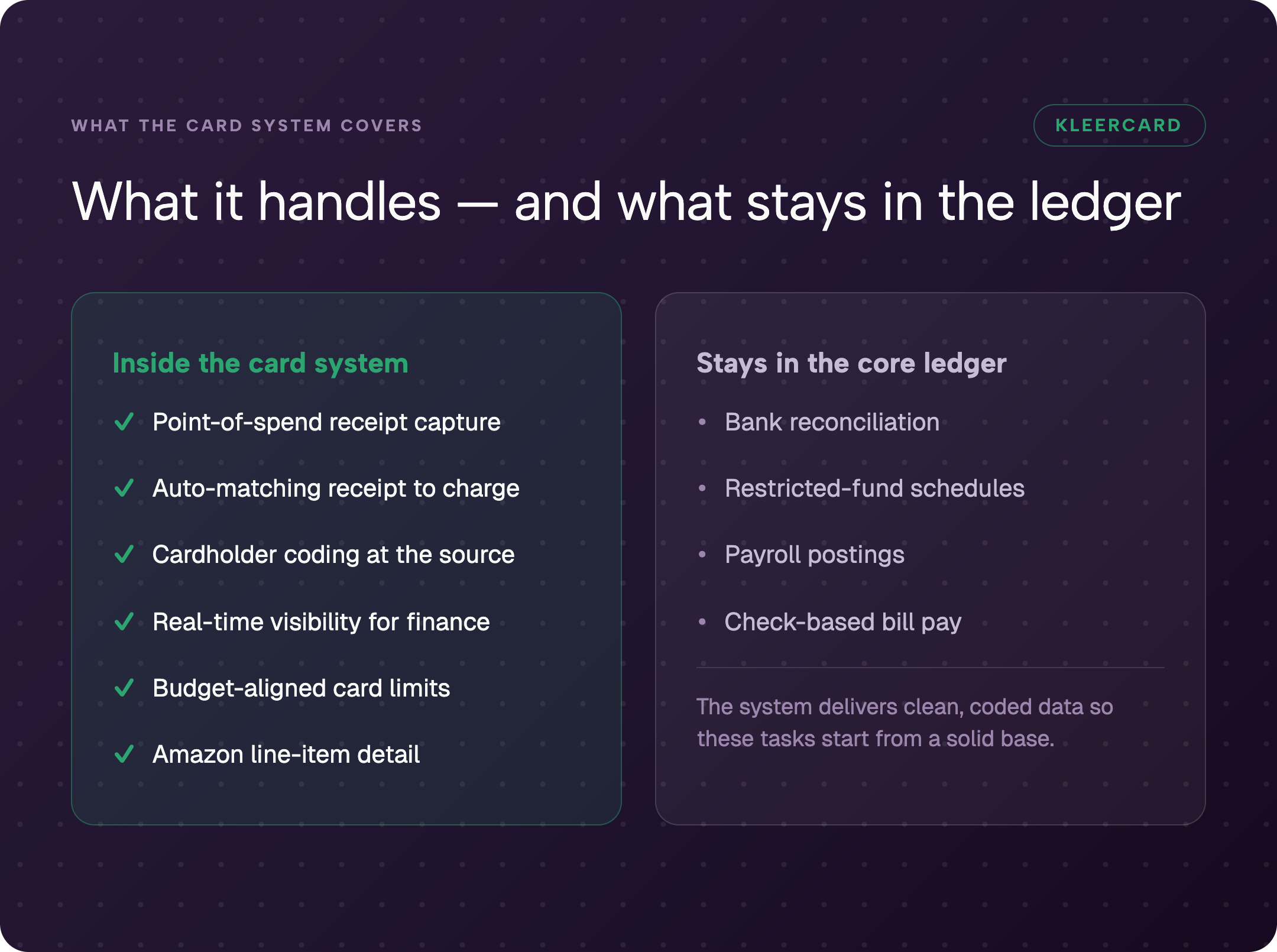
Honest limits matter. Card systems and receipt platforms do not replace every accounting task.
Bill pay and check printing often remain separate. Bank reconciliation still runs through the core accounting system and the bank portal. Restricted grant and fund oversight continues to sit with the finance manager inside the general ledger. Some organizations keep a short Google Form process for people who do not yet hold a card.
The goal is to remove the documentation lag from the transactions that already run on cards or reimbursements so that the close itself stays short. Forcing every transaction onto a card is not required.
At the private Christian school with 540 students and about 100 staff, bill pay still happens with manual checks and bank rec runs through Shelby and the bank. Those accounting tasks stayed outside the card system. The card and receipt system simply delivered clean, coded data into the rest of the process. The same boundary applies to most churches and nonprofits I work with. Bill pay and reimbursements remain a separate workflow for many teams, and that is fine.
Understanding debits and credits in the context of already-documented card spend makes the remaining journal entries faster. The close becomes lighter because the hard documentation work is already finished. Record retention rules still apply to the supporting files; the IRS guidelines on how long to keep records generally expect most expense records to be kept for at least three years, and longer in some cases. Teams using QuickBooks for nonprofits or similar platforms still handle restricted-fund schedules inside the core ledger.
Best-in-class teams finish in three to five business days. Industry sources such as Ventana Research and APQC put the overall average closer to six to seven business days, with many smaller organizations taking longer. Missing receipts and incomplete coding are among the most common causes of the longer timelines. Organizations that capture receipts at the point of spend and reconcile weekly routinely report card-related portions of the close dropping to minutes. The private Christian school with 540 students and about 100 staff now finishes its credit-card portion in a few minutes.
Require the photo and the coding at the moment of purchase. Mobile upload, automatic matching, and auto-lock after a short grace period turn documentation into a habit instead of a month-end scramble. At the private Christian school with 540 students and about 100 staff, lost receipts fell from roughly five every week to fewer than five total across seven months with this approach. The same receipt tracking tools make that habit automatic.
Weekly. Context is still fresh, exceptions stay small, and month-end becomes a review of already-clean data. The private Christian school with 540 students and about 100 staff now checks credit-card activity weekly; the final month-end pass takes a few minutes.
Both work when the cardholder (or the department administrator) is responsible for the documentation. Labeled loaner cards tracked on a dashboard give access without forcing every staff member to carry plastic. Individual cards with clear budget limits create the strongest line-of-sight accountability. The private Christian school with 540 students and about 100 staff uses a mix of both. This model appears across best credit cards for small churches that prioritize visibility over shared plastic.
Undifferentiated “Amazon” lines on a statement are among the hardest items to reconcile. An Amazon Business account plus platform integration that pulls line-item detail and the original invoice directly to the named cardholder removes that friction. The buyer can code the charge to the correct program or fund without finance guessing. See Amazon Business expense tracking and the official Amazon Business site for how the separation of personal and organizational accounts works.
Bank reconciliation, restricted-fund schedule updates, payroll postings, and any remaining check-based bill pay typically stay in the core accounting system. The expense platform’s job is to deliver already-coded, receipt-backed card transactions so those remaining tasks start from clean data. Bill pay and reimbursements can stay separate when that fits the organization’s existing process. Restricted-fund work often continues inside platforms such as QuickBooks for nonprofits or Shelby.
The month-end close process itself is straightforward. The time it takes is determined by how complete the documentation already is when the window opens.
Schools and churches that moved from shared high-limit cards and personal reimbursements to individual and loaner cards with point-of-spend capture report the same pattern: lost receipts collapse, weekly rhythms become sustainable, and the final review shrinks from days or hours to minutes. The private Christian school with 540 students and about 100 staff is one concrete example. The churches that moved from three-day closes to seven minutes are another.
The next step is to measure your current receipt lag and decide whether the access model itself is creating the chase. Once the documentation lag is fixed, the practical pre-close, close-execution, and post-close checklist runs in far less time.
If you want to see how the weekly rhythm and mobile capture work in practice for a school or church finance team, schedule a short walkthrough. You can also explore how point-of-spend capture and budget-aligned cards fit KleerCard for nonprofits and KleerCard for churches, review current pricing, or look at the nonprofit credit card features that support the budget-aligned model. The white-glove setup path is available for teams that want guided implementation.


Speak to a member of our team and we can have you up and running in minutes, not weeks.