%202.svg)
Learn what debits and credits mean in accounting, how they work for nonprofits and schools, and the common mistakes that waste time.
Most accidental treasurers and school finance staff learn debits and credits the hard way. A charge hits the statement, the receipt is missing, and someone has to decide which account gets the entry.
The rules themselves are simple. The real work is deciding which accounts receive those debits and credits so the reports stay useful. After years working with churches through Compassion International and later at Switch, and now running the finance side of my own church, I have seen the same pattern again and again: the left-and-right rules are easy. The chart of accounts and the timing of the data are what actually determine whether the books help or hinder.
In double-entry accounting, every transaction is recorded with at least one debit and one credit of equal value. Debits sit on the left side of an account. Credits sit on the right side.
A debit increases asset and expense accounts and decreases liability, equity (or net assets), and revenue accounts. A credit does the opposite.
The total of all debits must equal the total of all credits. If they do not balance, the entry is incomplete and most accounting software will reject it.
This system produces the accounting equation: Assets = Liabilities + Equity (or Net Assets for nonprofits). That balance is what keeps the financial statements trustworthy. Software will usually flag an unbalanced entry before it can post.
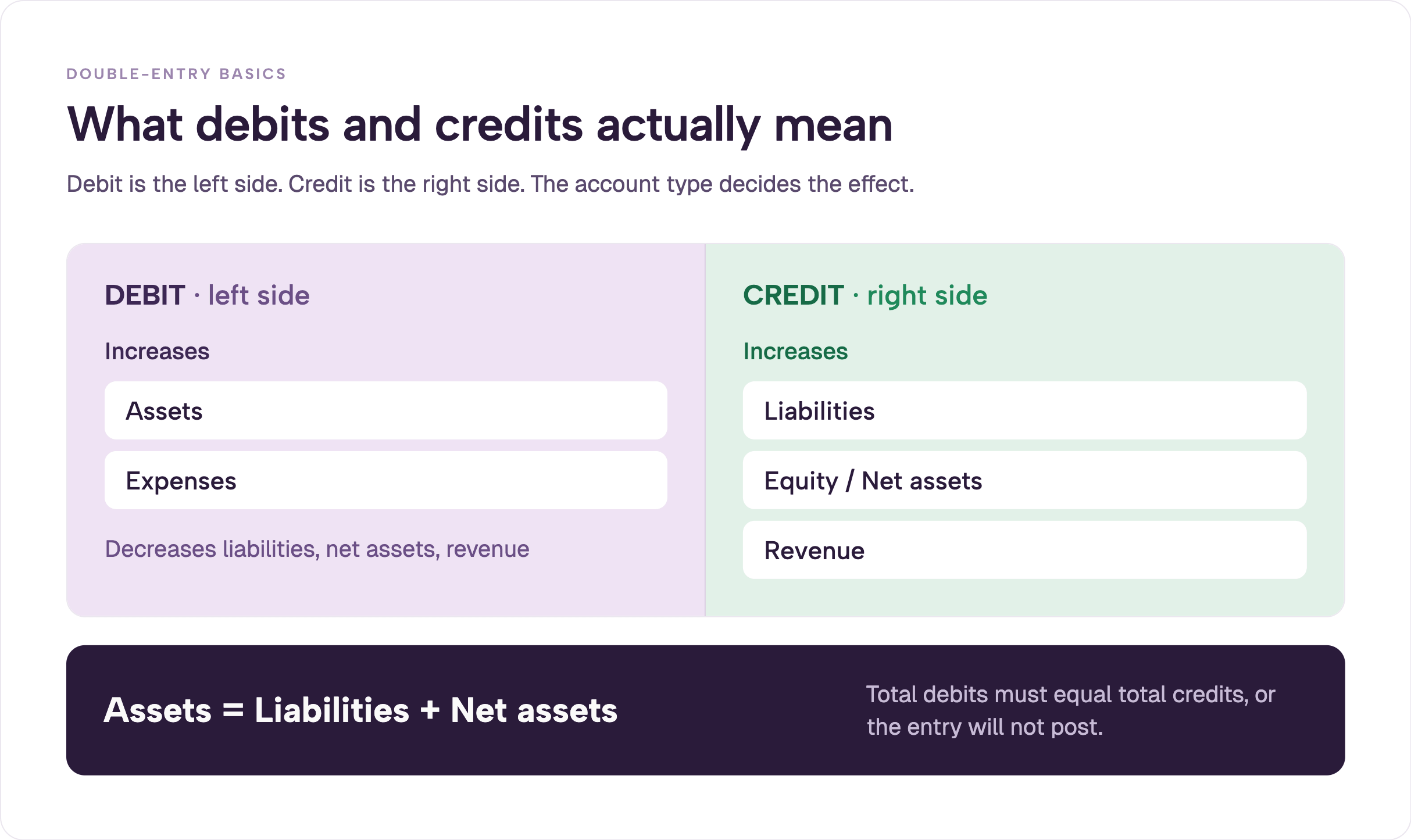
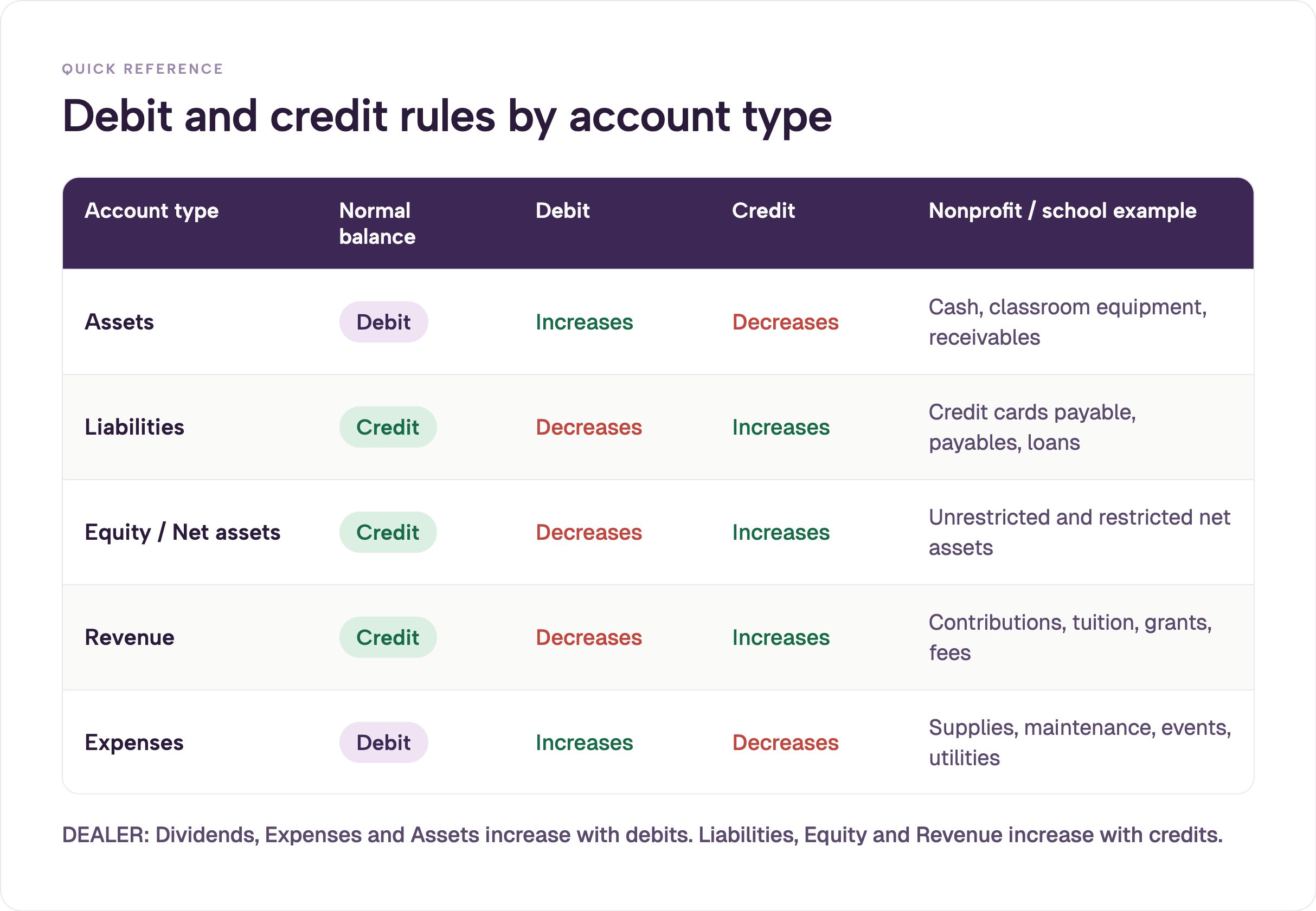
Use this table as a quick reference.
A simple memory aid: Debits increase Expenses and Assets. Credits increase Liabilities, Equity (Net Assets), and Revenue.
Some people remember the full DEALER mnemonic (Dividends/Expenses/Assets vs Liabilities/Equity/Revenue). Accountants use the DEALER mnemonic to remember the pattern: Dividends, Expenses, and Assets increase with debits, while Liabilities, Equity, and Revenue increase with credits. For a deeper walkthrough of normal balances, see the AccountingCoach explanation of debits and credits.
For nonprofits the equity section is usually labeled Net Assets and split between unrestricted, temporarily restricted, and permanently restricted (or, under current FASB guidance after ASU 2016-14, as net assets with donor restrictions and without donor restrictions). The debit and credit rules stay the same. Only the account names change. See the FASB not-for-profit financial statement presentation standards and related summaries for the authoritative classification.
Knowing whether to debit or credit is only half the work. The structure of the accounts that receive those entries decides whether the reports are useful.
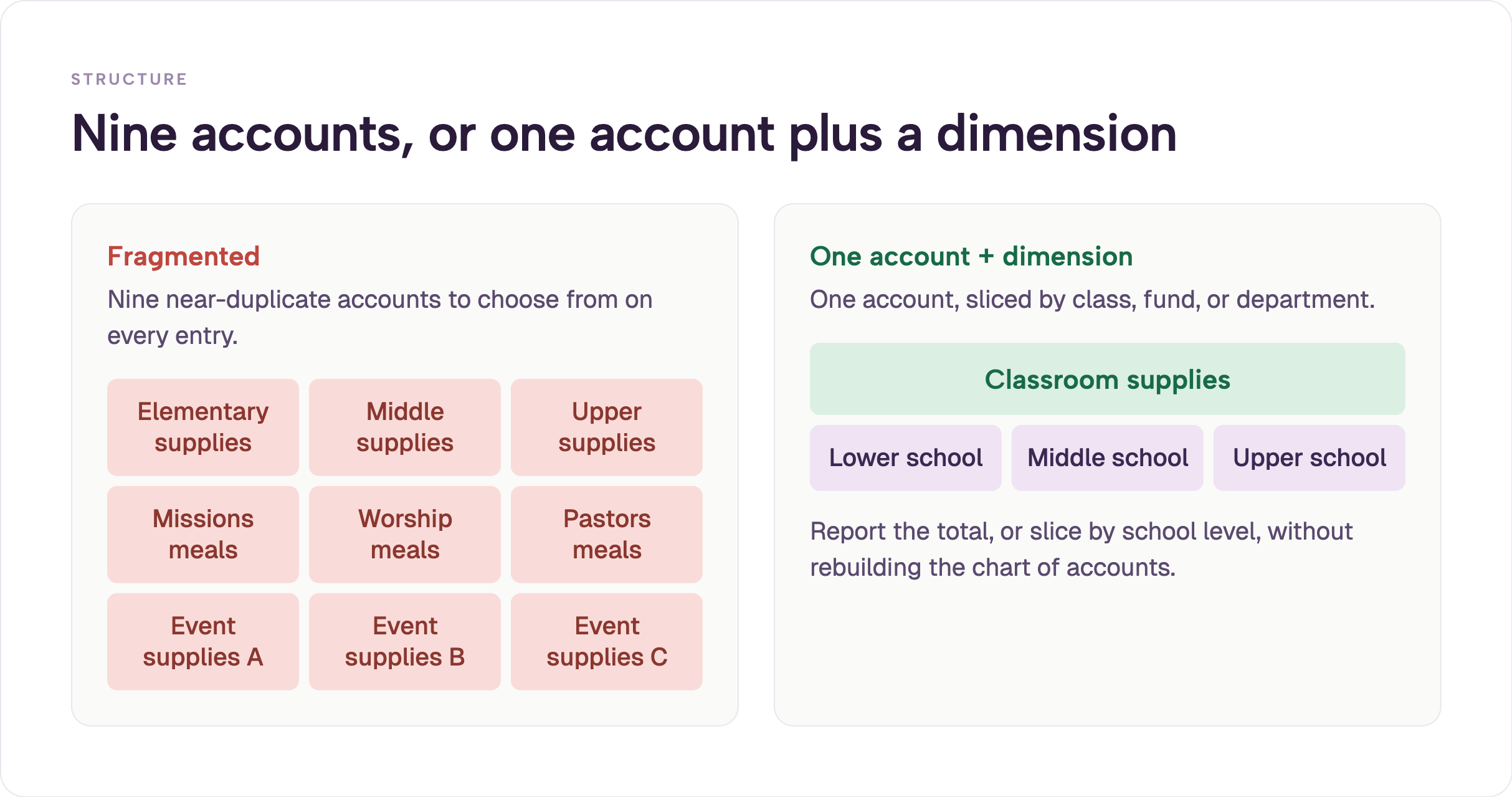
Many organizations create separate accounts for every variation: missions meals, worship meals, pastors meals, elementary classroom supplies, middle-school classroom supplies, upper-school classroom supplies. Every transaction then requires a precise choice of which near-duplicate account to debit.
A cleaner approach uses one account plus a dimension. In QuickBooks the dimension is called a class. Other systems use departments, funds, or projects. All classroom supplies land in one expense account. The elementary, middle, or upper school dimension is assigned at the same time. Reports can then sum total classroom supplies or slice by school level without rebuilding the chart of accounts. This is one of the practical lessons that shows up repeatedly in nonprofit organization accounting.
The same pattern applies to ministry meals, event supplies, or any recurring category. When someone says “our ministry is unique,” the usual result is an over-fragmented chart of accounts that makes every debit and credit harder than it needs to be.
I have seen this repeatedly in churches and schools. The data structure should stay consistent. Only the labels change for ministries, funds, or departments. That choice determines whether a simple debit produces a useful report or forces another custom spreadsheet every month. The goal is usefulness rather than maximum precision. A chart of accounts that supports the decisions leaders actually make will save far more time than one that tries to capture every possible nuance.
A maintenance director at a private Christian school needs parts to fix a toilet. Before the school issued individual cards, he had no card in his own name. He had to locate whoever held one of the five shared cards, often across two campuses, before he could even leave for Home Depot.
Now he carries his own card with a set weekly budget. The entry is straightforward:
He photographs the receipt at the store and uploads it. The entry is already coded and attached before the statement arrives. Access and visibility were the real issues, not trust or money. Modern receipt tracking makes this the default instead of the exception.
That single change removed hours of searching and waiting from the maintenance workflow.
An administrative assistant orders tablecloths, balloons, and supplies for a grandparents-day event on the school Amazon Business account.
Before, the statement simply showed “Amazon” for an amount. Finance then had to hunt for the order, the receipt, and the person who made the purchase. With the itemized invoice and cardholder already attached, she codes it to the right account herself. No one in the finance office has to guess which event the charge belongs to. Tools built for Amazon Business expense tracking turn what used to be a monthly scavenger hunt into a routine coding step.
Amazon is often the single hardest category to reconcile when purchases run through personal accounts or a single shared card. Itemization and card-level tracking solve that problem.
A donor gives $1,000 designated for the building fund.
The cash increases. The restriction is recorded so the money cannot be treated as unrestricted operating revenue. Later, when the funds are spent on the intended purpose, the restriction is released and the expense is recorded in the normal way. Under current FASB standards for not-for-profit entities, these amounts are reported as net assets with donor restrictions (see AccountingCoach and standard nonprofit accounting references for the underlying debit/credit mechanics that support the classification).
This keeps the books honest about donor intent and prevents the common error of treating restricted gifts as free operating cash. Many churches and schools still struggle with this because their software or chart of accounts does not make the restriction visible on the balance sheet. See the church fund accounting guide for more on handling restricted money cleanly.
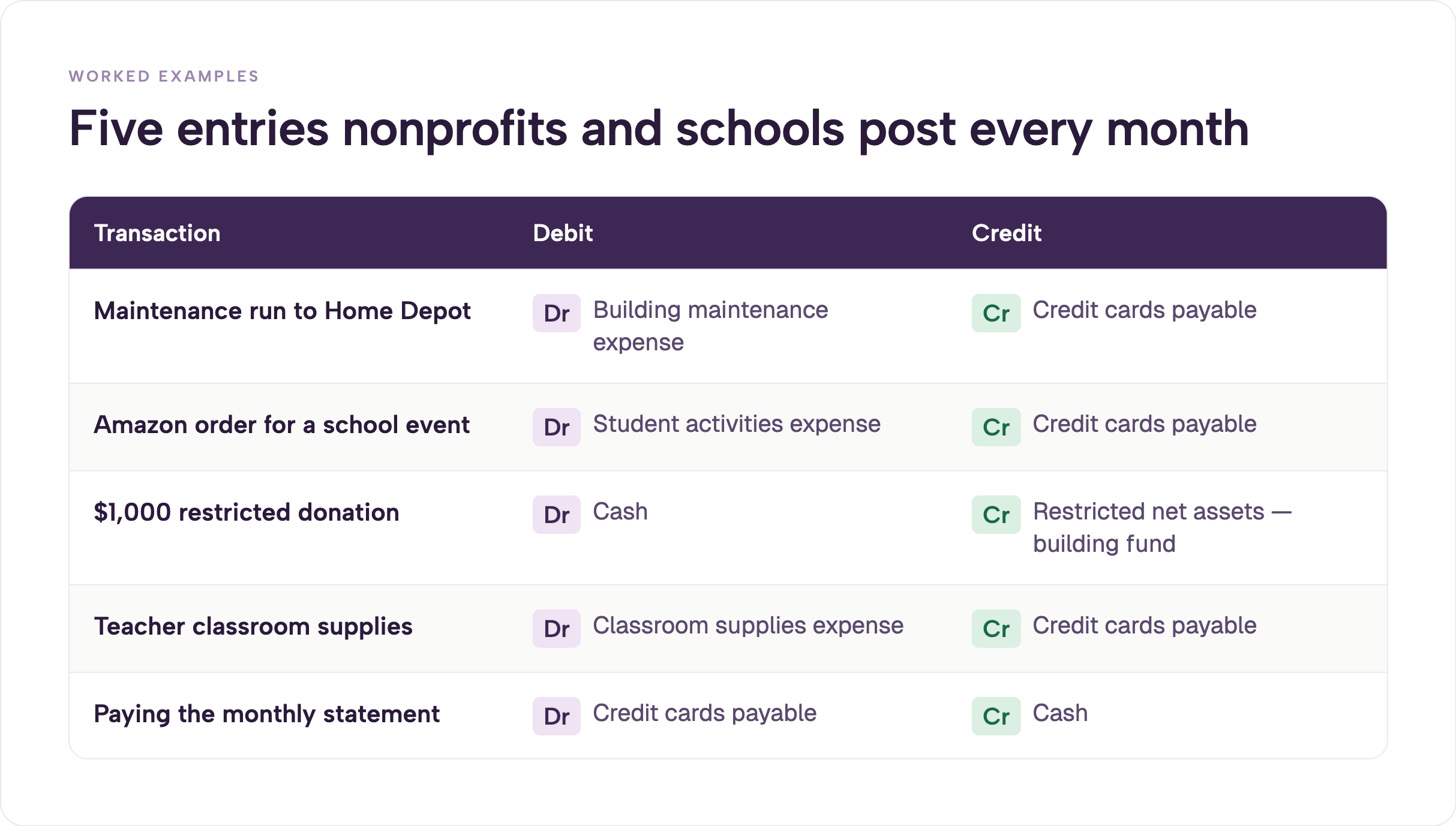
A lower-school teacher uses a card loaded with a quarterly classroom budget, often around $125 as a working example.
The school-level dimension (Lower School) is assigned at the same time. The teacher photographs the receipt and is finished. No reimbursement form is required. No one has to chase a lost receipt weeks later.
At one private Christian school with roughly 540 students and 100 staff, this kind of change moved the campus from five shared cards to more than sixty individual and loaner cards. Lost receipts dropped from roughly five chased every week to fewer than five across seven months of the school year.
The lower-school principal was already looking forward to the next school year when every teacher would have a card with a clear limit. The old reimbursement batches of ten or twelve requests at the deadline simply disappeared. Schools that want the same visibility often start with the solutions for churches or the broader nonprofit approach.
When an organization settles its monthly credit-card balance the entry is:
The liability is cleared and cash decreases. In organizations that already require every cardholder to photograph the receipt and code the transaction at the moment of purchase, the month-end review itself takes only a few minutes because the coding and documentation work has already been completed throughout the month. That is the practical difference between a lengthy statement scramble and a short confirmation that everything is already in place.
Bookkeepers are often paid for accuracy. Leaders need usefulness. The tension shows up in coding.
Every $3 coffee does not need its own precise classification if no decision will change based on that detail. One business-meals account is enough for most organizations. Automation can then route restaurant charges without waiting for someone to code them at month-end.
I have watched bookkeepers spend hours splitting travel meals from local meals or tracking every restaurant as a separate vendor. The leader making decisions never looks at that level of detail. The precision creates friction instead of insight.
Accuracy and precision are different things. The entry can be accurate (right high-level bucket) without being hyper-precise. Most organizations benefit from the former.
Shared high-limit cards create the illusion of control. The real control is a right-sized budget on a named card. When five cards serve a hundred staff members, people spend time hunting for the plastic instead of doing the work. Lost receipts and delayed reimbursements follow.
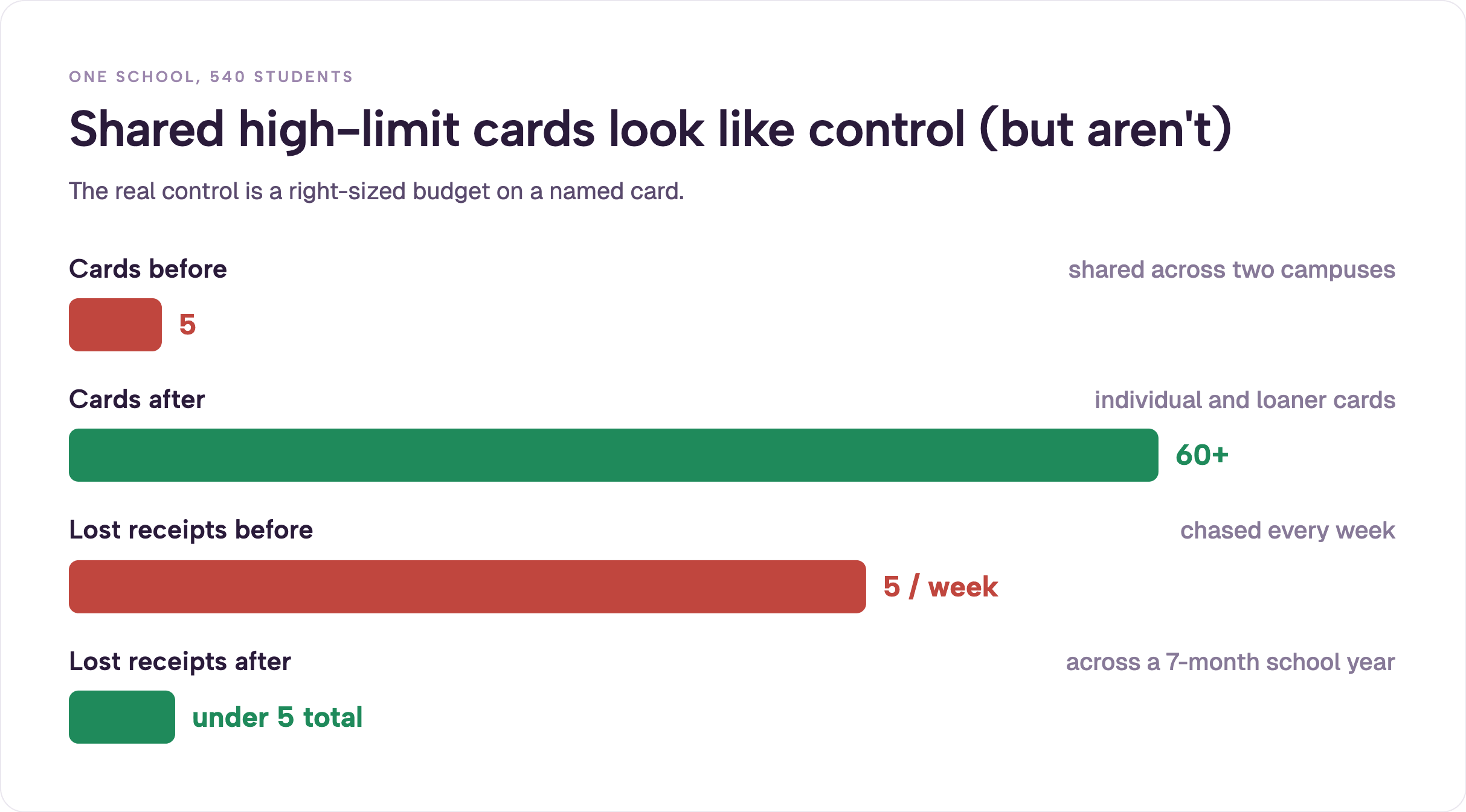
One school described the old process as a game of hide-and-seek across campus. The same school later moved from five shared cards to more than sixty individual cards and saw lost receipts drop from roughly five chased every week to fewer than five across an entire seven-month school year.
Reimbursements run through payroll create extra bank-reconciliation work and break automatic checks. Treat the person as a vendor and pay by ACH through bill pay and reimbursements. That keeps the books cleaner and gets the money back to staff faster.
Mixing restricted and unrestricted activity in the same accounts forces manual Excel adjustments every month to produce usable fund reports. The chart of accounts itself becomes the problem.
These mistakes compound. The more fragmented the accounts and the more delayed the receipts, the harder every monthly close becomes. If the goal is cleaner books with less friction, expense management tools that attach receipts and coding at the point of spend change the entire workflow.
When receipts are captured at the moment of purchase and coding happens weekly, month-end closes in minutes instead of days. One school finance office that moved from five shared cards to more than sixty individual and loaner cards reported fewer than five lost receipts across seven months of the school year. Reconciliation that once took a lengthy statement review now finishes in a few minutes because the work was already done weekly.
.webp)
Itemized Amazon charges arrive with the receipt and the cardholder already attached. Finance no longer has to reverse-engineer an undifferentiated “Amazon” line on the statement.
I have seen the same pattern across churches. One executive pastor moved month-end close from three days to seven minutes. Another finance director cut receipt collection from forty hours a month to one hour in the first month. A finance manager who spent two and a half hours a month on manual statement entry into Shelby saw that work drop to roughly ninety seconds once the data arrived already coded.
At my own church we run twenty-one cards with only two and a half paid staff. Line-of-sight accountability replaces the scarcity mindset that comes from per-seat pricing or shared plastic. That model is part of why many teams look at a dedicated nonprofit credit card approach rather than forcing corporate tools into ministry work.
The rules of debits and credits do not change. The timing and quality of the information that feeds those rules improves dramatically when the card, the receipt, and the coding live in the same system. That is the practical difference between a scramble and a short review.
For more on how this works with restricted funds, see the church fund accounting guide. Tools that keep receipts and coding attached to every card spend are covered under expense management options built for nonprofits and schools. Integration details live on the accounting sync page. Many organizations start with a white-glove setup to get the card and coding workflow right from day one. You can also schedule a demo to see how the pieces fit together in practice.
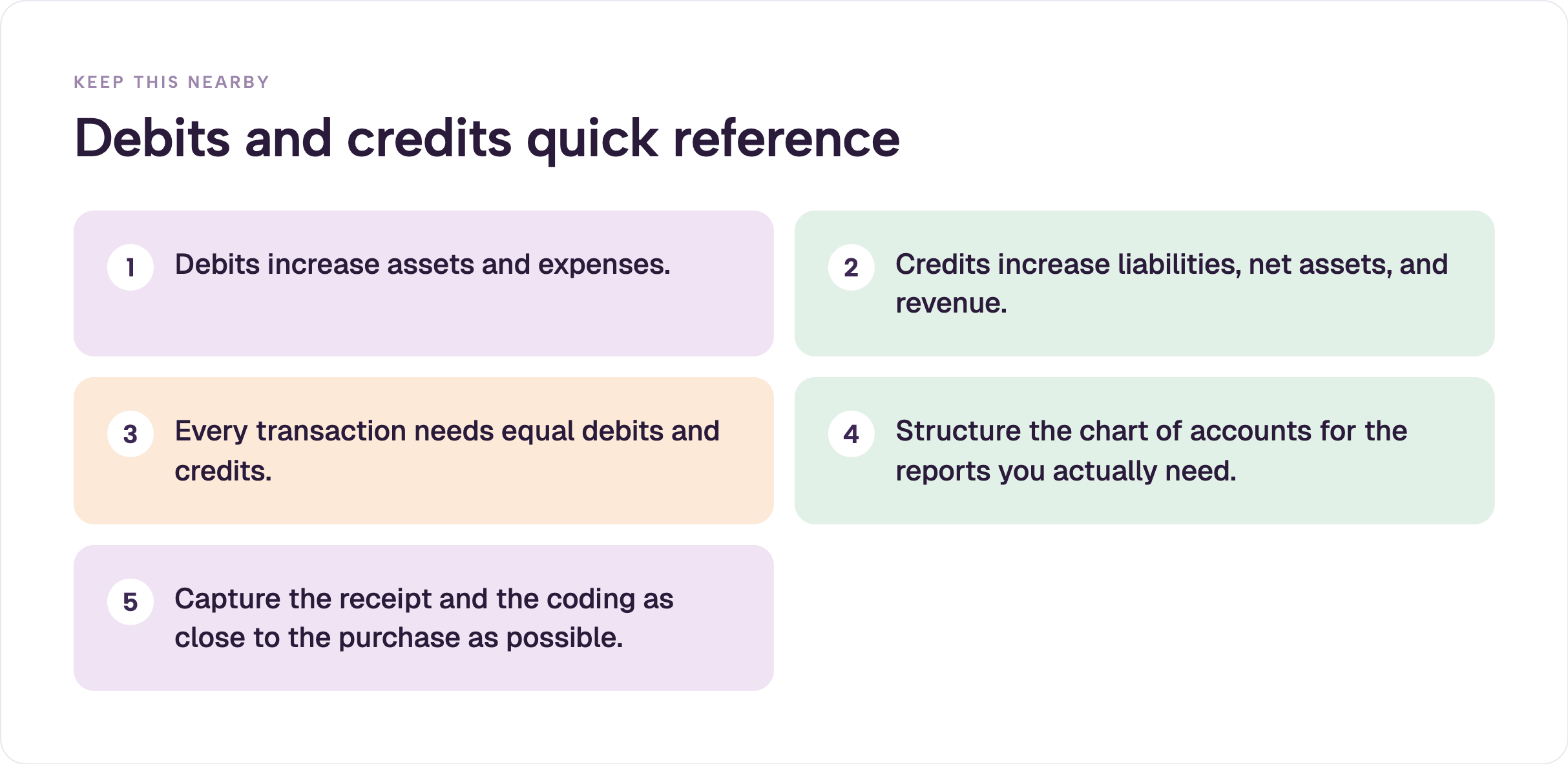
Keep this list nearby when you train new staff or volunteers. The concepts stay the same even as the tools improve.
A debit is an entry on the left side of an account. A credit is an entry on the right side. Whether the entry increases or decreases the account depends on the account type. Assets and expenses increase with debits. Liabilities, equity (net assets), and revenue increase with credits.
Yes. In double-entry accounting the total of the debits in any transaction must equal the total of the credits. Accounting software will usually reject an unbalanced entry.
Neither. Debit simply means left side. A debit to cash is usually good (more cash). A debit to an expense account records a cost. Context and account type determine the effect.
When the card is used, the organization typically debits the expense (or asset) account and credits Credit Cards Payable. When the statement is paid, Credit Cards Payable is debited and Cash is credited.
Debit Cash and credit the appropriate temporarily or permanently restricted net assets (or fund balance) account. This keeps the restriction visible so the money is not spent as unrestricted operating funds. Current FASB guidance classifies these as net assets with donor restrictions.
Debits increase Expenses and Assets. Credits increase Liabilities, Equity, and Revenue. The DEALER mnemonic expands this to include Dividends on the debit side. For more detail, the AccountingCoach normal balances guide is a clear reference.
Debits and credits are the language of double-entry bookkeeping. The left-and-right rules are necessary. The accounts that receive those entries, the dimensions attached to them, and the timing of the data determine whether the books support decisions or create extra work.
When receipts are captured and coded at the moment of spend, the monthly close becomes a short review instead of a scramble. That outcome is achievable for any church, nonprofit, or school finance team that structures the chart of accounts for usefulness and keeps the data close to the transaction.
For more on structuring funds and restricted money, see the church fund accounting guide. For tools that keep receipts and coding attached to every card spend, explore expense management options built for nonprofits and schools. Related reading also includes the best accounting software for churches and church spending controls.
Solutions pages for churches and non-profits show how the same principles apply at scale. You can also review the product page or schedule a demo if you want to see the workflow in action.


Speak to a member of our team and we can have you up and running in minutes, not weeks.