Compare the best church fund accounting software for 2026, learn how to choose with a simple checklist, and see which tools do true fund accounting.
Church money almost never shows up as one clean pile. A building fund gift, a missions offering, a restricted memorial and the general operating budget all end up in the same accounts. But they can't be spent the same way.
Church accounting software is a financial system that tracks money by fund (restricted, unrestricted and board designated) instead of by profit, and produces the donor, board and budget to actual reports a church needs. True fund accounting keeps each purpose separate, so you can prove where every restricted dollar actually went.
Our top pick is KleerFi Accounting, the fund accounting software we're building at KleerCard. It's still in development, but upon launch it will be the best accounting software for fund accounting. That's the whole reason we're building it.
Until then, QuickBooks Online is our number two pick: a solid platform with good support and many integrations, if you're willing to jump through a couple of hoops to do fund accounting.
I'm Owen Hill, co-founder of KleerCard, and I volunteer as treasurer at my own church. This guide comes from that work and from the ministries we work with through our accounting integrations.
Start with how to choose, then use the comparison table, our two picks, and the other platforms we evaluated. Prices and features are as of October 2026.
| Software | Built for churches | Fund accounting | Works with KleerCard | Starting price, as of October 2026 |
|---|---|---|---|---|
| KleerFi Accounting (waitlist) | Yes, churches and nonprofits | Built in, true fund accounting. | Being built by KleerCard | Not live yet. Join the waitlist |
| QuickBooks Online | No, built for small businesses | Classes and locations as a workaround (Plus and Advanced plans) | Yes, accounting integration | $38/mo list. Plus with classes is $140/mo. Donated Plus through TechSoup is an $80/yr admin fee for eligible nonprofits |
| Aplos | Yes, churches and nonprofits | Native, balance sheet by fund on every plan | Yes, API integration | Lite $79/mo (2 users), 15 day free trial |
| Realm (ACS Technologies) | Yes | Accounting add on for any Realm plan, organized by fund | Yes, file import into Realm | Quote on request |
| ShelbyNext Financials | Yes | Built in, true fund accounting | Yes, direct integration: a custom-built export and import (CSV or Excel) | Quote on request |
| ParishSOFT Accounting | Yes, Catholic parishes and dioceses | Native, web based fund accounting | Yes, API integration | Quote on request |
| PowerChurch Plus | Yes | Fund accounting principles, restricted gifts tracked under FASB 117 | Not a listed integration | $445 one time (Windows). PowerChurch Online is $47/mo |
| ChurchTrac | Yes | Included in every plan | Not a listed integration | $29/mo for up to 75 names, 30 day free trial, optional accounting setup from $399 |
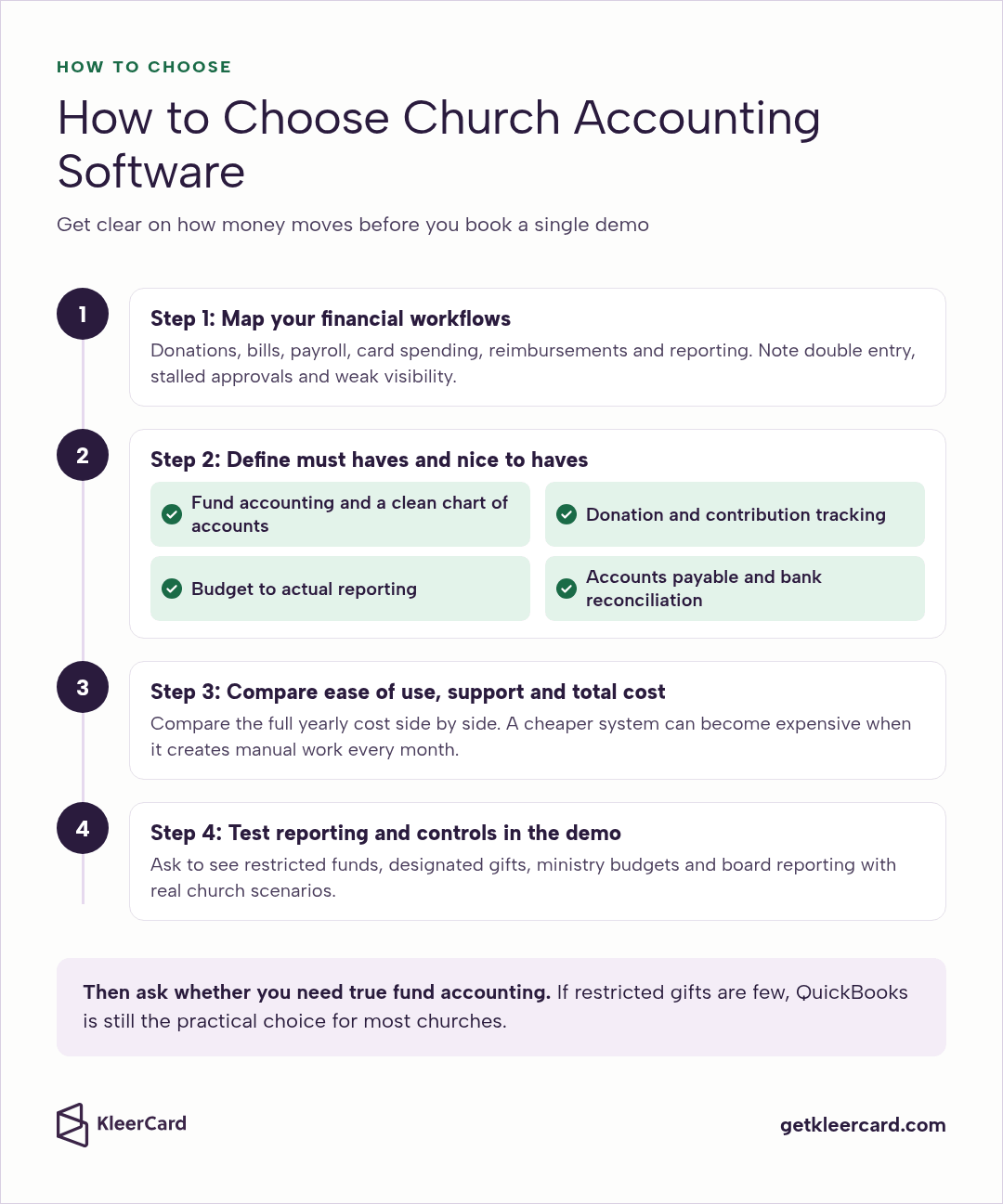
The best software decision starts inside your church. Get clear on how money moves and where your control gaps are before you book a single demo.
Then ask whether you actually need true fund accounting. If restricted gifts are few and a monthly spreadsheet step feels fine, QuickBooks is still the practical choice for most churches. If you want clean per fund balance sheets without monthly manual fixes, you need native fund accounting, which all six of the other platforms we evaluated below offer.
Document how donations, bills, payroll, card spending, reimbursements and reporting happen today. Note where information gets entered twice, where approvals stall and where visibility is weak.
This exercise often shows that the problem goes beyond accounting. It may also be expense management, card control or inconsistent coding, and those are worth solving at the same time.
Separate what you can't live without from what would be helpful. For most churches the must haves are:
Nice to haves usually include integrations with your church management, giving and payroll tools, role based access, and cloud access with mobile approvals for part time teams and remote approvers. Keeping this list short keeps your evaluation focused and saves you from paying for features your team won't use.
Think about who will actually use the system. Volunteer treasurers and part time staff need something straightforward, and the right tool matches the people you have today.
Subscription price matters, but so do admin time, add ons and the effort it takes to keep records clean. Ask about onboarding, training and data migration.
A cheaper system can become expensive when it creates manual work every month, so compare the full yearly cost side by side.
At October 2026 list prices, QuickBooks Online Plus (the first plan with classes) works out to $1,680 a year and Aplos Lite to $948, while eligible nonprofits can get donated QuickBooks Plus through TechSoup for an $80 yearly fee. Don't assume the church specific tool is the expensive one until you've done that math for your own church.
Ask vendors to show you restricted funds, designated gifts, ministry budgets and board reporting using real church scenarios. If reporting feels awkward in the demo, it will feel worse in real life. These are the questions I would bring:
Some churches want members, giving and the books in one system. Others want a dedicated ledger that connects to the rest. Both paths work well when they match how your church runs, and the line between them blurs, since Aplos and Shelby also offer donor and people tools of their own.
| ChMS with accounting built in | Dedicated fund accounting software | |
|---|---|---|
| What it holds | Members, giving, events and the books in one system | The general ledger and funds, with giving imported or connected |
| Fits best when | You want one login and one vendor, and your finances are fairly simple | You manage several restricted funds, grants, campuses or regular audits |
| Fund reporting | Varies by product, so test a balance sheet by fund in the demo | Fund reporting is the core of the product |
| Changing tools later | Moving often means switching people, giving and books together | You can change your ChMS or giving tool without touching the ledger |
| Examples in this guide | ChurchTrac, Realm, PowerChurch Plus, ParishSOFT | Aplos, ShelbyNext Financials |
General tools like QuickBooks Online sit in a third lane. They are familiar and widely supported, and churches with strong bookkeeping help and simpler structures make them work with classes. Expense and card tools such as KleerCard sit alongside any of these and handle card controls, receipt capture and bill pay approvals before transactions reach the books.
KleerFi Accounting is the fund accounting software we're building at KleerCard for churches and other nonprofits. Even though it's still in development, upon launch, this will be the best accounting software for fund accounting.
It isn't live yet, so there's no demo, price, or review score to share. If you'd like to hear when it's ready, join the waitlist. Until then, QuickBooks Online is our number two pick.
QuickBooks Online is a solid platform with good support and many integrations, if you're willing to jump through a couple of hoops to do fund accounting. The hoops are setting up a class for each fund, which starts on the Plus plan, and a monthly export to Excel to back restricted balances out of the balance sheet.
QuickBooks is the platform I see in more churches than anything else. Bookkeepers and CPAs already know how it works, payroll connects without drama, and plenty of third party tools plug in easily.
At my own church we handle most of the bookkeeping here (although we're moving to KleerFi Accounting now). We've dealt with fund separation through a quick monthly process. QuickBooks was built for small businesses, so funds run on classes and locations, which Intuit includes starting with the Plus plan (up to 40 classes and locations) and without limit on Advanced.
For the price, especially with the TechSoup donation, and the help network around it, many churches get most of what they need and live with the rest. A lot of churches are better off here than paying for features they'll barely touch.
As of October 2026, Intuit lists Simple Start at $38 a month, Essentials at $85, Plus at $140 and Advanced at $340, and eligible nonprofits can request donated Plus for an $80 yearly admin fee (5 users) or Advanced for $170 (25 users) through TechSoup.
TechSoup allows one donated subscription per organization, and add ons such as payroll aren't part of the donation, so budget for payroll separately.
Once card transactions arrive coded, KleerCard accounting sync sends them to QuickBooks Online with one click (it isn't a live sync) and maps them to your accounts, classes, locations and projects. In short, QuickBooks handles the core books well and misses true fund separation.

Aplos was built for churches and nonprofits from the start. Every plan includes a balance sheet and income statement by fund, bank reconciliation and a board portal, and Aplos tracks online donations by donor and purpose and prepares giving statements.
The interface stays simple enough that volunteers can use it. Churches often look at it when the Excel workaround starts to feel like a real headache, and many smaller churches appreciate that they can get started without a long implementation.
As of October 2026, Aplos lists Lite at $79 a month with 2 users, Core at $129 a month with basic budgeting, accounts payable and third party integrations, and Advanced from $229 a month with budgeting by fund or grant, plus a 15 day free trial.
KleerCard connects to Aplos through an API integration that syncs your chart of accounts, funds and vendors, and Aplos stays your system of record. Aplos lists third party integrations starting on Core, so ask Aplos which plan you need before you connect. At list price, Aplos Lite costs less than QuickBooks Plus, and Aplos's current plans are at aplos.com.
Realm puts church management and accounting in the same system. Its accounting organizes your finances by fund, supports cash or accrual methods, and can post giving batches into the general ledger as deposits once you link your giving funds to your accounts.
It works well for churches already in the ACS world or that want member data and giving history in one place. It's a solid fit when the membership side matters as much as the books.
As of October 2026, Realm pricing is quote on request, and accounting is an add on you can attach to any Realm plan, so ask for both in the same quote. KleerCard works with Realm through a file export and a General Ledger import template you set up once in Realm.
Shelby was made for church finance workflows. ShelbyNext Financials is cloud based fund accounting for churches, ministries and denominational offices, and Shelby describes it as compliant with FASB 117 and GAAP. It covers the general ledger, payroll with clergy and lay staff settings, accounts payable and receivable, purchase order approvals and fixed assets.
It rewards having someone experienced running it day to day, and it's worth considering when reporting depth justifies the cost.
As of October 2026, ShelbyNext Financials pricing is quote on request, and Shelby's site offers free trials. KleerCard has a direct integration with ShelbyNext Financials, a custom-built export and import made for it. Nothing syncs on its own: you export coded transactions as a CSV or Excel file and import that file into ShelbyNext Financials on your schedule.
ParishSOFT Accounting is built for Catholic parishes, schools and dioceses. Its Ledger and Payables module is web based fund accounting, Financial Consolidation gives the diocese reporting across every organization, and payroll, purchasing and fixed assets come as connected modules.
It shines when the parish already lives in the ParishSOFT ecosystem or the diocese needs multi entity clarity.
As of October 2026, ParishSOFT pricing is quote on request. KleerCard connects to ParishSOFT through an API integration set up during onboarding, and ParishSOFT stays the accounting system of record.
PowerChurch Plus keeps membership, contributions, accounting and event scheduling in one package. Its accounting uses fund accounting principles, tracks restricted gifts under FASB 117 guidelines, and includes budget comparisons, accounts payable and payroll.
As of October 2026, a new user license is $445 as a one time download for Windows PCs. PowerChurch Online runs the same software on PowerChurch's servers for $47 a month or $499 a year for two concurrent users.
It works for churches that like a one time purchase and already have someone comfortable keeping it running.
ChurchTrac keeps the price low and bundles people, giving, fund accounting, check in, groups and volunteers in one platform.
As of October 2026, every plan includes fund accounting, with pricing from $29 a month for up to 75 names to $119 a month for unlimited names, a 30 day free trial, and an optional accounting setup service starting at $399.
It's a good fit for smaller churches that want one simple system for members, giving and the books.
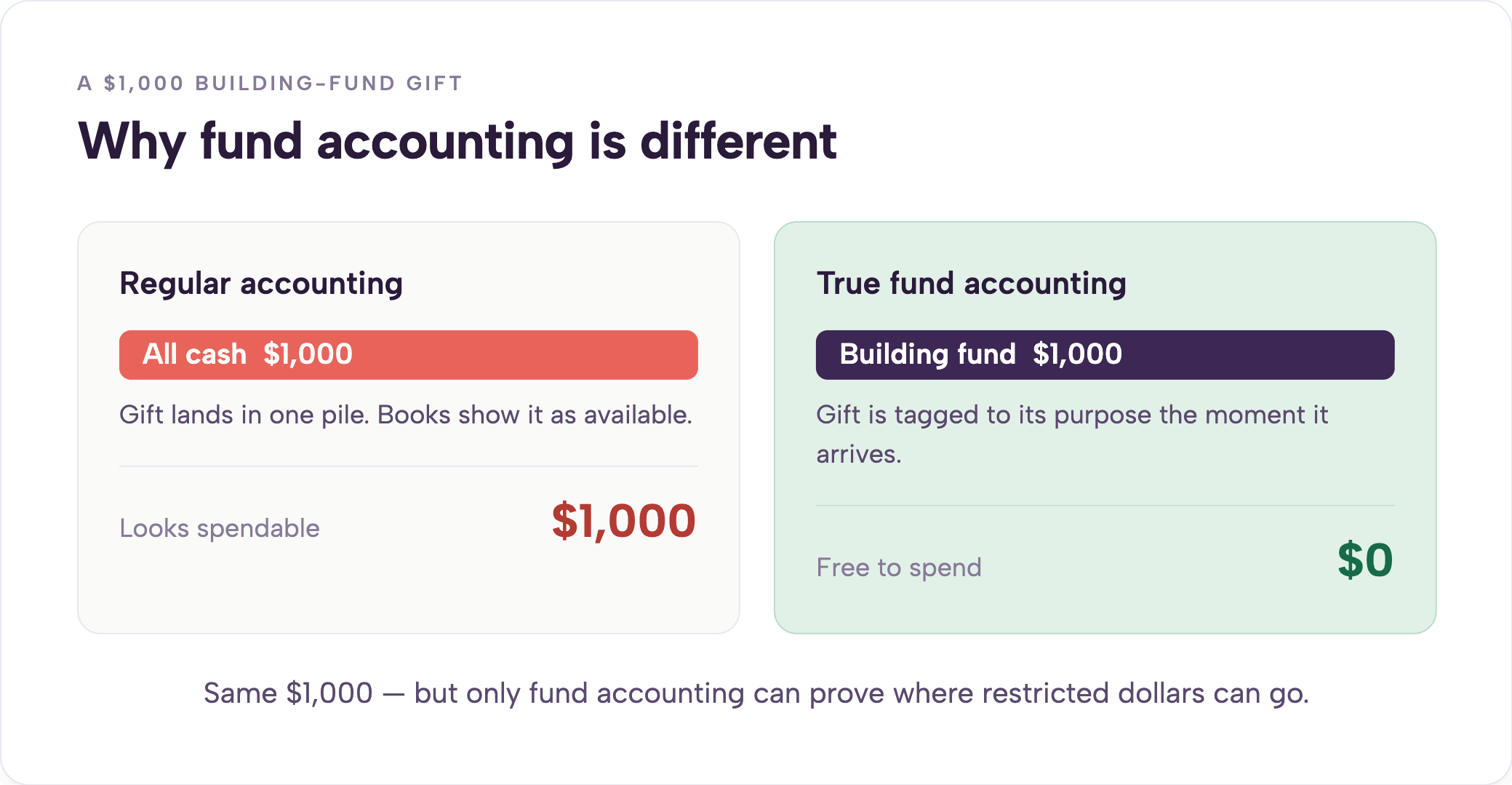
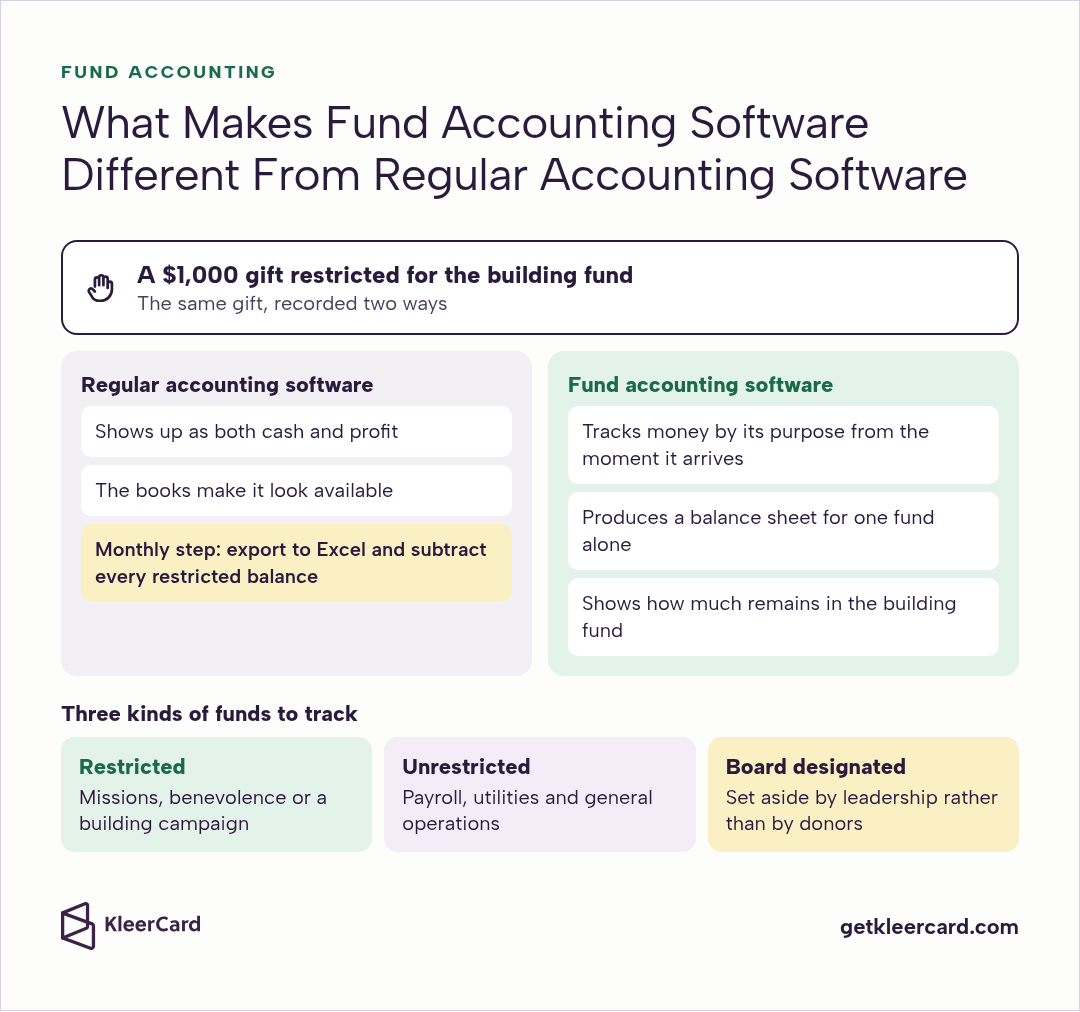
At my church we often receive specific gifts for specific funds. For example, a $1,000 gift restricted for the building fund. In QuickBooks it showed up as both cash and profit. That money couldn't pay rent or support a missions trip, yet the books made it look available.
Every month I export the balance sheet to Excel and manually subtract every restricted balance. Leadership can then see what was truly spendable.
The workaround works, but it takes time and leaves room for error, because QuickBooks can't produce a true fund balance sheet.
True fund accounting software tracks money by its purpose from the moment it arrives. It can produce a balance sheet for one fund alone, which general tools only reach with class based tracking and manual adjustments.
Restricted funds must be used for specific purposes like missions, benevolence or a building campaign. Unrestricted funds cover payroll, utilities and general operations.
Many churches also track board designated funds, which are set aside by leadership rather than by donors and should be reported that way.
You notice the difference the first time a donor or auditor asks exactly how much remains in the building fund. Churches with only a few restricted gifts often stay with QuickBooks and accept the monthly Excel step. Churches with more complex restricted money, multiple campuses or regular audits may need native fund accounting even if it costs more.
Aplos, ShelbyNext Financials, ParishSOFT, PowerChurch Plus and ChurchTrac all build fund accounting into the product, and Realm offers it through its accounting add on. QuickBooks Online uses classes and needs manual steps for a balance sheet by fund.
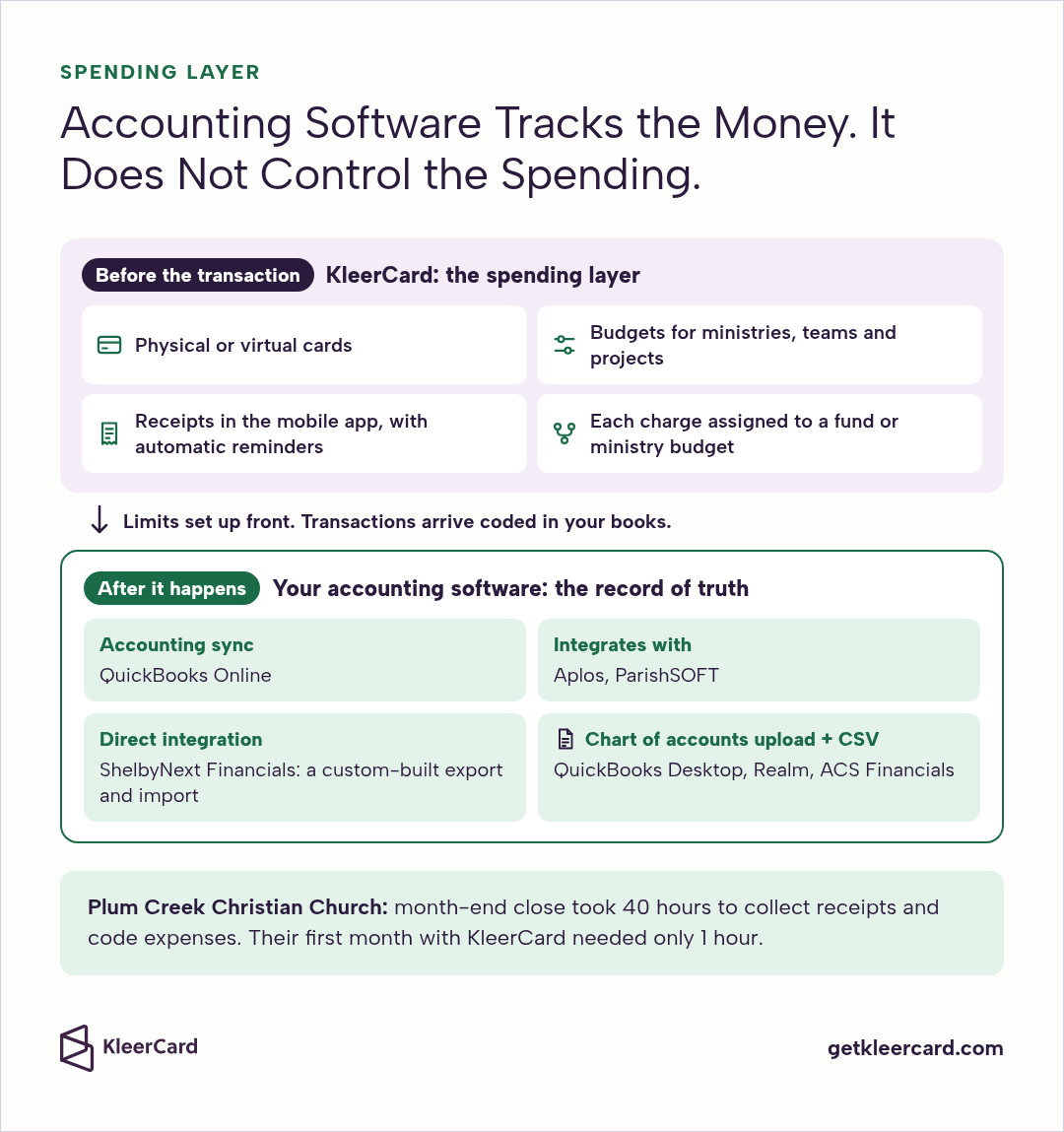
Accounting platforms record what already happened. They don't decide who can spend, how much or on what before the transaction goes through. That gap is where many churches still lose time and visibility.
At KleerCard we built the spending layer that sits next to your accounting software. You issue physical or virtual cards, set budgets for ministries, teams and projects, and see each transaction as it comes in. Cardholders upload receipts in the mobile app with automatic reminders, and each charge can be assigned to the right fund or ministry budget.
Each card's limits, categories and schedules are set up front, so a purchase outside them is declined at the register, and transactions arrive coded for your books. KleerCard integrates with QuickBooks Online through accounting sync, and with Aplos and ParishSOFT.
ShelbyNext Financials has its own direct integration, the custom-built export and import described above. QuickBooks Desktop, Realm and ACS Financials integrate through a chart of accounts upload and CSV export, so you import coded transactions on your schedule. Your accounting system stays the record of truth.
Your accounting software keeps the books, and KleerCard keeps the spending that feeds it clean and documented. A lot of churches add KleerCard after they've already picked their accounting platform. At Plum Creek Christian Church, executive pastor Jared says month-end close took 40 hours to collect receipts and code expenses, and their first month with KleerCard needed only 1 hour.
See how it works with expense management for churches, or schedule a demo to try it alongside what you already use.
Church accounting software is a financial system that tracks money by fund instead of by profit. It records restricted, unrestricted and board designated gifts separately and produces the donor, board and budget to actual reports a church needs.
Our top pick is KleerFi Accounting, the fund accounting software we're building at KleerCard. Even though it's still in development, upon launch, this will be the best accounting software for fund accounting. Until then, our number two pick is QuickBooks Online, a solid platform with good support and many integrations, if you're willing to jump through a couple of hoops to do fund accounting.
You can keep it simple. Map how money moves today, list your must haves such as true fund accounting and bank reconciliation, compare ease of use and total cost, then ask each vendor to demo your restricted funds, designated gifts and board reports with real church scenarios.
It's a fair question, and the answer is yes if you regularly receive restricted gifts or need to report clearly on designated funds to leadership, donors or auditors. Many smaller churches manage with QuickBooks and a simple monthly process. Larger or more complex ministries usually need native fund accounting to stay accurate and audit ready.
It can be, depending on your size and what you'd pay for QuickBooks. For many smaller and mid size churches, a lighter setup is enough, and QuickBooks plus a monthly process delivers enough clarity.
At list price, though, Aplos Lite costs less than QuickBooks Plus, so compare the full yearly cost before assuming native fund accounting costs more. Larger churches, or those with frequent audits and complex restricted gifts, often find native fund accounting worthwhile.
Yes, and plenty of churches do. At my church we've used it successfully for years. It handles the core books well.
Fund separation requires a monthly export and manual adjustment, but that trade off works for a lot of congregations given the wide availability of help and, for eligible nonprofits, the low cost of donated QuickBooks through TechSoup.
Intuit's pricing page lists no church plan as of October 2026, but churches have a good workaround. They adapt QuickBooks Online with a church style chart of accounts and class tracking, which starts on the Plus plan, and eligible nonprofits can request donated Plus or Advanced through TechSoup.
In my work with churches, QuickBooks is the one I see most often. Aplos, Realm, ShelbyNext Financials and ParishSOFT show up regularly in mid size and larger churches that want fund accounting built in.
It's worth asking, especially for a small budget. Free options are limited.
As of October 2026, QuickBooks Online lists a free plan for one user with basic income and expense tracking, though it has no class tracking for funds and no third party integrations, and Aplos and ChurchTrac offer free trials of 15 and 30 days. Most growing churches settle on a paid plan that matches their actual workflow.
Several do, which is good news for churches with staff. As of October 2026, ShelbyNext Financials, Realm, ParishSOFT and PowerChurch Plus all list payroll as part of their accounting. ShelbyNext lets you mark clergy and lay staff on each person's record and prints Forms 941 and W-2.
Clergy pay also has its own tax rules, including a housing allowance the church must designate before it pays it, so ask each vendor how its payroll handles that. If you use QuickBooks or Aplos, ask how payroll connects before you sign.
It doesn't on its own, which is where a second tool helps. Accounting software records transactions after they happen. A spend layer like KleerCard sets each card's limits, categories and schedules up front, so a purchase outside them is declined at the register. Receipts are captured as people spend, and transactions arrive coded before they reach the books.
Start with whether your church needs true fund accounting or can live with a simple workaround. Match the tool to your size, volunteer capacity and budget. For many churches, QuickBooks with a simple monthly fund process is still the practical place to start.
When native fund accounting becomes necessary, that's what we're building KleerFi Accounting to do.
Accounting software records the past. Pair it with a spending system that guides what happens next. That way your finance team can spend less time chasing problems and more time supporting ministry.
If you'd like a second set of eyes on how your accounting and card spending fit together, our team would love to help. Schedule a demo and we'll walk through it with you.


Speak to a member of our team and we can have you up and running in minutes, not weeks.