%202.svg)
A P-card program gives staff their own cards with limits set up front. Learn the roles, controls, policy and rollout for schools, churches and nonprofits.
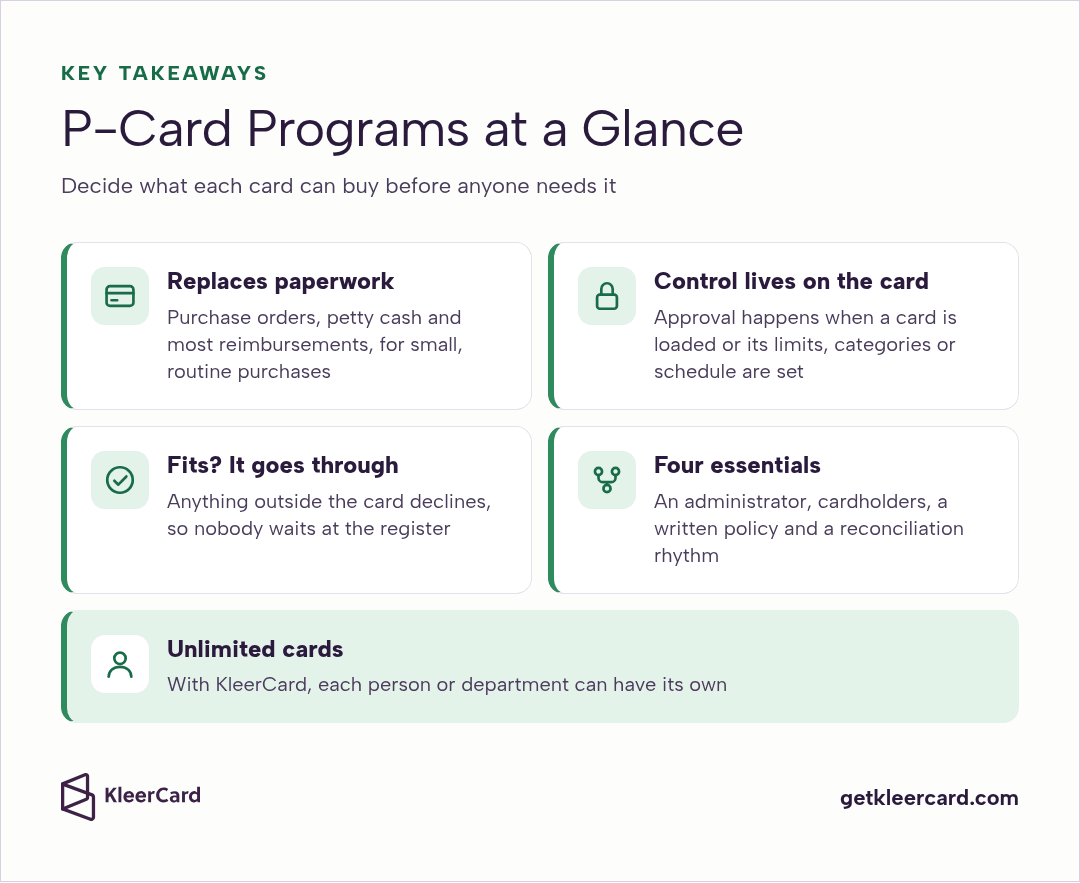
A P-card program gives authorized staff their own organization-issued cards for routine purchases, so they can buy what they need without purchase orders, petty cash or waiting on reimbursement. Finance sets each card's limits, categories and schedule up front, approves funds when a card is loaded, and reconciles spending as receipts come in.
P-card is short for purchasing card, and you'll also hear it called a procurement card. A purchasing card program works the same way at a school business office, a church finance team or a nonprofit with staff and volunteers spread across programs.
I've helped schools, churches and nonprofits set up card programs for years, and the ones that run smoothly share one habit. They decide what each card can buy before anyone needs it. Here's how to build a program like that, from the roles and controls to the policy, the rollout and a calm month-end.
Key takeaways
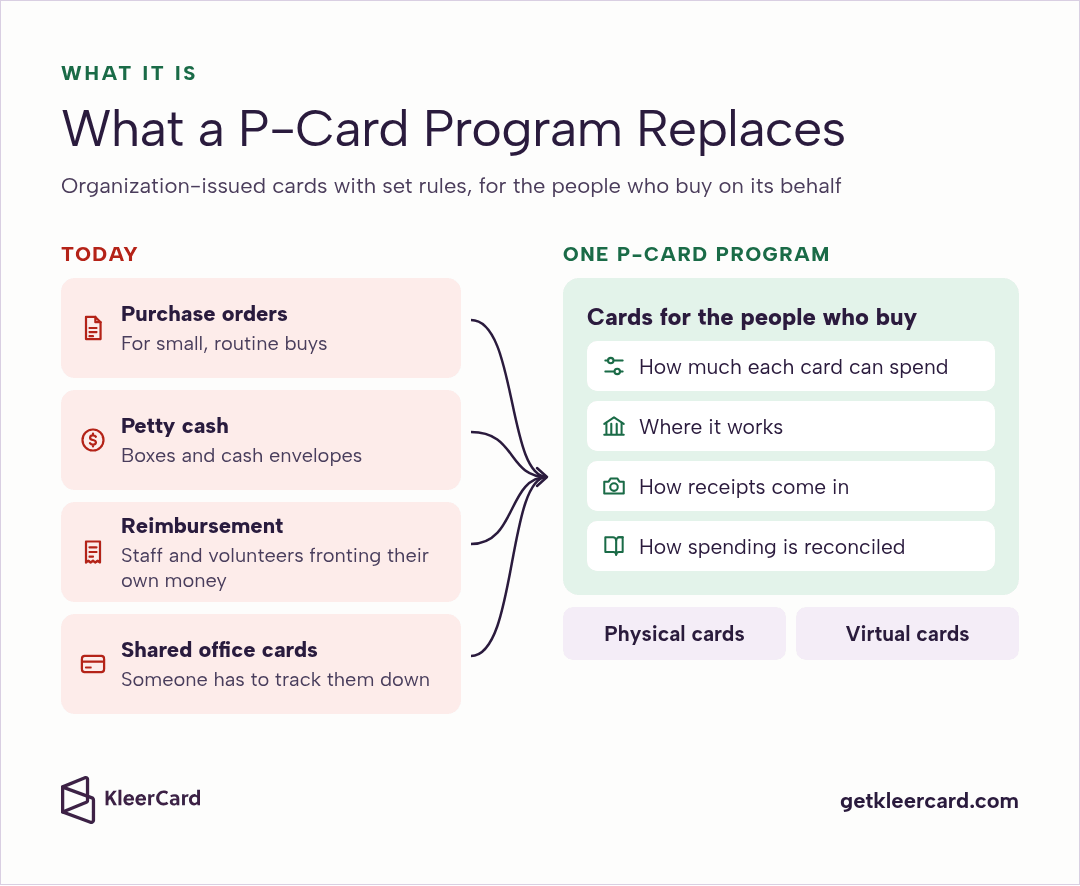
A P-card program is an organization's system for issuing purchasing cards to the people who buy things on its behalf. It sets rules for how much each card can spend, where it works, how receipts come in and how the spending gets reconciled.
The Government Finance Officers Association describes purchasing cards as an efficient way to pay for small-dollar, high-volume purchases, usable wherever a purchase order, check request or petty cash would have been processed (Using Purchasing Cards to Streamline the Purchasing Process).
That's the job at a school, church or nonprofit too: the box of science supplies, the hardware store run before a work day, the youth retreat deposit.
A P-card can be a plastic card for in-person purchases or a virtual card number for online orders and subscriptions. Most programs use both. Our guide to virtual cards covers where each one fits.
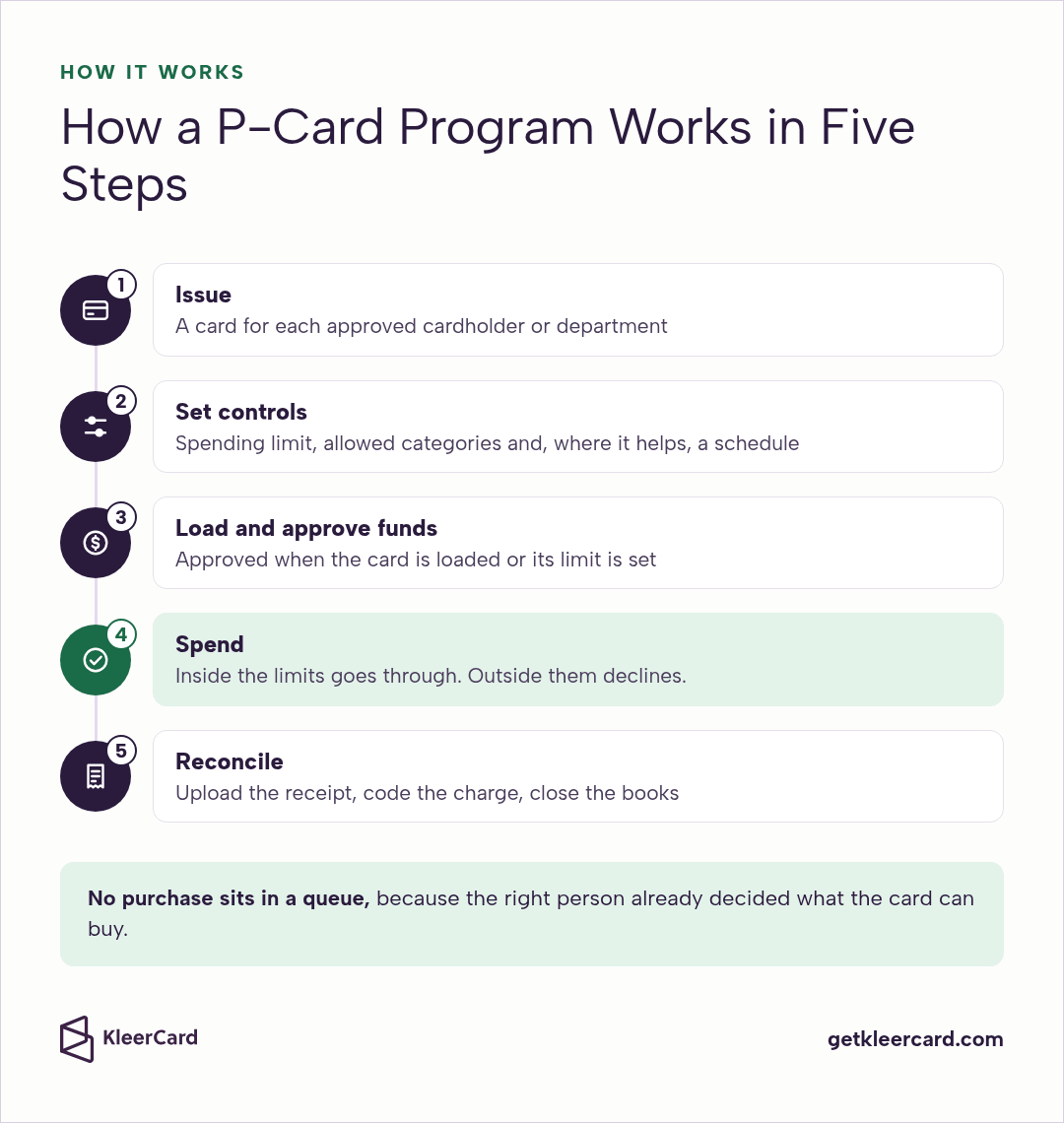
A P-card program works in five steps:
That fourth step is where a well-run program saves everyone time. No purchase sits in a queue, because the right person already decided what the card can buy.
It also means a completed purchase is settled. If a card allowed something it shouldn't have, you adjust its settings for next time.
The most useful control in any P-card program is matching each person's authority to spend with their ability to spend. Get that right and most other rules become a light second layer.
A high-limit card in a desk drawer feels safe because so few people touch it. But whoever holds it can buy almost anything, and finance may not see what was bought until the statement arrives.
A right-sized card in each person's name works the other way around. The limit already matches their budget, so the card itself holds the line.
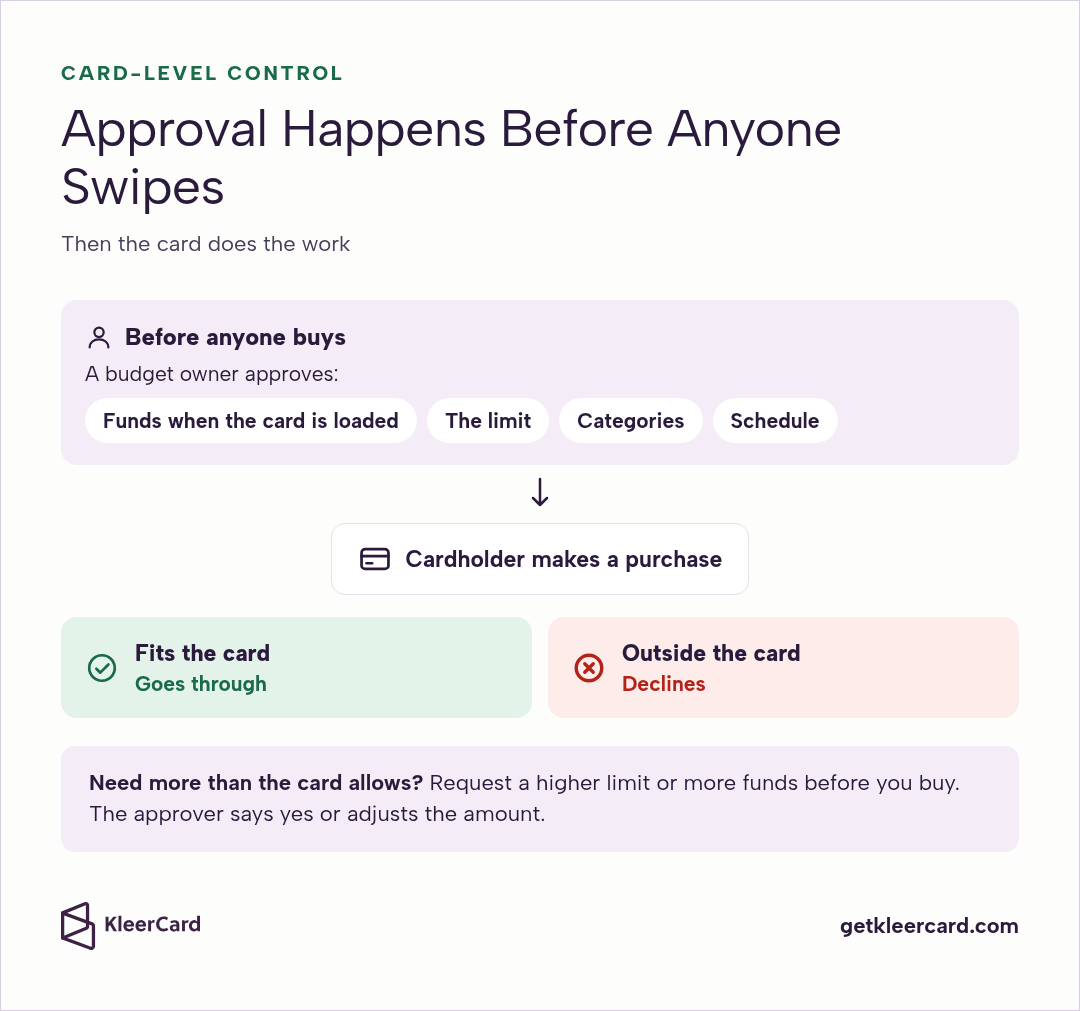
Approval in a P-card program happens at the card level. A budget owner approves funds when a card is loaded, or approves the limit, categories and schedule the card carries. After that, the card does the work: a purchase that fits goes through, and anything outside declines.
When a cardholder knows a purchase will run past their preset limit, they request a higher limit or more funds before they buy. The right approver says yes or adjusts the amount, and the card is ready when they reach the register.
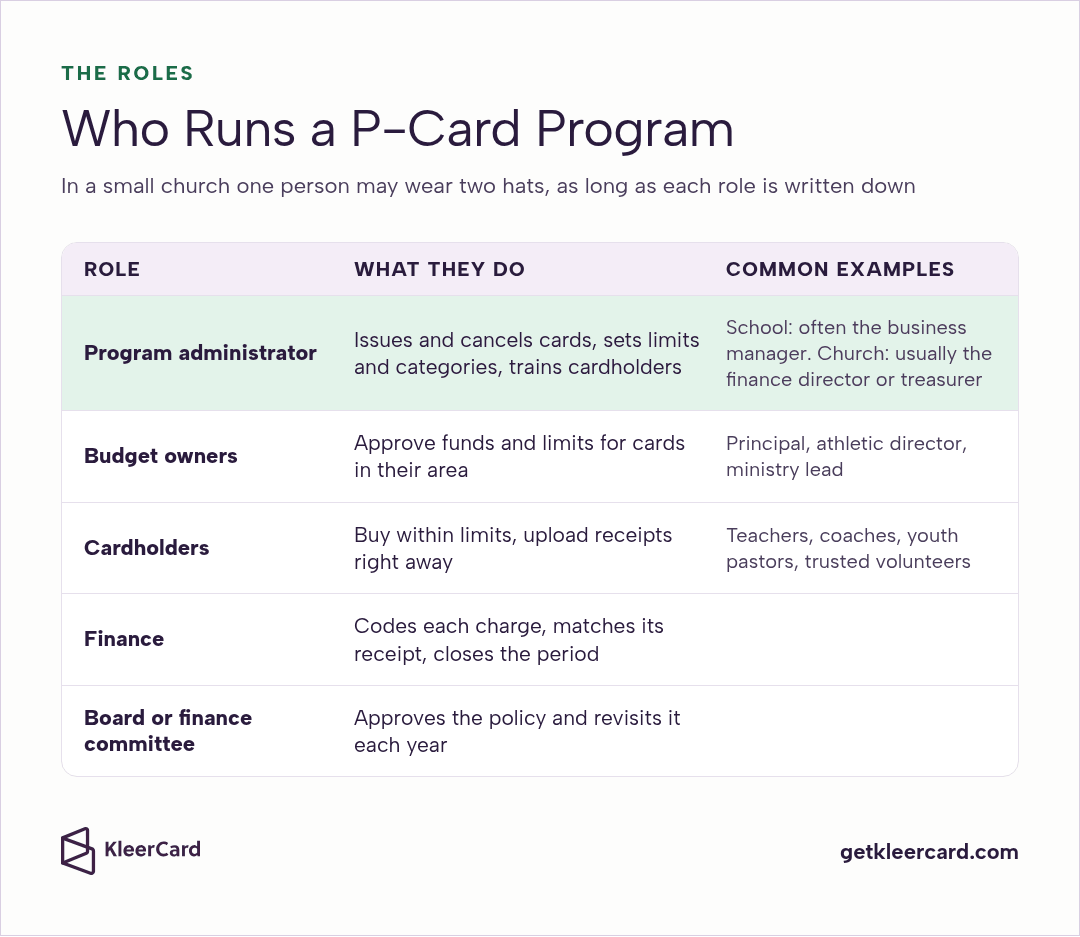
Every P-card program, large or small, runs on a handful of clear roles. In a small church one person may wear two hats, and that's fine as long as each role is written down.
The administrator issues and cancels cards, sets limits and categories, keeps the cardholder list current and trains new cardholders. At a school this is often the business manager. At a church it's usually the finance director or treasurer.
Budget owners approve the funds and limits for the cards in their area. A principal, athletic director, ministry lead or program director knows what their people need.
Cardholders buy within their card's limits, upload receipts right away and follow the policy they signed. Teachers, coaches, facilities staff, youth pastors and trusted volunteers are all common cardholders.
Finance codes each charge, matches it to its receipt and closes the period.
The board or finance committee approves the purchasing card policy and revisits it each year.
Card controls are the heart of a P-card program. Set them once, adjust them as roles change, and the card enforces them.
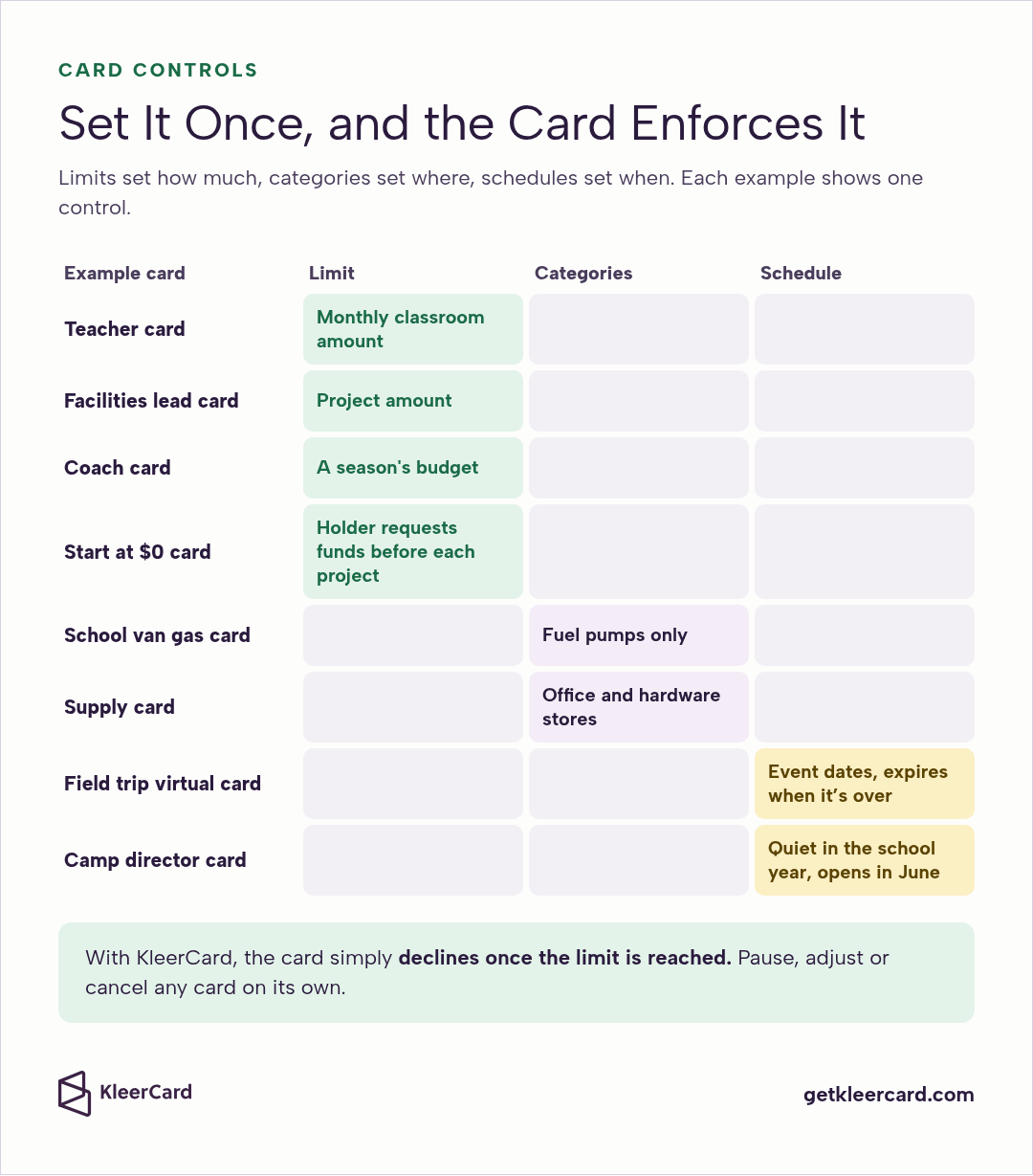
Give each card a limit that fits the person's real budget: a monthly classroom amount for a teacher, a project amount for a facilities lead, a season's budget for a coach. You can also start a card at $0 so the holder requests funds before each project.
With KleerCard, you can load a fixed budget or start at $0 and require a funding request, and the card simply declines once the limit is reached.
Merchant categories decide where a card works. Every merchant carries a four-digit merchant category code, or MCC, that describes its main line of business, and those codes are what a card's category settings read.
A gas card for the school van can be locked to fuel pumps and kept on the van's key ring, with a simple rule for whoever drives: fill up when it drops under half a tank. A supply card can work at office and hardware stores and nowhere else.
Schedules decide when a card works. A virtual card for a field trip or a retreat can be set to the event dates and expire when it's over. A summer camp director's card can stay quiet during the school year and open up in June.
Labeled loaner cards, such as one per department, cover occasional buyers who don't need a card of their own, alongside physical and virtual cards for everyone else.
Pause, adjust or cancel any card on its own without touching anyone else's. When a volunteer steps away or a staff member changes roles, update their card the same day. Our volunteer spend controls show how this works for people who serve part-time.
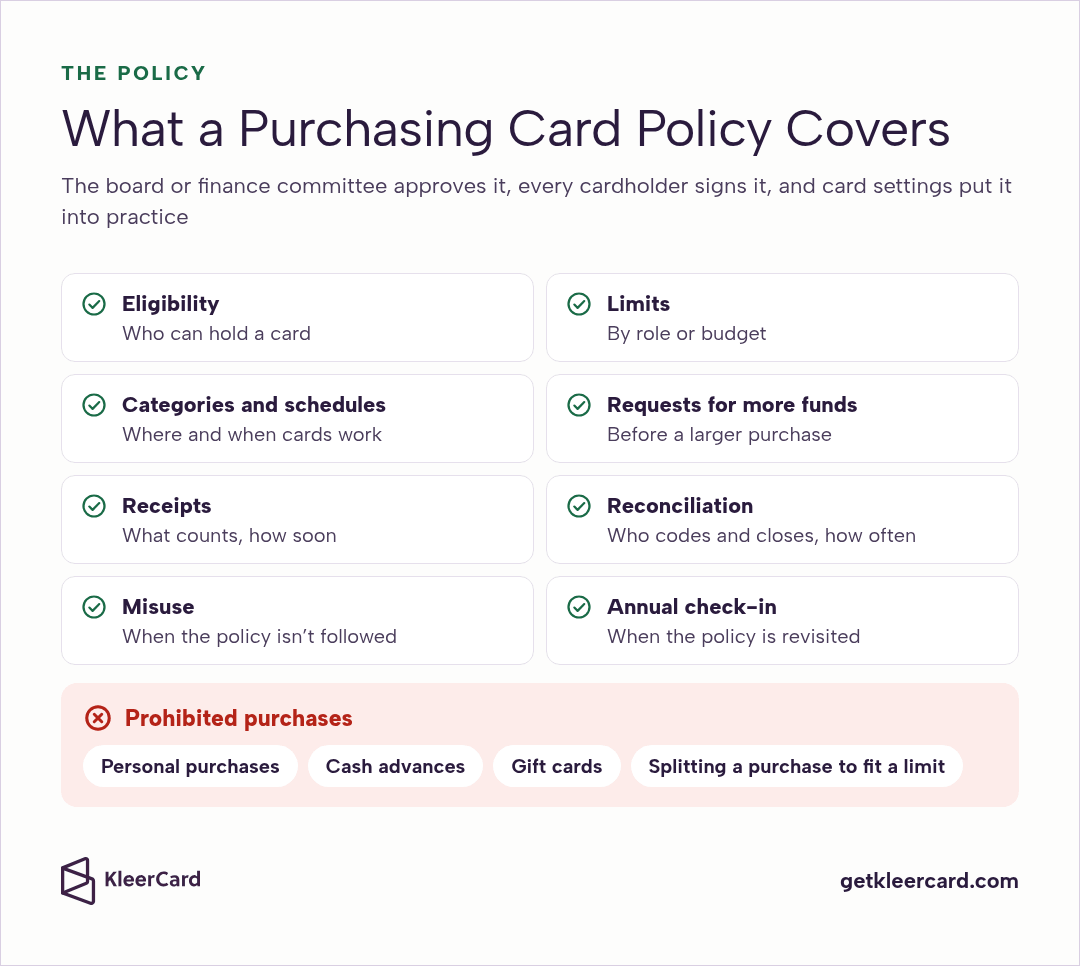
A purchasing card policy is the written rulebook for your P-card program. Your board or finance committee approves it, every cardholder signs it, and your card settings put it into practice.
A purchasing card policy should cover:
For a full, editable document with a cardholder agreement, start from our nonprofit credit card policy template. It works for churches and schools as well.
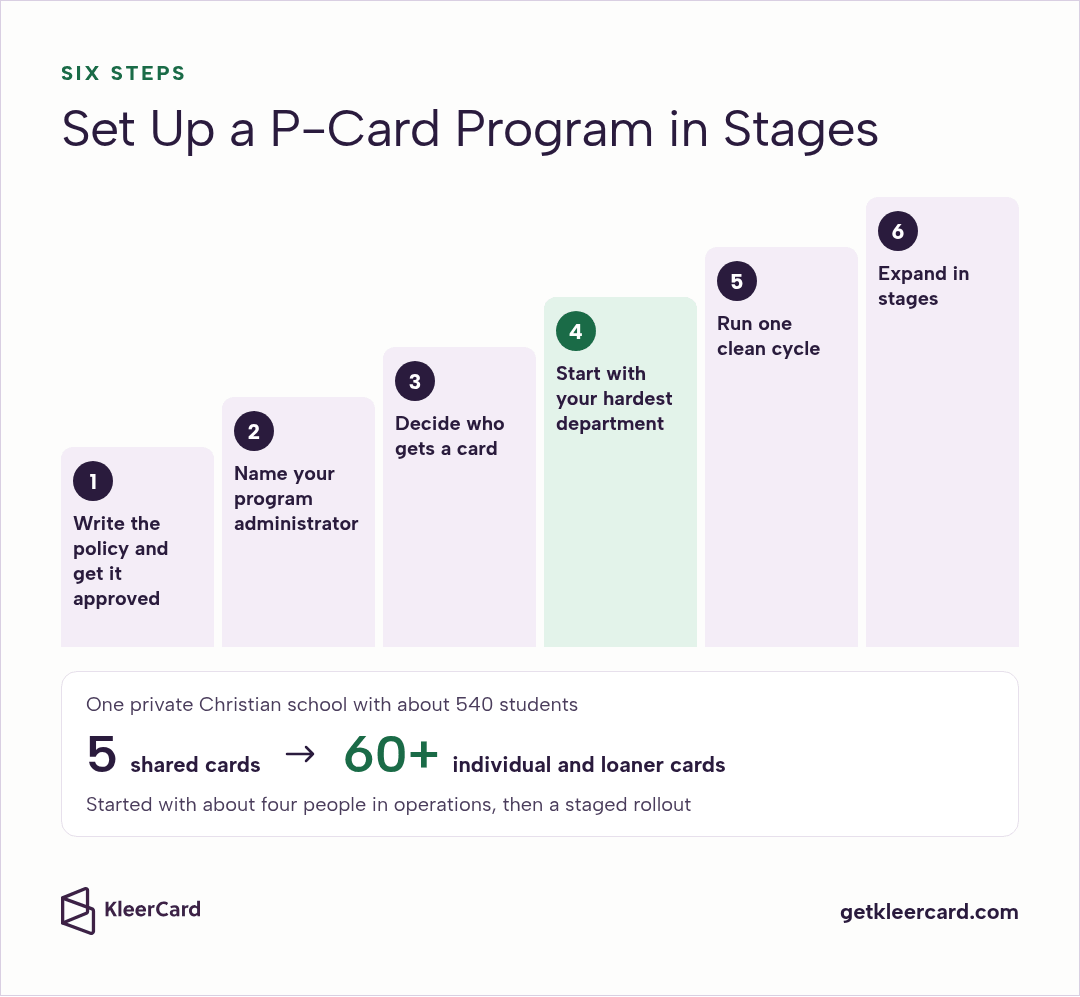
Setting up a P-card program goes best in stages. Here's the order I recommend.
Draft the purchasing card policy and take it to your board or finance committee. Public school districts have a few extra steps here, such as board authorization and cooperative contracts, and our school district credit card program guide walks through them.
Choose one person to own the cards, the settings and the cardholder list. Name a backup so the program keeps running during vacations and turnover.
List everyone who buys on the organization's behalf today, including the people quietly using their own cards. Give frequent buyers their own cards and cover occasional buyers with labeled loaner cards. Because every KleerCard plan includes unlimited cards, nobody has to share a card to keep costs down.
Begin with the group whose spending is messiest. One private Christian school with about 540 students started with about four people in operations: maintenance, IT, vehicles and the hardware store runs.
The thinking was simple. If the process worked for the highest-friction department, every group after them would be easier. That first group caught on within days.
Let the first group spend, upload receipts and reconcile for a full cycle. Adjust limits and categories based on how people actually buy, and update the policy where it needs it.
Expect a surprise or two, like a category nobody thought of. That's the point of starting small.
Add administrators next so they can coach their own teams, then teachers, coaches, ministry leaders and support staff. That same school went from 5 shared cards to more than 60 individual and loaner cards in a staged rollout. You can read how a private Christian school went from 5 cards to 60+.
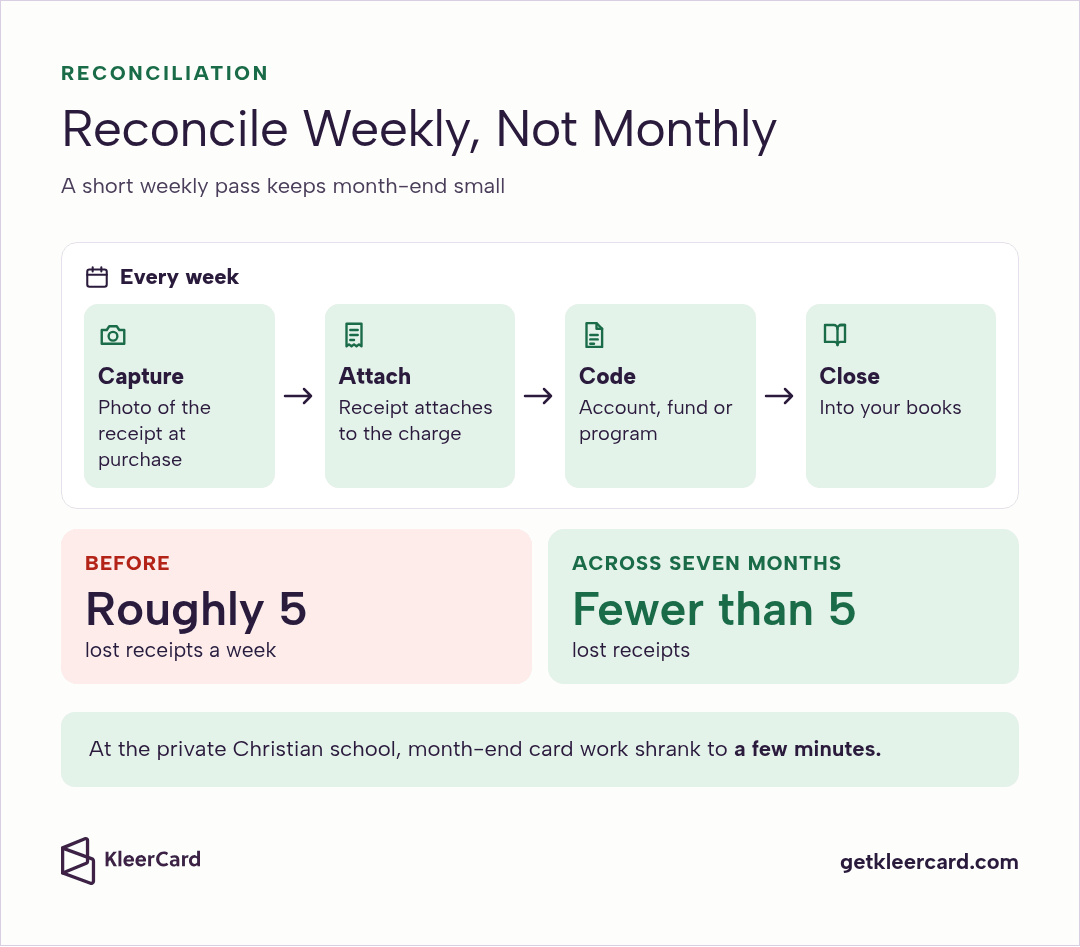
P-card reconciliation is matching each charge to its receipt, coding it to the right account, fund or program, and closing it into your books. The easiest programs do it every week instead of saving it for a monthly statement.
Ask cardholders to photograph the receipt before it goes in a pocket. With KleerCard receipt tracking, the receipt attaches to the charge, missing receipts are flagged automatically, and reminders go out on their own.
On the Pro plan, automatic card-locking can also lock a card if required documentation doesn't arrive in time, commonly after seven days. Cardholders get reminders along the way, so nobody is caught off guard.
Online orders are often the hardest to reconcile. With the Amazon Business integration, each order arrives with its receipt and line-item detail already attached, so finance knows what was bought and by whom.
A short weekly pass keeps month-end small. At the private Christian school above, lost receipts fell from roughly five a week to fewer than five across seven months, and month-end card work shrank to a few minutes.
Coded card spending moves into the accounting system you already use. KleerCard accounting sync syncs with QuickBooks Online and QuickBooks Desktop, and KleerCard also integrates with Aplos, Blackbaud, Realm, ParishSOFT, NetSuite and ACS Technologies, all listed on our integrations page.
Churches on ShelbyNext Financials get a direct integration built for Shelby: a custom export from KleerCard that matches Shelby's import, so your team decides when charges post. If you track restricted gifts, coding each charge to its fund at the start makes restricted fund tracking far easier.
We're also building KleerFi Accounting, fund accounting for nonprofits, and the waitlist is open now.
A P-card, a corporate card and a business credit card can run on the same card networks. The difference is what each is built for and how it's controlled.
| P-card (purchasing card) | Corporate card | Business credit card | |
|---|---|---|---|
| Built for | Routine operational purchases | Broader business and travel spending | General business spending |
| Typical holders | Many staff and departments | Employees who travel or spend often | An owner or a few officers |
| Controls | Per-card limits, merchant categories, schedules | Spending limits, with category rules on some programs | A credit limit, with spending rules that vary by issuer |
| Liability | Usually the organization, under the card agreement | Often the organization; some programs bill the employee | Often a personal guarantee from the owner or an officer |
| Reconciliation | Receipts and coding per charge | Often expense reports | Monthly statement |
For a nonprofit, school or church, the P-card model fits the way money actually moves: lots of small purchases by lots of people, each tied to a budget. KleerCard cards are issued to the organization itself, with no personal guarantee required. If you're comparing providers, our guide on how to choose a corporate card lists the questions to ask.

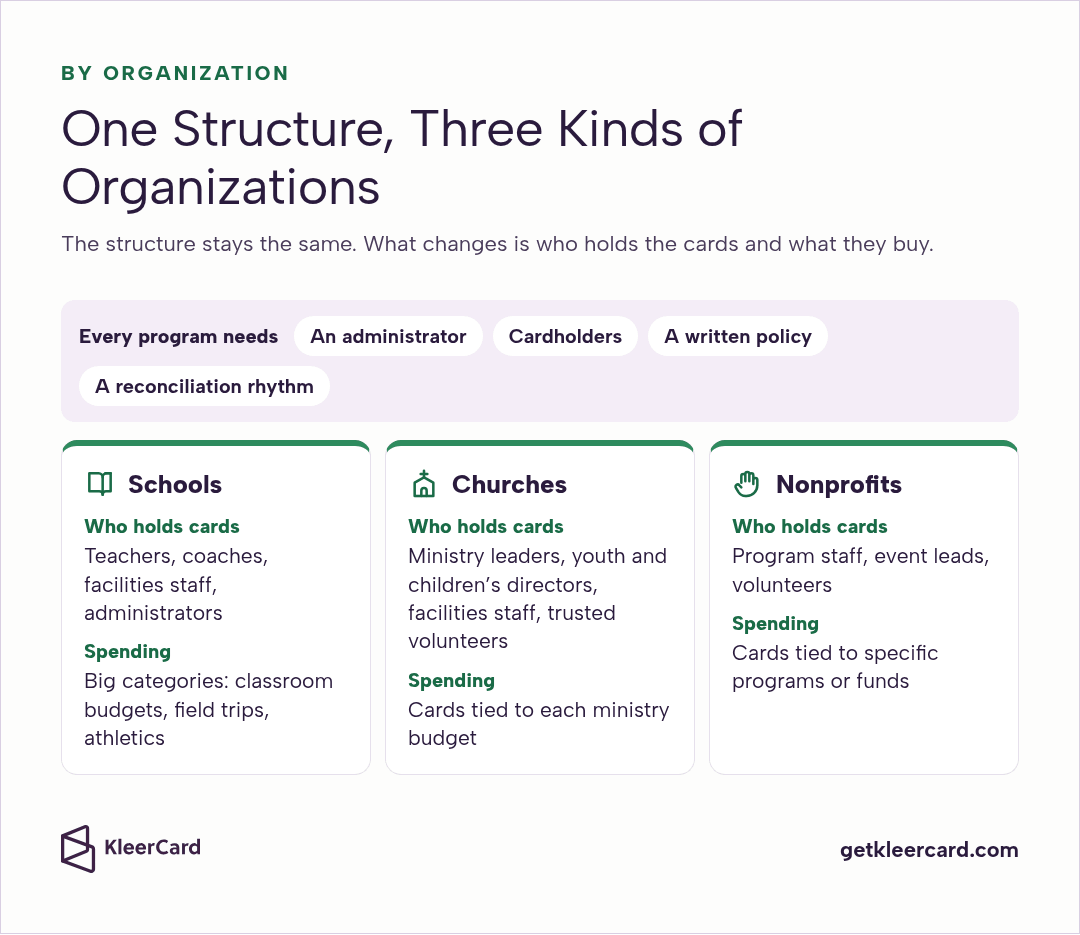
The structure stays the same across organizations. What changes is who holds the cards and what they buy.
Teachers, coaches, facilities staff and administrators are natural cardholders, with classroom budgets, field trips and athletics as the big categories. Public districts that buy through a state cooperative often already have their card issuer chosen. Independent, charter and parish schools set their own policy and choose their own provider.
See how KleerCard supports schools and educators, and our best credit cards for school districts guide compares the options side by side.
Ministry leaders, youth and children's directors, facilities staff and trusted volunteers buy something nearly every week. Cards tied to each ministry budget keep spending aligned with what the congregation gave for. See KleerCard for churches and our guide to church spending controls.
Program staff, event leads and volunteers often work far from the finance office. Cards tied to specific programs or funds keep grant and program spending documented from the first purchase. See KleerCard for nonprofits and our checklist of nonprofit internal controls.
A P-card can be a physical card, a virtual one, or both. Physical cards suit people who shop in person, and virtual cards suit online orders, subscriptions and one-time events. With KleerCard, both are included on every plan, and virtual cards can be ready the same day.
Happily, no, and your team can buy what fits their card without waiting on anyone, because you set each card's limits, categories and schedule up front. If a purchase needs more than a card allows, the cardholder asks for a higher limit first, and an approver can say yes before they buy.
Bill pay is separate from cards and has its own approval step, so a vendor bill can be approved before it's paid.
We'd suggest issuing enough cards that nobody has to borrow one or front their own money. With KleerCard, every plan includes unlimited cards, so each person or department can have a card with its own limit instead of sharing a few high-limit cards.
It's a fair question, and the cost depends on the provider and the plan. KleerCard has no per-user fee and no platform fee, starts with a Free plan at $0 a month, and includes unlimited cards on every plan. Our pricing page lists each plan.
It takes less time than most people expect. Applying for KleerCard takes about eight minutes, and approval typically takes 24 to 48 hours. For a private school of about 540 students, a staged rollout from the first department to the whole campus typically runs four to eight weeks.
The two get mixed up a lot, but a P-card is built for routine purchases by many people, with per-card limits and categories set by the organization. A business credit card often carries one shared credit limit, and many issuers require a personal guarantee from the owner or an officer.
Your staff and volunteers give a lot to your mission. We'd love to make buying what they need the easy part of their week. White glove setup comes with every account, so our team configures your accounts, cards and permissions with you, and your first department can start with confidence.


Speak to a member of our team and we can have you up and running in minutes, not weeks.