%202.svg)
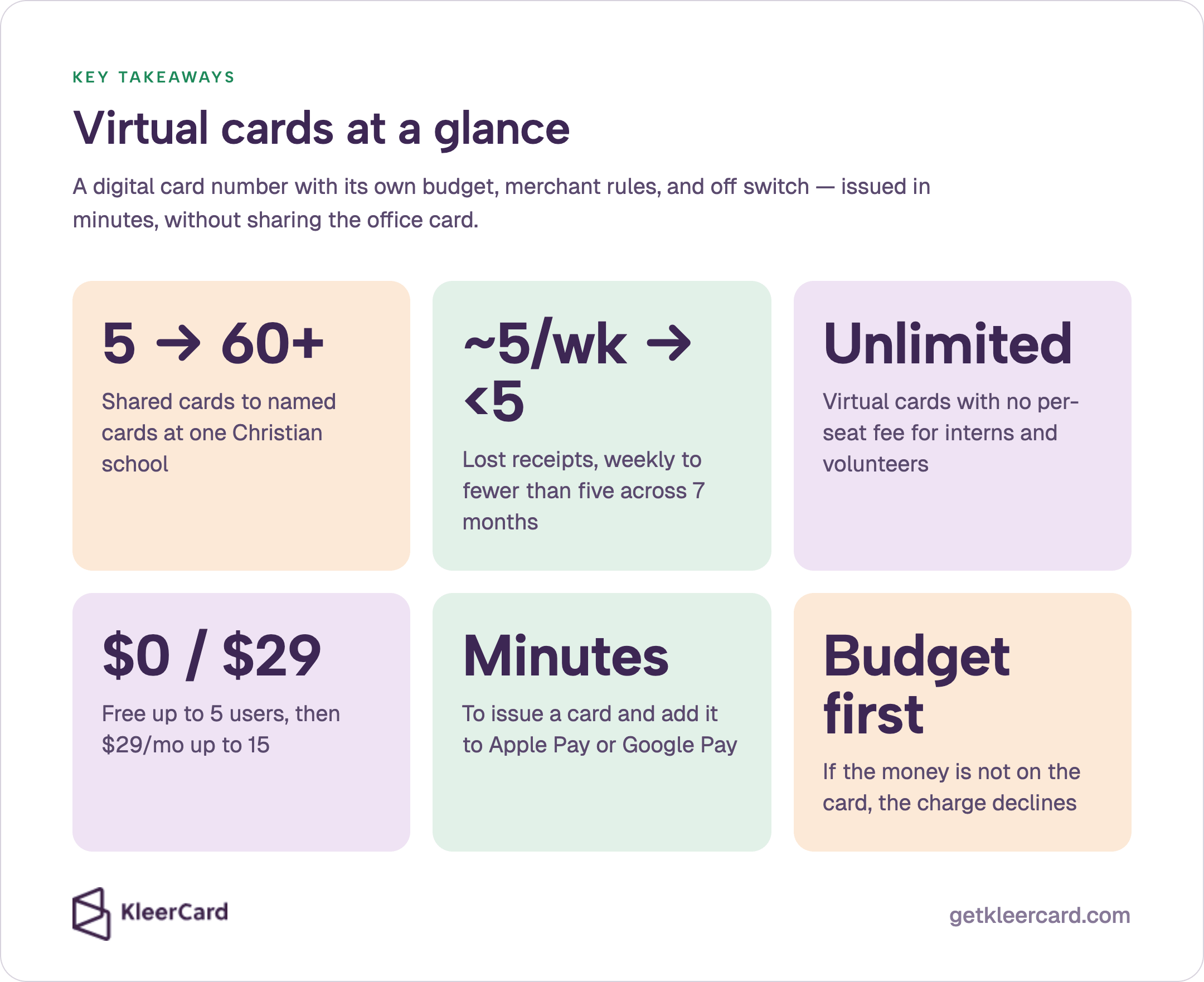
A virtual credit card is a digital card number you can issue in minutes, load with a budget, restrict by merchant or time, add to Apple Pay or Google Pay, and shut off when the work is done.
A church hospitality lead needs $250 for weekend meals and does not have the office card. A teacher needs science supplies tomorrow and will not hunt across two campuses for one of five shared cards. A mission team leader is leaving Thursday and cannot wait five to eight days for plastic to arrive.
A virtual credit card solves those three jobs with the same tool. It is a digital card number you can issue in minutes, load with a budget, restrict by merchant or time, add to Apple Pay or Google Pay, and shut off when the work is done.
I co-founded KleerCard and serve as treasurer at my church. Before that I worked with churches and nonprofits at Compassion International and Switch Consulting. The missing piece I keep seeing is a card the right person can use today, with a limit that matches the job.
About the author. Owen Hill is co-founder of KleerCard and volunteer treasurer at his Orthodox parish. He holds a degree in Economics and Operations Research from the United States Air Force Academy and a Ph.D. in Economics.
He previously ran books on Blackbaud Financial Edge, Microsoft Great Plains, QuickBooks, and Xledger. More on the KleerCard team.
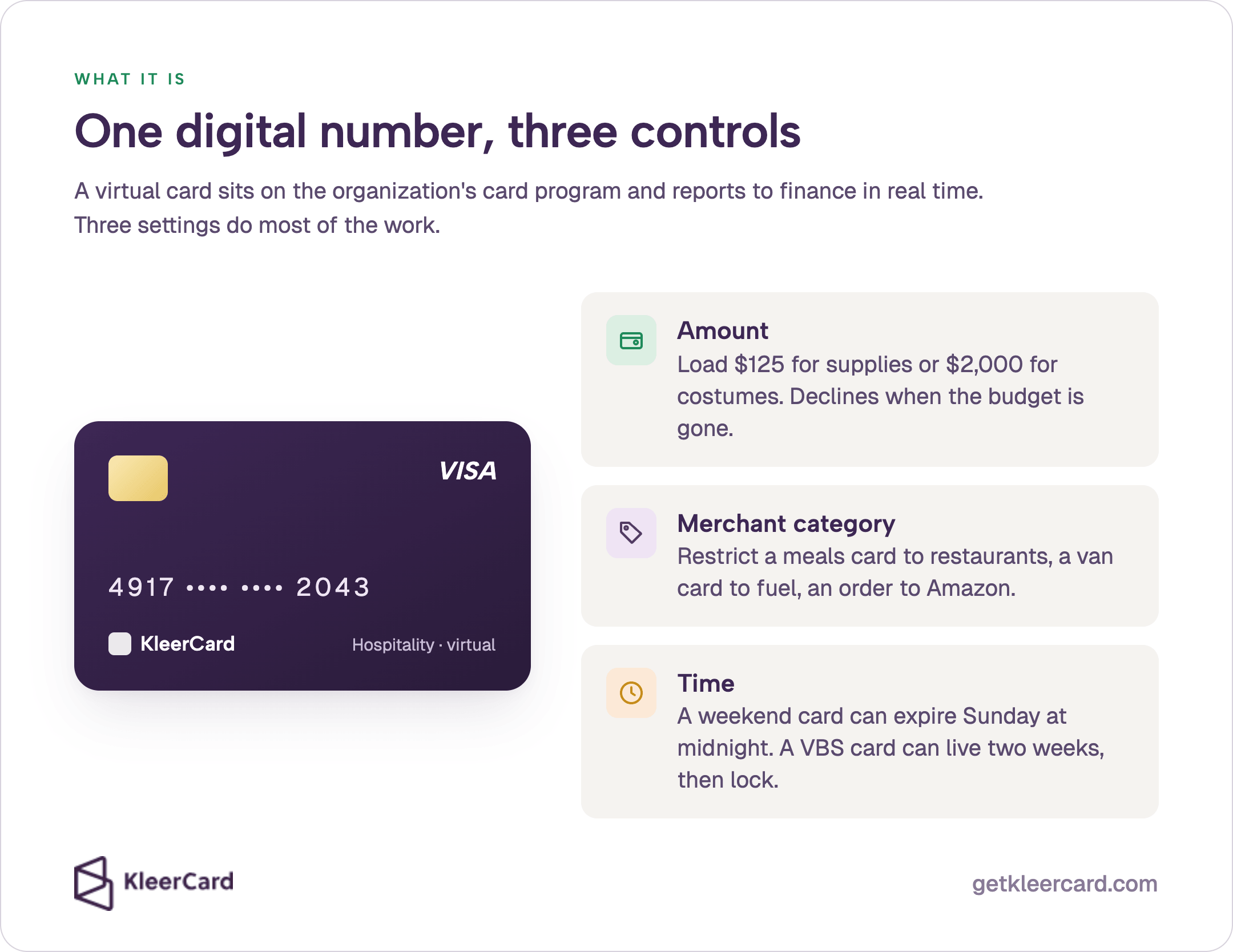
A virtual credit card is a digital number with its own limit, merchant rules, expiration, and CVV. A treasurer can issue one in minutes for a hospitality weekend, a classroom Amazon order, or a trip leader's meals, add it to Apple Pay or Google Pay, and turn it off when the event ends.
The number works anywhere the network is accepted online. In person, the same 16-digit number can live in a phone wallet for contactless tap to pay, so the cardholder does not wait for plastic.
A virtual card sits on the organization’s card program, inherits the organization’s underwriting, and reports back to finance in real time. It is not a separate bank account or a grocery-store gift card.
A prepaid virtual card is loaded with cash first and dies when the balance hits zero. A virtual credit card or charge card draws on the organization’s line and is paid on the statement. KleerCard issues spend-control virtual cards on a charge model, not a consumer prepaid product.
Visa describes the same idea as a virtual card for business: a digital number issued from an account, with amount, date, and merchant controls set by the program manager.
Three settings do most of the work on a virtual card.
KleerCard issues unlimited virtual cards on every plan, including the free plan for small teams. Approval typically returns in 24 to 48 hours. Virtual cards can go live the same day.
Physical cards still ship in five to eight days for the jobs that need plastic. The same nonprofit credit card can carry both formats under one account.
For the generic definition and the mechanics behind the number, see what a virtual card is and how virtual credit cards work. Those pages cover the number itself. This article stays on church, school, and mission-trip jobs.
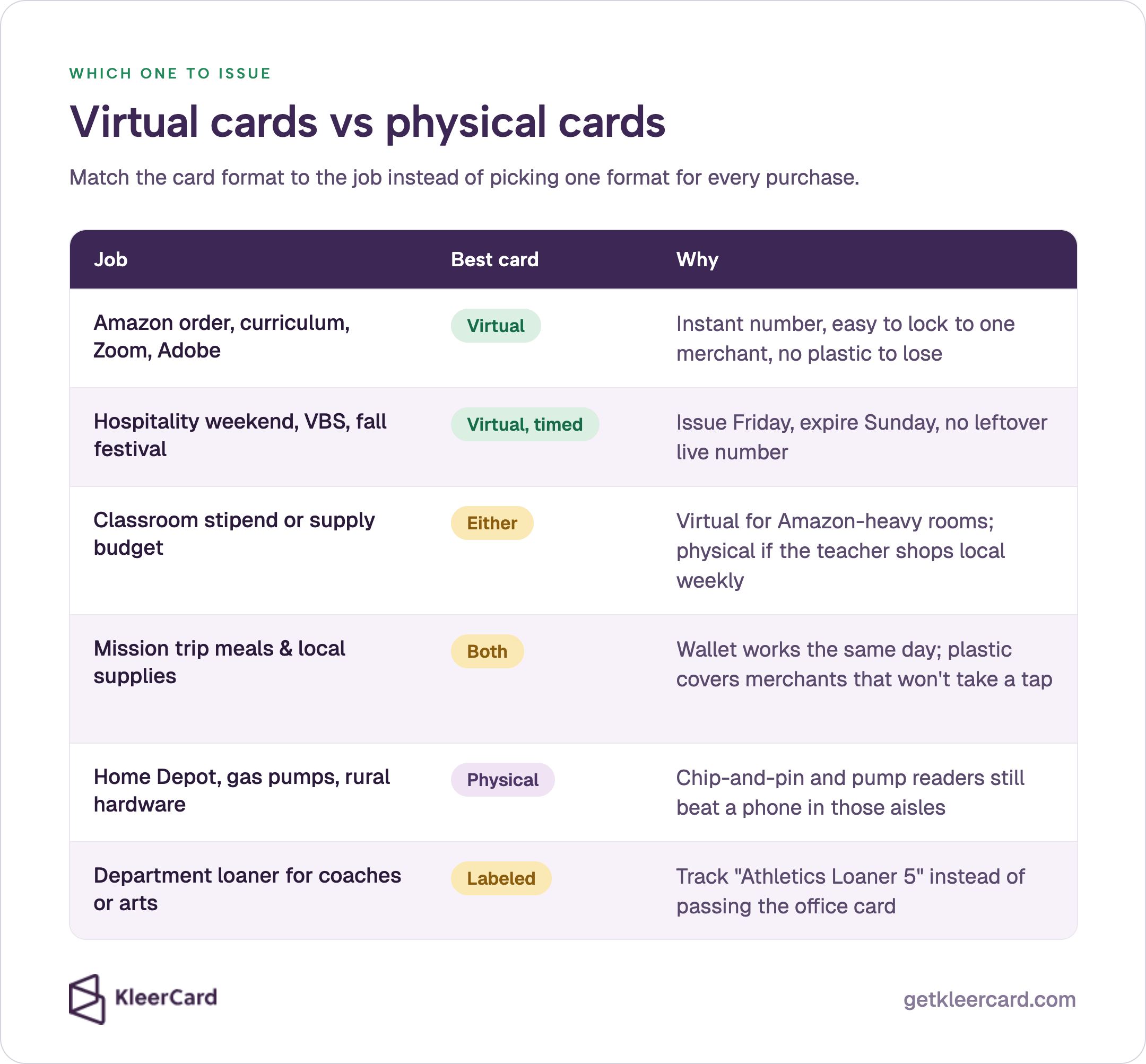
Use this table when you decide what to hand someone this week.
| Job | Best card type | Why |
|---|---|---|
| Amazon order, curriculum, Zoom, Adobe, online vendor | Virtual | Instant number, easy to lock to one merchant, no plastic to lose |
| Hospitality weekend, VBS, fall festival, one-time event | Virtual, time-limited | Issue Friday, expire Sunday, no leftover live number |
| Classroom stipend or teacher supply budget | Virtual or physical | Virtual for Amazon-heavy classrooms; physical if the teacher shops local stores weekly |
| Mission trip meals, local supplies, last-minute bookings | Virtual in wallet, plus one physical backup | Wallet works the same day; plastic covers merchants that will not take a tap |
| Home Depot, gas pumps, rural hardware, some overseas shops | Physical | Chip-and-pin and pump readers still beat a phone in those aisles |
| Department loaner for coaches or fine arts | Labeled physical or virtual loaner | Track “Athletics Loaner 5” on the dashboard instead of passing the office card |
Jessica’s school still needed physical cards for the maintenance director’s Home Depot runs and for coaches who buy team meals in person. The campus used virtual numbers for Amazon event supplies, subscriptions, and seasonal programs.
The finance office matched the virtual or physical card to the job instead of picking one format for every purchase.
Physical cards remain the right tool when the reader at the pump or the hardware counter will not take a wallet. Virtual cards remain the right tool when you need a number today, a tight limit, or a card you can kill the moment the event ends.
Most church and school teams end up with both. If you want to walk the mix against your ministries or classrooms, schedule a demo.
Churches burn time on a small set of repeat problems. A shared office card that is never in the office.
Reimbursements after VBS or a youth retreat. Subscriptions that renew on someone’s personal card.
A working church pattern looks like this.
Recurring ministry cards. Hospitality, children’s ministry, and worship each get a virtual card with a monthly budget. The hospitality lead does not wait for the administrator to be on campus. The card declines when the month’s budget is gone.
Single-use virtual cards. A missions team covering travel meals this weekend can receive a card capped at $250, restricted to restaurants, set to expire Sunday at midnight. The card shuts off. No one uses it Monday for gas.
Vendor and subscription cards. Zoom, Planning Center add-ons, and curriculum platforms sit on their own virtual numbers. Finance always codes Zoom the same way. A forgotten renewal shows up on a named card instead of looking like fraud on a shared number.
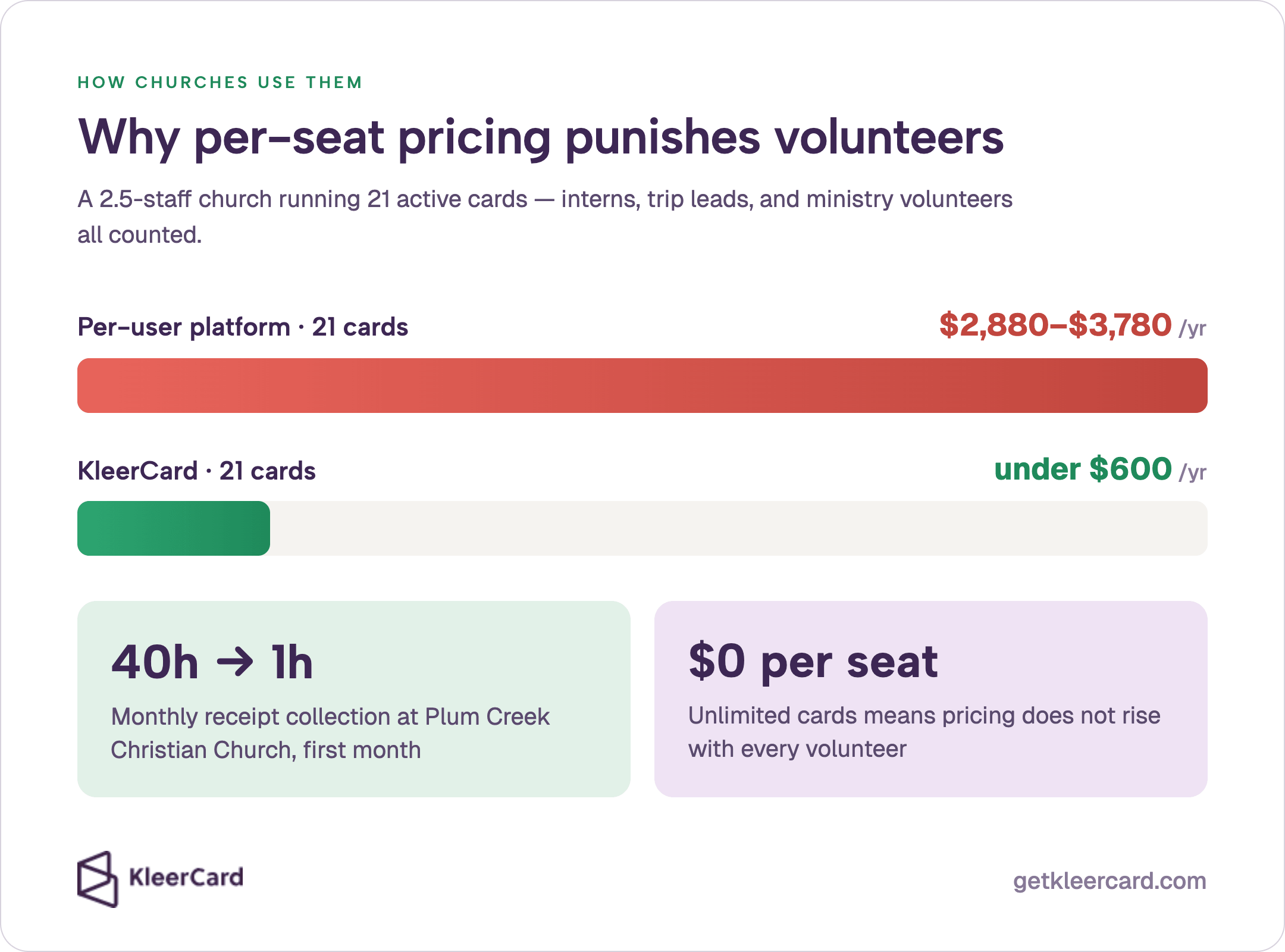
Volunteer and intern cards. A summer intern or a trip volunteer should not force a new per-seat fee. Unlimited virtual cards let the church give that person line-of-sight accountability for two weeks and then turn the number off.
The church where I serve as treasurer runs 2.5 paid employees and 21 active cards. On a per-user platform that would cost roughly $2,880 to $3,780 a year. On KleerCard the same 21 cards stay under $600 because pricing does not rise with every volunteer.
Jared, Executive Pastor at Plum Creek Christian Church, cut receipt collection from about 40 hours a month to one hour in the first month after Plum Creek put virtual cards and mobile capture in place. A new ministry virtual card can go live the same afternoon the need appears.
If your board is comparing platforms, start with the best credit cards for churches. Confirm unlimited virtual cards with merchant and time rules, and no personal guarantee on the pastor or treasurer.
See KleerCard for churches for the workflow against a ministry chart of accounts. Small churches comparing cost at 5 to 15 users can use the best credit cards for small churches guide.
Teams still running reimbursements after events can move that work into bill pay and reimbursements instead of payroll.
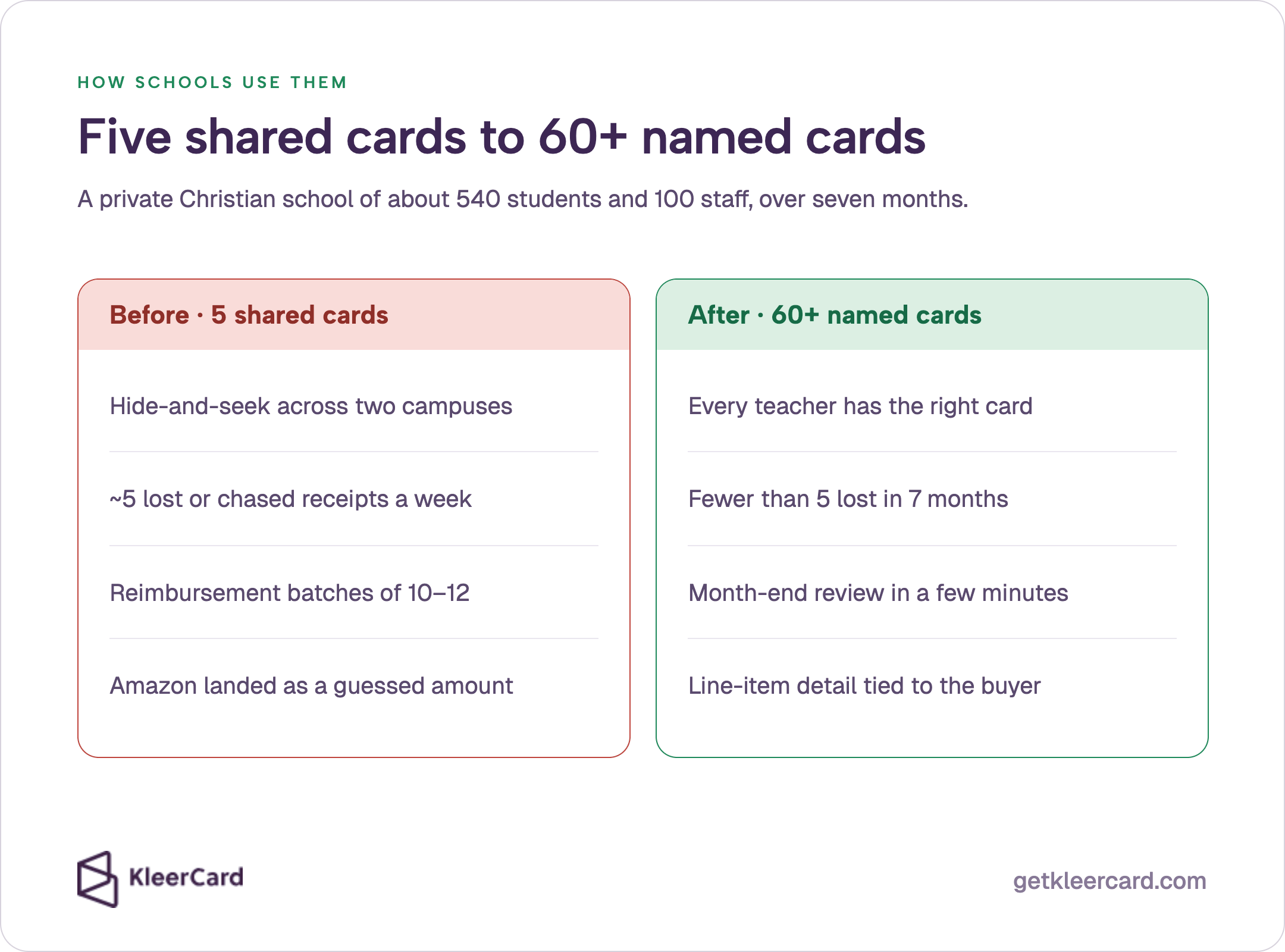
Five shared cards for a hundred staff produces hide-and-seek. Teachers stop asking, buy supplies on a personal card, and turn in a reimbursement with a crumpled receipt, or none at all.
Jessica’s private Christian school, with about 540 students and 100 staff, lived that pattern. The campus, including a children’s center, ran on five cards. A teacher who needed a science item had to find the director of operations, who had already handed the card to the academics director on the other campus.
Reimbursement batches of ten or twelve hit every deadline. Lost or chased receipts ran about five per week. Amazon charges landed as a generic amount, so finance guessed which classroom or event the order belonged to.
After the finance office issued more than 60 virtual and physical cards, lost receipts dropped to fewer than five across seven months. Month-end credit-card review became a few minutes. Amazon orders arrived with line-item detail already attached to the cardholder.
Virtual cards did three jobs at Jessica’s school. Same-day numbers while plastic was still in the mail. Amazon orders tied to a named person.
Seasonal cards covered the summer camp director, who barely spends during the school year and is the heaviest spender in June and July.
Loaner cards still matter. Fine Arts Loaner 1 and Athletics Loaner 5 are easier to track than one office card passing through five hands.
Some loaners are physical because coaches and facilities staff buy in person. Some are virtual because the purchase lives on Amazon.
Classroom cards can carry a modest limit. Jessica floated about $125 as the kind of number lower-school teachers would receive so they stop fronting supplies. When the balance hits zero, the teacher requests more.
The full campus story is in how a private Christian school went from 5 cards to 60+. The Amazon workflow is covered in Amazon Business expense tracking, which pairs with an Amazon Business account.
School and district teams can also review KleerCard for educators and credit cards for school districts.
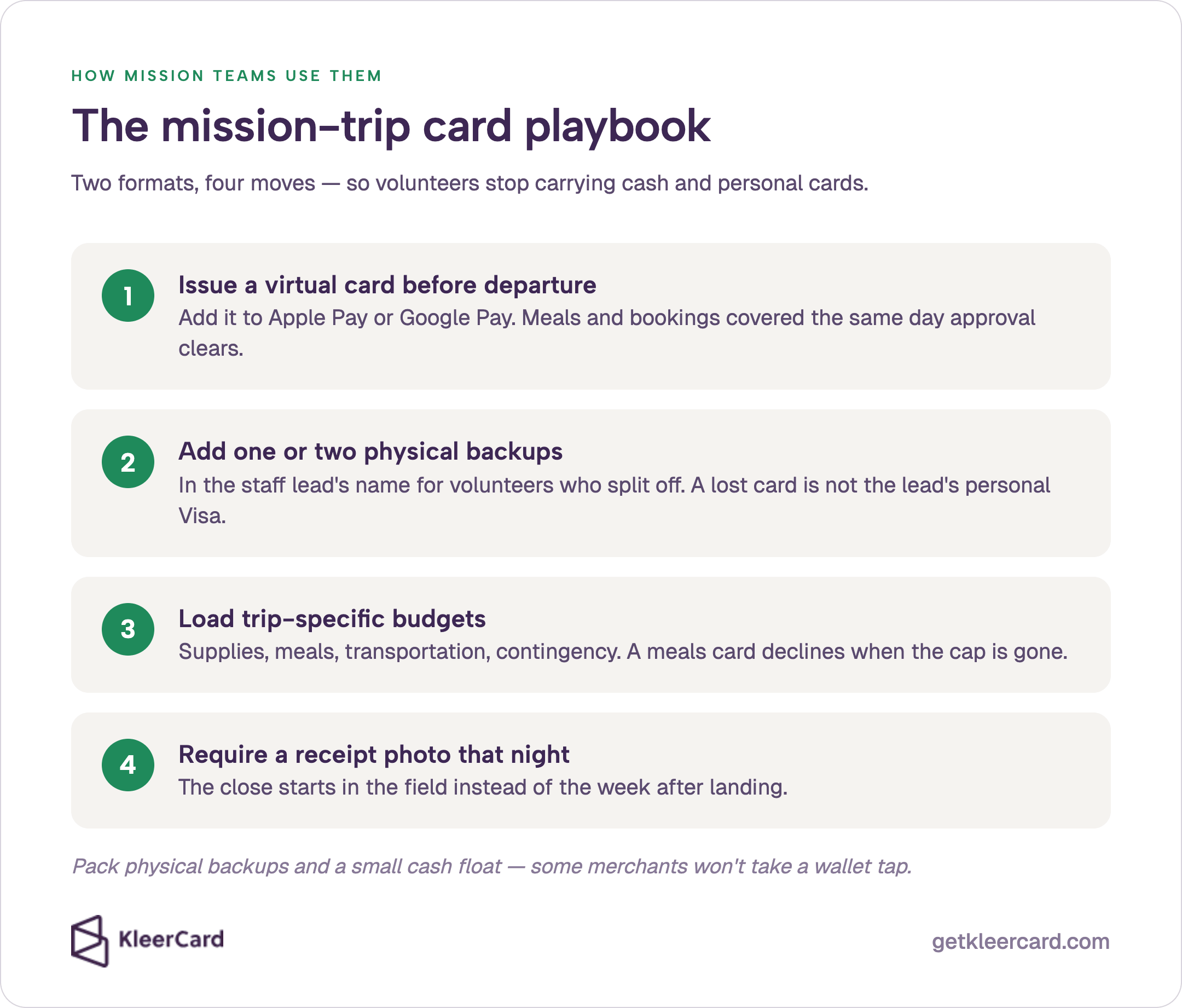
Mission trips break shared-card systems. A mission team is in another country. The office card is at home.
Volunteers do not want to put $800 of groceries and taxis on a personal card and wait for reimbursement after they land.
The old pattern is cash. A team of 10 to 12 people carries a stack of bills because that is what the local market takes.
Receipts live in a pocket. The trip leader comes home with a pile of paper and a week of reconstruction.
White Horse Missions documented the same failure in Central America. Teams carried cash for groceries.
Receipts went missing. Close waited until everyone was home.
Nightly receipt photos and cards in the field are what changed those White Horse trips.
A better mission-trip pattern uses both formats.
I have watched international relief teams move from one staff card to virtual cards plus extra physical cards. Previously only the staff lead carried an organization card.
Volunteer leaders used personal cards, felt awkward asking for reimbursement, and were stuck if the group split or the lead’s card failed. Two extra cards under the lead’s visibility changed how those trips ran.
Virtual cards are not magic overseas. Some merchants will not take a wallet tap, and some treat a prepaid-looking number with suspicion.
Pack physical backups. Confirm the foreign transaction fee with your issuer before the team leaves. Keep a small cash float for markets that are cash-only.
For trip controls and post-trip reporting, use the mission trip spending cards workflow. For designated gifts, accountable plans, and Form 990 classification, use the mission trip expense management guide.
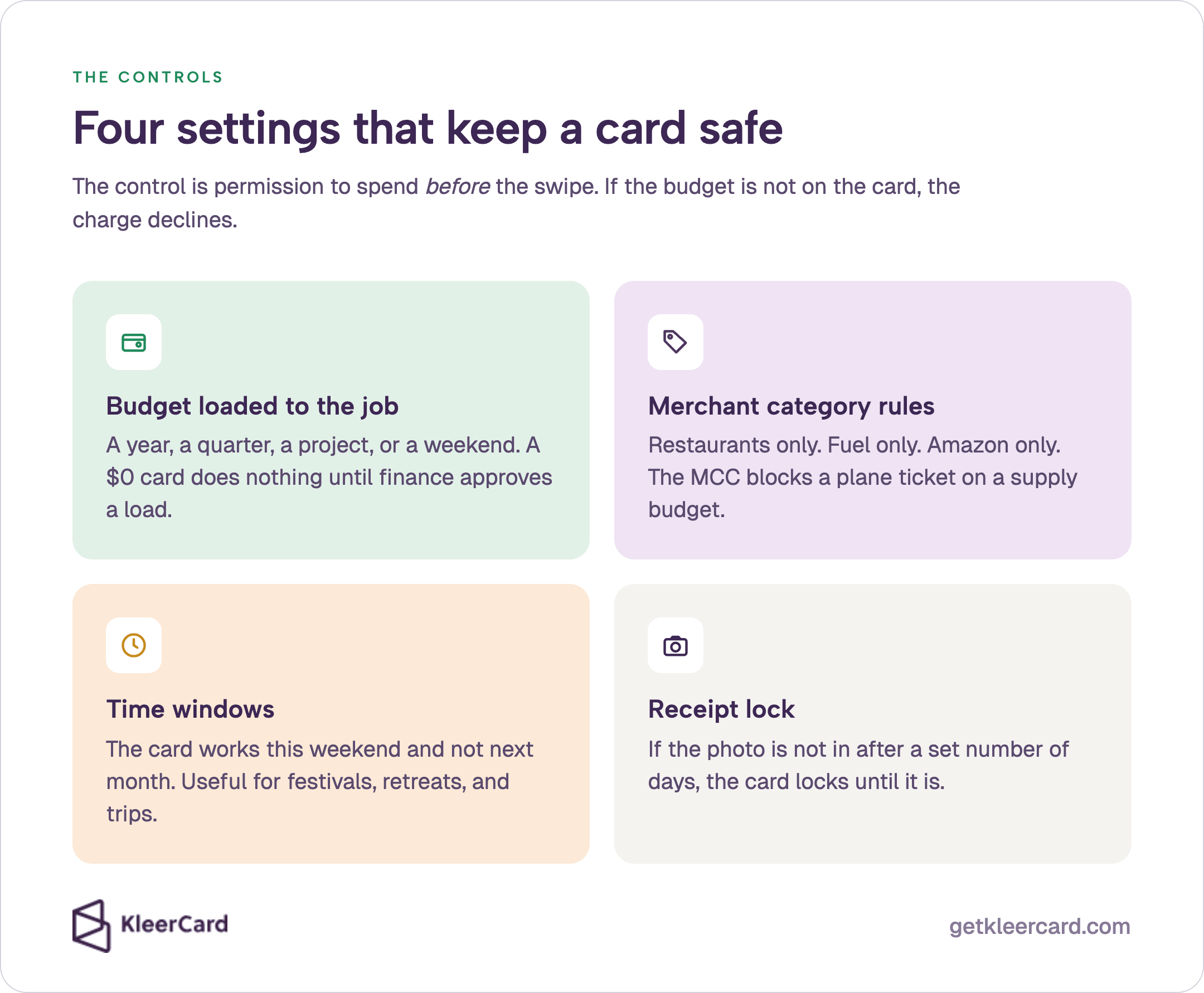
The control on a virtual card for a church, school, or mission team is permission to spend before the swipe. If the budget is not on the card, the charge declines.
Four settings cover almost every church, school, and trip case.
Budget loaded to the job. A year, a quarter, a project, or a weekend. A $0 card sits in someone’s wallet and does nothing until finance or an administrator approves a load.
Merchant category rules. Restaurants only. Fuel only. Amazon only. The merchant category code on the authorization is what blocks a plane ticket on a classroom supply budget.
Time windows. The card works this weekend and not next month. Useful for festivals, retreats, and trips with a hard end date.
Receipt lock. If the photo is not in after a set number of days, the card locks. Jessica’s school got receipts under control because people photographed the slip before they put it in a bag.
Photographing the receipt at the register is the core of receipt tracking. Shared visibility is the other half of the control. Finance can open the athletics director’s card and see what the director sees.
No screenshots. No guessing about the $214 at Walmart.
A high-limit office card in a drawer does the reverse. Anyone who holds it can charge far beyond the classroom or hospitality budget. Paperwork after the fact does not undo the swipe.
Public-sector purchasing-card, or p-card, programs make the same point: the card itself has to carry the limit, not the drawer. See the GFOA purchasing card guidance.
KleerCard does not build enterprise approval chains. Churches and schools whose approver is at camp for five weeks still need finance to work.
If you need a linear manager-then-finance chain, a different platform fits better.
KleerCard houses those virtual-card controls in expense management built for churches, schools, and nonprofits.

Do not hand a virtual card to every volunteer on day one. Use the staged rollout that worked at Jessica’s school.
Week one. Connect the card platform to accounting, and to Amazon Business if you buy there. Issue three to five virtual cards to the messiest spenders: operations, the heavy online buyer, or the trip lead leaving soonest. Get receipt photos working.
Weeks two and three. Add administrators so they can approve loads and coach their own people. Jessica’s school used a $5,000 self-load ceiling for administrators, with anything above that routed to the head of school.
Month two. Expand to teachers, coaches, ministry leads, and labeled loaners. Keep a simple request path for people who do not have a card yet. The finance office still uses a Google Form that routes to the administrator, then to finance, who points the person to the right loaner.
A KleerCard application typically clears in 24 to 48 hours with no personal guarantee when the platform underwrites the organization. Virtual cards can be issued the same day. Physical cards arrive in five to eight days.
Run a few weeks of overlap if you can, and collect the old bank card when the new virtual or physical card goes live. Most teams finish setup in two or three short calls through white-glove setup.
Pricing on KleerCard starts free for up to five users and $29 per month for up to 15. There is no per-seat fee, which is what makes intern, volunteer, and trip cards affordable.
See current pricing and the nonprofit credit card overview if you want both virtual and physical cards under one account. You can also sign up on the free or Standard plan and issue the first virtual cards the same day approval clears.
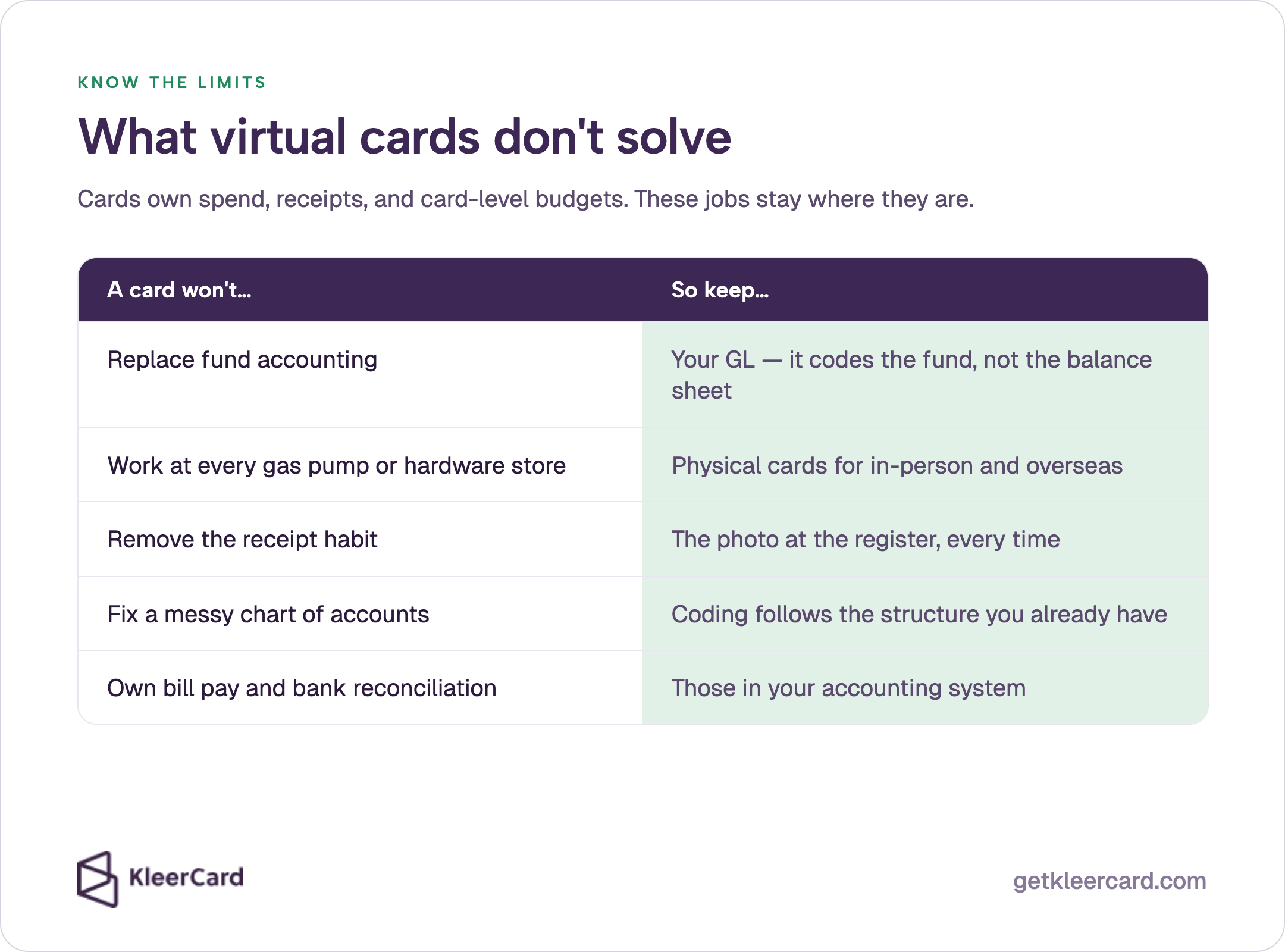 fund accounting, work at every gas pump, remove the receipt habit, fix a messy chart of accounts, or own bill pay. Keep the GL, physical cards, register photos, existing coding, and recon in accounting." style="width:100%; height:auto; display:block;">
Virtual cards do not replace fund accounting. A restricted building gift still needs a fund balance the general ledger can report.
The virtual card can code the charge to the right fund. It cannot produce a per-fund balance sheet inside QuickBooks.
Intuit still treats classes as labels on a single company file, not as separate funds. See its balance sheet by class article.
Virtual cards do not replace physical cards for gas pumps, many hardware stores, and some international merchants. Plan for both.
Virtual cards do not remove the need for a receipt habit. The photo at the register is what collapsed month-end at Jessica’s school and at Plum Creek. A virtual number with no receipt is still a chase.
Virtual cards do not fix a chart of accounts that splits classroom supplies into four near-duplicate accounts. Coding follows the structure you already have.
Bill pay and bank reconciliation often stay in the accounting system. Jessica’s school still printed checks and reconciled in Shelby. That is normal.
A card platform should own spend, receipts, and card-level budgets.
If month-end close is still a reconstruction project, pair the cards with the habit in our month-end close and receipt tracking guide.
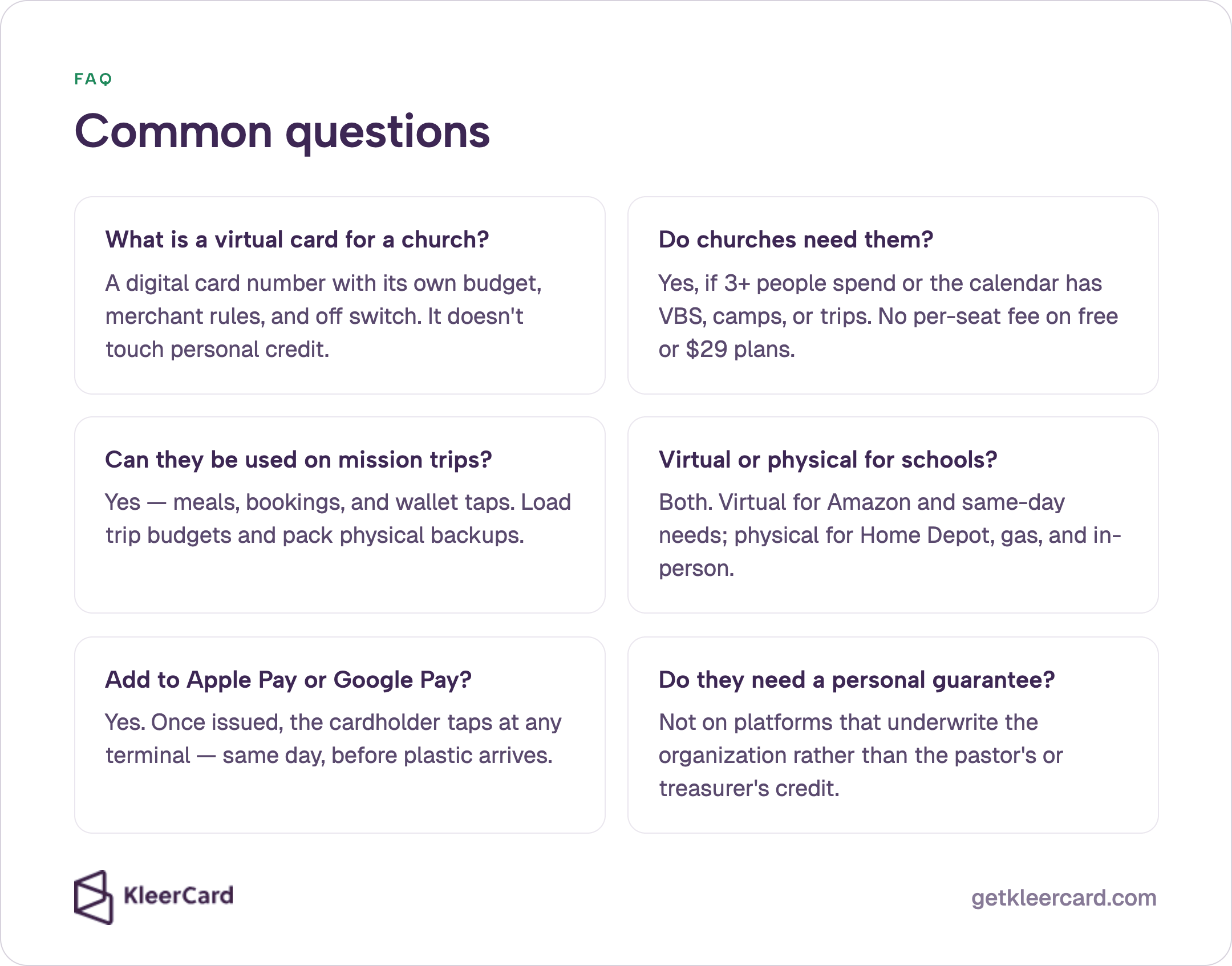
A virtual credit card is a digital card number issued by the organization, with its own budget, merchant rules, and off switch. A treasurer can create one in minutes for a ministry, a classroom, or a trip and add it to Apple Pay or Google Pay. It reports to finance in real time and does not sit on a staff member’s personal credit.
Yes, if more than two or three people spend or if the calendar includes VBS, camps, mission trips, or one-off events. Virtual cards cover those spikes without sharing the office card or waiting a week for plastic. Small churches on a KleerCard free or $29 plan can issue them without a per-seat fee.
Yes, for meals, bookings, and any merchant that accepts the card network or a phone wallet. Issue the trip lead a virtual card before departure, load trip-specific budgets, and require a receipt photo the night of the purchase.
Pack physical backups. Some overseas merchants still prefer a chip card or cash.
Use both. Virtual cards fit Amazon, subscriptions, and same-day needs. Physical cards fit Home Depot, gas, cafeteria runs, and coaches who buy in person.
Jessica’s school of about 540 students reached 60+ cards by mixing named cards, virtual numbers, and labeled loaners rather than picking a single format.
Yes. Once the virtual number is issued, the cardholder adds it to Apple Pay, Google Pay, or Google Wallet and taps at any terminal that accepts the network.
Wallet tap is how a trip lead or a hospitality volunteer spends the same day the treasurer creates the card, before plastic arrives. Apple’s own steps for adding a card to Apple Wallet cover the phone side of that setup.
Not on platforms that underwrite the organization. KleerCard and Devote issue to the church, school, or nonprofit rather than to the pastor’s personal credit. Charity Charge’s church card guidance makes the same no-guarantee claim for its 501(c)(3) product.
Confirm the current policy with any credit-union or bank card before you assume the same. The full comparison lives in credit cards for nonprofits with no personal guarantee.
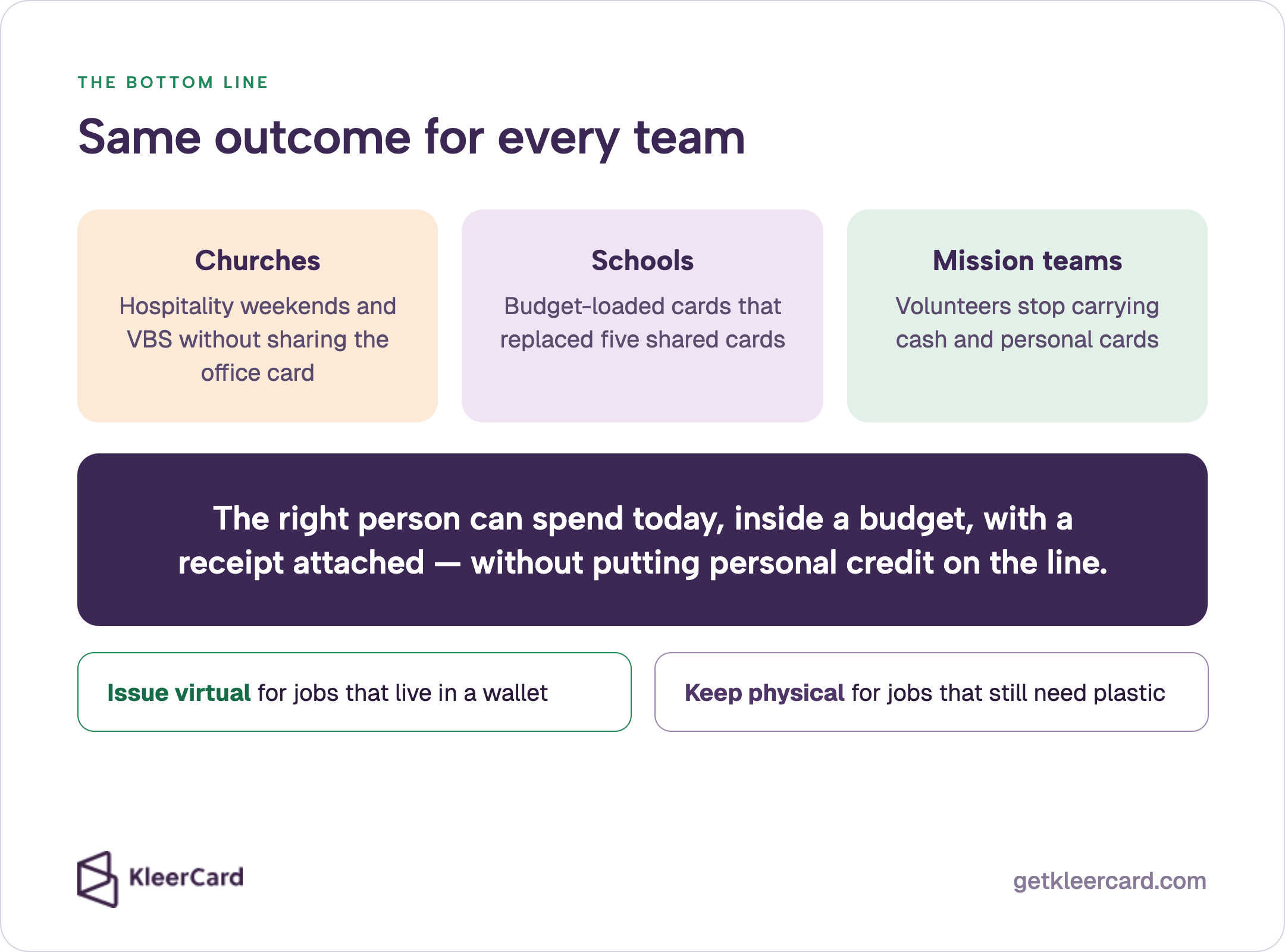
Virtual cards give a church, a school, and a mission team the same outcome. The right person can spend today, inside a budget, with a receipt attached, without putting personal credit on the line.
Jessica’s school used budget-loaded virtual cards to move off five shared cards. Churches use virtual cards for hospitality weekends and VBS. Trip leads use virtual cards so volunteers stop carrying cash and personal cards.
Issue virtual numbers for the jobs that can live in a wallet. Keep physical cards for the jobs that still need plastic.
Load the budget that matches the work. Capture the receipt at the register.
If you want to see the workflow against your ministries, classrooms, or next trip, schedule a demo or review expense management built for churches, schools, and nonprofits.
Related reading includes best credit cards for small churches and KleerCard for nonprofits.
Owen Hill is co-founder of KleerCard. He previously worked with churches and nonprofits at Compassion International and Switch Consulting, running books on Blackbaud Financial Edge, Microsoft Great Plains, QuickBooks, and Xledger.
He currently serves as volunteer treasurer of his Orthodox parish.


Speak to a member of our team and we can have you up and running in minutes, not weeks.